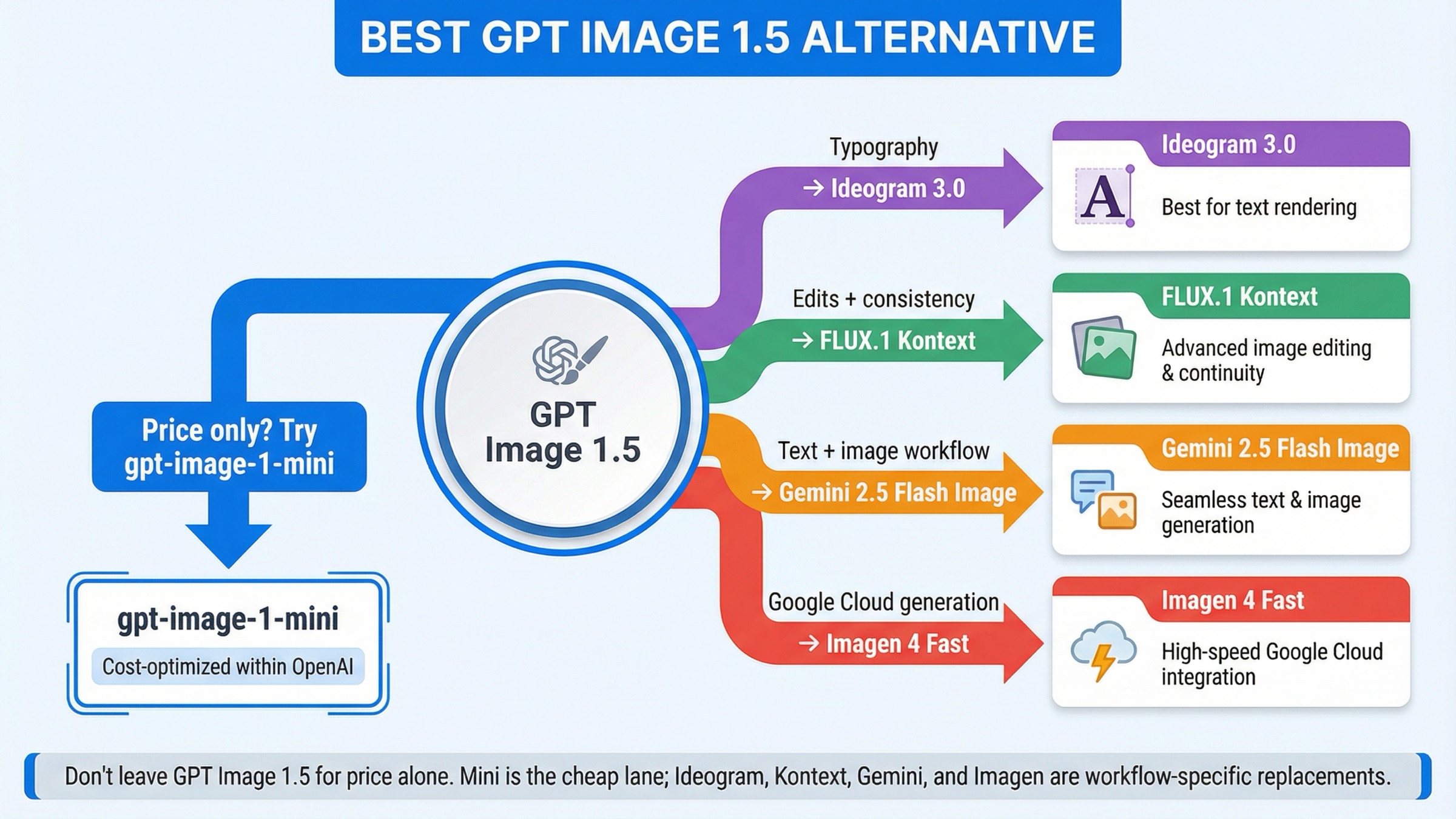
As checked on March 26, 2026, the best GPT Image 1.5 alternative depends on what is actually failing. If price is your only problem, do not switch providers yet. OpenAI's own gpt-image-1-mini is still the cheapest current official entry lane. Switch only when GPT Image 1.5 is failing on a workflow axis that mini does not fix: use Ideogram 3.0 for text-heavy design, FLUX.1 Kontext for iterative edits and character consistency, Gemini 2.5 Flash Image when one call needs to reason and render, and Imagen 4 Fast when you want a Google Cloud hosted generation stack.
That short answer matters because the current SERP still solves the wrong problem. Exact-match results are full of broad alternatives lists, marketplace hubs, and hosted model cards. They name many tools, but they rarely tell you whether you should actually leave GPT Image 1.5, downgrade inside OpenAI, or pick a tool built for a different job.
There is also one caveat worth stating early. Not every GPT Image 1.5 alternative search is really an alternatives problem. OpenAI's current image-generation guide still says the Image API is the best choice for one-shot image generation and edits, while the Responses API is better for conversational editable image experiences. Some teams are not hitting a model ceiling. They are hitting the wrong OpenAI surface, account friction, or a workflow mismatch.
TL;DR
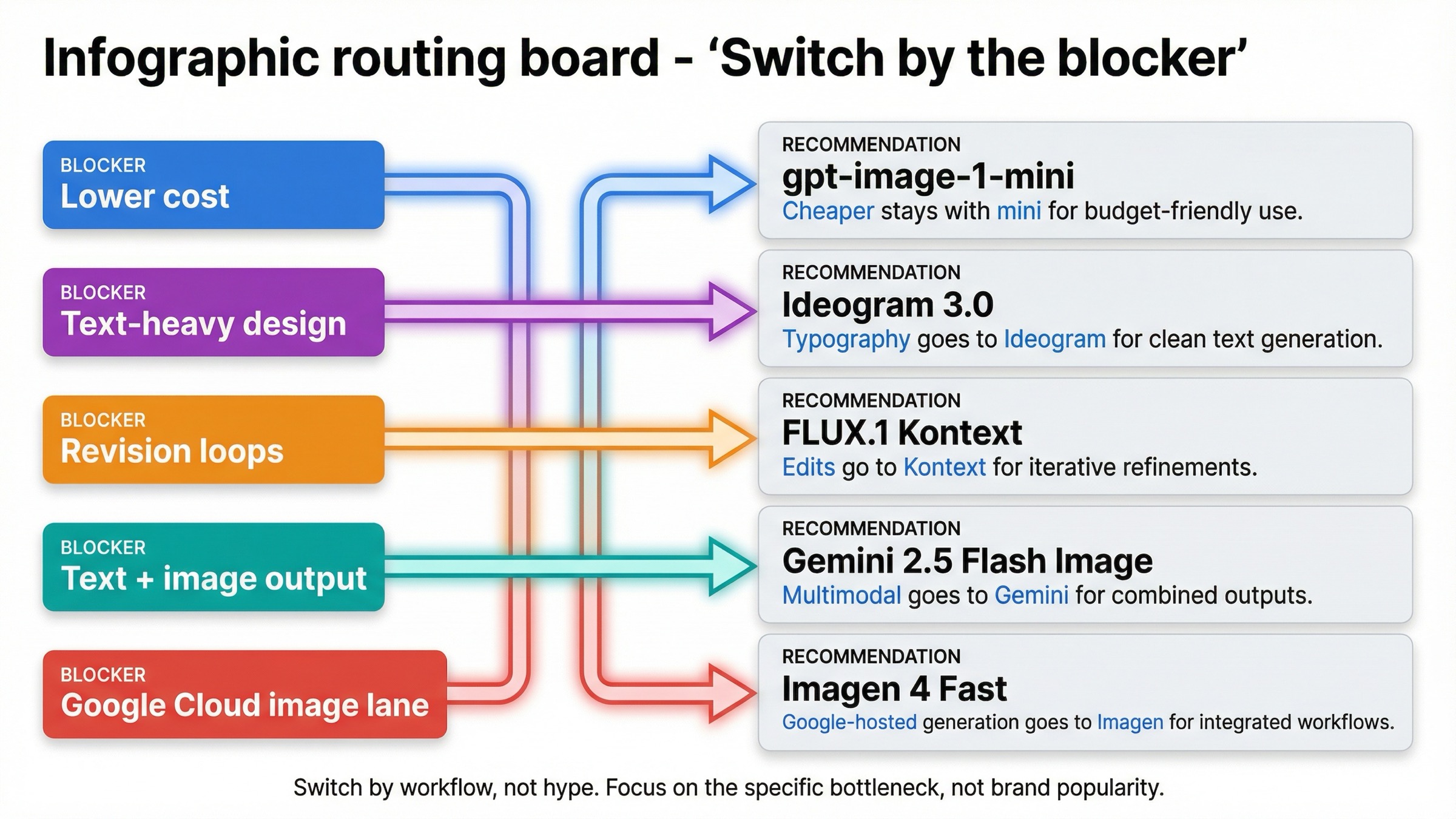
If you only need the routing answer, start here.
| If GPT Image 1.5 is failing because... | Use this instead | Why it is better for that job | Main tradeoff |
|---|---|---|---|
| you only need lower cost | gpt-image-1-mini | OpenAI still positions mini as the cost-efficient lane, and current official pricing is lower than GPT Image 1.5 across common square image tiers | You are still inside OpenAI, and quality tradeoffs matter on harder creative work |
| you care most about text, posters, ads, or layout-heavy design | Ideogram 3.0 | Ideogram is explicitly positioning 3.0 around stronger text rendering and graphic-design output | It is not the best answer for general multimodal workflow orchestration |
| your team keeps revising the same image instead of generating from scratch | FLUX.1 Kontext | Kontext is built around image editing, character consistency, text editing, and style transformation | It is not the cheapest hosted option |
| your app needs text and image output in one interaction | Gemini 2.5 Flash Image | Google documents text and image inputs with text and image outputs in one route | Token-based pricing is harder to reason about than a simple per-image card |
| you want a Google Cloud hosted image-generation stack | Imagen 4 Fast | Vertex AI sells it as a dedicated generation lane with a simple per-image price | It is a weaker answer if you actually need multimodal text-plus-image behavior |
| your real problem is setup, tiers, or API surface confusion | Stay with GPT Image 1.5 | The issue may be account state or workflow shape, not the model itself | You still keep OpenAI's pricing and verification logic |
The real advantage of that table is not the tool count. It is the fact that each row answers a different kind of pain. That is exactly what current ranking pages keep flattening into one generic best image models survey.
When gpt-image-1-mini is the better move than leaving OpenAI
If your complaint is mostly cost, mini is the first thing to benchmark before leaving OpenAI.
That matters because exact-query listicles keep acting as if GPT Image 1.5 is the only current OpenAI image lane. It is not. OpenAI's current models directory still lists gpt-image-1-mini as a cost-efficient version of GPT Image 1, and current official pricing snippets still show mini's square-image ladder below GPT Image 1.5 across the usual low, medium, and high tiers.
The practical mistake is easy to make. A team sees GPT Image 1.5 medium or high quality output, decides OpenAI is too expensive, and jumps straight to a different provider. But if the workflow is high-volume ideation, internal mockups, cheap A/B variants, or early prototyping, the smarter question is not what external model is cheaper than GPT Image 1.5? The smarter question is did this job need GPT Image 1.5 in the first place?
OpenAI's own pricing page still makes the internal split clear: GPT Image 1.5 is the flagship lane, and mini is the cheaper lane. That means the first cost-saving lever is often downgrading the model, not switching the vendor.
There is another practical reason to test mini first: it preserves most of your integration assumptions. You are still inside OpenAI's auth model, endpoint family, and billing surface. That makes the experiment fast. If mini is already good enough for the workload, you save money without reopening provider selection, new rate-limit behavior, or a bigger migration project.
This is also where a lot of alternatives articles lose trust. They silently assume every reader wants to leave OpenAI. A useful page cannot do that. Some readers should absolutely leave. Others should stay and choose the cheaper surface.
If your follow-up question is pure cost math rather than alternatives, the best next read is GPT Image 1.5 API pricing. That page goes deeper on per-image and Batch math. This page is narrower: it is about when the right answer is still OpenAI mini instead of a provider switch.
Ideogram 3.0 is the best GPT Image 1.5 alternative for text-heavy design
GPT Image 1.5 is strong at text rendering by general image-model standards. That still does not mean it is the right default when the job is mostly graphic design with visible text as the product.
That is the lane where Ideogram 3.0 is the better thing to test first.
The reason is not that Ideogram is a universal replacement for GPT Image 1.5. It is not. The reason is that Ideogram is openly positioning itself around text rendering, design output, and longer, more complex compositions. That is a different promise from a more general image-generation stack.
This distinction matters in practice. If your team is generating posters, ad creatives, thumbnails with strong headline text, event cards, marketing layouts, or product images where the typography itself is part of the deliverable, the question is no longer which image model is generally best? The question becomes which model is least likely to waste time on type cleanup, broken spacing, awkward layout, or post-generation manual correction?
That is where many GPT Image 1.5 users hit a real ceiling. The model may be good enough for general scene generation and still not be the best economic choice for layout-heavy design work. The more your job looks like a designer's brief instead of a standard image prompt, the more justified an Ideogram test becomes.
This is also one case where a slightly narrower tool can be the more useful tool. Ideogram's current API positioning is not trying to be your whole multimodal assistant stack. It is trying to be good at design-oriented image creation. If your team's failure mode is the scene is fine but the words still need cleanup, that narrower focus is a feature, not a weakness.
I would still keep the recommendation narrow. Use Ideogram 3.0 when text and layout are the point. Do not automatically treat it as the best answer for pure image editing, mixed multimodal flows, or simple commodity generation. This is a model-specific alternative for one specific weakness, and that is exactly why it belongs in this article.
If your complaint about GPT Image 1.5 is mostly the words are still not reliable enough in real design assets, Ideogram is the first external model I would test.
FLUX.1 Kontext is the best alternative for iterative edits and character consistency
Many teams are not unhappy with GPT Image 1.5 because the first generation looks bad. They are unhappy because the second, third, and fourth revisions become expensive, inconsistent, or annoying.
That is where FLUX.1 Kontext becomes a better answer than generic image-model rankings suggest.
Black Forest Labs is not positioning Kontext as another plain text-to-image API. The official Kontext overview centers it around image editing, character consistency, text editing, and style transformation. That is a strong signal that the product is meant for change-heavy workflows, not only first-pass generation.
That matters because many production image tasks are really revision systems in disguise. Marketing teams keep the composition and change the headline. Product teams keep the scene and swap the object. Brand teams keep the character and update the background, outfit, or pose. If your workflow looks like keep most of this, change these exact parts, the winning API is often not the one with the prettiest first image. It is the one that survives revision pressure with less drift.
This is also one place where community feedback helps explain alternative demand. One current Reddit thread about GPT Image 1.5 praises stronger prompt adherence and cleaner outputs, but still complains that consistency across generations drifts. That does not prove GPT Image 1.5 is weak overall. It does show why some users search for alternatives even when the flagship quality itself is good.
The tradeoff is that Kontext is not the cheapest hosted lane. On current BFL pricing, Kontext is priced as a premium edit-oriented workflow, not as a mass-cheap commodity image endpoint. But if your real cost problem is repeated manual cleanup after every revision loop, then the cheapest nominal per-image number is not the number that matters most.
There is a second decision embedded here too. Some teams do not need a better generator. They need a better change-management tool for images. That is the clearest line between GPT Image 1.5 and Kontext. GPT Image 1.5 is still a strong flagship generator. Kontext is the more compelling test when your production process keeps saying keep most of this, but fix these exact details.
So the practical rule is simple: switch to FLUX.1 Kontext when your real pain is revision reliability, not when your real pain is only entry price.
Gemini 2.5 Flash Image vs Imagen 4 Fast
Google's two strongest current alternatives matter for different reasons, and most current roundups do a poor job separating them.
Choose Gemini 2.5 Flash Image when your product needs text and image behavior in the same interaction.
Choose Imagen 4 Fast when your product wants a dedicated Google Cloud image-generation lane with simple per-image pricing.
That split matters because the two routes are solving different workflow problems.
Google's current documentation for Gemini 2.5 Flash Image says the model supports text and image inputs and returns text and image outputs. It also says one generated image consumes 1290 tokens. That sounds like a pricing detail, but it actually tells you what kind of product this is. Gemini 2.5 Flash Image is not just a generator. It is a multimodal route for applications that need to reason, explain, and render in one flow.
That makes it a strong alternative when GPT Image 1.5 feels too isolated from the rest of the interaction. If your app needs one call that can talk about the prompt, refine the request, and then produce the image, Gemini is usually the better test than a plain generation endpoint.
Imagen 4 Fast is different. Google's current Vertex AI pricing page lists Imagen 4 Fast at $0.02 per image, and the current Imagen 4 documentation positions Imagen as Google's latest dedicated image-generation line with up to 4 output images per prompt. That is a cleaner answer when the job is simply run image generation inside Google Cloud.
So the real split is not which Google model is best? It is:
- Gemini 2.5 Flash Image for multimodal text-plus-image workflows
- Imagen 4 Fast for dedicated Google-hosted generation
Another way to read that split is orchestration versus output lane. Gemini is stronger when the product flow itself is multimodal. Imagen is stronger when the workflow is just send prompt, get images back, keep it inside Google's hosted image stack.
That distinction lets the article stay practical. A lot of teams only say they want a Google alternative when what they actually want is either one multimodal call or a cleaner hosted generation stack. Those are not the same buying decision.
If you want the deeper Google-side cost math after choosing the route, the best next read is Gemini image generation API pricing.
When GPT Image 1.5 is still the right default
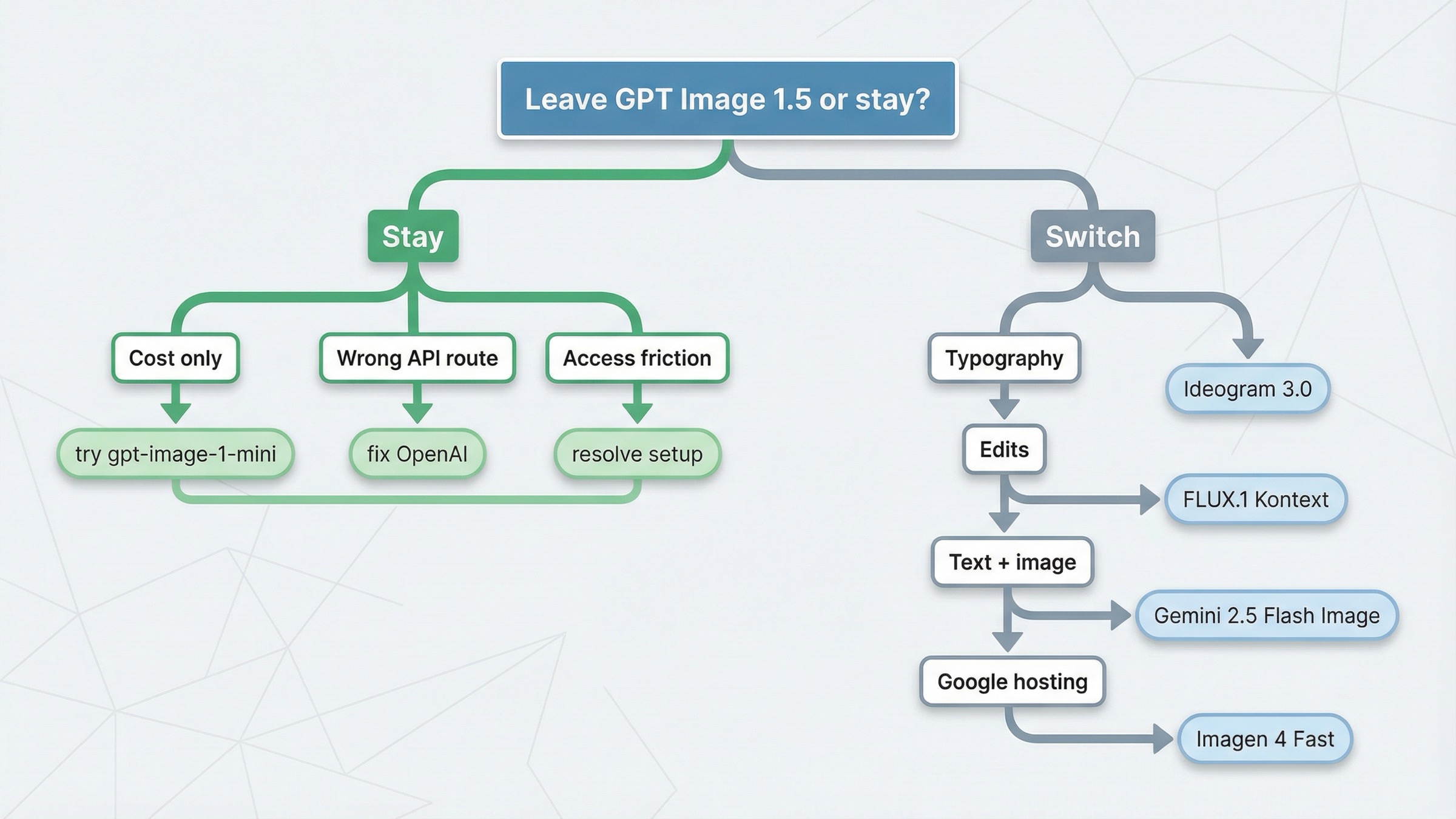
A trustworthy alternatives page needs one section that tells the reader when not to switch.
GPT Image 1.5 is still the right default when:
- you need strong general-purpose image generation and editing inside OpenAI's current image stack
- you care about prompt adherence and text rendering, but not enough to justify a typography-first move to Ideogram
- your workflow is not revision-heavy enough to justify FLUX Kontext
- your product does not need mixed text-plus-image output in one model call
- your real problem is setup, verification, or wrong API surface
That last point matters more than many roundups admit. OpenAI's current help article on API model availability by usage tier and verification status still says gpt-image-1 and gpt-image-1-mini are available across tiers 1 through 5, with some access subject to organization verification. Community threads about rate limits and setup friction show why some builders interpret access problems as proof they need a different provider. Sometimes that is true. Sometimes the correct fix is to resolve account state first.
There is also one more reason to stay. If the feature already works and your real complaint is just that GPT Image 1.5 is not cheap enough, mini is still the first controlled downgrade to test. Leaving OpenAI is more defensible when the problem is what the workflow needs to do, not only what the current flagship costs.
So this article's core recommendation is intentionally conservative. Do not switch just because alternative sounds efficient. Switch only when a different model shape clearly maps to the blocker you are hitting.
How I would test the replacement in one afternoon
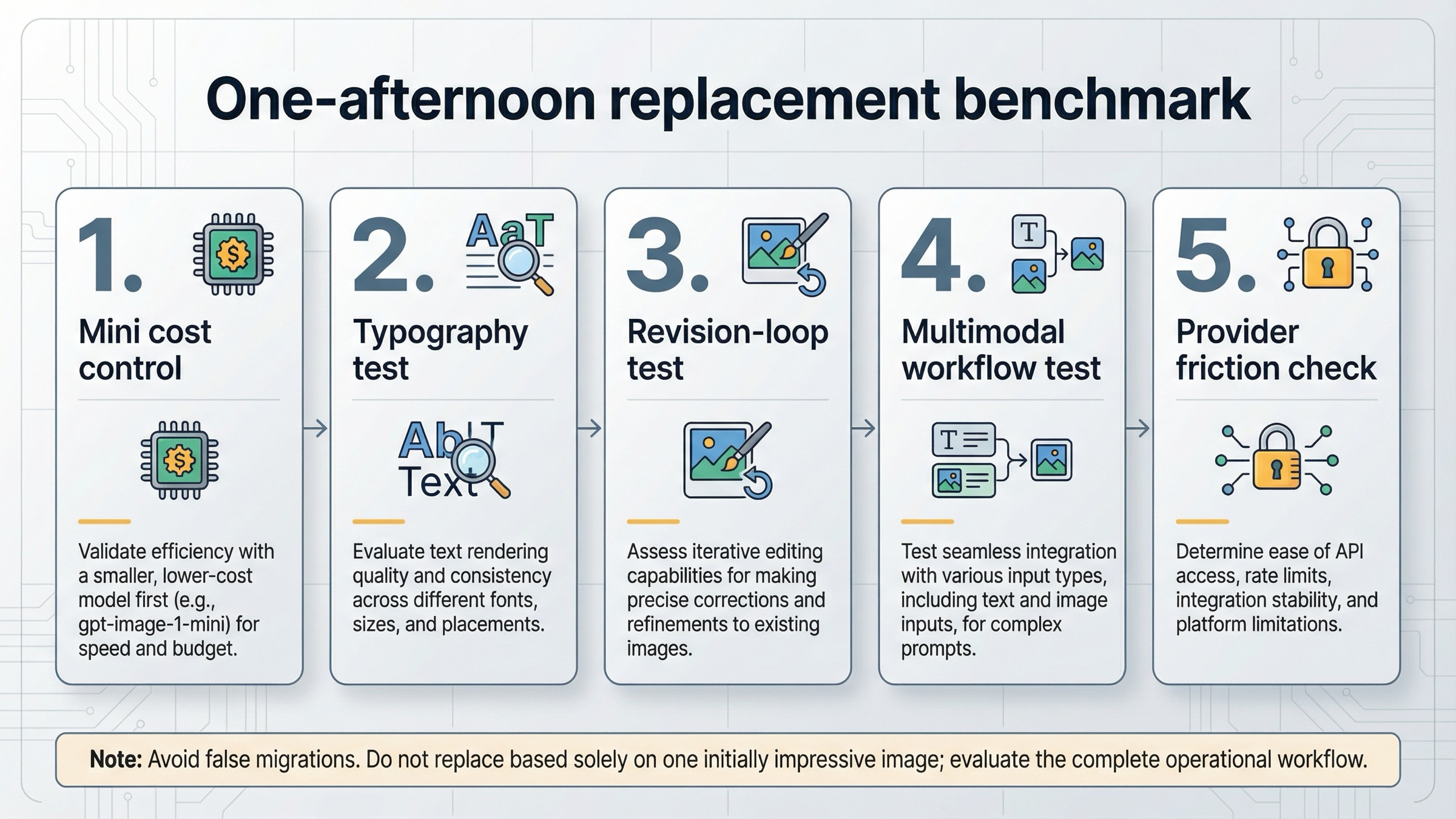
If your team is serious about replacing GPT Image 1.5, do not start with a broad beauty contest. Start with one short benchmark that mirrors the actual blocker.
1. Run the cheapest honest control first.
If cost is the complaint, benchmark gpt-image-1-mini against your current GPT Image 1.5 prompts before touching another provider.
2. Use one typography test.
If the complaint is text quality, run the same poster, ad, thumbnail, or card prompt through GPT Image 1.5 and Ideogram 3.0. Judge how much manual cleanup each result still needs.
3. Use one revision-loop test.
If the complaint is editing, do not score the first generation. Take one image through three change requests and compare GPT Image 1.5 against FLUX.1 Kontext on drift, preservation, and operator effort.
4. Use one multimodal workflow test.
If your app needs text and images together, compare your current OpenAI flow against one Gemini 2.5 Flash Image interaction that reasons and renders in a single turn.
5. Check provider friction before calling the experiment done.
Rate limits, organization verification, and regional availability can change the practical answer even when the model output looks good in a quick side-by-side test.
That sequence matters because it prevents a false migration. Many teams think they are comparing models when they are really comparing different jobs. A one-afternoon benchmark forces the real question into the open.
What I would choose in five real situations
If I were making this decision today, I would use these rules.
1. I only care about lowering cost on a workflow that does not need flagship quality.
Stay with gpt-image-1-mini. That is the cleanest first move because it reduces cost without changing vendor, auth, or API-family assumptions.
2. My outputs are posters, ads, thumbnails, and other text-heavy design assets.
Test Ideogram 3.0 first. Typography and layout are the real job, so use the model that is explicitly trying to win that job.
3. My team keeps revising the same image and fighting style drift.
Switch to FLUX.1 Kontext. That is the better lane when the product is really an editing and consistency workflow, not a one-shot generator.
4. My app needs one interaction that can reason in text and then return an image.
Switch to Gemini 2.5 Flash Image. That is the cleaner multimodal route than forcing a dedicated image API to solve a broader interaction design problem.
5. I want Google Cloud hosted image generation with straightforward per-image economics.
Choose Imagen 4 Fast. That is the best fit when the requirement is not multimodal reasoning but a Google-hosted generation stack.
Those five situations cover most of the real demand underneath this keyword. They also explain why generic best alternatives pages feel weak: they are answering the market, not the blocker.
Bottom line
The best GPT Image 1.5 alternative is not one model. It is the model shape that fixes the specific reason GPT Image 1.5 stopped being the right default.
If price is the only issue, stay with OpenAI and move to gpt-image-1-mini. If typography is the issue, test Ideogram 3.0. If revisions and consistency are the problem, switch to FLUX.1 Kontext. If your product needs one call that can reason and render, use Gemini 2.5 Flash Image. If you want a Google Cloud hosted generation lane, use Imagen 4 Fast. And if your real problem is setup or surface choice, stay with GPT Image 1.5 and fix the route before you switch vendors.


