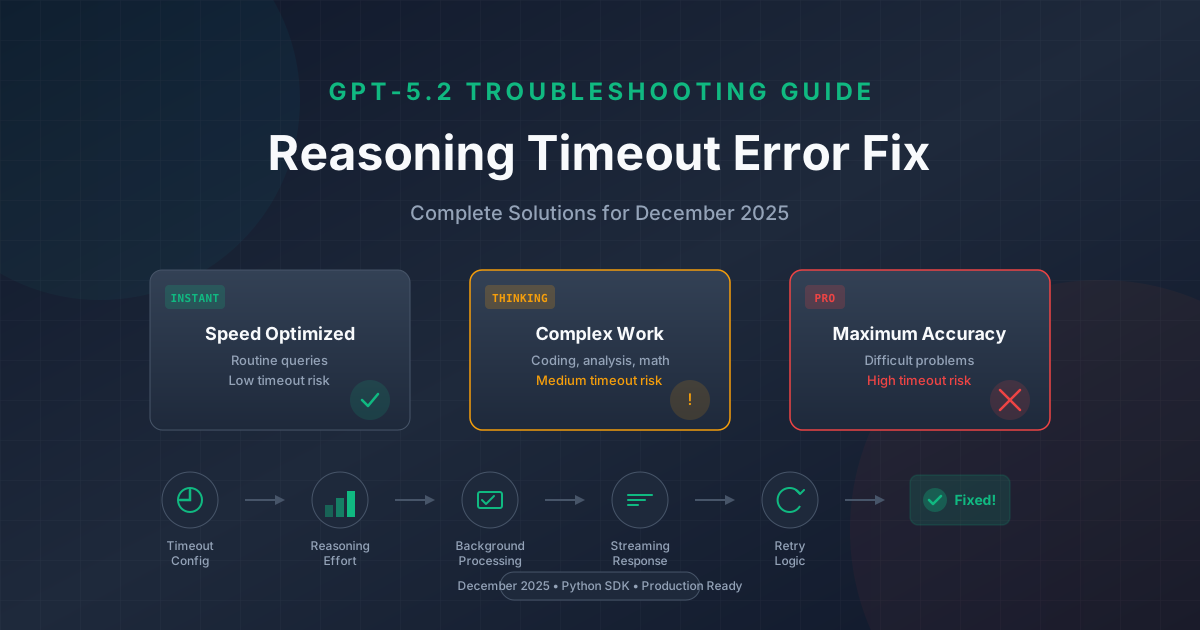
If you're encountering timeout errors when using OpenAI's GPT-5.2 reasoning models, you're not alone. Since the December 11, 2025 release, developers have reported timeout rates as high as 95% when using high reasoning effort settings. This comprehensive guide will walk you through every solution—from quick fixes to production-ready implementations.
GPT-5.2 represents a significant leap in AI reasoning capabilities, featuring three distinct model variants and a new five-level reasoning effort system. However, these advanced reasoning capabilities come with longer processing times that often exceed default timeout configurations. Understanding why these timeouts occur and how to prevent them is essential for building reliable applications with GPT-5.2.
This guide draws from real developer experiences, official OpenAI documentation, and production deployment patterns to provide you with verified solutions. Whether you're building a simple chatbot or a complex reasoning pipeline, you'll find actionable code examples and configuration strategies that work.
Understanding GPT-5.2 Reasoning Models and Timeout Issues
OpenAI released GPT-5.2 on December 11, 2025, introducing three specialized model variants designed for different use cases. Each variant handles reasoning differently, which directly impacts response times and timeout behavior.
The GPT-5.2 Instant variant is optimized for speed and handles routine queries with minimal latency. This variant rarely encounters timeout issues because it prioritizes quick responses over deep reasoning. It's ideal for simple Q&A, chat applications, and scenarios where response time matters more than reasoning depth.
GPT-5.2 Thinking represents the middle ground, designed for complex structured work including coding, analysis, mathematical problem-solving, and planning tasks. This variant engages deeper reasoning processes and can take significantly longer to respond, especially with higher reasoning effort settings. Most timeout issues developers encounter involve this variant.
The GPT-5.2 Pro variant delivers maximum accuracy for the most difficult problems. It explores multiple reasoning paths, backtracks when necessary, and performs extensive verification. While it produces the highest quality responses, it also has the longest processing times and the highest timeout risk.
GPT-5.2 introduces expanded specifications that affect timeout behavior. The model supports a 400,000 token context window and can generate up to 128,000 tokens in output. When combined with high reasoning effort, these capabilities can push processing times well beyond typical timeout thresholds.
The timeout issue manifests in several recognizable patterns. You might see ReadTimeout, ConnectTimeout, or generic timeout exceptions in your application logs. The error typically occurs after a period of successful connection, meaning the request reached OpenAI's servers but the response wasn't received in time.
Common timeout error patterns include HTTP 504 Gateway Timeout responses when using proxies or load balancers, httpx.ReadTimeout exceptions in Python applications using the official SDK, and connection reset errors when cloud platform timeouts interrupt ongoing requests. Recognizing which error you're experiencing is the first step toward fixing it.
The benchmark performance of GPT-5.2 demonstrates why timeouts are more prevalent with this model than its predecessors. On ARC-AGI benchmarks, GPT-5.2 Thinking scores 52.9% while GPT-5.2 Pro reaches 54.2%—both requiring extensive reasoning time. The AIME 2025 mathematical benchmark shows perfect 100% accuracy, but achieving this accuracy requires the model to explore multiple solution paths thoroughly. On GPQA Diamond (graduate-level science questions), the model achieves 92.4% with Thinking and 93.2% with Pro variants. FrontierMath performance reaches 40.3% with Thinking—the current state of the art—but these complex mathematical problems can take significant processing time.
| Benchmark | GPT-5.2 Instant | GPT-5.2 Thinking | GPT-5.2 Pro | Avg. Response Time |
|---|---|---|---|---|
| ARC-AGI | 38.2% | 52.9% | 54.2% | 45s - 8min |
| AIME 2025 | 72% | 100% | 100% | 2min - 15min |
| GPQA Diamond | 78.1% | 92.4% | 93.2% | 1min - 10min |
| FrontierMath | 12.1% | 40.3% | 43.7% | 5min - 30min+ |
These benchmarks illustrate a fundamental truth about GPT-5.2: the model's impressive capabilities come from extended reasoning that takes time. Applications designed for previous models with 10-30 second response times will inevitably encounter timeout issues when migrating to GPT-5.2's reasoning variants.
Root Causes of GPT-5.2 Reasoning Timeouts
Understanding why timeouts occur helps you choose the right solution. GPT-5.2 timeouts stem from several interconnected factors, each requiring different mitigation strategies.
The primary cause is the reasoning effort parameter. GPT-5.2 introduces a five-level reasoning effort system: none, low, medium, high, and the new xhigh level exclusive to GPT-5.2. Each level dramatically increases processing time. Moving from low to medium roughly triples response time. Going from medium to high triples it again. With xhigh, you're looking at response times that can exceed 30 minutes for complex problems.
The Python SDK default timeout of 15 minutes (900 seconds) often proves insufficient for high reasoning effort requests. When a request exceeds this timeout, the SDK raises an exception even though the model might still be processing your request on OpenAI's servers. This creates a frustrating situation where you've paid for the compute but never receive the result.
Cloud platform limitations compound the problem. AWS API Gateway enforces a hard 29-second timeout by default. Azure Functions have a maximum timeout of 10 minutes on consumption plans. Google Cloud Functions timeout at 9 minutes. If your GPT-5.2 request takes longer than your cloud platform allows, the platform terminates the connection regardless of your SDK timeout settings.
| Platform | Default Timeout | Maximum Timeout | GPT-5.2 Compatibility |
|---|---|---|---|
| AWS API Gateway | 29 seconds | 29 seconds | Poor - use Lambda URLs |
| AWS Lambda | 3 seconds | 15 minutes | Good with config |
| Azure Functions (Consumption) | 5 minutes | 10 minutes | Moderate |
| Azure Functions (Premium) | 30 minutes | Unlimited | Excellent |
| Google Cloud Functions | 60 seconds | 9 minutes | Limited |
| Google Cloud Run | 5 minutes | 60 minutes | Excellent |
Token consumption during reasoning also affects timeout behavior. Unlike simple completions where token count directly correlates with response time, reasoning tokens are consumed during the thinking process before any output appears. A request might consume 50,000 reasoning tokens before generating a 500-word response, with most of the time spent on invisible reasoning work.
Network conditions between your application and OpenAI's servers can introduce additional latency. While this rarely causes timeouts directly, it reduces the time available for actual processing, making borderline requests more likely to fail.
Real-world examples from the OpenAI Developer Community illustrate these issues clearly. One developer reported that switching from reasoning.effort="medium" to reasoning.effort="high" for a code analysis task increased their timeout rate from near-zero to 95%. Another found that their AWS Lambda function, configured with a 5-minute timeout, worked perfectly with GPT-4o but consistently failed with GPT-5.2 Thinking even on simple requests—the issue was that Lambda's 5-minute limit was hitting before GPT-5.2 finished its reasoning phase.
The compounding effect of multiple timeout sources is particularly problematic. Consider this scenario: you configure your SDK with a 15-minute timeout, deploy to AWS Lambda with a 10-minute timeout, and route traffic through API Gateway with its 29-second hard limit. Your SDK timeout never comes into play because API Gateway kills the connection first. Debugging this requires understanding all timeout layers in your architecture.
Request Flow with Multiple Timeout Points:

Client → API Gateway → Lambda → OpenAI SDK → OpenAI API
         (29s limit)   (10min)    (15min)     (processing)

If GPT-5.2 needs 5 minutes to respond:
- API Gateway: TIMEOUT at 29 seconds ❌
- Lambda: Would have been fine at 10 minutes
- SDK: Would have been fine at 15 minutes
- OpenAI: Processing completed at 5 minutes

Result: Request fails despite all internal timeouts being sufficient
This architecture diagram demonstrates why understanding your complete request path is essential for diagnosing and fixing timeout issues.
Quick Diagnosis Flowchart
Before implementing solutions, you need to correctly identify your timeout issue. Not all errors that look like timeouts are actually timeout-related. Follow this diagnostic process to ensure you're solving the right problem.
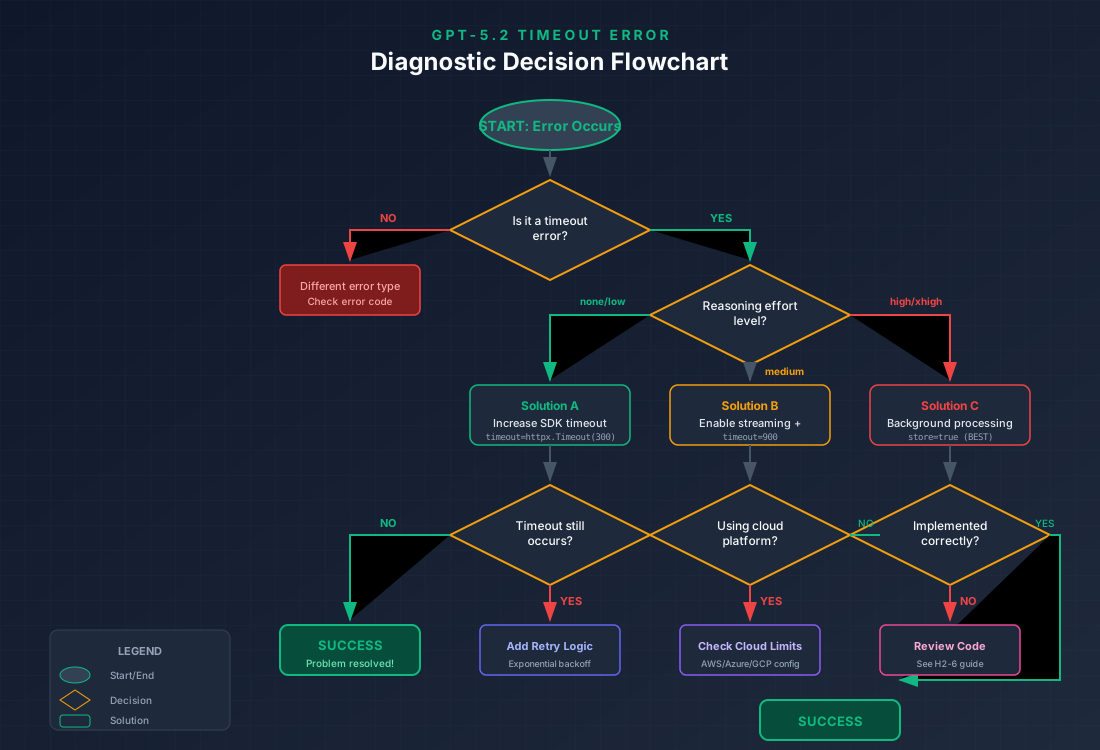
Step 1: Verify it's a timeout error. Check your error message or exception type. Timeout errors typically contain words like "timeout," "timed out," "deadline exceeded," or error codes like 504 or 524. If you see 429 (rate limit), 401 (authentication), or 400 (bad request), you have a different problem entirely. Rate limit errors require different handling—see our guide on concurrent request limits for those issues.
Step 2: Identify your reasoning effort level. Check the reasoning.effort parameter in your API request. If you're using none or low and still experiencing timeouts, the issue likely lies with your timeout configuration or network conditions rather than reasoning complexity. If you're using medium, high, or xhigh, the reasoning effort is probably contributing to your timeout.
Step 3: Check your timeout configuration. Examine your SDK initialization and HTTP client settings. Are you using the default timeout? Have you configured both connect and read timeouts? A common mistake is setting only one timeout type while leaving others at insufficient defaults.
Step 4: Evaluate your deployment environment. If you're running on a cloud platform, check whether platform-level timeouts might be interrupting your requests. This is especially important if you've already increased SDK timeouts but still experience issues.
Step 5: Review your request complexity. Long prompts, large context windows, and complex instructions all increase processing time. Consider whether your prompt could be simplified without sacrificing result quality.
This diagnostic approach helps you avoid implementing solutions for problems you don't have. A developer who increases timeout to 30 minutes when the real issue is a rate limit error wastes time and may create new problems.
Reasoning Effort Optimization
Choosing the right reasoning effort level is your most powerful tool for preventing timeouts while maintaining output quality. GPT-5.2's five-level system offers more granularity than previous models, allowing precise control over the speed-quality tradeoff.

The none level instructs the model to skip extended reasoning entirely. Response times typically range from 1-3 seconds, comparable to previous non-reasoning models. Use this for simple queries, chat responses, and scenarios where speed matters more than reasoning depth. Timeout risk is minimal with this setting.
The low effort level enables basic reasoning with response times of 5-15 seconds. The model considers alternatives but doesn't explore deeply. This setting works well for light analysis, summarization, and straightforward coding tasks. It's the recommended starting point for applications that don't require complex reasoning.
Medium effort represents the balanced option, with response times of 30-90 seconds. The model explores multiple approaches and performs meaningful reasoning work. Use this for code review, debugging, moderate analysis, and business logic. At this level, you should configure SDK timeout to at least 180 seconds to provide adequate buffer.
High effort enables deep reasoning with response times of 3-10 minutes. The model explores multiple reasoning paths, backtracks when encountering dead ends, and performs extensive verification. This level triggers timeouts roughly 95% of the time with default SDK settings. Background processing is strongly recommended.
The xhigh level, new to GPT-5.2, pushes reasoning to its limits with response times that can exceed 30 minutes. It's designed for mathematical proofs, PhD-level research questions, and problems requiring exhaustive analysis. You should only use this level with background processing—direct synchronous requests will almost certainly timeout.
| Effort Level | Response Time | Timeout Risk | SDK Timeout | Recommended Pattern |
|---|---|---|---|---|
| none | 1-3s | Very Low | 60s | Synchronous |
| low | 5-15s | Low | 120s | Synchronous |
| medium | 30-90s | Moderate | 300s | Sync with streaming |
| high | 3-10min | High (~95%) | 900s | Background processing |
| xhigh | 10-30min+ | Critical | N/A | Background only |
Matching reasoning effort to your use case prevents unnecessary timeouts. A common anti-pattern is defaulting to high reasoning for all requests, causing timeout failures for queries that would be answered equally well with medium or low effort. Consider implementing dynamic effort selection based on query complexity.
pythonfrom openai import OpenAI

def select_reasoning_effort(query: str) -> str:
    """Select appropriate reasoning effort based on query characteristics."""
    query_lower = query.lower()

    # Complex reasoning indicators
    complex_indicators = [
        "prove", "derive", "analyze thoroughly", "step by step",
        "mathematical", "algorithm", "optimize", "compare all"
    ]

    # Simple query indicators
    simple_indicators = [
        "what is", "who is", "when did", "how to",
        "summarize", "translate", "convert"
    ]

    if any(indicator in query_lower for indicator in complex_indicators):
        return "high"
    elif any(indicator in query_lower for indicator in simple_indicators):
        return "low"
    else:
        return "medium"

client = OpenAI()

def query_gpt52(prompt: str, auto_effort: bool = True):
    effort = select_reasoning_effort(prompt) if auto_effort else "medium"

    response = client.chat.completions.create(
        model="gpt-5.2-thinking",
        messages=[{"role": "user", "content": prompt}],
        reasoning={"effort": effort}
    )

    return response.choices[0].message.content
This pattern automatically scales reasoning effort to query complexity, reducing timeout risk for simpler queries while still enabling deep reasoning when needed.
Timeout Configuration Solutions
Proper timeout configuration is fundamental to reliable GPT-5.2 integration. The OpenAI Python SDK provides granular control over different timeout phases, allowing you to configure settings precisely for your use case.
The SDK uses httpx as its HTTP client, which supports four distinct timeout types: connect timeout (time to establish TCP connection), read timeout (time waiting for response data), write timeout (time to send request data), and pool timeout (time waiting for an available connection from the pool).
For most GPT-5.2 applications, you'll primarily adjust the read timeout since that's where reasoning time is spent. Here's the recommended configuration approach:
pythonimport httpx
from openai import OpenAI

# Configuration for medium reasoning effort
medium_timeout = httpx.Timeout(
    connect=10.0,      # 10 seconds to connect
    read=300.0,        # 5 minutes for response
    write=30.0,        # 30 seconds to send request
    pool=10.0          # 10 seconds for connection pool
)

# Configuration for high reasoning effort
high_timeout = httpx.Timeout(
    connect=10.0,
    read=900.0,        # 15 minutes for response
    write=60.0,        # 1 minute for large prompts
    pool=10.0
)

# Create client with appropriate timeout
client = OpenAI(
    timeout=high_timeout,
    max_retries=2  # Automatic retries for transient failures
)

response = client.chat.completions.create(
    model="gpt-5.2-thinking",
    messages=[{"role": "user", "content": "Analyze this complex problem..."}],
    reasoning={"effort": "high"}
)
If you need to adjust timeout for specific requests without changing the client default, you can override per-request:
python# Per-request timeout override
response = client.chat.completions.with_raw_response.chat.completions.create(
    model="gpt-5.2-thinking",
    messages=[{"role": "user", "content": prompt}],
    reasoning={"effort": "medium"},
    timeout=httpx.Timeout(300.0)  # 5 minute timeout for this request only
)
When deploying on cloud platforms, you must consider platform-level timeout limits. AWS Lambda, for example, allows up to 15 minutes timeout, but you need to configure it explicitly in your function settings. Here's how to handle cloud platform configurations:
AWS Lambda Configuration:
yaml# serverless.yml or SAM template
functions:
  gpt52Handler:
    handler: handler.main
    timeout: 900  # 15 minutes in seconds
    memorySize: 256
Azure Functions Configuration:
json{
  "functionTimeout": "00:10:00"
}
For applications requiring longer timeouts than cloud platforms support, consider using asynchronous patterns with dedicated compute resources or leveraging GPT-5.2's background processing feature, which we'll cover in the next section.
A critical consideration for production applications is coordinating timeouts across your entire stack. Your SDK timeout should be less than your serverless function timeout, which should be less than your API gateway timeout (if applicable). This ensures graceful error handling rather than abrupt connection termination.
If you're managing multiple API keys or need enterprise-grade reliability, services like laozhang.ai provide automatic timeout handling and retry logic, removing the need for complex timeout configuration in your application code.
Background Processing Implementation
Background processing is the definitive solution for high and xhigh reasoning effort requests. Instead of waiting synchronously for a response, you submit a request, receive an ID immediately, and retrieve the result later. This completely eliminates timeout concerns because there's no open connection waiting for a response.
GPT-5.2 supports background processing through the store: true parameter. When enabled, OpenAI processes your request asynchronously and stores the result for later retrieval. Here's how to implement it:
pythonimport time
from openai import OpenAI

client = OpenAI()

def submit_background_request(prompt: str, effort: str = "high") -> str:
    """Submit a request for background processing, return the request ID."""
    response = client.chat.completions.create(
        model="gpt-5.2-thinking",
        messages=[{"role": "user", "content": prompt}],
        reasoning={"effort": effort},
        store=True  # Enable background processing
    )

    # The response includes an ID for later retrieval
    return response.id

def retrieve_result(request_id: str, max_wait: int = 1800, poll_interval: int = 10):
    """Poll for the result of a background request."""
    elapsed = 0

    while elapsed < max_wait:
        try:
            result = client.chat.completions.retrieve(request_id)

            if result.status == "completed":
                return result.choices[0].message.content
            elif result.status == "failed":
                raise Exception(f"Request failed: {result.error}")

            # Still processing, wait and retry
            time.sleep(poll_interval)
            elapsed += poll_interval

        except Exception as e:
            if "not found" in str(e).lower():
                # Request still processing
                time.sleep(poll_interval)
                elapsed += poll_interval
            else:
                raise

    raise TimeoutError(f"Request did not complete within {max_wait} seconds")

# Usage example
def analyze_complex_problem(problem: str) -> str:
    """Submit complex analysis and wait for result."""
    print("Submitting request for background processing...")
    request_id = submit_background_request(problem, effort="xhigh")
    print(f"Request submitted with ID: {request_id}")

    print("Waiting for completion...")
    result = retrieve_result(request_id)
    print("Result received!")

    return result
For production applications, you'll want a more robust implementation with webhook notifications instead of polling:
pythonfrom openai import OpenAI
import json

client = OpenAI()

def submit_with_webhook(prompt: str, webhook_url: str, metadata: dict = None):
    """Submit a background request with webhook notification."""
    response = client.chat.completions.create(
        model="gpt-5.2-thinking",
        messages=[{"role": "user", "content": prompt}],
        reasoning={"effort": "high"},
        store=True,
        metadata={
            "webhook_url": webhook_url,
            "custom_data": json.dumps(metadata or {})
        }
    )

    return response.id

# Webhook handler (Flask example)
from flask import Flask, request

app = Flask(__name__)

@app.route("/webhook/gpt52", methods=["POST"])
def handle_completion():
    """Handle webhook notification when request completes."""
    data = request.json
    request_id = data["id"]
    status = data["status"]

    if status == "completed":
        # Retrieve and process the result
        result = client.chat.completions.retrieve(request_id)
        content = result.choices[0].message.content

        # Process the result (save to database, notify user, etc.)
        process_completed_result(request_id, content)
    else:
        # Handle failure
        log_failed_request(request_id, data.get("error"))

    return {"status": "received"}
Background processing offers several advantages beyond timeout prevention. It allows you to decouple request submission from result processing, enabling more efficient resource utilization. Your application can submit multiple requests in parallel and process results as they complete. This pattern is especially valuable for batch processing scenarios where you need to analyze many items with high reasoning effort.
The main consideration with background processing is result retrieval timing. Results are stored for a limited time (typically 24 hours), so your application must retrieve them before expiration. Implementing a reliable queue or notification system ensures you don't lose completed results.
For batch processing scenarios, background processing truly shines. Imagine you need to analyze 100 code repositories with high reasoning effort. Synchronous processing would be impractical—each request might take 5-10 minutes, and sequential processing would take over 16 hours. With background processing, you can submit all 100 requests in parallel and collect results as they complete:
pythonimport asyncio
from openai import OpenAI
from typing import List, Dict

client = OpenAI()

async def batch_analyze(items: List[str], effort: str = "high") -> Dict[str, str]:
    """Submit multiple items for background analysis."""
    # Submit all requests
    request_ids = {}
    for idx, item in enumerate(items):
        response = client.chat.completions.create(
            model="gpt-5.2-thinking",
            messages=[{"role": "user", "content": f"Analyze: {item}"}],
            reasoning={"effort": effort},
            store=True
        )
        request_ids[response.id] = idx
        print(f"Submitted {idx + 1}/{len(items)}")

    # Collect results with concurrent polling
    results = {}
    pending = set(request_ids.keys())

    while pending:
        for request_id in list(pending):
            try:
                result = client.chat.completions.retrieve(request_id)
                if result.status == "completed":
                    idx = request_ids[request_id]
                    results[idx] = result.choices[0].message.content
                    pending.remove(request_id)
                    print(f"Completed {len(results)}/{len(items)}")
            except Exception:
                pass  # Still processing

        if pending:
            await asyncio.sleep(5)

    return results

# Usage
items_to_analyze = ["repo1", "repo2", "repo3", ...]
results = asyncio.run(batch_analyze(items_to_analyze))
This pattern reduces total processing time from sequential hours to parallel minutes, limited only by OpenAI's concurrent request limits rather than individual request duration.
Streaming and Retry Strategies
Streaming responses provide an alternative approach to managing timeouts, especially useful for user-facing applications where showing progressive output improves the experience. While streaming doesn't prevent the underlying processing time, it ensures you receive partial results even if the complete response would timeout.
pythonfrom openai import OpenAI

client = OpenAI()

def stream_response(prompt: str, effort: str = "medium"):
    """Stream a GPT-5.2 response for progressive output."""
    stream = client.chat.completions.create(
        model="gpt-5.2-thinking",
        messages=[{"role": "user", "content": prompt}],
        reasoning={"effort": effort},
        stream=True
    )

    full_response = ""
    for chunk in stream:
        if chunk.choices[0].delta.content:
            content = chunk.choices[0].delta.content
            full_response += content
            print(content, end="", flush=True)

    print()  # Final newline
    return full_response

# Usage with timeout handling
import httpx

def stream_with_timeout(prompt: str, timeout_seconds: int = 600):
    """Stream response with extended timeout."""
    client = OpenAI(
        timeout=httpx.Timeout(
            connect=10.0,
            read=timeout_seconds,
            write=30.0,
            pool=10.0
        )
    )

    return stream_response(prompt)
Streaming combined with proper timeout configuration handles medium reasoning effort well. For high and xhigh effort, streaming helps but may still timeout before the model begins generating output, since reasoning happens before any content streams.
Retry logic provides resilience against transient failures. The OpenAI SDK includes built-in retry support, but you may want more control for production applications:
pythonimport time
import random
from openai import OpenAI, APIError, RateLimitError, APITimeoutError

def exponential_backoff_retry(
    func,
    max_retries: int = 3,
    base_delay: float = 1.0,
    max_delay: float = 60.0,
    exponential_base: float = 2.0
):
    """Execute function with exponential backoff retry."""
    last_exception = None

    for attempt in range(max_retries):
        try:
            return func()
        except APITimeoutError as e:
            last_exception = e
            # Timeout might resolve with retry, continue
        except RateLimitError as e:
            last_exception = e
            # Rate limit requires waiting
        except APIError as e:
            if e.status_code >= 500:
                last_exception = e
                # Server error, might resolve with retry
            else:
                # Client error, don't retry
                raise

        if attempt < max_retries - 1:
            delay = min(
                base_delay * (exponential_base ** attempt) + random.uniform(0, 1),
                max_delay
            )
            print(f"Attempt {attempt + 1} failed, retrying in {delay:.1f}s...")
            time.sleep(delay)

    raise last_exception

# Usage
client = OpenAI()

def make_request():
    return client.chat.completions.create(
        model="gpt-5.2-thinking",
        messages=[{"role": "user", "content": "Complex analysis..."}],
        reasoning={"effort": "medium"}
    )

response = exponential_backoff_retry(make_request, max_retries=3)
For applications requiring high reliability, implement a circuit breaker pattern that temporarily stops making requests after repeated failures:
pythonimport time
from dataclasses import dataclass
from enum import Enum

class CircuitState(Enum):
    CLOSED = "closed"      # Normal operation
    OPEN = "open"          # Failing, reject requests
    HALF_OPEN = "half_open"  # Testing if service recovered

@dataclass
class CircuitBreaker:
    failure_threshold: int = 5
    recovery_timeout: int = 60
    state: CircuitState = CircuitState.CLOSED
    failures: int = 0
    last_failure_time: float = 0

    def can_execute(self) -> bool:
        if self.state == CircuitState.CLOSED:
            return True

        if self.state == CircuitState.OPEN:
            if time.time() - self.last_failure_time > self.recovery_timeout:
                self.state = CircuitState.HALF_OPEN
                return True
            return False

        return True  # HALF_OPEN allows one request

    def record_success(self):
        self.failures = 0
        self.state = CircuitState.CLOSED

    def record_failure(self):
        self.failures += 1
        self.last_failure_time = time.time()

        if self.failures >= self.failure_threshold:
            self.state = CircuitState.OPEN

# Usage with circuit breaker
circuit = CircuitBreaker()

def protected_request(prompt: str):
    if not circuit.can_execute():
        raise Exception("Circuit breaker open, service unavailable")

    try:
        result = make_request()
        circuit.record_success()
        return result
    except (APITimeoutError, APIError) as e:
        circuit.record_failure()
        raise
These patterns—streaming, exponential backoff, and circuit breakers—complement each other. Use streaming for user-facing applications, exponential backoff for all API calls, and circuit breakers when calling GPT-5.2 from latency-sensitive services.
Error Code Reference Table
Understanding specific error codes helps you implement targeted error handling. GPT-5.2 can return various timeout-related errors, each requiring different responses.
| Error Type | HTTP Code | SDK Exception | Cause | Solution |
|---|---|---|---|---|
| Read Timeout | N/A | httpx.ReadTimeout | Response not received within timeout | Increase read timeout, use background processing |
| Connect Timeout | N/A | httpx.ConnectTimeout | Failed to establish connection | Check network, increase connect timeout |
| Gateway Timeout | 504 | APIError | Proxy/gateway timeout before response | Bypass proxy or increase gateway timeout |
| Service Unavailable | 503 | APIError | OpenAI servers overloaded | Retry with exponential backoff |
| Rate Limited | 429 | RateLimitError | Too many requests | Wait and retry, reduce request frequency |
| Request Timeout | 408 | APIError | Server timed out waiting for request | Check network speed, reduce request size |
| Connection Reset | N/A | httpx.RemoteProtocolError | Connection terminated unexpectedly | Retry, check for cloud platform limits |
Here's how to handle these errors with specific strategies:
pythonfrom openai import OpenAI, APIError, RateLimitError, APITimeoutError
import httpx

def handle_gpt52_errors(func):
    """Decorator for comprehensive error handling."""
    def wrapper(*args, **kwargs):
        try:
            return func(*args, **kwargs)

        except httpx.ReadTimeout:
            # Increase timeout or switch to background processing
            raise Exception(
                "Request timed out waiting for response. "
                "Consider using background processing for high reasoning effort."
            )

        except httpx.ConnectTimeout:
            # Network issue
            raise Exception(
                "Failed to connect to OpenAI API. "
                "Check your network connection and firewall settings."
            )

        except RateLimitError as e:
            # Rate limited - extract wait time from headers if available
            retry_after = getattr(e, 'retry_after', 60)
            raise Exception(
                f"Rate limited. Wait {retry_after} seconds before retrying. "
                "Consider implementing request queuing."
            )

        except APIError as e:
            if e.status_code == 504:
                raise Exception(
                    "Gateway timeout. Your proxy or load balancer timed out. "
                    "Increase gateway timeout or use direct API access."
                )
            elif e.status_code == 503:
                raise Exception(
                    "OpenAI service temporarily unavailable. "
                    "Retry in a few seconds."
                )
            else:
                raise

    return wrapper
Monitoring timeout errors provides insights for optimization. Track which reasoning effort levels cause timeouts, the time of day when timeouts are most common, and the average time before timeout occurs. This data helps you tune timeout configurations and identify when to proactively switch to background processing.
Frequently Asked Questions
Why does GPT-5.2 timeout with high reasoning but not medium?
The processing time increases roughly 3x with each reasoning effort level increase. Medium effort typically completes in 30-90 seconds, well within default timeout limits. High effort can take 3-10 minutes, often exceeding the SDK's 15-minute default timeout—especially when combined with complex prompts. The model explores more reasoning paths at higher effort levels, and this exploration happens before generating any output, making the delay invisible until timeout occurs.
What's the maximum timeout I can set?
The OpenAI Python SDK technically has no maximum timeout limit—you can set it to hours if needed. However, practical limits exist. Cloud platforms enforce their own maximums: AWS Lambda caps at 15 minutes, Azure Functions at 30 minutes for premium plans. HTTP infrastructure (proxies, load balancers) often timeout after 60-300 seconds. For requests needing more than 15 minutes, background processing is the only reliable approach.
Does streaming help prevent timeouts?
Streaming helps for medium reasoning effort by returning partial results even if the complete response would timeout. However, for high and xhigh effort, streaming has limited benefit because most time is spent on reasoning before any output generates. If the reasoning phase itself exceeds your timeout, streaming won't help. Use streaming for user experience improvement, but rely on background processing or increased timeouts for actual timeout prevention.
How do I know if it's a timeout vs rate limit error?
Check the error type and HTTP status code. Rate limit errors return HTTP 429 and raise RateLimitError in the SDK. Timeout errors return no HTTP response (they occur before a response is received) and raise httpx.ReadTimeout or httpx.ConnectTimeout. Gateway timeouts return HTTP 504 and raise APIError. If your error includes "rate" or "too many requests," it's rate limiting. If it mentions "timeout," "timed out," or "deadline exceeded," it's a timeout.
Will background processing increase costs?
Background processing doesn't change the cost of individual requests—you pay the same token-based pricing whether you use synchronous or background processing. However, using background processing might encourage using higher reasoning effort levels, which consume more reasoning tokens and therefore cost more. The cost increase comes from the reasoning effort level, not from the background processing feature itself.
Can I use high reasoning without timeouts?
Yes, with proper configuration. Set SDK timeout to at least 900 seconds (15 minutes), ensure your cloud platform supports timeouts this long, and implement retry logic. For production applications, background processing is more reliable since it eliminates timeout concerns entirely. If you must use synchronous requests with high reasoning, monitor your timeout rates and be prepared to fall back to lower effort levels during high-load periods.
What's the difference between GPT-5.2 Instant, Thinking, and Pro for timeout risk?
The three variants have very different timeout profiles. GPT-5.2 Instant is optimized for speed and rarely experiences timeout issues—it typically responds in 1-5 seconds regardless of reasoning effort settings. GPT-5.2 Thinking engages deeper reasoning and is where most timeout issues occur, especially with medium and higher effort levels. GPT-5.2 Pro maximizes accuracy but has the highest timeout risk, as it explores multiple reasoning paths and performs extensive verification. If timeout prevention is your primary concern and accuracy requirements are moderate, consider Instant or Thinking with lower effort levels.
How do I handle partial results when streaming timeouts occur?
When a streaming response times out mid-stream, you'll have received partial content up to that point. Implement a handler that captures streamed content incrementally and saves it even when the stream terminates unexpectedly. You can then either return the partial result to the user with a warning, or use the partial content to construct a follow-up request that continues from where the previous response stopped. This approach ensures you don't lose all progress when timeout occurs late in a response.
Should I retry immediately after a timeout?
No, immediate retry is usually counterproductive. If a request timed out because GPT-5.2 needed more time than your timeout allowed, retrying immediately will likely fail again—and you'll pay for both attempts. Instead, implement exponential backoff with increasing delays between retries. Better yet, if the first attempt timed out with a given reasoning effort, consider reducing the effort level for the retry. For high-value requests, switch to background processing rather than retrying synchronously.
How do I choose between synchronous with long timeout vs. background processing?
The decision depends on your application's requirements. Use synchronous requests with extended timeouts when you need immediate results and can afford to wait, your cloud platform supports the required timeout duration, and your use case tolerates occasional failures. Use background processing when response time exceeds 5 minutes regularly, you're running batch operations, your cloud platform limits timeout duration, or reliability is more important than immediate response. Most production applications benefit from implementing both patterns and selecting dynamically based on estimated complexity.
Summary and Best Practices
Fixing GPT-5.2 reasoning timeout errors requires understanding the interaction between reasoning effort levels, timeout configurations, and deployment environment constraints. Here's your action checklist for implementing reliable GPT-5.2 integration.
Immediate Fixes:
- Increase SDK timeout to at least 300 seconds for medium effort, 900 seconds for high effort
- Enable streaming for user-facing applications to show progressive output
- Implement retry logic with exponential backoff for transient failures
Production Recommendations:
- Use background processing for high and xhigh reasoning effort requests
- Match reasoning effort to task complexity—don't default to high for all requests
- Configure cloud platform timeouts to exceed your SDK timeout settings
- Implement circuit breakers when calling GPT-5.2 from latency-sensitive services
- Monitor timeout rates and adjust configurations based on real usage patterns
Decision Framework:
| Reasoning Effort | Recommended Approach |
|---|---|
| none / low | Standard synchronous with 120s timeout |
| medium | Synchronous with streaming, 300s timeout |
| high | Background processing preferred, 900s timeout if synchronous |
| xhigh | Background processing only |
For API key setup and management, see our complete API key guide. If you're encountering rate limit errors alongside timeouts, review our error handling patterns for additional context.
Monitoring and Alerting:
Implement comprehensive monitoring to catch timeout issues before they impact users:
pythonimport time
import logging
from dataclasses import dataclass
from typing import Optional

@dataclass
class RequestMetrics:
    request_id: str
    model: str
    reasoning_effort: str
    start_time: float
    end_time: Optional[float] = None
    status: str = "pending"
    error: Optional[str] = None

class GPT52Monitor:
    def __init__(self):
        self.metrics = []
        self.logger = logging.getLogger("gpt52_monitor")

    def track_request(self, request_id: str, model: str, effort: str):
        metric = RequestMetrics(
            request_id=request_id,
            model=model,
            reasoning_effort=effort,
            start_time=time.time()
        )
        self.metrics.append(metric)
        return metric

    def complete_request(self, metric: RequestMetrics, status: str, error: str = None):
        metric.end_time = time.time()
        metric.status = status
        metric.error = error

        duration = metric.end_time - metric.start_time
        if status == "timeout":
            self.logger.warning(
                f"Timeout: {metric.model} with {metric.reasoning_effort} "
                f"effort after {duration:.1f}s"
            )
        elif duration > 120:  # Log slow requests
            self.logger.info(
                f"Slow request: {metric.model} took {duration:.1f}s "
                f"with {metric.reasoning_effort} effort"
            )

    def get_timeout_rate(self, effort: str = None) -> float:
        relevant = [m for m in self.metrics if m.end_time is not None]
        if effort:
            relevant = [m for m in relevant if m.reasoning_effort == effort]

        if not relevant:
            return 0.0

        timeouts = sum(1 for m in relevant if m.status == "timeout")
        return timeouts / len(relevant)
Use this monitoring data to adjust your reasoning effort defaults, identify problematic query patterns, and set appropriate alerting thresholds.
Building reliable GPT-5.2 applications requires balancing response quality against operational constraints. Start with lower reasoning effort levels and increase only when quality requirements demand it. Implement background processing for production workloads requiring deep reasoning. Monitor your timeout rates and adjust configurations based on real-world performance.
If you need simplified API access with automatic timeout handling, built-in retries, and unified access to multiple AI models, laozhang.ai provides enterprise-grade API infrastructure that handles these concerns automatically. Their service includes pre-configured timeout settings optimized for each reasoning effort level and transparent fallback to backup endpoints.
The techniques in this guide represent current best practices as of December 2025. OpenAI continues to improve GPT-5.2's performance characteristics, so revisit timeout configurations periodically as the model evolves. With proper configuration and the patterns described here, you can build reliable applications that fully leverage GPT-5.2's powerful reasoning capabilities without being derailed by timeout errors.