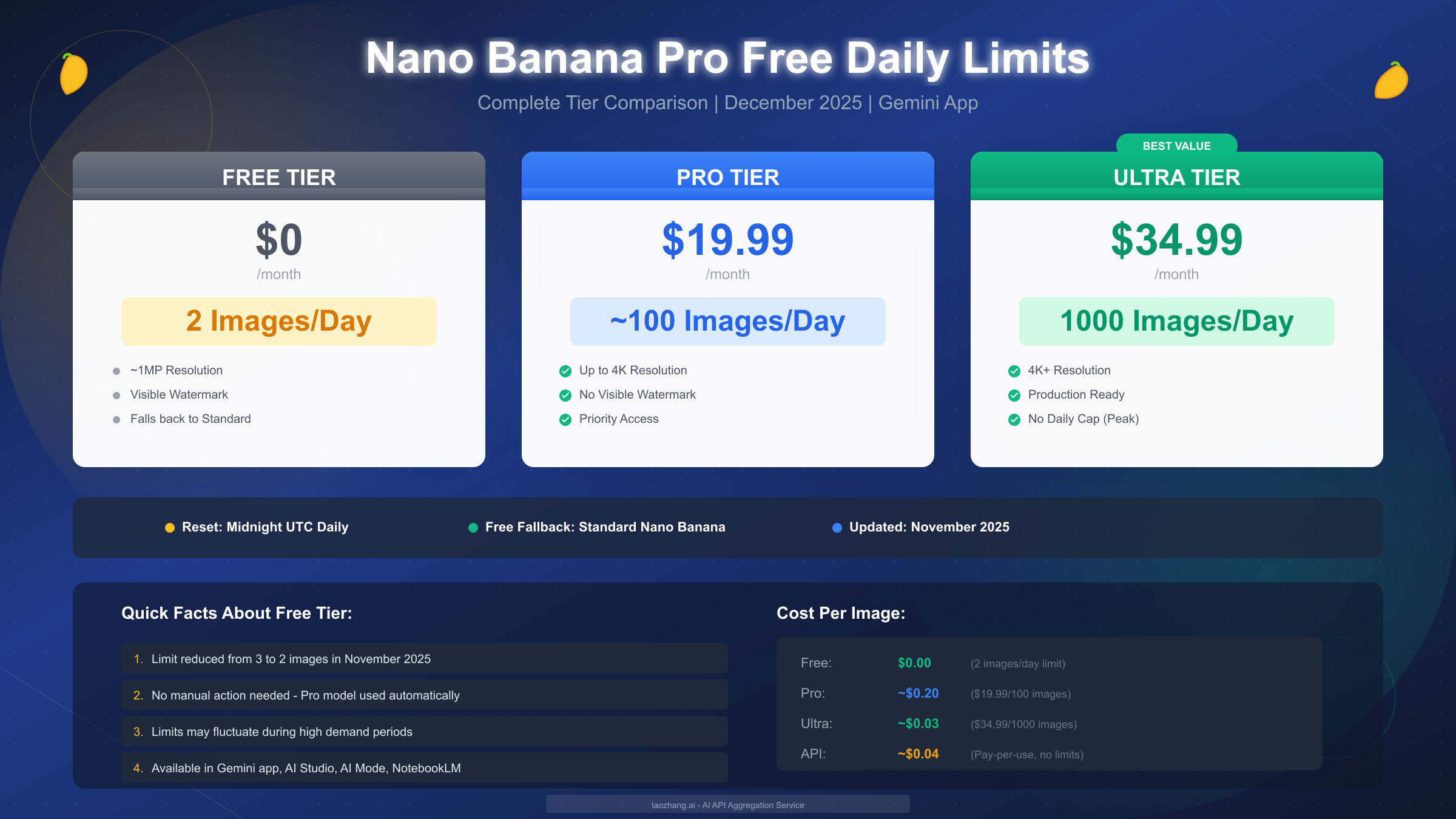
Nano Banana Pro is indeed free to use in the Gemini app, but with significant daily limits that every user should understand. As of December 2025, free users can generate up to 2 images per day using Google's latest image generation model, reduced from the original 3 images following the November 2025 update. Your daily quota resets at midnight UTC, and when you exhaust your free allocation, the app automatically falls back to the standard Nano Banana model with reduced capabilities. This guide provides everything you need to know about maximizing your free Nano Banana Pro access, understanding the paid tier options, and finding cost-effective alternatives when 2 images per day simply isn't enough.
Is Nano Banana Pro Really Free? The Quick Answer
The short answer is yes, but with important caveats that affect how you can actually use it. Google launched Nano Banana Pro (officially called Gemini 3 Pro Image) on November 20, 2025, and made it available to all Gemini app users worldwide without requiring a paid subscription. However, the free tier comes with strict daily generation limits that have been reduced since launch due to overwhelming demand.
When you open the Gemini app and select "Create images" with the "Thinking" model option, you're using Nano Banana Pro. The model activates automatically for your first generations each day, requiring no manual configuration or account upgrades. This seamless integration means many users don't even realize they're using the Pro version until they hit the daily limit and notice the quality drop when the system falls back to the standard Nano Banana model.
The free tier provides access to most of Nano Banana Pro's core capabilities, including improved text rendering, higher resolution outputs, and the advanced visual reasoning that makes this model stand out from competitors. However, free users face a hard cap of 2 images per day, visible watermarks on all outputs, and automatic fallback to the older model once the quota is exhausted. According to Google's support documentation (https://support.google.com/gemini/answer/16275805 ), "Image generation and editing is in high demand. Limits may change frequently and will reset daily."
For users who need predictable, higher-volume access, Google offers paid tiers starting at $19.99/month (Pro) and $34.99/month (Ultra) that dramatically increase daily limits while removing visible watermarks. The decision between free and paid access ultimately depends on your usage patterns and quality requirements, which we'll explore in detail throughout this guide.
Nano Banana Pro Daily Limits by Tier: Complete Breakdown
Understanding the exact limits for each tier helps you choose the right access level for your needs. Google has structured Nano Banana Pro access across three main tiers, each with distinct allocations, capabilities, and pricing that cater to different user segments.
The free tier represents Google's effort to let everyone experience Nano Banana Pro's capabilities, albeit with significant restrictions. At just 2 images per day, this tier suits casual users who occasionally need high-quality image generation for personal projects or experimentation. The resolution caps at approximately 1 megapixel, outputs include a visible Gemini watermark, and once your daily quota depletes, the system silently switches to the standard Nano Banana model without explicit notification. This fallback behavior catches many users off guard, as the quality difference becomes apparent only after comparing outputs side by side.
| Tier | Monthly Cost | Daily Image Limit | Resolution | Visible Watermark | Priority Access |
|---|---|---|---|---|---|
| Free | $0 | 2 images | ~1 MP | Yes | No |
| Pro | $19.99 | ~100 images | Up to 4K | No | Yes |
| Ultra | $34.99 | 1,000 images | 4K+ | No | Yes + Early Features |
The Pro tier at $19.99/month dramatically expands your capabilities, offering approximately 100 images per day according to user reports, though Google's official documentation states "significantly higher limits." Real-world testing suggests the actual allocation fluctuates between 35-100 images depending on system load, with priority access ensuring your requests process faster than free tier users during peak times. Pro tier removes the visible watermark (though the invisible SynthID metadata signature remains) and unlocks full 4K resolution output. For professionals who generate images regularly but don't require production-scale volumes, Pro represents the sweet spot between cost and capability.
The Ultra tier at $34.99/month targets power users and small teams who need production-level output. With up to 1,000 images daily, essentially no practical cap for most use cases, plus early access to new features and highest priority processing, Ultra users experience Nano Banana Pro at its full potential. At roughly $0.03 per image when maxing out the daily allocation, Ultra offers the best per-image economics for high-volume users. For context on Gemini API pricing details, developers may find even more flexible options through direct API access.
Beyond the consumer tiers, developers can access Nano Banana Pro through the Gemini API with a different rate structure. The API free tier offers 5-10 requests per minute with 50-100 requests per day, suitable for development and testing. Production API access follows pay-per-use pricing at approximately $0.04 per image (based on token consumption), with no hard daily limits beyond rate limiting. This option appeals to developers building applications who need predictable, scalable access without monthly subscription commitments.
When Do Daily Limits Reset? Your Timezone Guide
One of the most common questions users have concerns exactly when their Nano Banana Pro quota refreshes. Google resets free tier limits at midnight UTC (Coordinated Universal Time) for consumer app users, which translates to different local times depending on your location. Understanding your exact reset time helps you plan generations strategically, especially when working on time-sensitive projects.
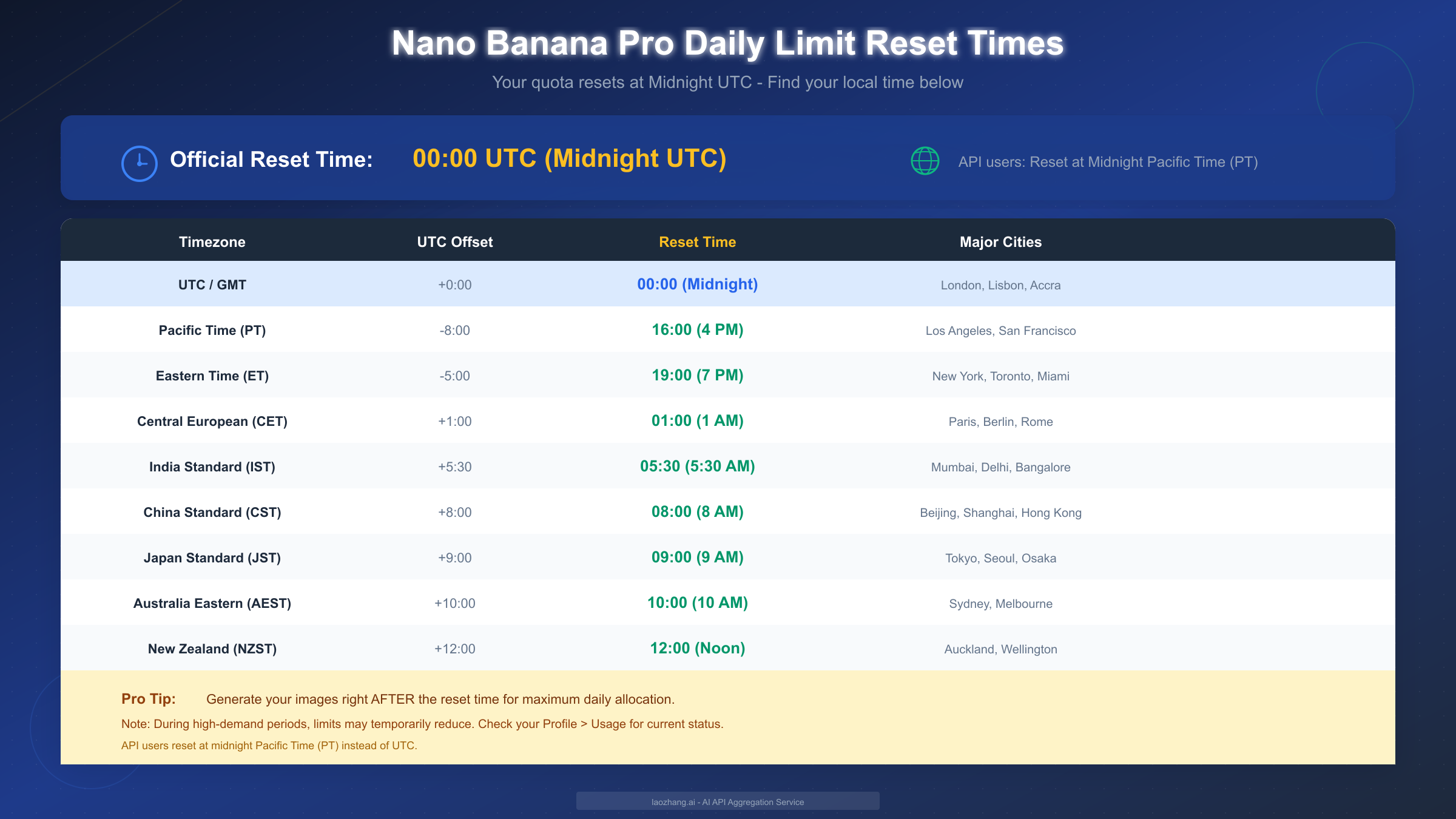
The UTC reset applies to all consumer-facing Gemini products, including the Gemini app, AI Mode in Search, NotebookLM, and Workspace integrations. This global standard means users in different timezones experience their daily quota refresh at varying local times, which can work to your advantage or disadvantage depending on your workflow. For instance, users in Asia get their quota refreshed during morning hours, perfect for starting the workday with full allocation, while users in the Americas receive fresh quota during afternoon or evening hours.
Here's a quick reference for major timezone regions:
- UTC/GMT (London, Lisbon): 00:00 (Midnight)
- Pacific Time PT (Los Angeles, San Francisco): 16:00 (4 PM previous day)
- Eastern Time ET (New York, Toronto): 19:00 (7 PM previous day)
- Central European CET (Paris, Berlin): 01:00 (1 AM)
- India Standard IST (Mumbai, Delhi): 05:30 (5:30 AM)
- China Standard CST (Beijing, Shanghai): 08:00 (8 AM)
- Japan Standard JST (Tokyo, Seoul): 09:00 (9 AM)
- Australia Eastern AEST (Sydney): 10:00 (10 AM)
A practical strategy involves generating your most important images immediately after the reset time for your location. This ensures you have maximum allocation available and aren't racing against a depleting quota for critical work. Some users report that generating images right at reset time sometimes experiences brief delays as the system processes the global quota refresh, so waiting 5-10 minutes past midnight UTC often yields smoother performance.
It's worth noting that API users experience a different reset schedule. Developer API quotas reset at midnight Pacific Time (PT) rather than UTC, which can affect applications serving global audiences. If you're building applications that consume Nano Banana Pro through the API, your rate limit refreshes occur at a different time than your end users' consumer quotas, creating potential synchronization considerations for usage tracking. For more details on similar reset mechanisms, see our coverage of ChatGPT's limit reset mechanism.
How to Access Nano Banana Pro for Free
Getting started with Nano Banana Pro requires only a Google account and access to one of the supported platforms. Google has integrated Nano Banana Pro across multiple touchpoints, giving you flexibility in how you interact with the model depending on your preferences and use case.
Through the Gemini App
The Gemini app represents the most straightforward path to Nano Banana Pro. Available on both desktop (gemini.google.com) and mobile (iOS and Android apps), the Gemini app provides direct access to image generation without any configuration required. To use Nano Banana Pro specifically, navigate to the tools menu and select "Create images," then choose the "Thinking" model from the available options. The "Thinking" designation indicates you're using the Pro model with its advanced reasoning capabilities rather than the standard Nano Banana.
When you submit a prompt, Nano Banana Pro processes your request using its multi-stage workflow, which includes an internal "plan-generate-review-correct" capability that produces more accurate results for complex instructions. The app interface shows a generation progress indicator, and completed images appear directly in the conversation with options to download, edit further, or request variations. No manual action enables Nano Banana Pro; the model activates automatically for all image generation requests until you exhaust your daily quota.
Via AI Mode in Search
Google also makes Nano Banana Pro available through AI Mode in Search, accessible by visiting google.com and activating AI Mode while signed into your Google account. Within AI Mode, click the dropdown menu and select "Thinking with 3 Pro," then use the plus sign icon to choose "Create Images Pro." This integration particularly suits users who want to combine search context with image generation, as the system can ground image creation in real-time search results for topics requiring current information.
Using Google AI Studio
Developers and power users can access Nano Banana Pro through Google AI Studio (aistudio.google.com), where it appears as "Gemini 3 Pro Image" in the model selector. AI Studio includes monthly free credits for experimentation, providing an excellent environment for testing prompts, exploring capabilities, and developing workflows before committing to production usage. The studio interface offers additional controls unavailable in the consumer app, including parameter adjustments and batch processing options that help maximize the value of each generation within your quota.
NotebookLM Integration
For users working with research documents, reports, or presentation materials, NotebookLM offers native Nano Banana Pro integration. This Google product allows you to upload sources, generate summaries, and now create visualizations including slide decks and infographics powered by Nano Banana Pro. The integration excels at turning textual information into visual narratives, making it particularly valuable for educators, researchers, and content creators who need to transform complex information into accessible graphics.
What Happens When You Hit the Daily Limit?
Understanding the fallback behavior helps set appropriate expectations and plan your workflow around the 2-image daily cap. When you exhaust your free Nano Banana Pro quota, Google doesn't block image generation entirely; instead, the system silently transitions to the standard Nano Banana model (Gemini 2.5 Flash Image) for your remaining requests that day.
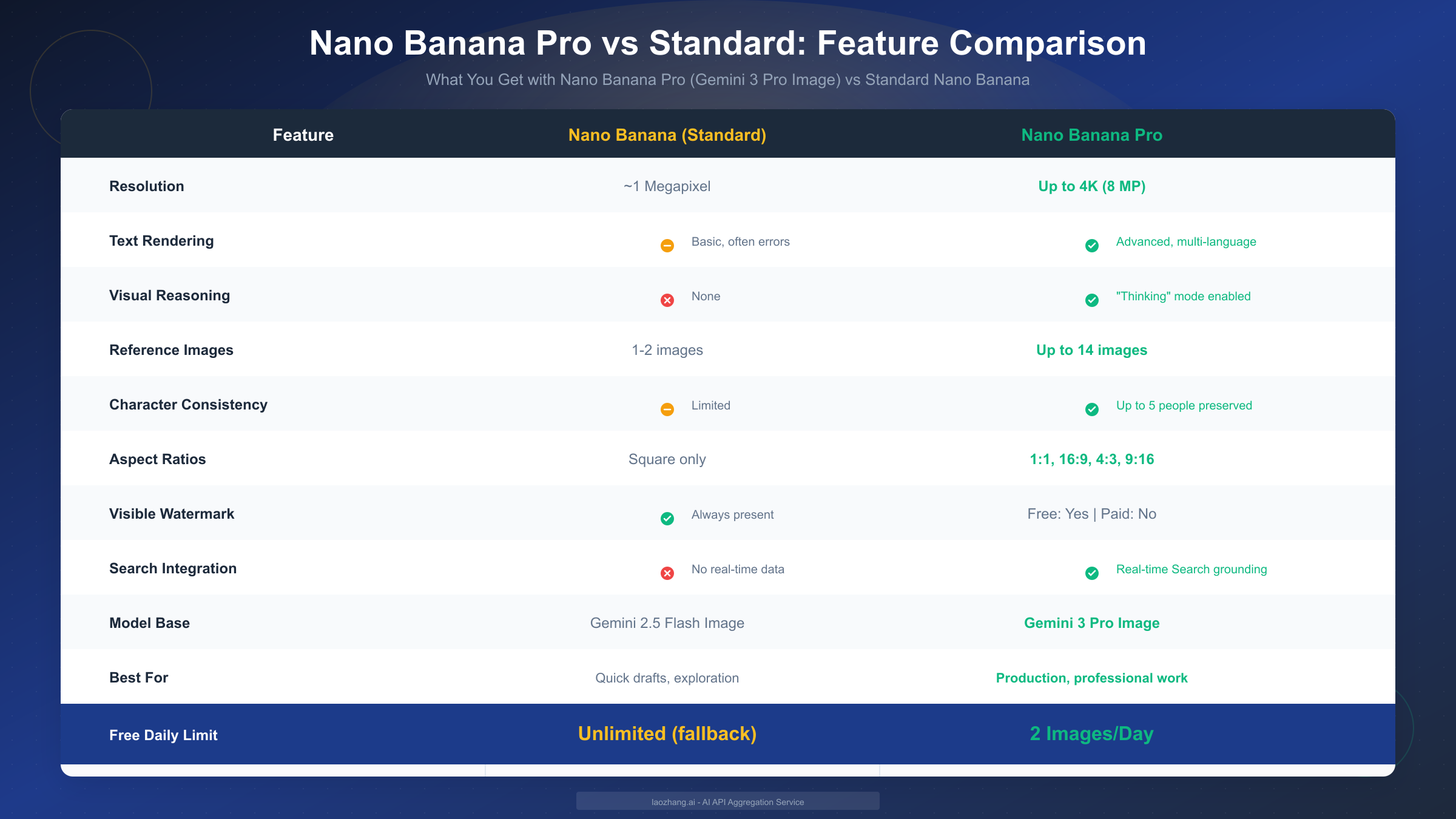
This automatic fallback occurs without explicit notification in the interface, which catches many users off guard. One moment you're generating crisp, well-reasoned images with accurate text rendering, and the next your outputs show the characteristic limitations of the older model. The quality difference becomes most apparent in three key areas: resolution drops from potential 4K to approximately 1 megapixel, text rendering accuracy decreases significantly with longer phrases often containing errors, and the advanced visual reasoning that handles complex multi-element prompts simply isn't available.
The practical impact varies by use case. For simple illustrations, icons, or conceptual images that don't require text, the fallback to standard Nano Banana may produce acceptable results that serve your purpose. However, for professional work requiring accurate text in images, detailed infographics, or complex scene compositions, the quality difference makes the standard model inadequate as a substitute. Many users find themselves frustrated when a project starts with impressive Pro-quality outputs, then shifts to noticeably inferior results mid-workflow.
Google provides no countdown or warning as you approach your limit. The only way to check remaining quota involves navigating to your Profile settings and looking for "Usage & Limits" information, though this display doesn't always show precise image counts. Some users report the transition happening unexpectedly even when they believe they haven't reached 2 images, which may relate to how the system counts certain operations (editing an existing image may consume quota differently than generating from scratch).
Once the fallback occurs, your options include waiting until midnight UTC for quota refresh, upgrading to a paid tier for immediate higher limits, or seeking alternative platforms and APIs that offer different access structures. For users who find themselves regularly hitting the limit, the cost-per-image analysis in the following section helps determine whether paid access or alternatives make more financial sense.
Need More Images? Affordable Alternatives
When 2 images per day doesn't meet your needs but $20-35/month feels excessive for your usage level, several alternatives provide more flexible access to high-quality image generation. The AI image generation ecosystem has expanded significantly, offering options that range from pay-per-use APIs to third-party platforms aggregating multiple models.
Direct API Access represents the most flexible option for developers and power users comfortable with technical integration. The Gemini API offers Nano Banana Pro through pay-per-use pricing at approximately $0.04 per image with no hard daily limits beyond rate limiting. This approach makes sense for users whose needs vary significantly month-to-month, as you pay only for actual usage rather than a fixed subscription. Google AI Studio provides free monthly credits for experimentation, and you can monitor consumption closely to control costs. For those interested in exploring this path, our guide on free Gemini Flash Image API access details the setup process.
API Aggregation Services have emerged as a popular middle-ground solution, offering access to multiple AI image models through a single integration point. Platforms like laozhang.ai aggregate Google's Gemini models alongside competitors like DALL-E, Midjourney, and Flux, providing unified billing and often competitive rates compared to direct API access. These services particularly benefit users who want to compare outputs across models or need backup options when primary services experience capacity constraints. For teams requiring consistent, high-volume access without managing multiple API integrations, aggregation services simplify operations while maintaining cost efficiency.
Alternative Image Generation Models worth considering include OpenAI's GPT-Image-1, Midjourney, and various Flux variants, each with distinct strengths. GPT-Image-1 excels at following detailed instructions and produces highly coherent results but operates at higher per-image costs. Midjourney offers distinctive artistic styles and strong community features but requires Discord access and subscription-based pricing. Flux models provide open-source options that can run locally or through various API providers, eliminating per-image costs in exchange for infrastructure management. For a comprehensive comparison of these options, see our analysis of Gemini 2.5 Pro free tier limits which contextualizes Google's offerings against alternatives.
The right choice depends on your specific requirements:
- Occasional use (5-20 images/month): Stick with free tier across multiple platforms to maximize free allocations
- Regular use (50-200 images/month): Consider Pro tier ($19.99) or API pay-per-use depending on predictability needs
- Heavy use (500+ images/month): Ultra tier ($34.99) or API aggregation services offer best economics
- Variable/project-based: Pay-per-use APIs provide flexibility without subscription commitment
Cost efficiency ultimately depends on consumption patterns. The Pro tier's ~$0.20 per image (at 100 images/month) exceeds API pricing but includes the convenience of app-based access and guaranteed allocation. Ultra's ~$0.03 per image (at 1000 images/month) undercuts most alternatives but requires consistent high-volume usage to realize savings. API services typically range $0.03-0.05 per image with no minimum commitment, making them ideal for variable workloads. For developers exploring API-based solutions, platforms like laozhang.ai (https://docs.laozhang.ai/ ) offer documentation and testing environments to evaluate options before committing to a particular approach.
Nano Banana vs Nano Banana Pro: Understanding the Difference
The distinction between standard Nano Banana and Nano Banana Pro extends far beyond just daily limits—these represent two generations of Google's image generation technology with fundamentally different capabilities. Understanding these differences helps you recognize when you're using each model and what to expect from your outputs.
Nano Banana (officially Gemini 2.5 Flash Image) launched in August 2025 and gained viral popularity in September 2025 with the 3D figurine trend that flooded social media. This model established Google as a serious competitor in the image generation space, offering quick generation times, decent quality for simple prompts, and broad accessibility through the Gemini app. However, users quickly discovered significant limitations, particularly with text rendering, where longer phrases frequently contained spelling errors, and with complex scenes requiring multiple elements or specific spatial relationships.
Nano Banana Pro (Gemini 3 Pro Image) arrived November 20, 2025, addressing most of the original model's shortcomings while introducing advanced capabilities that set it apart from competitors. Built on the newer Gemini 3 architecture, Pro added 13 million users in just four days after launch, demonstrating enormous demand for its improvements. The model's internal "Thinking" mechanism enables true visual reasoning, allowing it to plan, generate, review, and correct outputs before finalizing—a capability absent from both the original Nano Banana and most competing models.
The most significant improvements in Nano Banana Pro include resolution jumping from ~1MP to full 4K (8 megapixels), text rendering that works accurately across multiple languages with various fonts and styles, support for up to 14 reference images for style consistency (compared to 1-2 in the original), character consistency preserving facial features, clothing, and lighting across multiple images for up to 5 people, flexible aspect ratios including 1:1, 16:9, 4:3, and 9:16 options, and real-time Search grounding that generates images based on current events and data.
For practical usage, the model differences become most apparent in these scenarios:
- Text-heavy images (signs, infographics, labels): Pro handles accurately, Standard fails frequently
- Multi-element compositions: Pro maintains coherence, Standard struggles with spatial relationships
- Character sequences (storyboards, campaigns): Pro preserves consistency, Standard produces variations
- High-resolution needs (print, large displays): Only Pro delivers usable quality
- Current events/data visualization: Only Pro can access real-time information
Both models still share some limitations. Batch generation inconsistency remains unfixed—requesting multiple outputs from the same prompt produces varying quality, with some images perfect and others distorted. Prompt interpretation quirks persist, with the system occasionally ignoring parts of complex instructions. Neither model handles certain content categories that trigger safety filters, though the specific boundaries differ slightly between versions.
FAQ: Common Questions About Nano Banana Pro Free Access
This section addresses the most frequently asked questions about Nano Banana Pro's free tier, compiled from Google's official documentation and real user experiences.
How many images can I generate for free per day?
Free users can generate 2 images per day using Nano Banana Pro, reduced from 3 images following the November 2025 update. Google notes that "limits may change frequently" based on demand, so this number could adjust further. Once you hit this limit, image generation continues but uses the standard Nano Banana model instead.
Why did my image quality suddenly drop?
If you notice a quality decrease mid-session, you've likely exhausted your Nano Banana Pro quota and the system has fallen back to the standard Nano Banana model. This transition happens automatically without notification. The most obvious signs include lower resolution, text rendering errors, and less coherent complex scenes.
Do I need to enable Nano Banana Pro manually?
No manual action is required. When you select "Create images" and choose the "Thinking" model in the Gemini app, you're automatically using Nano Banana Pro. The system handles the transition to standard Nano Banana once your daily quota depletes.
Does editing an image count against my limit?
Yes, editing operations consume quota similar to new generations. In-painting, style transfers, and other edit operations typically count as image generations for quota purposes. Users report that some minor edits may not consume quota, but significant modifications generally do.
Can I increase my free limit without paying?
The 2-image daily limit applies universally to free tier users with no known method to increase it without upgrading to a paid tier. Some users try multiple platforms (Gemini app, AI Studio, AI Mode in Search) hoping for separate quotas, but these share the same limit tied to your Google account.
What's the difference between Gemini AI Pro and Nano Banana Pro?
Gemini AI Pro refers to the Pro subscription tier ($19.99/month) for Gemini products, while Nano Banana Pro is the specific image generation model (Gemini 3 Pro Image). You can access Nano Banana Pro on the free tier with limited daily images, or access it with higher limits through a Gemini AI Pro or Ultra subscription.
Is the API free tier the same as the app free tier?
No, they operate independently with different structures. The Gemini app free tier offers 2 images/day to consumers, while the API free tier provides 5-10 requests per minute with 50-100 requests per day for developers. API limits reset at midnight Pacific Time rather than midnight UTC.
When should I upgrade to a paid tier?
Consider upgrading when you consistently hit the 2-image daily limit and find the standard Nano Banana fallback inadequate for your needs. Pro at $19.99/month makes sense for regular users needing 50-100 images monthly with professional quality requirements. Ultra at $34.99/month suits power users or small teams with production-level volume needs.
Conclusion: Making the Most of Free Nano Banana Pro
Nano Banana Pro represents a significant advancement in accessible AI image generation, and Google's decision to offer free tier access—even with tight limits—democratizes technology that was previously available only to paid subscribers of competing services. The 2 images per day allocation, while restrictive, provides enough capacity for casual exploration, learning the model's capabilities, and occasional personal projects.
For users whose needs exceed the free tier, the path forward depends on usage patterns and budget. The Pro tier at $19.99/month offers the best value for regular users who need reliable, higher-quality output without managing API integrations. Power users and teams benefit most from Ultra's volume pricing or API-based solutions that provide flexibility and scalability. Pay-per-use API access through direct integration or aggregation services suits variable workloads where monthly subscriptions create waste.
Key takeaways for maximizing your Nano Banana Pro experience include understanding your reset time to plan generations strategically, recognizing the fallback behavior so quality drops don't surprise you, and evaluating alternatives when the free tier consistently proves insufficient. The AI image generation landscape continues evolving rapidly, with Google actively updating limits and capabilities—staying informed helps you make the best choice for your specific needs and budget.
Whether you stick with the free tier or upgrade to paid access, Nano Banana Pro's combination of advanced reasoning, accurate text rendering, and high-resolution output establishes a new baseline for what AI image generation can achieve. The question isn't whether the technology impresses, but how much access makes sense for your particular use case.


