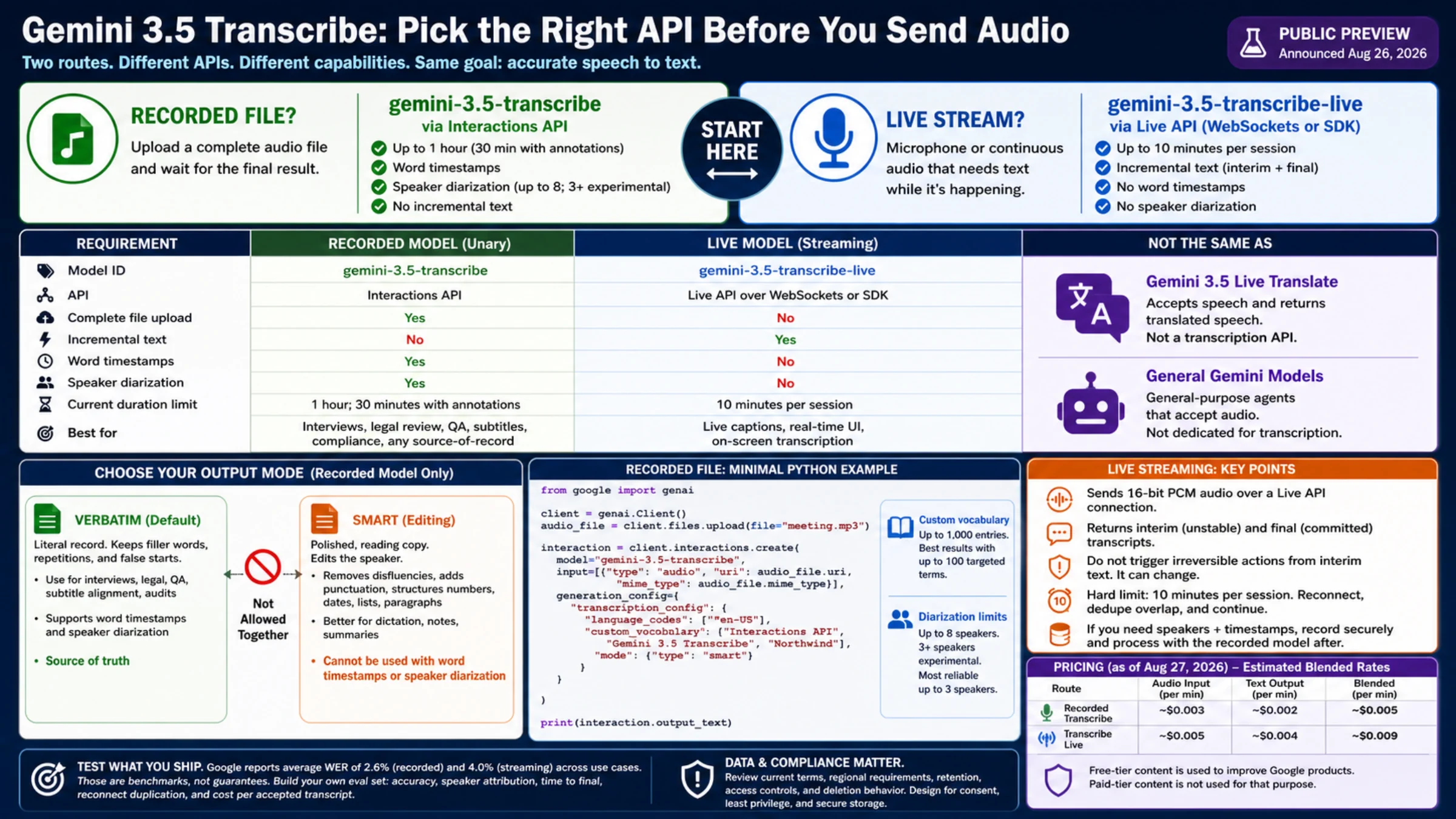
Gemini 3.5 Transcribe has two developer routes, and the audio source decides which one belongs in your architecture. A finished recording goes to gemini-3.5-transcribe through the Interactions API. A microphone or continuous audio stream goes to gemini-3.5-transcribe-live through the Live API.
Both routes produce text. They are not aliases for Gemini 3.5 Live Translate, which accepts speech and returns translated speech, and they are not general-purpose Gemini agents that happen to accept audio. The dedicated Transcribe models have a narrower contract: speech in, transcript out, with controls for fidelity, language and domain vocabulary.
Google announced the model on August 26, 2026 and describes developer access as public preview. It is ready for evaluation and guarded integration, but preview status should affect rollback plans, monitoring and any promise you make to downstream users.
The endpoint decision takes thirty seconds
Choose the recorded model when you can upload a complete file and wait for a final result. It supports up to one hour of audio, speaker diarization and word-level timestamps. If either annotation feature is enabled, the current maximum falls to 30 minutes.
Choose the live model when the transcript must appear while someone is speaking. It sends incremental text over a bidirectional Live API connection and currently allows ten minutes per session. It does not provide speaker diarization or word-level timestamps.
| Requirement | Recorded model | Live model |
|---|---|---|
| Model ID | gemini-3.5-transcribe | gemini-3.5-transcribe-live |
| API | Interactions API | Live API over WebSockets or SDK |
| Complete file | Yes | No |
| Incremental text | No | Yes |
| Word timestamps | Yes | No |
| Speaker diarization | Yes | No |
| Current duration limit | 1 hour; 30 minutes with annotations | 10 minutes per session |
The official model reference documents automatic detection across more than 85 languages and utterance-level code-switching on both routes. If the language is known, provide its published BCP-47 code; if speakers switch languages, omit the list or pass an empty list and test the exact combination you expect.
Decide whether the transcript may edit the speaker
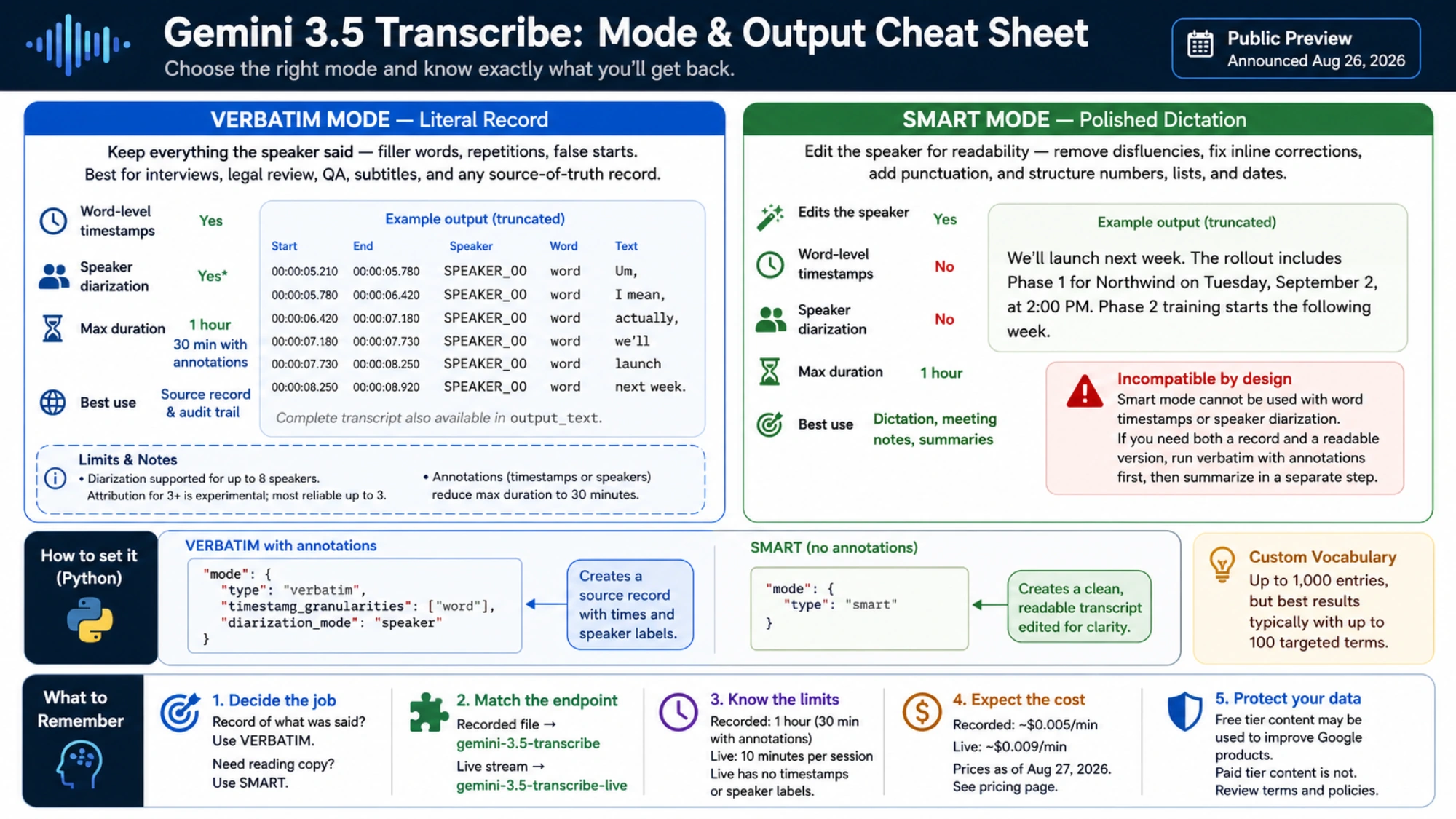
The default verbatim mode keeps filler words, repetitions and false starts. That is usually the right source record for interviews, legal review, quality assurance, subtitle alignment and any workflow where a person may need to replay the audio and verify a phrase.
smart mode produces reading copy. It removes disfluencies, resolves inline corrections, adds punctuation and turns spoken sequences into structured dates, numbers, lists and paragraphs. “Send it Tuesday—actually, Wednesday at two” can become a clean Wednesday appointment rather than a record of both phrases.
That behavior is useful for dictation, meeting notes and post-call summaries, but it is an editorial transformation. Do not call it verbatim, and do not discard the original audio merely because the output looks polished.
The transcription guide also imposes a hard configuration boundary: smart mode cannot be combined with word timestamps or speaker diarization. If you need a defensible source and a readable deliverable, request verbatim annotations first and create the summary in a separate, traceable step.
A minimal recorded-file request in Python
The documented flow uploads the file with the Files API, then passes its URI to an Interactions API request. Keep the API key in the runtime environment rather than source code.
from google import genai

client = genai.Client()
audio_file = client.files.upload(file="meeting.mp3")

interaction = client.interactions.create(
    model="gemini-3.5-transcribe",
    input=[
        {
            "type": "audio",
            "uri": audio_file.uri,
            "mime_type": audio_file.mime_type,
        }
    ],
    generation_config={
        "transcription_config": {
            "language_codes": ["en-US"],
            "custom_vocabulary": [
                "Interactions API",
                "Gemini 3.5 Transcribe",
                "Northwind",
            ],
            "mode": {"type": "smart"},
        }
    },
)

print(interaction.output_text)
Use custom vocabulary for names, SKUs, acronyms and technical terms whose corruption changes the result. The API accepts up to 1,000 entries, but Google's guidance says customers typically get the best results with up to 100 targeted terms. A short list of consequential terms is easier to maintain and evaluate than a pasted dictionary.
For a speaker-attributed source record, switch to verbatim and request annotations:
"mode": {
    "type": "verbatim",
    "timestamp_granularities": ["word"],
    "diarization_mode": "speaker",
}
The complete text remains in interaction.output_text. Speaker and timing details are word annotations inside the interaction response, so parse those fields explicitly. Do not build a consumer around assumed labels embedded in the plain text.
Google currently documents diarization for up to eight speakers and marks attribution for three or more as experimental. Its launch post highlights reliable use up to three speakers. The safe interpretation is not “eight speakers guaranteed”; it is “the API accepts that range, but crowded meetings need their own attribution test.”
Live captions require a state machine, not just a WebSocket
The Live transcription guide separates a transcription pipeline from a conversational Live agent. Transcribe Live accepts raw 16-bit PCM audio and returns text. It does not reason, call tools or speak back as part of that model contract.
A useful client handles two kinds of events:
- Interim hypotheses update quickly while the person is speaking. Render them as temporary captions.
- Final transcripts are the committed text. Persist these, index them and use them for downstream actions.
Never trigger an irreversible workflow from an interim phrase. The next audio chunk can revise it. Also define what happens at the ten-minute boundary: close cleanly, mark the final offset, create a new session and deduplicate the overlap after reconnecting.
If a live meeting also needs audited speakers and word times, use two pipelines only when the value justifies the extra data handling: Live for on-screen captions, plus a securely retained recording sent to the unary model after the meeting. The design improves the final artifact but creates storage, consent and deletion obligations.
The listed price is a token estimate, not a project budget
As of August 27, 2026, the Gemini Developer API pricing page lists a free tier and these paid standard estimates:
| Route | Audio input | Text output | Estimated blended rate |
|---|---|---|---|
| Recorded Transcribe | about $0.003/min | about $0.002/min | about $0.005/min |
| Transcribe Live | about $0.005/min | about $0.004/min | about $0.009/min |
A one-hour recording is therefore roughly $0.30 in model charges at the published estimate. Sixty minutes of live audio is roughly $0.54, split across multiple sessions under the current limit. Uploads, storage, retries, observability, post-processing and human review sit outside those figures.
The same pricing table says free-tier submitted content is used to improve Google products, while paid-tier content is not. That row is material when audio contains customer conversations, health information, legal matters or internal strategy. It is not a substitute for reviewing current terms, regional requirements, retention, access controls and deletion behavior.
Benchmark the output contract you will actually ship
Google's launch announcement reports an average WER of 4.0% for streaming and 2.6% for non-streaming use cases, measured by Artificial Analysis. It also reports a 70% improvement in time to final transcription over Chirp 3 and separate FLEURS multilingual results.
Those are useful positioning signals, not a service-level promise for your microphones, accents or product codes. Build a small evaluation set from permitted real audio: clean and noisy rooms, single and overlapping speakers, names, alphanumeric IDs, code-switching and long pauses. Score word accuracy, number accuracy, speaker attribution, time to final, reconnect duplication and cost per accepted transcript.
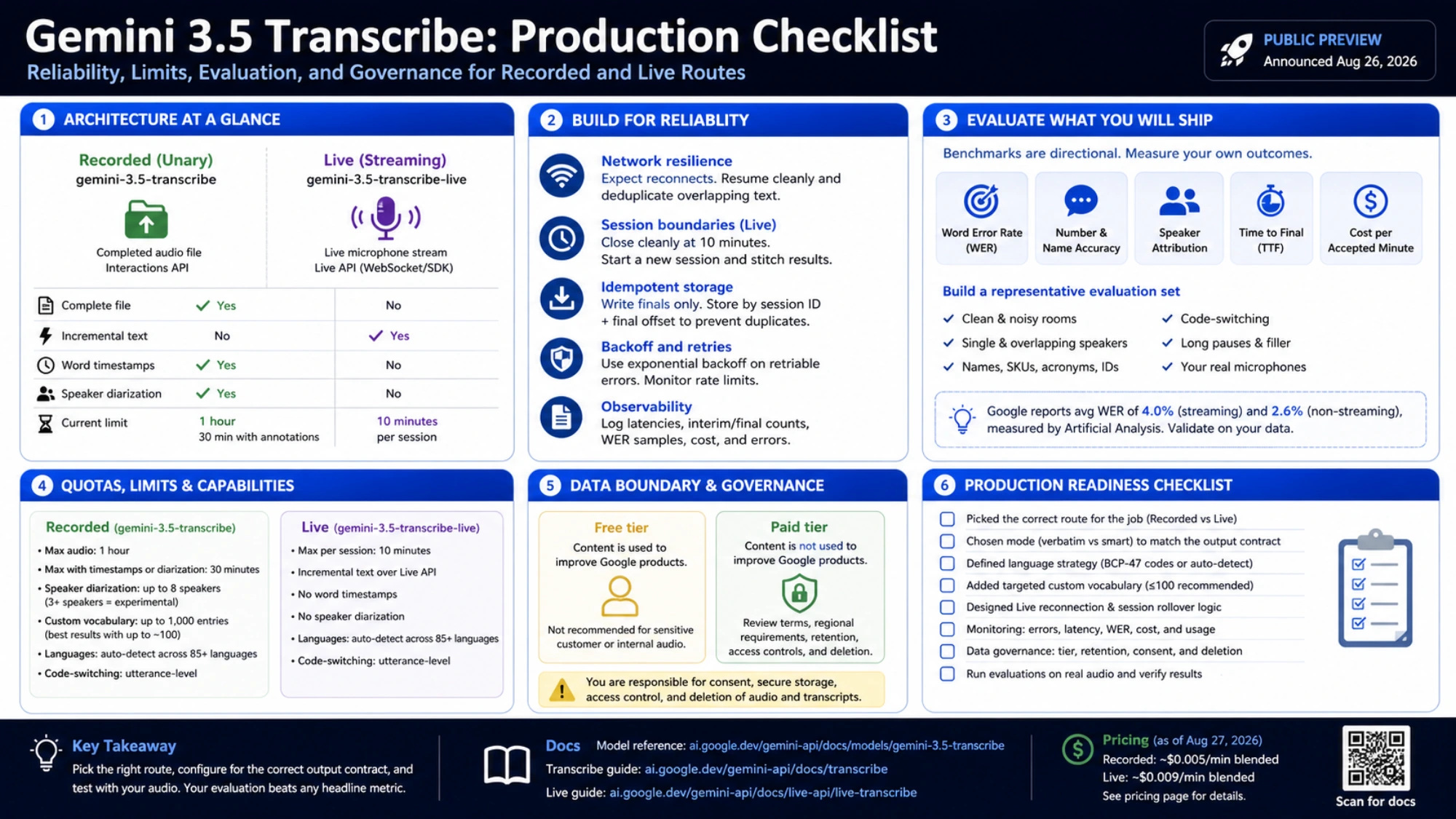
Start with unary verbatim when the transcript is a record, unary smart when it is reading copy, and Live when text must arrive during speech. The right model is the one whose output contract matches the job before any aggregate WER enters the discussion.