
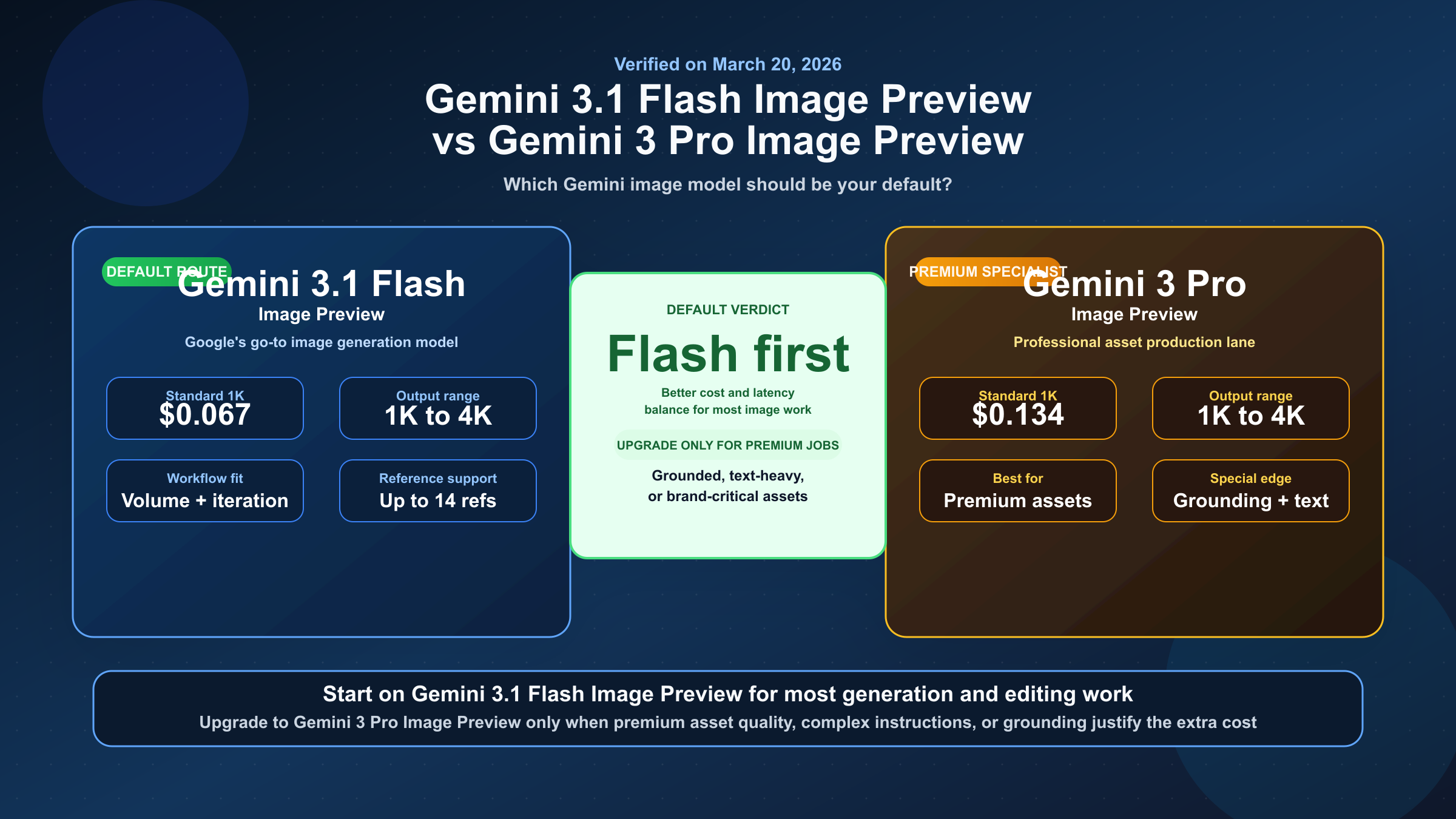
If by "Gemini 3 Flash Image" you mean Google's current Flash-side image model, use gemini-3.1-flash-image-preview by default. Move up to gemini-3-pro-image-preview only when the job depends on more demanding asset-production quality, complex instructions, or grounded generation.
The real choice is default lane versus specialist upgrade. As of March 22, 2026, Google's live docs list gemini-3.1-flash-image-preview and gemini-3-pro-image-preview as the current image pair. Flash Image Preview is the high-volume, lower-cost route; Pro Image Preview is the premium lane for teams that need more reasoning and higher production headroom.
TL;DR
If you want one rule, use Gemini 3.1 Flash Image Preview for everyday generation and editing, and pay for Gemini 3 Pro Image Preview only when the job is expensive enough that the premium workflow matters more than cost or latency. Google's current docs do not frame Pro as the universal winner. They frame it as the specialist lane. If you searched for "Gemini 3 Flash Image," this is the current model Google is pointing you to.
| Model | Current Google positioning | Current standard output pricing | Batch output pricing | Free Tier on pricing page | Best fit |
|---|---|---|---|---|---|
gemini-3.1-flash-image-preview | Google's go-to Gemini image model | $0.067 at 1K, $0.101 at 2K, $0.151 at 4K | $0.034 at 1K, $0.050 at 2K, $0.076 at 4K | Not available | Default choice for most teams, high-volume work, and cost-sensitive production |
gemini-3-pro-image-preview | Premium model for professional asset production | $0.134 at 1K or 2K, $0.24 at 4K | $0.067 at 1K or 2K, $0.12 at 4K | Not available | Text-heavy visuals, grounded workflows, premium brand assets, and more complex instructions |
The important nuance is that both models now support 1K, 2K, and 4K output according to Google's current image-generation and pricing docs. So the real difference is not "Flash is basic and Pro is the only serious model." The real difference is default cost-latency balance versus premium contextual asset work.
What These Model Names Actually Mean
Google's current image-generation docs map the names like this:
- Nano Banana 2 =
gemini-3.1-flash-image-preview - Nano Banana Pro =
gemini-3-pro-image-preview
If you want to verify the current naming and positioning directly, Google's official Gemini API image generation guide, pricing page, and models directory are the core source set.
That mapping matters because the SERP still mixes brand-name articles, old screenshots, and official model-ID docs. A reader can easily end up comparing a nickname from one page with a model ID from another and assume they are different products. They are not. The brand names are the product-facing labels; the model IDs are the API-facing surfaces.
There is a second naming trap that matters even more. The current Gemini models page warns that Gemini 3 Pro Preview was shut down on March 9, 2026. That warning refers to the text reasoning model gemini-3-pro-preview, not the image model gemini-3-pro-image-preview. If your team writes "Gemini 3 Pro" in tickets, prompts, or internal runbooks without the -image- part, you are creating future migration problems for yourself.
There is a third trap on the Flash side. As of March 22, 2026, Google's current models and deprecations pages list gemini-3.1-flash-image-preview as the live Flash-side image model, not a separate gemini-3-flash-image-preview image SKU. So when someone inside your team says "Gemini 3 Flash Image," the safest interpretation is usually "the current Flash image lane," which today means gemini-3.1-flash-image-preview.
This is one reason the article should stay model-ID first. The older brand-name comparison angle is already covered elsewhere. What the current keyword really needs is naming discipline, current docs, and a workflow recommendation that does not confuse active image models with retired text models.
Why Gemini 3.1 Flash Image Preview Should Be Your Default
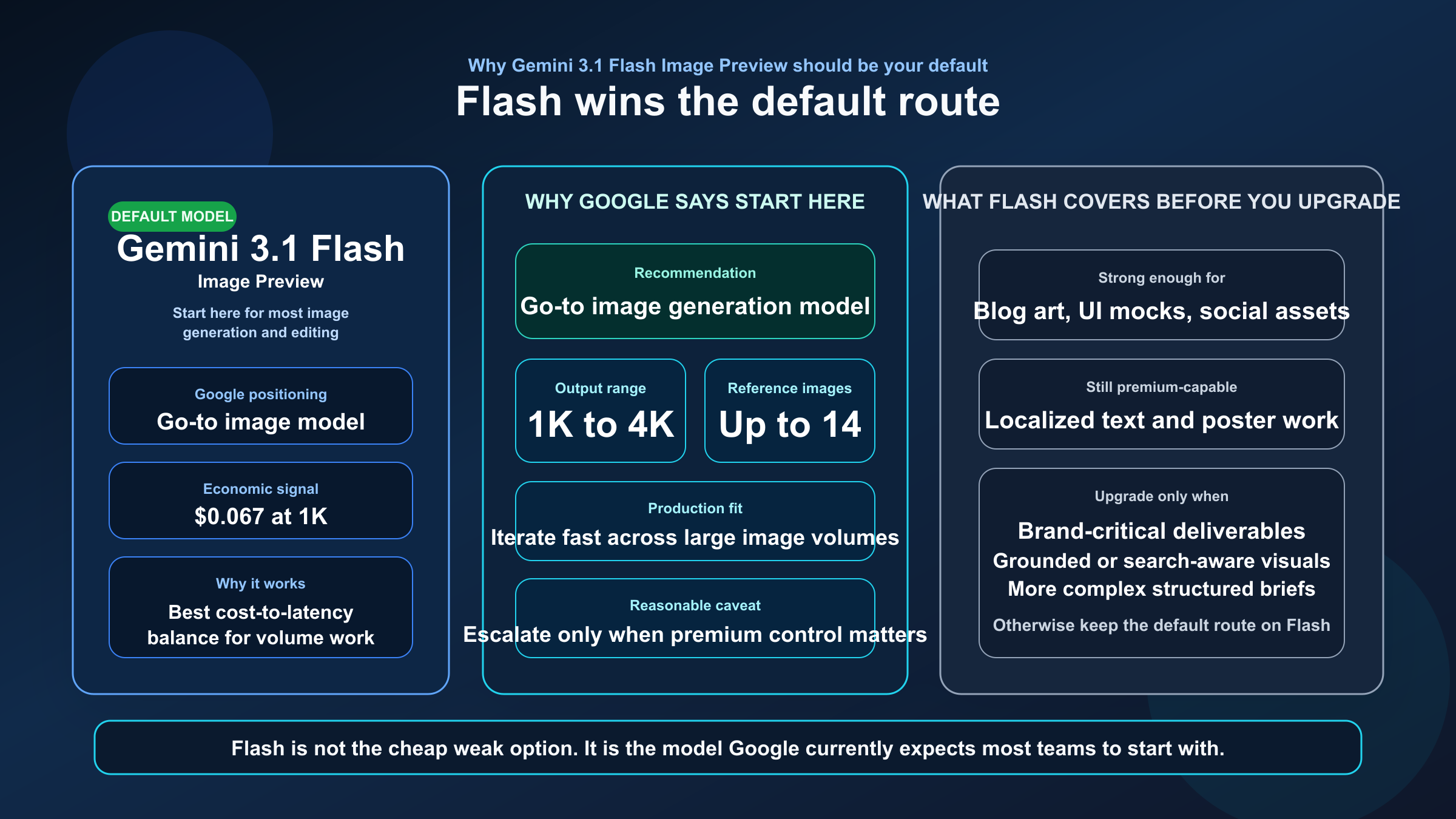
The strongest reason to start with Flash is simple: Google's own current image-generation guide recommends it as the go-to image generation model. That is unusually strong recommendation language for an official docs page, and it means you do not need to invent an artificial tie just to sound balanced. Flash is supposed to be the default route.
Why would Google recommend Flash first? Because the model's value is not just lower pricing. The current docs and model card position Gemini 3.1 Flash Image as a serious production model that still supports 1K, 2K, and 4K output, up to 14 reference images in the Gemini 3 image workflow, localized text rendering, clear text for posters and diagrams, and a 1M-token context window inherited from Gemini 3 Flash. In other words, it is not the "cheap but weak" option. It is the model Google expects most developers to use most of the time.
The February 26, 2026 DeepMind model card makes that default-case story stronger, not weaker. In its side-by-side text-to-image and editing tables, Gemini 3.1 Flash Image with thinking plus search scored above Gemini 3 Pro Image on overall preference and slightly above it on general editing, while Pro kept the stronger premium positioning for studio-grade layouts and text-heavy final assets. That is exactly the split most buyers need: Flash is strong enough to start on, and Pro is the upgrade path when the asset quality bar or instruction complexity climbs.
That matters operationally. If your workload looks like product mockups, blog illustrations, social content, marketing variants, UI concepts, or iterative image editing inside a feature pipeline, the default route should optimize for volume, retry cost, and time-to-result. Flash does that better. The current pricing page makes the cost gap obvious, especially at 1K and in Batch mode, and the image-generation page makes the workflow argument explicit. Those two facts together are enough to justify a default-choice recommendation.
The DeepMind model card also helps here because it shows Flash is not positioned as a toy. Google says it is fit for professional precision and control, clear text for posters and intricate diagrams, long-context real-world knowledge, and studio-quality control. That language is much stronger than "good enough for drafts." It suggests the real reason Flash is the default is that Google believes the cost-quality tradeoff has improved enough that many teams no longer need to start on Pro.
That does not mean Flash is flawless. Google's current model card still warns about occasional slowness or timeout issues, weaker small-text rendering at 1K, imperfect character consistency, and a January 2025 knowledge cutoff. Those caveats are real. But they still do not overturn the main routing rule. They only tell you when it is time to escalate.
When Gemini 3 Pro Image Preview Is Worth the Upgrade
Pro is worth paying for when the image itself is expensive. Not expensive in tokens, but expensive in consequence. If the output is a final client deliverable, a text-heavy marketing asset, a diagram that cannot afford garbled labels, or a grounded image workflow where the model's contextual reasoning is part of the job, then Pro becomes rational very quickly.
Google's current image-generation guide is direct about what Pro is for: professional asset production, complex instructions, Google Search grounding, a default thinking process, and high-end image creation. The Pro model-card language pushes in the same direction. It frames Gemini 3 Pro Image as the higher-precision, more controlled lane for clear text in posters and diagrams, long-context real-world knowledge, and studio-quality control. That is not the language of a general default. It is the language of a premium specialist tool.
This is the right model when the prompt is not just "make a nice image," but "follow a more structured brief and get the details right." Think branded infographics, editorial hero visuals with embedded text, structured comparison assets, reference-heavy concept boards, or images where Google's grounding and reasoning process can materially improve the result. Pro is also easier to justify when a creative or production team would otherwise spend more time cleaning up output defects than the extra generation cost would save.
But the premium framing is exactly why you should not route to Pro blindly. Premium does not mean friction-free. Google's own model-card materials still mention occasional slowness or timeout issues. Community threads also show why that caveat matters in practice. One current Google AI Developers Forum thread reports gemini-3-pro-image-preview ignoring a requested 2K image size in a Node.js workflow. That thread is not official proof that the capability is unsupported, but it is a useful reminder that preview-model reality can still be rougher than the glossy capability story.
For the public quota posture, Google's official rate-limits page is still the safest reference because it explicitly notes that active limits are surfaced in AI Studio rather than one fixed inline preview-model table.
The cleanest decision rule is this: choose Pro when image quality failure is more expensive than model cost, and stay on Flash when iteration speed, retry cost, and production volume matter more than the last layer of premium control.
Pricing, Resolution, and Quota Posture
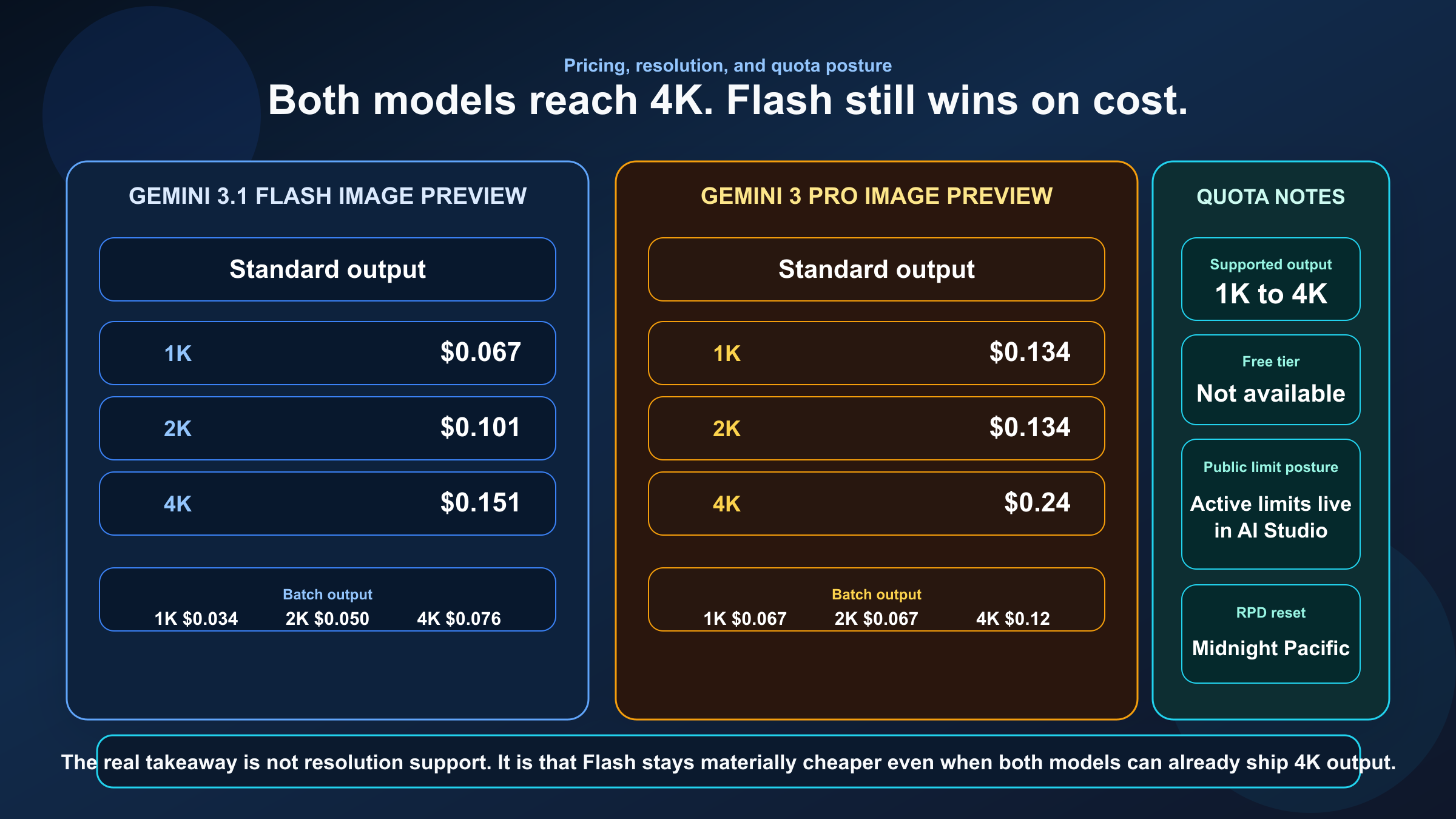
This is where the comparison stops being abstract. Google's pricing page now makes the difference concrete enough that you can model real workloads without guesswork.
| Price or limit question | gemini-3.1-flash-image-preview | gemini-3-pro-image-preview |
|---|---|---|
| Standard 1K output | $0.067 | $0.134 |
| Standard 2K output | $0.101 | $0.134 |
| Standard 4K output | $0.151 | $0.24 |
| Batch 1K output | $0.034 | $0.067 |
| Batch 2K output | $0.050 | $0.067 |
| Batch 4K output | $0.076 | $0.12 |
| Free Tier on current pricing page | Not available | Not available |
| Public rate-limit posture | Active limits shown in AI Studio, not one fixed inline standard table | Active limits shown in AI Studio, not one fixed inline standard table |
The most important pricing takeaway is not just that Flash is cheaper. It is that Flash stays meaningfully cheaper even at premium resolutions. If you assumed Pro was the only serious 2K or 4K option, the current docs no longer support that assumption. Flash can already cover many of those workloads, which is exactly why Google can recommend it as the go-to model.
The quota story needs careful wording. Google's current rate-limits page says requests per day reset at midnight Pacific time, but it does not present one neat inline standard RPM/RPD table for these preview image models the way readers often expect. Instead, the page points users to AI Studio for active limits. What it does still publish inline is Batch enqueued token capacity, where Pro is somewhat higher than Flash across Tiers 1 through 3. That is useful context, but not enough on its own to make Pro the default if your real concern is cost-per-image.
The practical reading of the quota docs is this: do not choose Pro because you think the public docs promise a dramatically better standard limit surface. The stronger public evidence is the price gap, not a clean inline throughput gap. If your team truly depends on current account-specific capacity, check AI Studio instead of relying on old screenshots or recycled blog tables.
Best Choice by Workflow
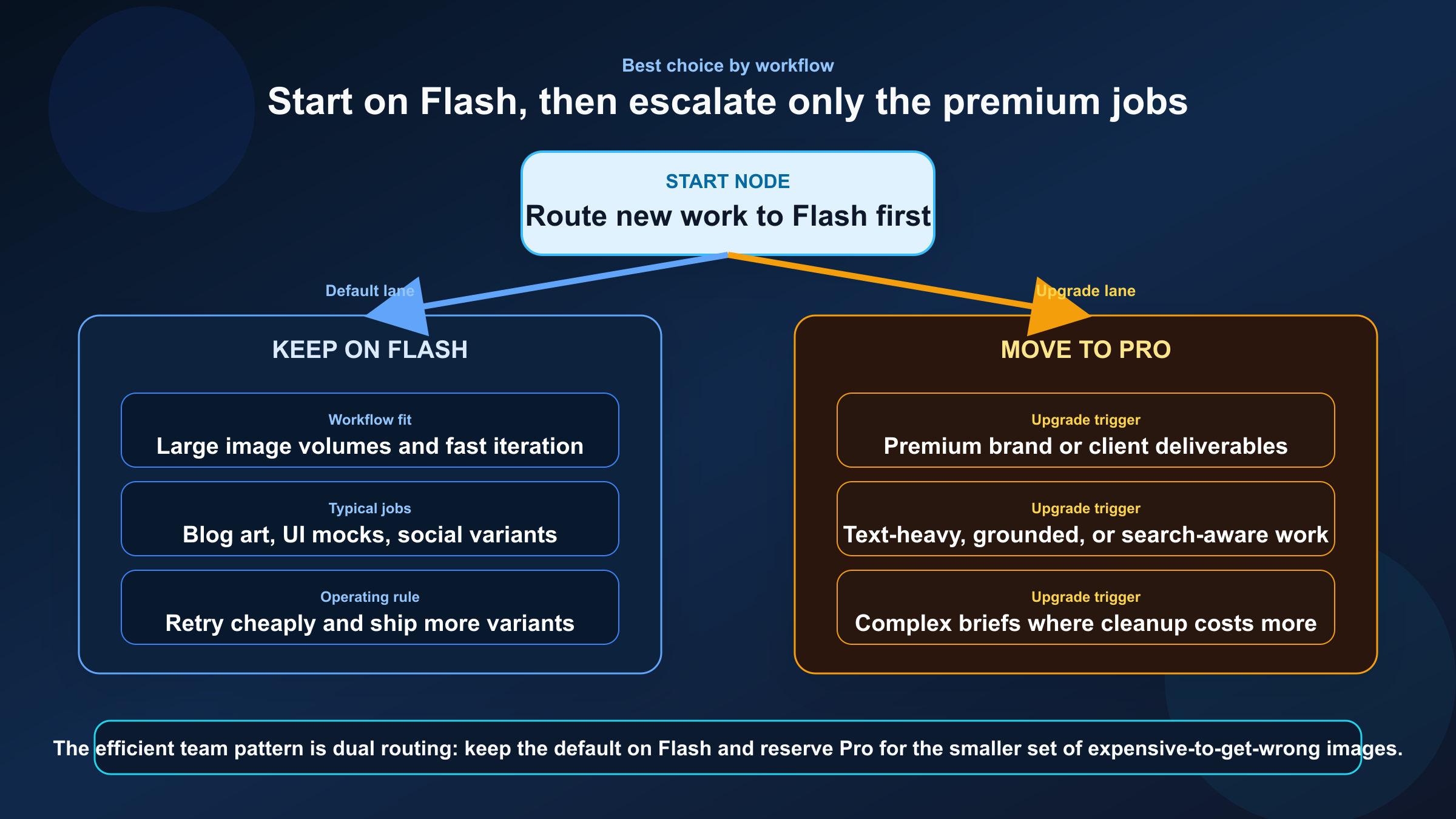
If your workload is an app feature, a content engine, or a team that generates lots of images every week, start with Flash. That includes blog graphics, social variants, product-image edits, landing-page experiments, internal design exploration, and most reference-assisted workflows where the goal is to ship good output quickly. Flash's price and Google's own go-to positioning make it the safer default.
If your workload is brand-critical, text-heavy, or hard to fix manually after generation, use Pro. That includes final poster assets, structured infographics, premium ad creative, visuals where grounded context matters, and jobs where more complex instruction following is part of the value. Pro is also a better candidate when the output count is low but the quality expectation is unusually high.
If you are unsure, the best operational pattern is not to debate endlessly. It is to route by escalation:
- start on Flash
- keep Flash for the workflows that already meet the bar
- escalate only the failing or premium assets to Pro
That route keeps your default costs sane without pretending every image job deserves the same model. It also matches how the current docs read: Flash first, Pro when the workflow justifies it.
This is also the cleanest way to stay differentiated from the older Nano Banana comparison framing. That older conversation often centers on branding, speed mythology, or generalized "95% of Pro" claims. The more defensible 2026 answer is simpler: Flash is the default route because Google says it should be, and Pro is the premium exception because Google's docs give it a more specialized job.
Implementation Notes and Naming Pitfalls
At the API level, the routing choice is straightforward:
textDefault model: gemini-3.1-flash-image-preview
Premium specialist model: gemini-3-pro-image-preview
The harder part is keeping the names straight across docs, product surfaces, and internal team communication. If one teammate says "Nano Banana Pro," another says "Gemini 3 Pro," and a third writes gemini-3-pro-preview in a config file, you now have three different concepts floating around the same project. Standardize the names early:
- use the official model ID in code and routing rules
- use the product names only as parenthetical labels in docs
- call out explicitly that
gemini-3-pro-previewis the retired text model, not the active image model
That naming discipline matters more than it sounds. It is the difference between a clean route choice and a support thread six weeks later where nobody can tell which model broke.
If you also need quota context for rollout planning, read our Gemini API rate limit explained guide alongside this comparison. The current public docs are careful on that front, and your real active limits are now better checked in AI Studio than inferred from old public tables.
FAQ
Which model should most teams start with right now?
Start with gemini-3.1-flash-image-preview. Google's current image-generation guide explicitly positions it as the go-to Gemini image model, and the current pricing page makes it much easier to justify as the default.
Is there a current model literally called gemini-3-flash-image-preview?
Not in Google's current March 22, 2026 model listings. The live Flash-side image model in the Gemini API docs is gemini-3.1-flash-image-preview, surfaced as Nano Banana 2.
Is Gemini 3 Pro Image Preview better for every image task?
No. It is better for premium, more complex, and more expensive image jobs. That is different from being the right default for every workflow.
Do both models support 4K now?
Yes. Google's current image-generation and pricing docs show 1K, 2K, and 4K support for both Gemini 3 image preview models, with Flash also offering a smaller 512 option.
Does either model have a Free Tier on the current pricing page?
No. As checked on March 20, 2026, Google's pricing page lists Free Tier as not available for both gemini-3.1-flash-image-preview and gemini-3-pro-image-preview.
Is gemini-3-pro-image-preview the same thing as the retired Gemini 3 Pro Preview model?
No. gemini-3-pro-image-preview is the active image model. gemini-3-pro-preview was the text reasoning model that Google's current models page says was shut down on March 9, 2026.
When is Pro worth the extra cost?
Use Pro when the image itself is expensive to get wrong: premium brand assets, infographics, poster-like layouts, grounded visual workflows, or jobs where more complex instruction following is worth paying for.
Bottom Line
The clean 2026 answer is not that Pro wins. It is that Flash wins the default route.
Use gemini-3.1-flash-image-preview when you want the best current balance of cost, latency, and capability for most Gemini image work. Use gemini-3-pro-image-preview when the job is expensive enough that the premium workflow, more contextual asset-production posture, and higher-end instruction following justify the higher price. That is the route Google's current docs already suggest, and it is the route most comparison pages still fail to say out loud.


