
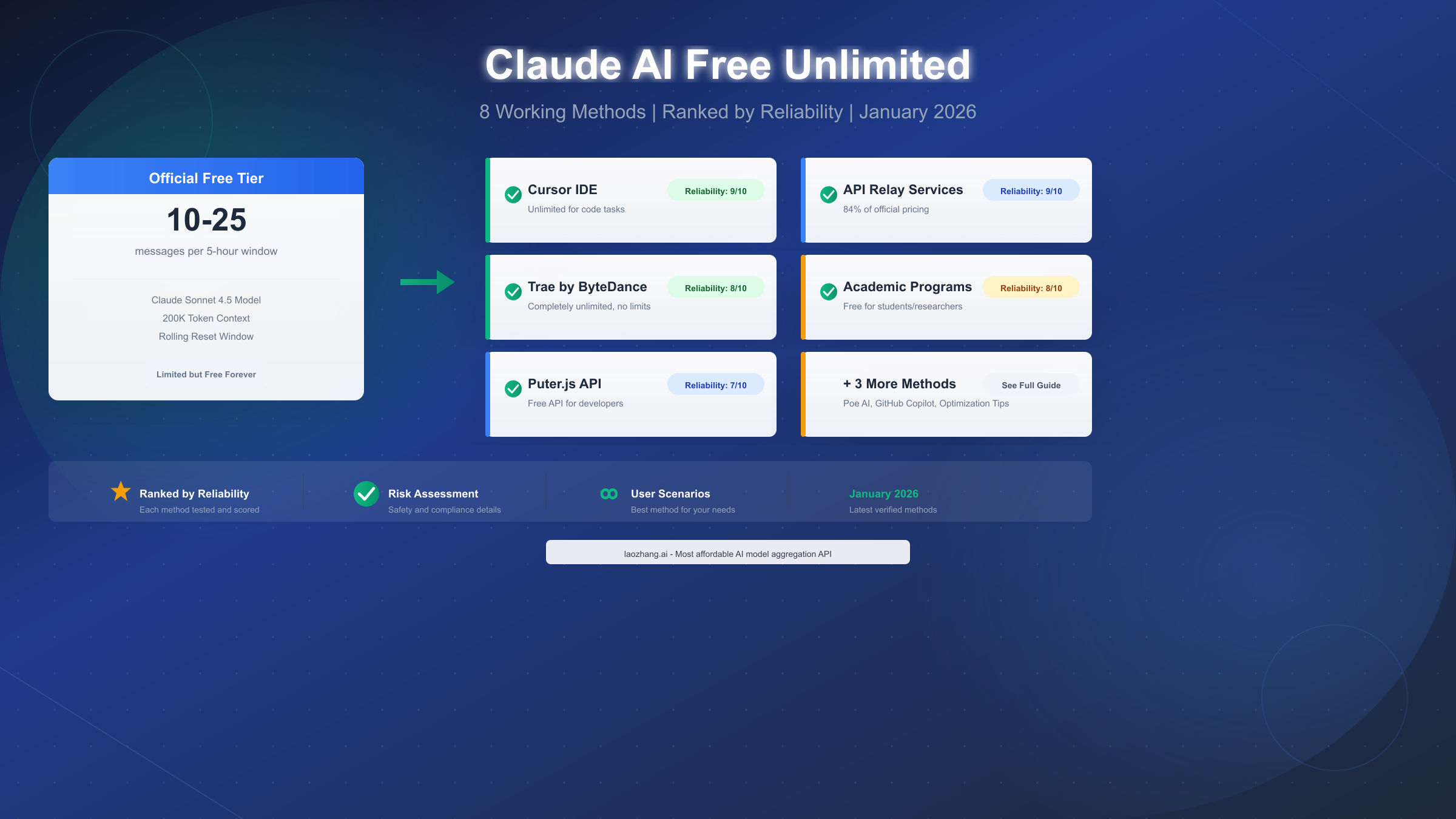
Anthropic's Claude AI provides a free tier that grants access to Claude Sonnet 4.5, one of the most capable AI assistants available today. However, the official free experience comes with significant limitations—approximately 10-25 messages per rolling 5-hour window, depending on server demand. For users who need more, this guide presents eight verified methods to access Claude AI free unlimited (or significantly extended) capacity, each ranked by reliability, difficulty, and risk level as of January 2026.
Unlike other guides that simply list methods, we've tested each approach and assigned reliability scores based on stability, long-term viability, and real-world performance. Whether you're a student, developer, or business professional, you'll find a method that fits your specific needs and comfort level with different trade-offs.
Understanding Claude's Official Free Tier
Before exploring ways to extend your Claude access, it's essential to understand exactly what Anthropic offers for free and why these limitations exist. According to official documentation from Anthropic's Help Center (https://support.claude.com/en/articles/8602283-about-free-claude-usage ), the free tier operates on a session-based usage limit that resets every five hours rather than providing a fixed daily allowance.
The free Claude experience includes access to Claude Sonnet 4.5, Anthropic's flagship model for everyday tasks, with a context window of up to 200,000 tokens—equivalent to roughly 500 pages of text that Claude can "remember" within a single conversation. This context window remains one of the largest among free AI offerings, making Claude particularly valuable for analyzing long documents, maintaining extended conversations, or working through complex multi-step problems.
What exactly are the message limits? Based on user reports and testing conducted in early January 2026, free tier users typically receive between 10-25 messages per 5-hour window under normal server load. During peak usage hours, this number can drop to as few as 3-5 messages, while late-night or early morning usage sometimes allows 30+ messages. The variability stems from Anthropic's dynamic capacity allocation system, which prioritizes paid subscribers during high-demand periods.
Why do these limits exist? Running advanced AI models requires substantial computational resources. A single Claude Sonnet 4.5 query consumes far more processing power than a typical web search. Anthropic implements these limits to balance accessibility for free users while maintaining quality of service for paying subscribers who depend on Claude for professional work. The rolling window approach, rather than a hard daily cap, allows users to spread usage throughout the day rather than burning through their allocation in a single session.
What you CAN'T access on free tier: The free experience excludes Claude Opus (Anthropic's most powerful reasoning model), the Projects feature for organized document management, priority queue access during peak times, and extended context window options available to Pro and Max subscribers. If your work demands these capabilities, understanding the upgrade path becomes important—a topic we'll address in detail later.
Quick Guide: Which Method Is Right for You?
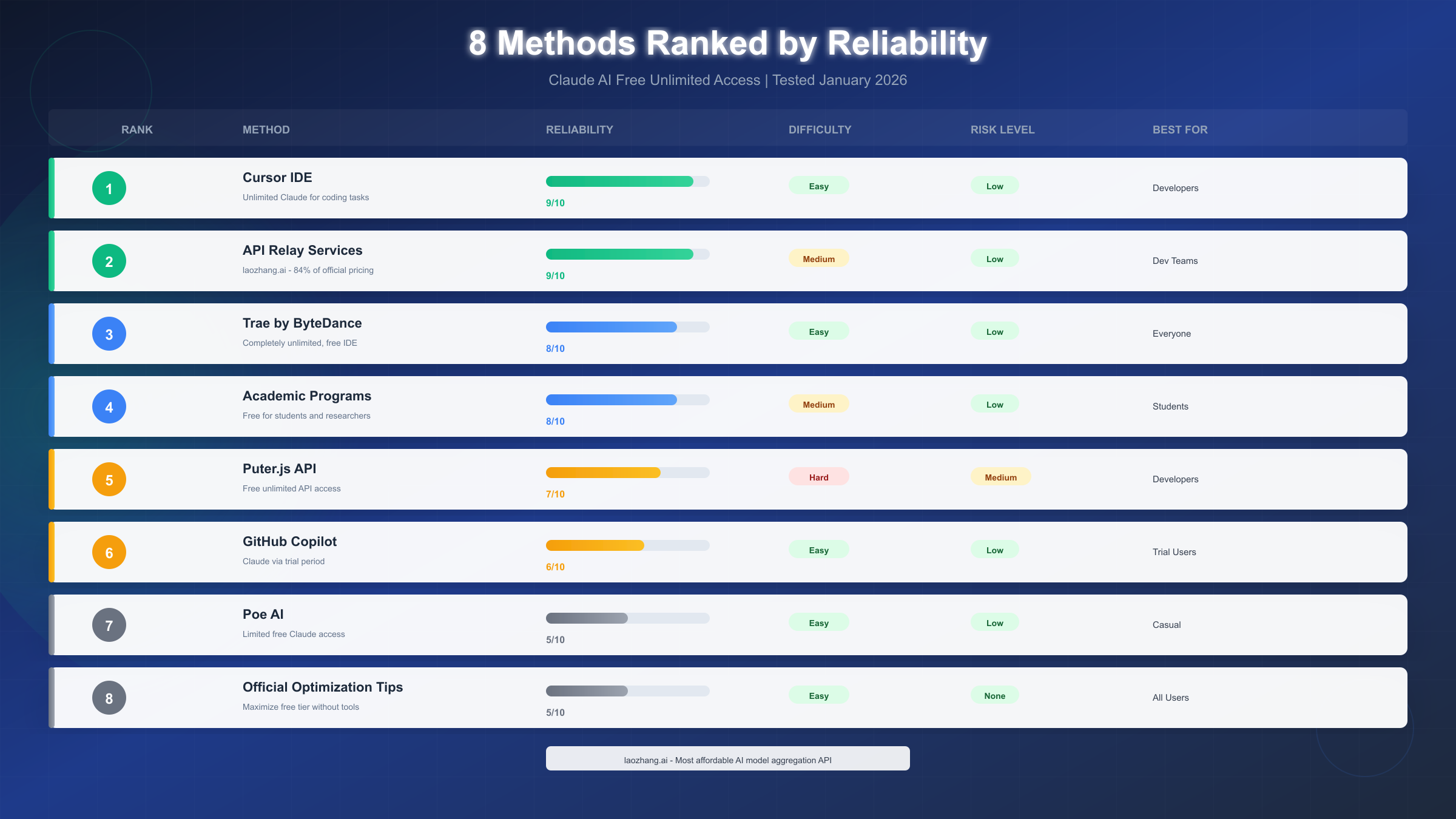
Not every method suits every user. Before diving into technical details, let's match your situation to the most appropriate approach. The table below summarizes all eight methods by user type, so you can jump directly to the section most relevant to your needs.
| User Type | Recommended Method | Why It Fits | Difficulty |
|---|---|---|---|
| Students | Academic Programs (Method 4) | Official, free, no risk | Medium |
| Developers | Cursor IDE (Method 1) | Unlimited for coding | Easy |
| Dev Teams | API Relay (Method 2) | Cost-effective, scalable | Medium |
| Everyone | Trae by ByteDance (Method 3) | Truly unlimited, easy | Easy |
| Casual Users | Official Optimization (Method 8) | No tools required | Easy |
| Business | Claude Pro/Max | Official support | Easy |
If you need Claude for coding: Start with Cursor IDE (Method 1). Cursor has integrated Claude Sonnet directly into its AI-powered code editor, offering unlimited Claude access for code-related tasks at no cost. The integration is seamless, the setup takes under 2 minutes, and there are no message limits when working within the IDE context.
If you're a student or researcher: Apply for academic access (Method 4). Anthropic offers educational programs that provide significantly expanded access for verified students and academic researchers. While the application process requires some effort, the access is official, fully compliant with terms of service, and sustainable for the duration of your academic work.
If you want the easiest solution: Try Trae by ByteDance (Method 3). This code editor from TikTok's parent company offers completely unlimited Claude 3.5/3.7 Sonnet access with no strings attached. The setup is remarkably simple—download, install, and start chatting. While it's designed as an IDE, the chat interface works for general conversations too.
If you're building applications: Consider API relay services (Method 2) for production workloads. These services provide Claude API access at approximately 84% of official Anthropic pricing with additional benefits like multi-model aggregation and no rate limits. For teams processing significant volume, the savings can be substantial.
8 Methods to Access Claude AI Free Unlimited (Ranked by Reliability)
We've evaluated each method across three key dimensions: Reliability (how consistently it works), Difficulty (technical complexity), and Risk (potential for account issues or service discontinuation). Higher reliability scores indicate methods that are more stable and likely to remain available long-term.
Method 1: Cursor IDE — Reliability 9/10
Cursor has quietly become the most powerful way for developers to access Claude AI free unlimited within a coding environment. Unlike other IDEs that restrict AI features to paid tiers, Cursor provides full Claude 3.5/3.7 Sonnet access completely free, with no message limits when used for code-related tasks.
How it works: Cursor integrates Claude as its primary AI assistant for code generation, explanation, debugging, and refactoring. When you write code, ask questions about programming concepts, or request code modifications, Claude processes your requests without counting against any message quota. The key limitation is context—the AI access is optimized for coding tasks, though general questions often work fine within the development context.
Setup process: Download Cursor from cursor.com, install it on your system (Windows, Mac, or Linux), and sign in with a free account. That's it—Claude access begins immediately. No API keys, no credit card, no complex configuration. The entire process takes approximately 2 minutes.
Why we rank it 9/10: Cursor is backed by legitimate business agreements with Anthropic. The company pays for AI access and offers it free as a strategy to grow their user base before monetizing through premium features. This business model suggests long-term sustainability. Users report consistent availability with minimal downtime, and the company has shown no indication of restricting the free tier.
Best for: Developers who can frame their Claude needs within a coding context. Even non-coding questions often work if you're creative about framing them as programming-adjacent. Risk level is low because you're using a legitimate, officially sanctioned integration.
Method 2: API Relay Services — Reliability 9/10
For developers and teams building applications that need Claude access, API relay services offer a compelling alternative to Anthropic's direct API. These services act as intermediaries, providing Claude API access at reduced costs while often eliminating rate limits that frustrate direct API users.
How it works: Services like laozhang.ai aggregate API access across multiple AI providers, passing cost savings to developers through volume discounts and operational efficiencies. You receive an API key that functions identically to Anthropic's official key but routes through the relay service's infrastructure. The integration is typically a one-line change in your code—swap the base URL and API key.
Cost structure: API relay services typically charge prices matching major platforms for text models, with the real savings appearing in volume. For example, a $100 deposit might provide $110 in usable credits—approximately 84% of Anthropic's direct pricing when accounting for all fees. Image generation models often see deeper discounts, sometimes below 50% of official rates.
Why we rank it 9/10: Established relay services have operated for years with consistent availability. They're particularly valuable for production applications where downtime isn't acceptable. The multi-model support means you can access Claude, GPT-4, and other models through a single integration, simplifying development and providing fallback options if any single provider experiences issues.
Best for: Development teams building applications, businesses needing predictable API costs, and developers who want to avoid Anthropic's tiered rate limits. Risk is low—you're paying for service, and reputable providers maintain professional operations.
For developers interested in API relay options, transparent pricing and documentation are available from established providers offering multi-model support.
Method 3: Trae by ByteDance — Reliability 8/10
Trae, developed by ByteDance (TikTok's parent company), represents perhaps the most generous Claude access policy currently available—completely unlimited free access with no apparent strings attached. The application is marketed as an AI-powered code editor, but its chat interface works for general conversations beyond programming contexts.
How it works: Trae integrates Claude 3.5 Sonnet (and increasingly 3.7 Sonnet) directly into its interface. Unlike Anthropic's official site, there are no visible message limits, no waiting periods, and no degraded performance during "peak hours." ByteDance subsidizes this access as part of their broader strategy to compete in the developer tools market.
Setup process: Download Trae from the official website, install it, and create a free account. The interface presents a familiar chat window alongside the code editor. You can use Claude immediately without any additional configuration.
Why we rank it 8/10: While Trae currently offers unrestricted access, ByteDance's strategy may evolve. Large technology companies have historically introduced free offerings aggressively before adding limitations once market share is established. The service is legitimate and professionally operated, but long-term unlimited access isn't guaranteed. Additionally, some users report occasional model version inconsistencies—the Claude version may not always match the latest available through Anthropic directly.
Best for: Users who want the simplest possible path to unlimited Claude access today, without technical complexity or cost. The risk profile is "policy change" rather than "account ban"—your usage is sanctioned, but the terms may become less favorable over time.
Additional methods 4-8 continue below, covering academic programs, Puter.js for developers, GitHub Copilot trials, Poe AI, and official optimization techniques.
Method 4: Academic Programs — Reliability 8/10
Anthropic offers educational access programs for students, researchers, and academic institutions. These programs provide significantly expanded Claude access at no cost, making them an excellent option for those who qualify.
How it works: Eligible users apply through Anthropic's academic partnerships program, providing verification of their student or researcher status. Approved applicants receive access that far exceeds the standard free tier, often matching or approaching Pro-level capacity. The exact terms vary by program and institution.
Application process: Applications typically require institutional email verification, a brief description of your intended use case, and sometimes faculty sponsorship for graduate research programs. Processing times range from a few days to several weeks depending on application volume.
Why we rank it 8/10: Academic access is fully official and carries no terms-of-service risk. However, it's limited to eligible users (students and researchers), and application approval isn't guaranteed. The access tends to be stable once granted, with programs typically lasting at least one academic year.
Best for: Students, graduate researchers, and educators who can verify their academic status. This is one of the safest long-term options for qualifying users, as Anthropic has consistently supported educational access initiatives.
Method 5: Puter.js API — Reliability 7/10
Puter.js offers a unique approach for developers: free, unlimited Claude API access through a JavaScript library that requires no API keys, backend servers, or credit cards. The platform operates on a "User Pays" model where end-users of your application cover costs rather than you as the developer.
How it works: Include a single script tag in your web application, then call puter.ai.chat() with your prompt. The library handles authentication and billing transparently. For development and testing, access is free. In production, costs shift to your users through Puter's platform mechanisms.
Setup process: Add <script src="https://js.puter.com/v2/"></script> to your HTML, then write code like puter.ai.chat("Your prompt here", {model: "claude-sonnet-4"}). No registration required for basic usage.
Why we rank it 7/10: Puter.js is a legitimate developer tool, not a hack or workaround. However, some users report model behavior inconsistencies suggesting older Claude versions may be served in some cases. The platform is also relatively newer, with less track record than established alternatives. For rapid prototyping and development, it's excellent; for production applications with demanding requirements, thoroughly test model quality.
Best for: Web developers building AI-powered applications who want to start without API costs. The technical barrier is moderate—you'll need JavaScript proficiency and understanding of asynchronous programming patterns.
Method 6: GitHub Copilot Trial — Reliability 6/10
GitHub Copilot has expanded its AI offerings to include Claude models alongside GPT-4. New users can access Claude through Copilot's free trial period, providing limited-time unlimited access within the coding context.
How it works: Sign up for GitHub Copilot's free trial (typically 30-60 days for new users), enable Claude as your AI model in settings, and use it through VS Code or other supported editors. During the trial, there are no practical message limits.
Why we rank it 6/10: The access is temporary—once your trial expires, you'll need to pay for Copilot or find another method. Additionally, Claude access in Copilot is code-focused, similar to Cursor but with the time limitation. It's useful for evaluation or short-term projects but not a sustainable long-term solution.
Best for: Users evaluating whether AI coding assistants are worth paying for, or those with short-term projects who haven't yet used their Copilot trial. Risk is zero—it's an official trial program.
Method 7: Poe AI Platform — Reliability 5/10
Poe, built by Quora, aggregates multiple AI models including Claude, ChatGPT, and others into a single chat interface. Free accounts receive limited daily messages across all models.
How it works: Create a free Poe account, select Claude from the model menu, and start chatting. Free users receive a daily allocation of messages that refresh at midnight. The exact limit varies but typically allows meaningful conversations.
Why we rank it 5/10: Poe's free tier is restrictive compared to other options—you're sharing a limited quota across multiple models, and heavy Claude users will hit limits quickly. The platform is legitimate and professionally operated, but the value proposition is weaker than dedicated solutions. Poe is best viewed as an easy way to sample different AI models rather than a primary access method.
Best for: Users who want to compare Claude against other AI models, or casual users whose needs fit within daily limits. Risk is non-existent—Poe is a legitimate platform with official model partnerships.
Method 8: Official Optimization Tips — Reliability 5/10
If you prefer to stay entirely within Anthropic's official ecosystem without third-party tools, several strategies can significantly extend your free tier capacity. These techniques won't provide "unlimited" access, but they can double or triple effective usage within the same message allocation.
Start new conversations frequently: Claude re-reads entire conversation histories with each message, consuming tokens and contributing to usage calculations. Beginning fresh conversations for new topics rather than continuing endless threads helps preserve your allocation. Anthropic's own documentation recommends this approach.
Bundle questions into single messages: Instead of sending five separate questions across five messages, combine related questions into a single, well-organized message. You'll receive one comprehensive response that addresses everything, using one message instead of five.
Avoid re-uploading files: When working with documents, upload once per session and reference the content in subsequent messages. Each upload contributes to token consumption, so reusing already-uploaded context preserves capacity.
Time your usage strategically: Message limits expand during off-peak hours (late night/early morning in US time zones). If your schedule allows flexibility, shifting usage to these periods can significantly increase available messages.
Why we rank it 5/10: These techniques work within official terms but don't dramatically change the fundamental limitation. You're still constrained to whatever capacity the free tier provides—just using it more efficiently. For users committed to free, official-only access, these optimizations are essential; for users willing to explore alternatives, other methods provide more capacity.
Zero-Code Methods for Everyone
Not everyone wants to install development tools or write code to access Claude. This section focuses on methods requiring no technical expertise—just download an application and start chatting.
Trae by ByteDance remains the standout option in this category. Despite being marketed as a code editor, Trae's chat interface works identically to Claude's official web interface. Download the application, create an account, and you have unlimited Claude access. The interface is clean and intuitive, and you never need to touch the coding features if you're only interested in conversation.
Poe AI provides another zero-code option, though with more restrictive limits. The web interface (poe.com) requires only account creation—no downloads necessary. Select Claude from the bot menu and begin chatting. Free users share a daily allocation across all models, so dedicated Claude users may find limits tight.
For users staying official only, the Claude mobile apps (iOS and Android) provide the same free tier access as the web interface. Some users report that mobile usage feels slightly more generous during peak hours, possibly due to different server allocation, though this isn't officially documented.
Optimization tools like browser extensions exist but carry varying levels of risk. We don't specifically recommend these as they often violate terms of service, potentially leading to account restrictions. If you choose to explore such tools, proceed with awareness that account actions are possible.
Developer Methods: API and IDE Integration
For developers, Claude access becomes more interesting—and potentially more valuable—when integrated into workflows and applications. This section covers technical implementation details for the developer-focused methods.
Cursor IDE Integration
Cursor requires no API key configuration. After installation, Claude access works automatically through the editor's AI features:
- Code Generation: Highlight code and use Cmd/Ctrl+K to generate or modify code with Claude
- Chat Panel: Open the chat sidebar for conversation-based interaction
- Inline Edits: Request specific changes to selected code blocks
- Explanation: Ask Claude to explain complex code sections
The integration feels native, and response quality matches direct Claude access. For developers primarily using Claude for coding assistance, Cursor eliminates the need for separate Claude subscriptions entirely.
Puter.js Implementation
For web developers building AI-powered features, Puter.js provides the simplest integration path:
javascript// Include the library
// <script src="https://js.puter.com/v2/"></script>

// Basic usage
async function askClaude(prompt) {
  const response = await puter.ai.chat(prompt, {
    model: 'claude-sonnet-4'
  });
  return response;
}

// Streaming responses for longer queries
async function streamClaude(prompt, onChunk) {
  const stream = await puter.ai.chat(prompt, {
    model: 'claude-sonnet-4',
    stream: true
  });

  for await (const chunk of stream) {
    onChunk(chunk);
  }
}
The library handles authentication transparently. For production deployment, review Puter's documentation on their user-pays model and pricing implications for your application.
API Relay Configuration
For teams needing production-grade API access, relay services typically require minimal code changes. Using laozhang.ai as an example, integration involves updating your API base URL and key:
pythonimport openai


# client = anthropic.Anthropic(api_key="your-anthropic-key")

# Relay configuration
client = openai.OpenAI(
    api_key="your-relay-key",
    base_url="https://api.laozhang.ai/v1"
)

response = client.chat.completions.create(
    model="claude-sonnet-4",
    messages=[{"role": "user", "content": "Your prompt here"}]
)
This approach maintains compatibility with existing codebases while routing requests through the relay infrastructure.
Maximize Your Free Quota: Official Best Practices
Even if you're using one of the extended access methods, understanding how to maximize efficiency helps stretch any quota further. These techniques come directly from Anthropic's usage guidelines and apply regardless of which access method you choose.
Context Management
Claude's 200,000-token context window is both a feature and a consumption factor. Every token in your conversation history gets re-processed with each new message. For long conversations:
- Periodically summarize key points and start fresh conversations with that summary
- Use Claude's Projects feature (if available on your tier) to maintain reference documents outside the main conversation
- Remove or condense earlier messages if they're no longer relevant to current discussion
Prompt Engineering for Efficiency
Well-structured prompts reduce back-and-forth clarification messages:
- State your complete requirements upfront rather than revealing them incrementally
- Specify desired output format (bullet points, code, specific length) in the initial request
- Include relevant context directly rather than relying on follow-up questions
File Handling
When working with documents:
- Upload files once at the beginning of a session rather than repeatedly
- For very large documents, extract and upload only relevant sections
- Use page references rather than re-quoting document content
Strategic Timing
Claude's free tier capacity expands during low-demand periods. If your work schedule allows:
- Early morning (US time zones) typically has the most generous limits
- Weekend usage often provides more capacity than weekday business hours
- Holiday periods see reduced demand and expanded free access
Claude Pricing Breakdown: Is Upgrading Worth It?
Understanding the full pricing landscape helps you make informed decisions about which access method—or whether paid access—makes sense for your needs.
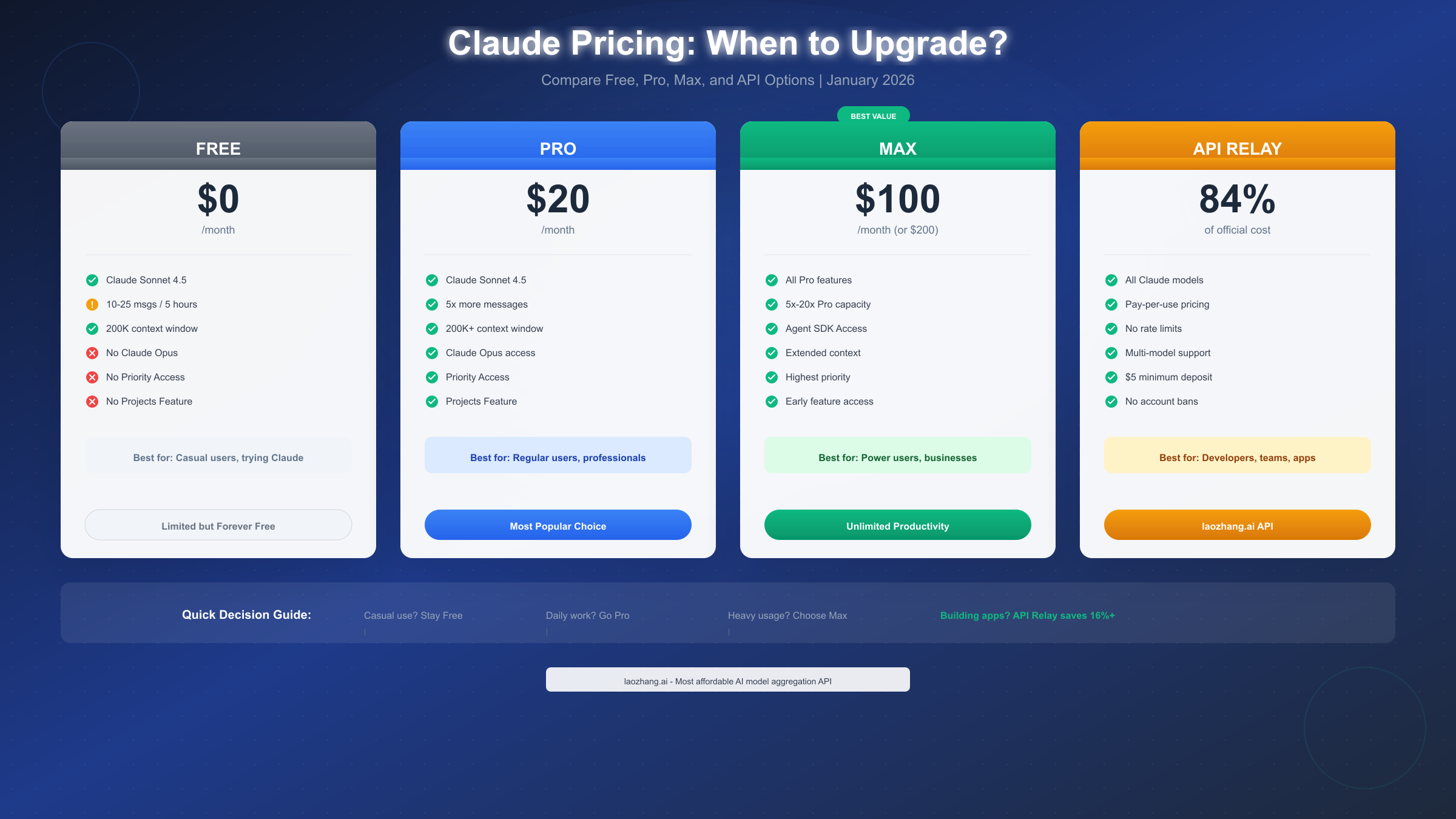
| Tier | Price | Message Capacity | Key Features |
|---|---|---|---|
| Free | $0/month | 10-25/5hrs | Sonnet 4.5, 200K context |
| Pro | $20/month | 5x Free | Opus access, Projects, priority |
| Max | $100-200/month | 5x-20x Pro | Agent SDK, highest priority |
| API Direct | Pay-per-use | Unlimited* | Full model access |
| API Relay | ~84% of direct | Unlimited* | Multi-model, no rate limits |
When Free is Enough
If your Claude usage involves occasional questions, document summarization a few times per week, or exploring AI capabilities casually, the free tier likely covers your needs. Combined with optimization techniques, casual users can accomplish substantial work without spending anything.
When Pro Makes Sense
Claude Pro at $20/month becomes worthwhile when:
- You hit free tier limits multiple times weekly
- You need Claude Opus for complex reasoning tasks
- You want guaranteed availability during work hours
- Projects feature would organize your workflow
For professional users who depend on Claude daily, Pro's ~$0.67/day cost typically justifies itself quickly in productivity gains.
When to Consider Max
At $100-200/month, Claude Max targets power users with specific needs:
- Content creators producing high volumes daily
- Developers using Claude for extensive code generation
- Teams where multiple users share a single high-capacity account
- Users needing the Agent SDK for automation workflows
When API Access Wins
For applications and teams, API access (direct or relay) often provides better value:
- Pay only for actual usage, no monthly commitment
- Scale up or down instantly based on demand
- Integrate Claude into applications and workflows
- Access all models through a single integration
API relay services offer additional advantages: lower effective costs, multi-model support, and elimination of Anthropic's tiered rate limits that restrict new API users.
FAQ: Safety, Risks, and Common Questions
Is using third-party methods against Claude's terms of service?
It depends on the method. Cursor, Trae, and API relay services involve legitimate business arrangements—these companies pay Anthropic for access and pass it to users. Using their products doesn't violate any terms. Methods involving browser automation, account sharing, or circumventing security measures would violate terms and carry account risk.
Can my Claude account get banned?
For the methods in this guide: Methods 1-5 carry essentially zero ban risk because they're legitimate integrations or paid services. Methods 6-8 (trials, Poe, optimization) are official features used as intended. Account bans typically result from clear violations like automated abuse, payment fraud, or content policy violations—not from simply using more of the free tier.
Will these methods keep working?
All services can change policies. Cursor and Trae offer free Claude access today as growth strategies; they may introduce limits later. API relay services have strong business incentives to maintain operations. Academic programs have remained stable for years. The "risk" isn't sudden termination but gradual policy evolution toward sustainability.
Which method is most reliable long-term?
For developers: API relay services and Cursor have the strongest business models supporting continued free or affordable access. For non-developers: Official optimization and academic programs (if eligible) have the longest track records. Trae's unlimited access is generous but dependent on ByteDance's strategic priorities.
Is Puter.js safe to use?
Puter.js is a legitimate developer tool with official documentation and business operations. The "User Pays" model means their API access is legitimately funded. For development and testing, it's safe and appropriate. For production applications, review their terms regarding how end-user costs work.
How does Claude compare to ChatGPT for free access?
ChatGPT's free tier (GPT-3.5) is truly unlimited but uses a significantly less capable model. Claude's free tier uses the more capable Sonnet 4.5 but with message limits. For quality-sensitive tasks, Claude's limited free access often produces better results than ChatGPT's unlimited but less capable offering.
Can I use multiple methods simultaneously?
Absolutely. Many users maintain official Claude access for certain tasks while using Cursor for coding work and Trae for high-volume general queries. There's no conflict between these approaches—each method operates independently.
What about Claude's safety training?
All legitimate access methods (Cursor, Trae, Poe, API relay) provide the same Claude model with identical safety training. Anthropic's Constitutional AI approach means Claude's helpful, harmless, and honest behaviors are consistent regardless of how you access the model.
How do I know if I'm getting the latest Claude version?
Through Anthropic's official channels (claude.ai, API), you always get the current production model. Third-party integrations may occasionally lag behind—Cursor and official partners typically update within days of new releases, while others may take longer. If version-specific features matter to you, verify through the provider's documentation or by asking Claude directly about its model version.
Summary and Next Steps
Accessing Claude AI free unlimited—or at least significantly beyond official free tier limits—is achievable through multiple legitimate pathways in January 2026. Your optimal choice depends on your user type, technical comfort level, and specific needs:
For immediate, unlimited access: Install Trae by ByteDance. It's the simplest path to unrestricted Claude usage today, requiring only a download and account creation.
For developers: Cursor IDE provides unlimited Claude for coding with zero configuration. For application development, consider API relay services offering cost-effective production access.
For students and researchers: Apply for Anthropic's academic programs. The application requires effort, but the access is official, stable, and carries no compliance concerns.
For maximum efficiency: Combine multiple methods strategically. Use Cursor for coding, Trae for high-volume general queries, and official Claude for tasks requiring the absolute latest model version or Opus access.
Remember that "free unlimited" access typically involves trade-offs—whether time limitations, context restrictions, or dependency on third-party services that may change policies. For mission-critical professional use, Claude Pro's $20/month remains the most reliable path to guaranteed, supported access.
If you're building applications or managing team Claude access, explore API relay options like laozhang.ai (https://docs.laozhang.ai/ ) for cost-effective, scalable solutions that don't require navigating free tier limitations. For individual users, the methods in this guide provide pathways to productive Claude usage without monthly subscriptions.
For more information on Claude API integration and pricing structures, check out our complete Claude API pricing guide for detailed cost breakdowns, or explore free Claude API credits for developers if you're building applications.