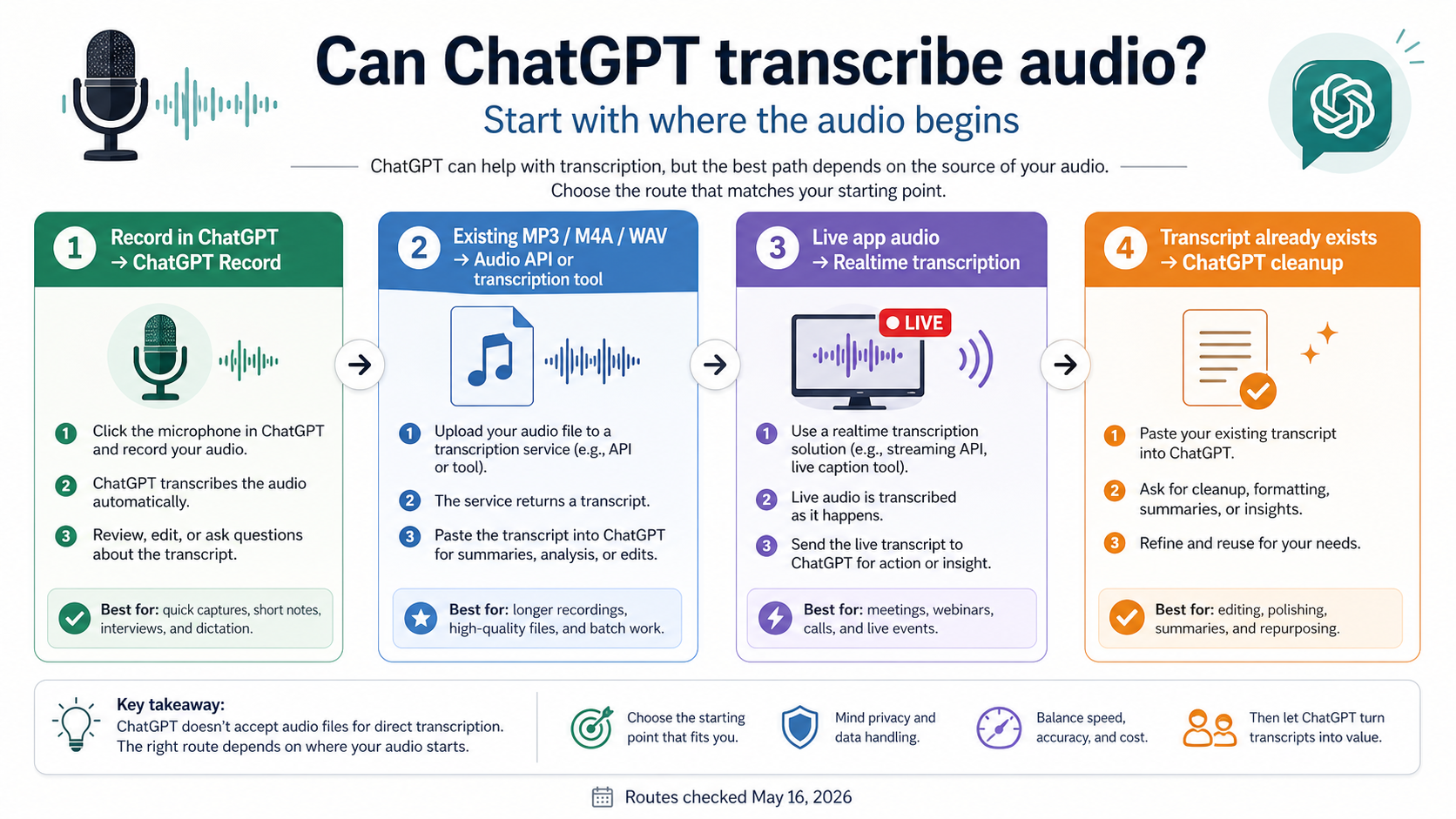
ChatGPT can transcribe audio, but only through specific routes. Use ChatGPT Record when you are recording inside an eligible ChatGPT desktop workspace, use the OpenAI Audio API or a dedicated transcription tool for an existing MP3, M4A, WAV, or voice memo, and use Realtime transcription when live speech needs to become text as it happens.
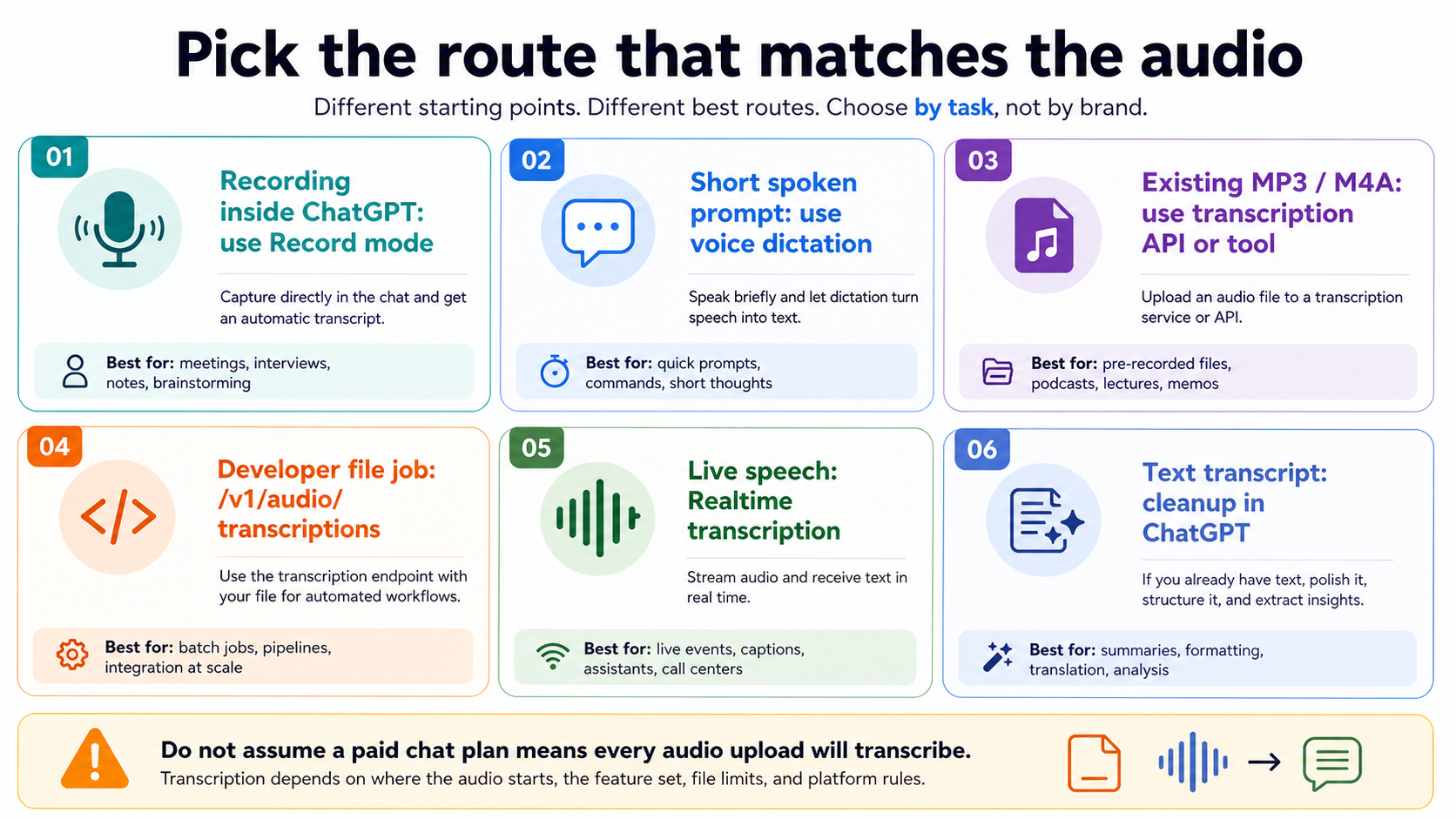
| Starting point | Best route | Do not assume |
|---|---|---|
| You are recording inside ChatGPT | ChatGPT Record | Every ChatGPT chat can ingest old audio files |
| You are speaking a short prompt | Voice dictation | Meeting-style transcription or speaker labels |
| You already have an MP3, M4A, WAV, or voice memo | OpenAI Audio API or a transcription tool | A paid chat plan guarantees audio-file transcription |
| You are building a file transcription workflow | /v1/audio/transcriptions | Realtime streaming behavior |
| Your app needs live speech-to-text | Realtime transcription | Completed-file upload semantics |
| You already have a transcript | ChatGPT cleanup, summary, translation, or action items | Audio transcription happened inside ChatGPT |
OpenAI documents ChatGPT Record separately from the developer Audio and Realtime APIs, so a ChatGPT subscription and an OpenAI API key are not interchangeable. Availability, model names, file formats, and service status were checked on May 16, 2026.
Do not upload private calls, regulated data, or audio recorded without permission. If names, numbers, speaker labels, or decisions matter, review the transcript before acting on it.
Start with where the audio is now
The useful question is not whether the word "ChatGPT" can be attached to transcription. The useful question is where the audio sits when the work begins.
If the audio is happening now and you are in the eligible ChatGPT desktop experience, the consumer route is ChatGPT Record. If the audio already exists as a file, the more reliable route is a file transcription tool or the OpenAI Audio API. If your product needs live captions, call notes, or in-app speech-to-text, the Realtime transcription route is the better mental model. If the audio has already been turned into text, ChatGPT is often strongest as the editor, summarizer, translator, and action-item extractor.
That split prevents the two common bad answers. "Yes, ChatGPT can transcribe audio" is too broad when a reader has an old MP3 and expects ordinary file upload to work. "No, ChatGPT cannot transcribe audio" is also stale when Record mode and OpenAI's audio APIs are live routes. The correct answer is conditional, and the condition belongs near the top of the page.
The other boundary is account ownership. A ChatGPT plan controls what the ChatGPT product exposes. An OpenAI API key controls what a developer project can call. A third-party transcription app controls its own upload handling, retention, pricing, and speaker-label behavior. Treat those as three separate contracts before you share audio with any of them.
When ChatGPT Record is the right route
Use ChatGPT Record when the recording is being captured inside the supported ChatGPT app experience and you want the product to generate a transcript, summary, or notes from that session. OpenAI's ChatGPT Record help page, checked on May 16, 2026, says Record is available in the macOS desktop app for Plus, Pro, Business, Enterprise, and Edu workspaces.
That makes Record useful for meetings, brainstorms, interviews, voice notes, and similar live capture jobs. It is not the same thing as dragging any old audio file into any ChatGPT chat. The feature has its own product surface, permissions, workspace controls, and session limits. The Help Center currently describes a four-hour session cap and notes that limits or pricing can change.
Record mode can handle multiple speakers, but the transcript still needs review. Speaker names, action items, technical terms, prices, dates, and proper nouns are exactly where transcription mistakes become expensive. If the output will drive a contract, a customer reply, medical note, legal record, or payment decision, treat the transcript as a draft that needs human verification.
Retention is another reason to keep the route narrow. OpenAI says Record audio recordings are used for transcription and deleted afterward, while generated canvases and transcripts follow the normal conversation or canvas retention settings. That is a different privacy shape from uploading a file to a random transcription site, and it is also different from running audio through a developer API that your own system logs.
What to do with an existing MP3, M4A, WAV, or voice memo
An existing audio file is the branch where most confusion shows up. A paid ChatGPT plan may expose better models, file upload, or Record mode, but that does not mean every ChatGPT chat becomes a general audio-file transcription inbox. OpenAI's supported file types page, checked on May 16, 2026, lists common document, spreadsheet, presentation, PDF, and text file types for ordinary ChatGPT file uploads; it does not make audio formats the reliable general upload route.
For a one-off personal recording, a dedicated transcription tool may be simpler than building an API call. The tradeoff is trust. Before uploading a meeting, sales call, lecture, interview, or voice memo, check who runs the service, whether files are retained, whether deletion is available, whether speaker labels cost extra, whether long files are split, and whether the tool trains on uploads. Free-looking transcription pages can be useful for disposable audio and risky for private audio.
For repeatable work, the OpenAI Audio API is usually the cleaner route because it gives the developer an explicit endpoint, response shape, model choice, and logging boundary. That matters when the product needs retries, storage, audit trails, cost tracking, or integration with a database. It also prevents the user from confusing a consumer ChatGPT limitation with a developer capability.
When a file fails in ChatGPT, do not keep retrying the same upload blindly. First decide whether the product surface actually supports that audio route in your session. Then check file length, format, size, workspace rules, and current service status. If the file is business-critical, move to a controlled transcription route instead of trying to force a chat upload path that was not designed for the job.
Use the Audio API for completed files
Use the OpenAI Audio API when the input is a completed file and the output should be a transcript your application can store or process. The current speech-to-text guide, checked on May 16, 2026, documents /v1/audio/transcriptions for transcription and /v1/audio/translations for translating audio into English.
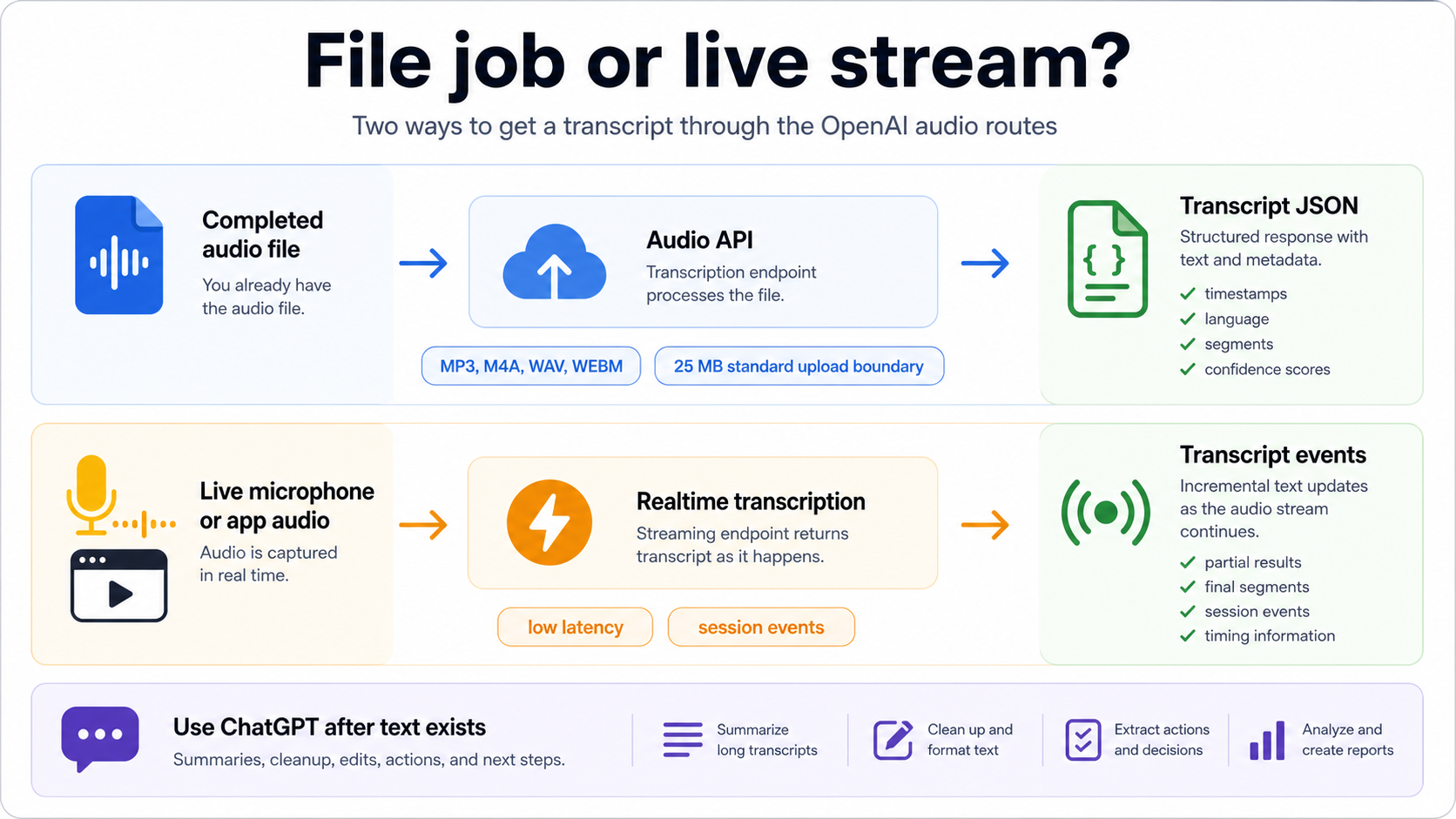
The practical file route is straightforward: upload an accepted audio file, choose a transcription model, receive text or JSON, and then pass that transcript to downstream steps. The guide currently lists mp3, mp4, mpeg, mpga, m4a, wav, and webm as standard upload formats, with a 25 MB standard file-upload boundary. Those details are volatile enough to recheck before production, especially if the workflow accepts customer uploads.
Model choice should follow the output you need. The current guide lists gpt-4o-transcribe, gpt-4o-mini-transcribe, gpt-4o-transcribe-diarize, and whisper-1. Use a lighter route when cost matters and the audio is clean. Use a stronger route when accuracy matters. Use the diarization route when speaker labels matter, and check the parameter support before assuming timestamps, streaming, or speaker labels work the same way across every model.
Here is the shape, not a complete production wrapper:
import OpenAI from "openai";
import fs from "node:fs";

const client = new OpenAI({ apiKey: process.env.OPENAI_API_KEY });

const transcript = await client.audio.transcriptions.create({
  model: "gpt-4o-mini-transcribe",
  file: fs.createReadStream("meeting.m4a"),
  response_format: "json",
});

console.log(transcript.text);
Production code needs more than that first call. Store the source file name, duration, model, response format, request time, retry count, and transcript version. If the transcript feeds customer-visible summaries or action items, store a review state too. A transcript can be technically valid and still wrong in the places that matter most.
Use Realtime transcription for live speech
Realtime transcription is the route for live audio streams, not a replacement name for file upload. It fits products that need captions, call notes, live assistant context, meeting intelligence, or in-app speech-to-text while the user is still talking. The Realtime transcription guide, checked on May 16, 2026, documents transcription sessions, transcript delta events, latency and accuracy tradeoffs, and the current low-latency gpt-realtime-whisper path.
The implementation question changes in Realtime. Instead of uploading a finished file and waiting for the final transcript, the app opens a session, streams audio, receives incremental transcript events, and decides how to handle partials, corrections, silence, turn boundaries, and disconnects. That makes it better for live user experience and more complex for reliability.
Use Realtime when delay matters. Do not use it just because "streaming" sounds more advanced. For batch transcription of old lectures or voice memos, a file endpoint is easier to debug and cheaper to operate in many cases. For live meetings, voice agents, and real-time captions, Realtime gives the product a way to react while the conversation is still happening.
The May 7, 2026 OpenAI release post introduced GPT-Realtime-Whisper for streaming speech-to-text, and OpenAI Status later recorded a resolved May 7-8 transcription-failure incident affecting ChatGPT and Codex. That incident is not a current failure diagnosis by itself, but it is a reminder to check the live status page when transcription suddenly fails across clean inputs, accounts, or routes.
Use ChatGPT after transcription
Even when ChatGPT is not the component that turns audio into text, it can still be the best component after the transcript exists. That is often the cleanest workflow for existing audio files: transcribe with a dedicated route, then use ChatGPT to transform the transcript into useful work.
Good post-transcription jobs include:
- clean filler words without changing meaning
- summarize the transcript at different lengths
- extract decisions, risks, owners, and deadlines
- convert a meeting into a customer email or project brief
- translate a transcript while preserving speaker intent
- find quotes or timestamps if the transcript includes time markers
- compare two transcripts for changes in commitments or wording
This is where a ChatGPT subscription can still help even if ordinary audio-file upload is not the reliable transcription path. Once the content is text, ChatGPT can reason over it, rewrite it, turn it into structured notes, and help you ask follow-up questions. The key is to avoid claiming that the cleanup step proves audio transcription happened inside ChatGPT.
For sensitive transcripts, reduce the content before pasting. Remove private identifiers, payment details, medical or legal data, and anything the recipient does not need. If the transcript belongs to a customer, employer, class, or client, follow the policy that governs that relationship rather than relying on a generic AI-tool answer.
Safety and reliability checks before you upload
Audio is often more sensitive than a normal text prompt because it can contain voices, background names, customer details, health information, financial data, children, bystanders, or people who did not consent to recording. The right transcription route is not only the route that works; it is also the route you are allowed to use.
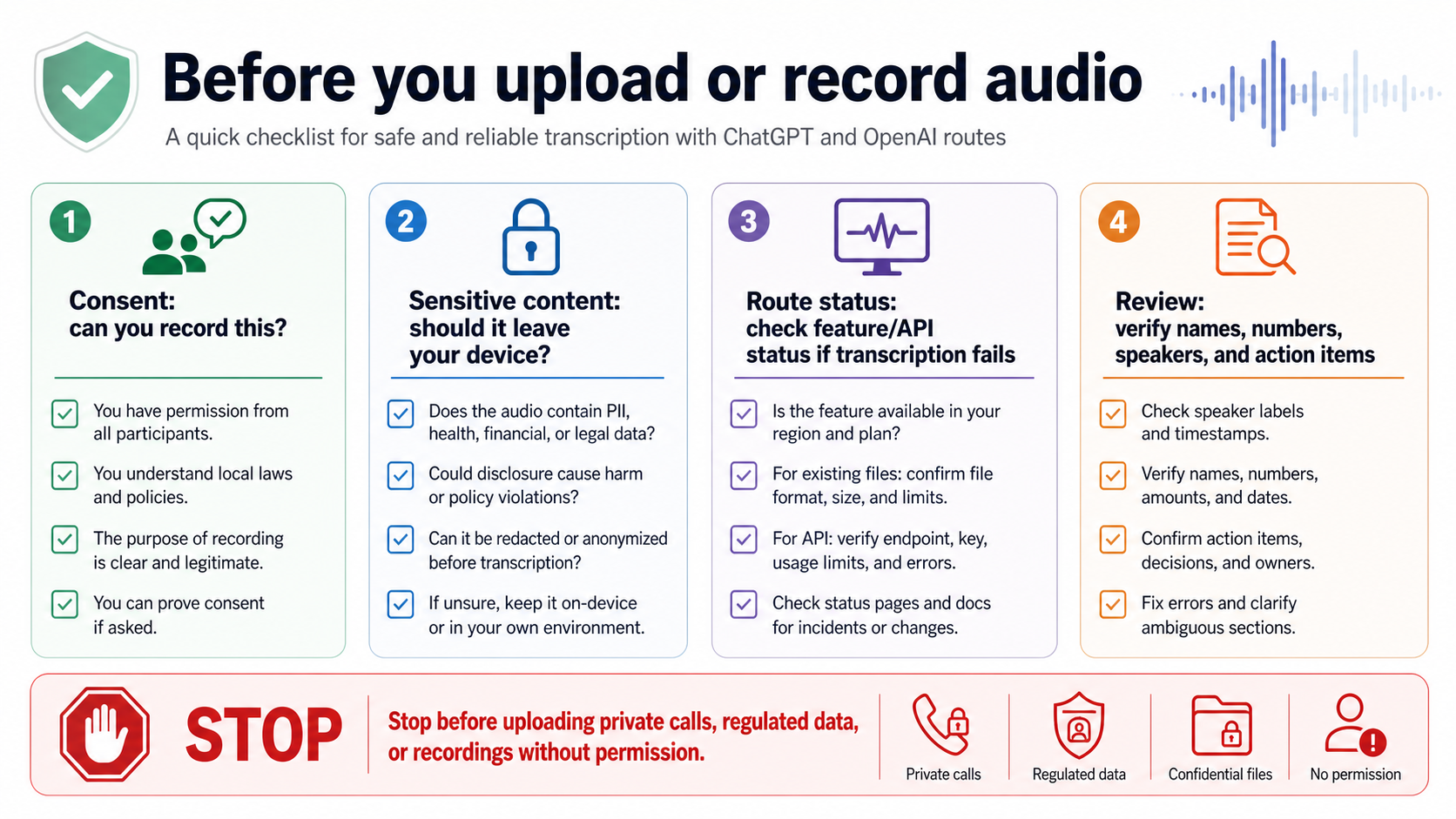
Use four checks before sending audio anywhere:
| Check | Ask this before you record or upload |
|---|---|
| Consent | Are you allowed to record this conversation and send it to a transcription service? |
| Sensitivity | Does the audio include regulated, private, customer, legal, financial, medical, or workplace-confidential information? |
| Route ownership | Is this ChatGPT Record, OpenAI API, a third-party app, or an internal tool, and who controls retention and deletion? |
| Review | Who will verify names, numbers, speaker labels, quotations, and action items before the transcript is used? |
Reliability has a similar shape. A bad transcript can still look polished. If the audio has noise, crosstalk, accents, low volume, music, specialist vocabulary, or multiple speakers, do not let a clean summary hide uncertainty. Ask for uncertain terms to be marked. Compare important decisions against the audio. Use speaker labels only after checking them.
When transcription fails, change one variable at a time. Try a shorter file, a simpler format, a clean recording, a fresh session, another route, or the status page. If every clean test fails at once, service status may be the branch. If only one file fails, the file is probably the branch. If the ChatGPT product route fails but the API route works, the product surface is the branch, not "OpenAI transcription" as a whole.
FAQ
Can ChatGPT transcribe an MP3 file?
Do not treat ordinary ChatGPT file upload as the reliable MP3 transcription route. ChatGPT Record can transcribe audio captured in its supported app surface, and the OpenAI Audio API can transcribe uploaded audio files through the developer route. If you already have an MP3, use the Audio API or a trusted transcription tool unless your current ChatGPT session explicitly exposes a supported audio-file feature.
Is ChatGPT Record free?
OpenAI's Record help page checked on May 16, 2026 lists Plus, Pro, Business, Enterprise, and Edu workspaces, and says the feature is available in the macOS desktop app. That is a product-entitlement claim, not a permanent pricing promise. Recheck the Help Center before publishing exact plan or platform language in your own documentation.
Is voice dictation the same as transcription?
No. Voice dictation turns your spoken prompt into text for the chat composer. Meeting transcription or file transcription turns a recording into a transcript, often with speaker, timestamp, or cleanup needs. Confusing dictation with transcription is one reason the simple "yes" answer misleads readers.
Which OpenAI model should developers use for transcription?
Start with the output requirement. Use a current gpt-4o transcription model when you want the newer speech-to-text route, consider the mini model when cost and speed matter, use the diarization model when speaker labels matter, and keep whisper-1 in mind when your workflow depends on older translation or timestamp behavior. Recheck the current speech-to-text guide because model names and parameter support can change.
Can OpenAI transcribe live audio?
Yes, but use the Realtime transcription route rather than the completed-file endpoint. Realtime transcription streams audio into a session and returns transcript events while the conversation continues. It is the right shape for captions, live assistant context, and in-app speech-to-text.
Can ChatGPT summarize an audio transcript?
Yes. Once the audio is text, ChatGPT can summarize, clean, translate, extract action items, draft emails, and help compare versions. Keep the route honest: summarizing a transcript is not the same as transcribing the original audio inside ChatGPT.
What should I do when transcription suddenly fails?
First identify the route. For ChatGPT Record, check app, workspace, microphone permissions, and OpenAI Status. For an existing file, check file format, length, size, and whether the route supports audio upload. For API calls, log the model, endpoint, response format, request time, and error. If multiple clean tests fail at the same time, check the live status page before changing the whole workflow.