使用 Gemini Python SDK 时遇到 60 秒超时导致连接断开?流式响应突然中断报 JSON 解析错误?这些问题困扰着大量开发者。本文将从原理到实践,提供完整的超时问题解决方案。

为什么你的 Gemini API 调用会超时?
理解超时的根本原因是解决问题的第一步。 Gemini API 的超时问题主要源于三个层面:SDK 默认配置、网络传输延迟、以及 API 服务端限制。根据 2025 年 5 月 Google AI 开发者论坛的讨论,大量用户报告了 httpx.RemoteProtocolError: Server disconnected without sending a response 错误,这个问题在使用 Gemini 2.5 Pro 思考模式时尤为突出。
默认 60 秒超时是最常见的问题源头。 google-genai SDK 底层使用 httpx 作为 HTTP 客户端,而 httpx 的默认超时配置为 60 秒。当你使用 generate_content() 方法调用需要深度思考的复杂任务时,模型可能需要超过 60 秒才能生成完整响应。一旦超过这个时间限制,连接就会被强制断开,导致所有已生成的内容丢失。
三种典型的超时场景值得关注:
| 场景 | 错误信息 | 原因 | 影响 |
|---|---|---|---|
| 连接超时 | ConnectTimeout | 无法建立到 API 服务器的连接 | 请求完全失败 |
| 读取超时 | ReadTimeout / 504 | 等待服务器响应超时 | 部分响应丢失 |
| 流式中断 | JSONDecodeError | 响应被截断导致 JSON 不完整 | 数据解析失败 |
网络环境对超时的影响不容忽视。 对于中国大陆用户,由于网络延迟和不稳定性,超时问题更加频繁。即使设置了较长的超时时间,网络波动也可能导致连接中断。这种情况下,使用 API 聚合服务 可以通过优化的网络路由显著改善连接稳定性。
SDK 版本差异直接影响超时行为。 Google 在 2024 年底将 google-generativeai 标记为弃用,推出了新的统一 SDK google-genai。两套 SDK 的超时配置方法完全不同,这导致了大量网上教程已经过时。如果你对 Gemini API 的定价和配额感兴趣,可以参考 Gemini 2.5 API 定价指南。
新旧 SDK 完全对比 (google-generativeai vs google-genai)
理解两套 SDK 的差异是正确配置超时的前提。 Google 在 2024 年 12 月正式发布了新的统一 Python SDK google-genai,用于同时支持 Gemini Developer API 和 Vertex AI。原有的 google-generativeai 包已被标记为弃用(deprecated),不再接受新功能更新。
安装方式的变化:
python# 旧 SDK (已弃用)
pip install google-generativeai

# 新 SDK (推荐)
pip install google-genai

# 如果需要 aiohttp 支持 (更好的异步性能)
pip install google-genai[aiohttp]
客户端初始化的差异非常显著:
python# 旧 SDK 方式
import google.generativeai as genai
genai.configure(api_key="YOUR_API_KEY")
model = genai.GenerativeModel('gemini-2.5-pro')
response = model.generate_content("你的提示词")

# 新 SDK 方式
from google import genai
client = genai.Client(api_key="YOUR_API_KEY")
response = client.models.generate_content(
    model="gemini-2.5-pro",
    contents="你的提示词"
)
超时配置方法的对比更加关键:
| 配置项 | 旧 SDK (google-generativeai) | 新 SDK (google-genai) |
|---|---|---|
| 超时配置位置 | request_options 参数 | HttpOptions 类 |
| 配置语法 | request_options={"timeout": 300} | http_options=types.HttpOptions(timeout=300) |
| 作用范围 | 单次请求 | 客户端级别 |
| 重试配置 | 不支持 | 部分支持 |
新 SDK 的超时配置完整示例:
pythonfrom google import genai
from google.genai import types

# 配置超时选项
http_options = types.HttpOptions(
    timeout=300  # 5分钟超时
)

# 创建客户端
client = genai.Client(
    api_key="YOUR_API_KEY",
    http_options=http_options
)

# 使用流式响应
response = client.models.generate_content_stream(
    model="gemini-2.5-pro",
    contents="请详细分析以下代码..."
)

for chunk in response:
    print(chunk.text, end="")
迁移时需要注意的兼容性问题。 如果你在使用 Cline 等 IDE 插件,它们可能还在使用旧 SDK。在迁移前,请确认你的依赖工具是否已经支持新 SDK。新 SDK 的版本号已经到达 v1.53.0(截至 2025 年 12 月),其中 v1.53.0 特别添加了对 aiohttp 总请求时长超时的支持。
超时配置完全指南
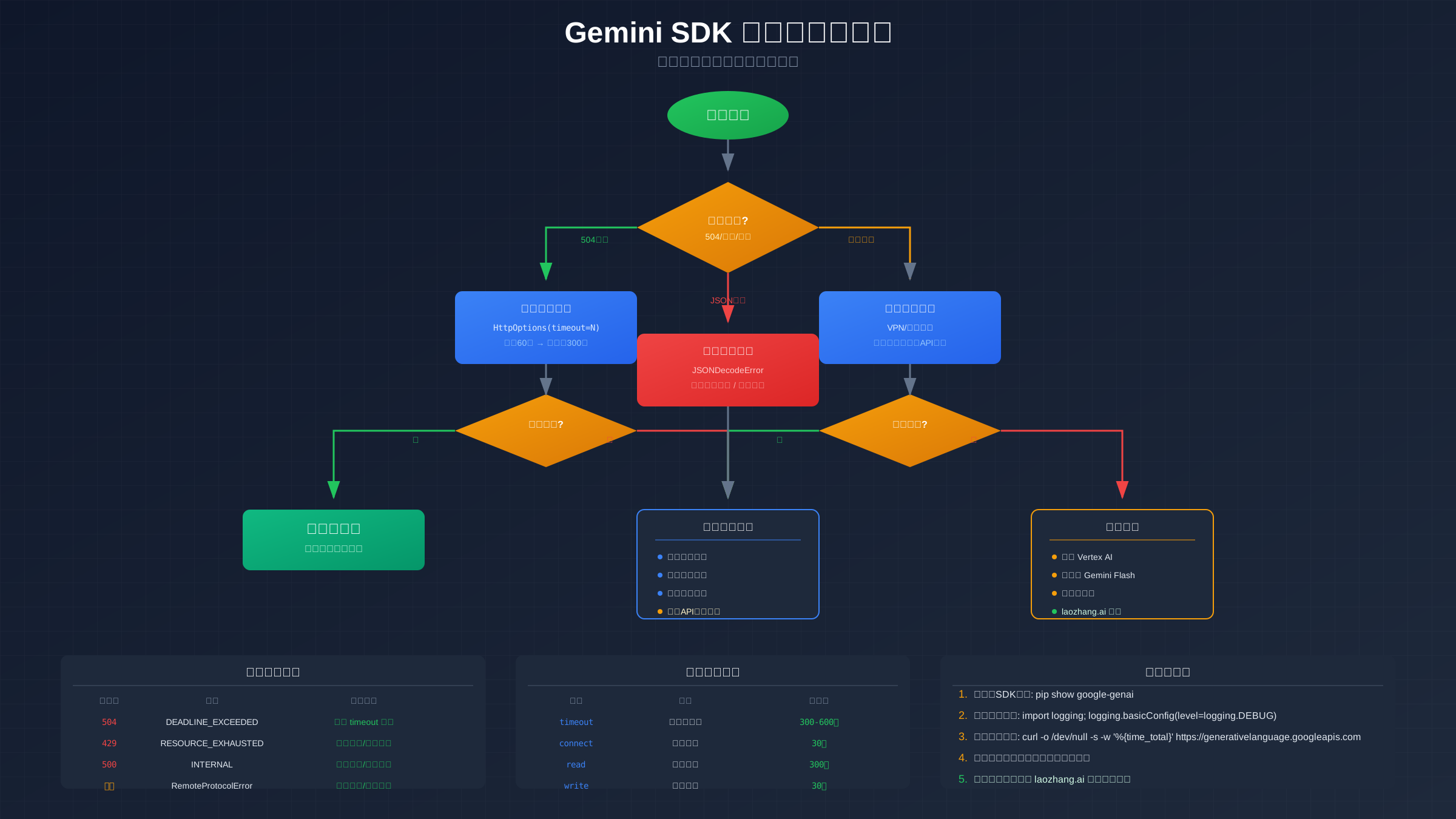
正确配置超时是解决问题的核心步骤。 在新 SDK 中,超时配置主要通过 HttpOptions 类实现,但其底层实际上是配置 httpx 或 aiohttp 的超时参数。理解这个层次关系对于解决顽固的超时问题至关重要。
HttpOptions 基础配置:
pythonfrom google import genai
from google.genai import types

# 基础超时配置 - 适用于大多数场景
http_options = types.HttpOptions(
    timeout=300  # 300秒 = 5分钟
)

client = genai.Client(
    api_key="YOUR_API_KEY",
    http_options=http_options
)
httpx 的四层超时机制需要深入理解。 当你设置 timeout=300 时,实际上是设置了一个综合超时值。但 httpx 实际支持四种不同类型的超时:
pythonimport httpx

# httpx 的精细化超时控制
timeout = httpx.Timeout(
    connect=30.0,    # 建立连接的超时时间
    read=300.0,      # 等待服务器响应的超时时间
    write=30.0,      # 发送请求的超时时间
    pool=30.0        # 从连接池获取连接的超时时间
)
对于流式响应,read 超时是最关键的参数。 因为流式响应期间,客户端需要持续等待服务器发送数据块。如果模型在两个数据块之间的思考时间超过了 read 超时,连接就会断开。
异步客户端 (aio) 的配置略有不同:
pythonfrom google import genai
from google.genai import types
import asyncio

# 异步客户端配置
http_options = types.HttpOptions(
    timeout=300,
    # 可以传递额外的 aiohttp 参数
    async_client_args={
        'trust_env': True  # 使用环境变量中的代理设置
    }
)

client = genai.Client(
    api_key="YOUR_API_KEY",
    http_options=http_options
)

async def generate_async():
    response = await client.aio.models.generate_content(
        model="gemini-2.5-pro",
        contents="你的提示词"
    )
    return response.text

# 运行异步函数
result = asyncio.run(generate_async())
Gemini 2.5 思考模式需要特殊处理。 当使用思考模式(thinking mode)时,模型可能需要数分钟来进行深度推理。这种情况下,建议:
python# 针对长任务的超时配置
http_options = types.HttpOptions(
    timeout=600  # 10分钟超时,适用于复杂推理任务
)

client = genai.Client(
    api_key="YOUR_API_KEY",
    http_options=http_options
)

# 使用流式响应配合长超时
response = client.models.generate_content_stream(
    model="gemini-2.5-pro",
    contents="请对这个复杂问题进行深度分析...",
    config=types.GenerateContentConfig(
        thinking_config=types.ThinkingConfig(
            thinking_budget=60  # 允许60秒思考时间
        )
    )
)
已知的超时配置问题。 根据 GitHub Issue #911 的报告,在 SDK v1.15.0 版本中,即使设置了更长的超时时间,请求仍然可能在约 5 分钟后超时。这可能是由于服务端也有超时限制。对于需要更稳定连接的生产环境,使用 laozhang.ai API 聚合服务 可以获得服务端的超时管理和自动重试支持。
流式响应错误处理实战
流式响应是解决长任务超时的有效方法,但需要正确处理错误。 使用流式响应时,服务器会分块发送数据,每个数据块都会重置读取超时计时器。这意味着即使总生成时间很长,只要数据块之间的间隔不超过读取超时,连接就不会断开。
基础流式响应处理:
pythonfrom google import genai
from google.genai import types

client = genai.Client(api_key="YOUR_API_KEY")

def stream_generate(prompt: str) -> str:
    """基础流式生成函数"""
    full_response = ""

    response = client.models.generate_content_stream(
        model="gemini-2.5-pro",
        contents=prompt
    )

    for chunk in response:
        if chunk.text:
            full_response += chunk.text
            print(chunk.text, end="", flush=True)

    return full_response
JSON 解析错误是流式响应中最常见的问题。 根据 GitHub Issue #1162,当 API 返回错误响应(如 429 限流错误)时,错误信息可能被分割成多个不完整的 JSON 块,导致 json.JSONDecodeError。
健壮的流式响应处理器:
pythonfrom google import genai
from google.genai import types
import json

def safe_stream_generate(prompt: str, max_retries: int = 3) -> str:
    """
    安全的流式生成函数,包含错误处理和重试逻辑
    """
    client = genai.Client(
        api_key="YOUR_API_KEY",
        http_options=types.HttpOptions(timeout=300)
    )

    buffer = ""
    retry_count = 0

    while retry_count < max_retries:
        try:
            response = client.models.generate_content_stream(
                model="gemini-2.5-pro",
                contents=prompt
            )

            for chunk in response:
                try:
                    if hasattr(chunk, 'text') and chunk.text:
                        buffer += chunk.text
                        yield chunk.text
                except json.JSONDecodeError as e:
                    # 记录但不中断流式处理
                    print(f"JSON 解析警告: {e}")
                    continue

            # 成功完成,退出重试循环
            return

        except Exception as e:
            retry_count += 1
            if retry_count >= max_retries:
                raise RuntimeError(f"流式生成失败,已重试 {max_retries} 次: {e}")
            print(f"重试 {retry_count}/{max_retries}: {e}")
断点续传实现方案。 对于特别长的生成任务,可以实现断点续传机制,在连接断开时保存已生成的内容,然后从断点继续:
pythonimport hashlib
import os

class StreamingWithCheckpoint:
    """支持断点续传的流式生成器"""

    def __init__(self, api_key: str, checkpoint_dir: str = "./checkpoints"):
        self.client = genai.Client(
            api_key=api_key,
            http_options=types.HttpOptions(timeout=300)
        )
        self.checkpoint_dir = checkpoint_dir
        os.makedirs(checkpoint_dir, exist_ok=True)

    def _get_checkpoint_path(self, prompt: str) -> str:
        """根据 prompt 生成唯一的检查点文件路径"""
        prompt_hash = hashlib.md5(prompt.encode()).hexdigest()[:8]
        return os.path.join(self.checkpoint_dir, f"checkpoint_{prompt_hash}.txt")

    def generate_with_checkpoint(self, prompt: str) -> str:
        """带断点续传的生成方法"""
        checkpoint_path = self._get_checkpoint_path(prompt)

        # 检查是否有之前的检查点
        existing_content = ""
        if os.path.exists(checkpoint_path):
            with open(checkpoint_path, 'r') as f:
                existing_content = f.read()
            print(f"从检查点恢复: 已有 {len(existing_content)} 字符")

        # 构建续写提示
        if existing_content:
            continuation_prompt = f"{prompt}\n\n[之前的回答已经写到这里,请继续:]\n{existing_content}"
        else:
            continuation_prompt = prompt

        try:
            response = self.client.models.generate_content_stream(
                model="gemini-2.5-pro",
                contents=continuation_prompt
            )

            for chunk in response:
                if chunk.text:
                    existing_content += chunk.text
                    # 每收到一个块就保存检查点
                    with open(checkpoint_path, 'w') as f:
                        f.write(existing_content)
                    yield chunk.text

            # 成功完成,删除检查点
            if os.path.exists(checkpoint_path):
                os.remove(checkpoint_path)

        except Exception as e:
            print(f"生成中断: {e}")
            print(f"已保存检查点: {checkpoint_path}")
            raise
生产级重试和降级方案
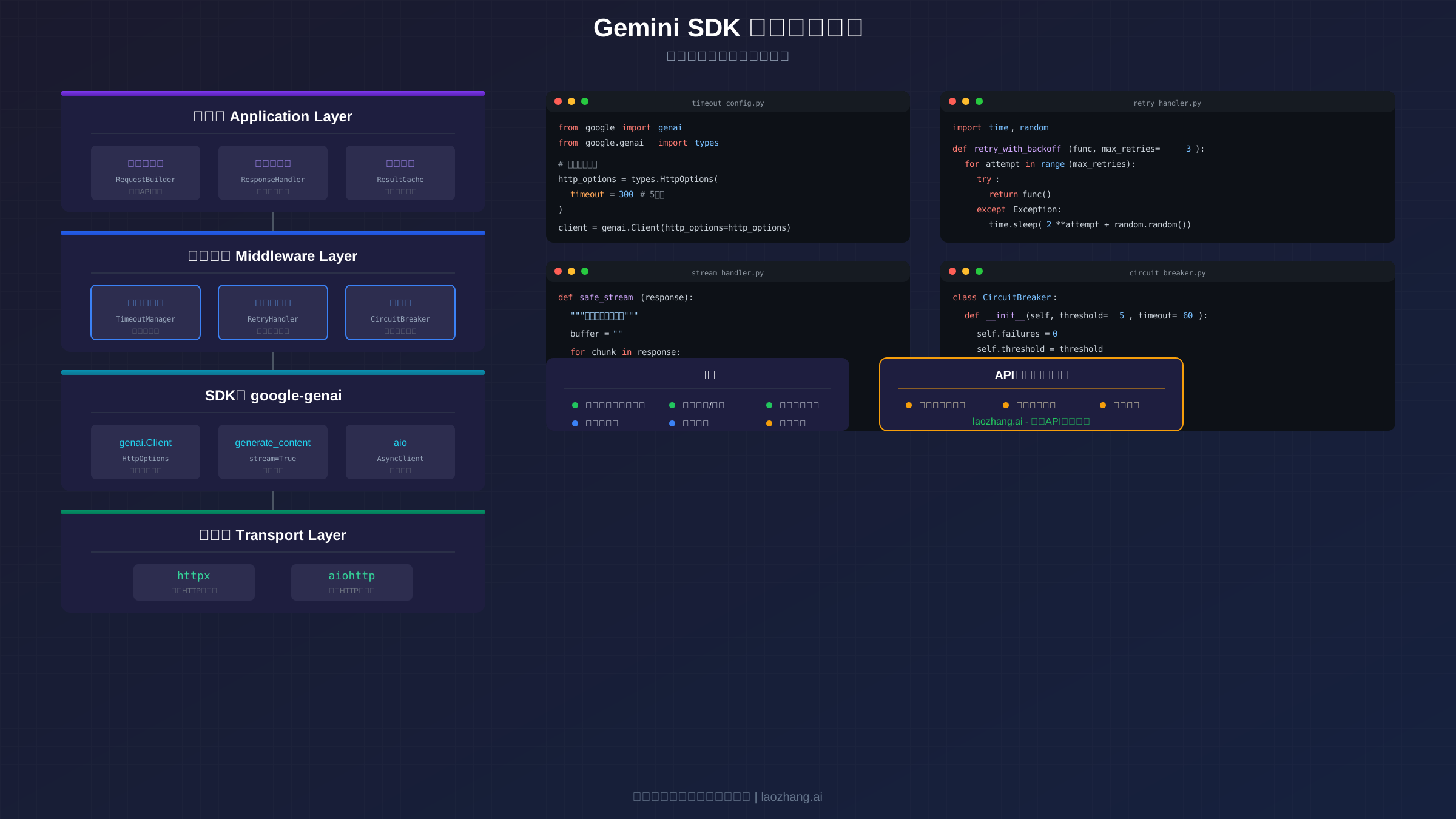
在生产环境中,单纯的超时配置是不够的。 你需要实现完整的错误处理策略,包括指数退避重试、熔断器模式、以及多模型降级。这些机制可以显著提高系统的可靠性和用户体验。
指数退避重试实现:
pythonimport time
import random
from typing import Callable, TypeVar, Any

T = TypeVar('T')

def retry_with_exponential_backoff(
    func: Callable[..., T],
    max_retries: int = 5,
    base_delay: float = 1.0,
    max_delay: float = 60.0,
    exponential_base: float = 2.0,
    jitter: bool = True
) -> T:
    """
    使用指数退避策略的重试装饰器

    Args:
        func: 要执行的函数
        max_retries: 最大重试次数
        base_delay: 基础延迟时间(秒)
        max_delay: 最大延迟时间(秒)
        exponential_base: 指数基数
        jitter: 是否添加随机抖动
    """
    retries = 0

    while True:
        try:
            return func()
        except Exception as e:
            retries += 1

            if retries > max_retries:
                raise RuntimeError(f"超过最大重试次数 {max_retries}: {e}")

            # 计算延迟时间
            delay = min(base_delay * (exponential_base ** (retries - 1)), max_delay)

            # 添加随机抖动,避免多个客户端同时重试
            if jitter:
                delay = delay * (0.5 + random.random())

            print(f"重试 {retries}/{max_retries},等待 {delay:.2f} 秒...")
            time.sleep(delay)

# 使用示例
def generate_content():
    client = genai.Client(api_key="YOUR_API_KEY")
    return client.models.generate_content(
        model="gemini-2.5-pro",
        contents="你的提示词"
    )

result = retry_with_exponential_backoff(generate_content)
熔断器模式可以防止系统在 API 持续故障时雪崩:
pythonimport time
from enum import Enum
from threading import Lock

class CircuitState(Enum):
    CLOSED = "closed"      # 正常状态
    OPEN = "open"          # 熔断状态
    HALF_OPEN = "half_open"  # 半开状态

class CircuitBreaker:
    """
    熔断器实现

    当连续失败次数达到阈值时,熔断器打开,直接拒绝请求。
    经过冷却时间后,进入半开状态,允许一个请求通过测试。
    """

    def __init__(
        self,
        failure_threshold: int = 5,
        recovery_timeout: float = 60.0,
        half_open_max_calls: int = 1
    ):
        self.failure_threshold = failure_threshold
        self.recovery_timeout = recovery_timeout
        self.half_open_max_calls = half_open_max_calls

        self.state = CircuitState.CLOSED
        self.failure_count = 0
        self.last_failure_time = None
        self.half_open_calls = 0
        self._lock = Lock()

    def can_execute(self) -> bool:
        """检查是否允许执行请求"""
        with self._lock:
            if self.state == CircuitState.CLOSED:
                return True

            if self.state == CircuitState.OPEN:
                # 检查是否已过冷却期
                if time.time() - self.last_failure_time >= self.recovery_timeout:
                    self.state = CircuitState.HALF_OPEN
                    self.half_open_calls = 0
                    return True
                return False

            if self.state == CircuitState.HALF_OPEN:
                return self.half_open_calls < self.half_open_max_calls

            return False

    def record_success(self):
        """记录成功调用"""
        with self._lock:
            self.failure_count = 0
            if self.state == CircuitState.HALF_OPEN:
                self.state = CircuitState.CLOSED

    def record_failure(self):
        """记录失败调用"""
        with self._lock:
            self.failure_count += 1
            self.last_failure_time = time.time()

            if self.state == CircuitState.HALF_OPEN:
                self.state = CircuitState.OPEN
            elif self.failure_count >= self.failure_threshold:
                self.state = CircuitState.OPEN

# 使用熔断器
breaker = CircuitBreaker(failure_threshold=3, recovery_timeout=30)

def protected_generate(prompt: str):
    if not breaker.can_execute():
        raise RuntimeError("服务暂时不可用,熔断器已打开")

    try:
        client = genai.Client(api_key="YOUR_API_KEY")
        result = client.models.generate_content(
            model="gemini-2.5-pro",
            contents=prompt
        )
        breaker.record_success()
        return result
    except Exception as e:
        breaker.record_failure()
        raise
多模型自动降级是保证服务可用性的重要策略。 当主模型超时或不可用时,自动切换到备用模型:
pythonfrom typing import List, Optional

class ModelFallback:
    """多模型降级处理器"""

    def __init__(self, api_key: str, models: List[str] = None):
        self.client = genai.Client(
            api_key=api_key,
            http_options=types.HttpOptions(timeout=120)
        )
        self.models = models or [
            "gemini-2.5-pro",
            "gemini-2.5-flash",
            "gemini-1.5-flash"
        ]

    def generate(self, prompt: str) -> Optional[str]:
        """尝试使用各模型生成,直到成功"""
        last_error = None

        for model in self.models:
            try:
                print(f"尝试使用模型: {model}")
                response = self.client.models.generate_content(
                    model=model,
                    contents=prompt
                )
                return response.text
            except Exception as e:
                last_error = e
                print(f"模型 {model} 失败: {e}")
                continue

        raise RuntimeError(f"所有模型都失败了: {last_error}")

# 使用
fallback = ModelFallback(api_key="YOUR_API_KEY")
result = fallback.generate("你的提示词")
对于需要最高可靠性的生产环境,推荐使用 API 聚合服务。 laozhang.ai 提供了内置的超时管理、自动重试、多模型降级等功能,并且针对中国用户优化了网络连接,可以显著减少超时问题的发生。
诊断工具和故障排查
系统化的诊断方法可以快速定位问题根源。 在面对超时问题时,按照以下步骤进行排查可以帮助你快速找到解决方案。
第一步:确认 SDK 版本
bash# 检查已安装的 SDK 版本
pip show google-genai

# 或者在 Python 中
import google.genai
print(google.genai.__version__)
第二步:启用详细日志
pythonimport logging

# 设置日志级别为 DEBUG
logging.basicConfig(level=logging.DEBUG)

# 特别关注 httpx 的日志
logging.getLogger("httpx").setLevel(logging.DEBUG)
logging.getLogger("httpcore").setLevel(logging.DEBUG)
第三步:网络延迟测试
bash# 测试到 Gemini API 的网络延迟
curl -o /dev/null -s -w "DNS: %{time_namelookup}s\nConnect: %{time_connect}s\nTTFB: %{time_starttransfer}s\nTotal: %{time_total}s\n" https://generativelanguage.googleapis.com
常见错误码速查表:
| 错误码 | 名称 | 含义 | 解决方法 |
|---|---|---|---|
| 504 | DEADLINE_EXCEEDED | 服务端处理超时 | 增加客户端超时配置 |
| 429 | RESOURCE_EXHAUSTED | 请求频率超限 | 实现重试机制,降低频率 |
| 500 | INTERNAL | 服务端内部错误 | 稍后重试,减小请求大小 |
| 503 | UNAVAILABLE | 服务暂时不可用 | 实现指数退避重试 |
中国区用户的特殊诊断步骤:
pythonimport socket
import time

def diagnose_network():
    """网络连通性诊断"""
    endpoints = [
        ("generativelanguage.googleapis.com", 443),
        ("aiplatform.googleapis.com", 443)
    ]

    for host, port in endpoints:
        try:
            start = time.time()
            sock = socket.create_connection((host, port), timeout=10)
            elapsed = time.time() - start
            sock.close()
            print(f"✓ {host}:{port} - {elapsed*1000:.0f}ms")
        except Exception as e:
            print(f"✗ {host}:{port} - {e}")

diagnose_network()
如果你在中国大陆遇到持续的连接问题,可以参考 Gemini API 国内访问指南 或使用 API 聚合服务 获得稳定的连接。如果遇到区域限制,解决 Gemini 区域限制问题 一文提供了详细的解决方案。
诊断脚本完整版:
python#!/usr/bin/env python3
"""
Gemini SDK 超时诊断脚本
"""

import sys
import time
import socket
import logging

def main():
    print("=== Gemini SDK 超时诊断 ===\n")

    # 1. 检查 SDK 版本
    print("1. SDK 版本检查")
    try:
        import google.genai
        print(f"   google-genai: {google.genai.__version__}")
    except ImportError:
        print("   ✗ google-genai 未安装")

    # 2. 检查网络连接
    print("\n2. 网络连接检查")
    host = "generativelanguage.googleapis.com"
    try:
        start = time.time()
        socket.create_connection((host, 443), timeout=10)
        elapsed = (time.time() - start) * 1000
        print(f"   ✓ API 端点可达 ({elapsed:.0f}ms)")
        if elapsed > 500:
            print(f"   ⚠ 延迟较高,建议使用 API 聚合服务")
    except Exception as e:
        print(f"   ✗ 无法连接: {e}")
        print(f"   建议: 检查网络/使用代理/使用 API 聚合服务")

    # 3. 测试 API 调用
    print("\n3. API 调用测试")
    try:
        from google import genai
        from google.genai import types

        api_key = input("   请输入 API Key (留空跳过): ").strip()
        if api_key:
            client = genai.Client(
                api_key=api_key,
                http_options=types.HttpOptions(timeout=30)
            )

            start = time.time()
            response = client.models.generate_content(
                model="gemini-2.5-flash",
                contents="Say hello"
            )
            elapsed = time.time() - start
            print(f"   ✓ API 调用成功 ({elapsed:.2f}s)")
        else:
            print("   - 跳过 API 测试")
    except Exception as e:
        print(f"   ✗ API 调用失败: {e}")

    print("\n=== 诊断完成 ===")

if __name__ == "__main__":
    main()
常见问题解答 (FAQ)
Q1: 为什么设置了 timeout=300 还是会超时?
SDK 的 timeout 参数设置的是客户端超时,但 Google API 服务端也有自己的超时限制。对于特别长的请求,即使客户端配置了更长超时,服务端也可能在约 5 分钟后断开连接。解决方案是使用流式响应(stream=True),因为流式响应在每个数据块传输时都会重置超时计时器。
Q2: google-generativeai 和 google-genai 应该用哪个?
强烈推荐使用新的 google-genai SDK。旧的 google-generativeai 已被标记为弃用,不会再有新功能更新。新 SDK 提供了更好的 TypeScript 支持、统一的 Vertex AI 集成、以及更完善的超时配置选项。
Q3: 流式响应中遇到 JSONDecodeError 怎么办?
这通常是因为 API 返回错误时(如 429 限流错误),错误消息被分割成多个不完整的 JSON 块。解决方法是在处理每个 chunk 时添加 try-except 包装,忽略解析错误的块,或者实现 JSON 缓冲解析逻辑。参见本文"流式响应错误处理实战"章节的代码示例。
Q4: 中国用户如何解决频繁的连接超时?
建议使用以下方案之一:1) 使用稳定的国际网络出口;2) 使用 API 聚合服务 获得优化的网络路由和自动重试;3) 参考 Gemini API 免费额度说明 合理规划调用频率。
Q5: 异步客户端 (aio) 和同步客户端哪个更稳定?
两者在稳定性上没有本质区别,主要区别在于并发处理能力。如果你的应用需要同时处理多个请求,使用异步客户端可以更高效地利用系统资源。对于单个长任务,两者表现相似。
Q6: 如何判断超时是客户端问题还是服务端问题?
启用 DEBUG 日志后,观察最后一条日志。如果显示 "RemoteProtocolError: Server disconnected",说明是服务端主动断开连接,需要使用流式响应或 API 聚合服务。如果显示 "ReadTimeout",说明是客户端等待超时,需要增加 timeout 配置。
Q7: 思考模式 (thinking mode) 的任务怎么处理超时?
思考模式任务需要特殊处理:1) 设置较长的超时时间(建议 600 秒以上);2) 必须使用流式响应;3) 配置合理的 thinking_budget。如果任务特别复杂,考虑将任务拆分成多个子任务。
Q8: 有没有完全不用担心超时的方案?
使用 laozhang.ai API 聚合服务 可以获得服务端级别的超时管理。该服务在服务端实现了自动重试、连接保持、以及多节点负载均衡,可以显著降低客户端遇到超时的概率。
总结与最佳实践
掌握了超时问题的解决方案后,让我们总结关键配置检查清单:
| 检查项 | 推荐配置 | 重要程度 |
|---|---|---|
| SDK 版本 | google-genai >= 1.53.0 | 必须 |
| 超时配置 | HttpOptions(timeout=300) | 必须 |
| 响应模式 | 使用流式响应 stream | 强烈推荐 |
| 重试机制 | 指数退避,最多 5 次 | 推荐 |
| 熔断器 | 5 次失败后熔断 60 秒 | 生产环境推荐 |
| 网络优化 | API 聚合服务 | 中国用户推荐 |
生产环境推荐配置:
pythonfrom google import genai
from google.genai import types

# 生产环境配置模板
http_options = types.HttpOptions(
    timeout=300,  # 5分钟超时
)

client = genai.Client(
    api_key="YOUR_API_KEY",
    http_options=http_options
)

# 使用流式响应
def production_generate(prompt: str):
    response = client.models.generate_content_stream(
        model="gemini-2.5-pro",
        contents=prompt
    )

    result = []
    for chunk in response:
        if chunk.text:
            result.append(chunk.text)

    return "".join(result)
最后的建议: 超时问题的根本解决需要客户端配置、网络环境、服务端稳定性三方面的配合。如果你在优化客户端配置后仍然频繁遇到超时问题,强烈建议尝试使用 laozhang.ai API 聚合服务,它可以从服务端层面解决大部分超时问题,让你专注于业务逻辑而非基础设施。
本文基于 2025 年 12 月最新的 SDK 版本和 API 行为编写。如果你发现任何过时的信息,请参考 Google AI 开发者文档 获取最新信息。