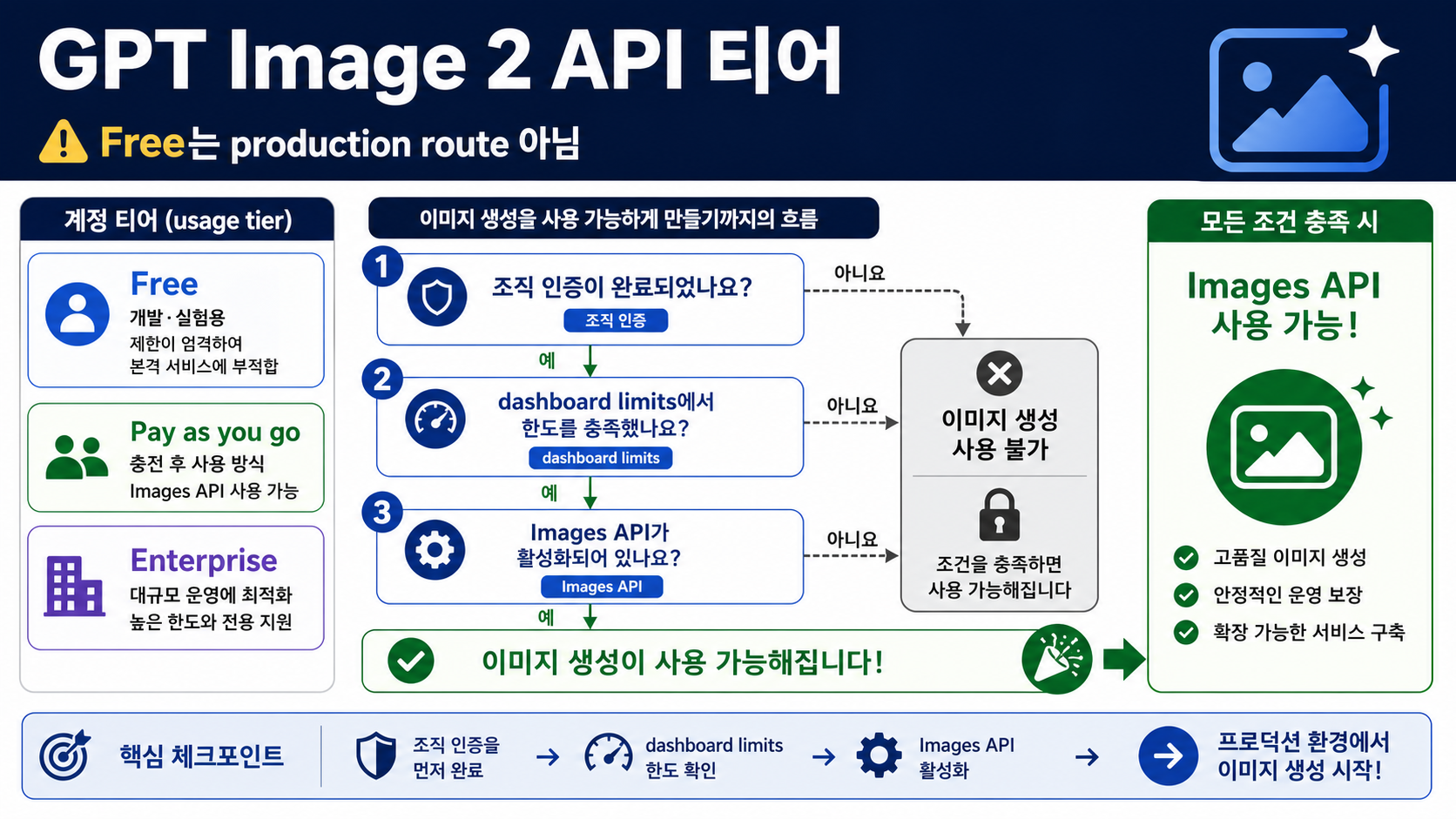
GPT Image 2 API 접근은 하나의 Tier 라벨로 결정되지 않습니다. 2026년 5월 16일 기준으로 Free API tier를 gpt-image-2 직접 호출 route로 전제하지 않는 편이 안전합니다. 유료 조직이라도 dashboard의 모델별 limits, project 설정, Organization Verification 상태를 확인해야 production 계획을 세울 수 있습니다.
먼저 세 층을 분리해야 합니다. OpenAI usage tier는 조직 계정의 결제와 한도 배경을 설명합니다. gpt-image-2 모델 행과 limits 화면은 해당 모델이 현재 조직과 project에서 보이는지, 어느 정도 capacity가 있는지 답합니다. service_tier는 유효한 request의 processing mode를 고르는 옵션이며 Tier 1, Tier 2, Tier 5와 같은 계정 등급이 아닙니다.
| 층 | 답하는 질문 | 증명하지 않는 것 |
|---|---|---|
| OpenAI usage tier | 조직 계정의 결제와 사용 한도 구간 | 현재 project의 gpt-image-2 실제 quota |
| 모델 행과 dashboard | 모델 지원 여부와 모델별 capacity | ChatGPT 제품 권한이나 외부 provider 계약 |
service_tier | request processing lane | 계정 tier, 모델 entitlement, 조직 인증 상태 |
가장 먼저 볼 곳은 공식 모델 정보와 자신의 OpenAI dashboard입니다. 공식 route가 막혔다면 cloud나 provider gateway가 도움이 될 수 있지만, 그 순간 billing, limits, support, failure handling의 책임자는 별도 계약으로 넘어갑니다.
어떤 tier 답을 먼저 믿어야 하나
공식 모델 surface를 먼저 보고, 그다음 자신의 organization으로 좁힙니다. GPT Image 2의 API model ID는 gpt-image-2이고, 이번 확인에서 공개 snapshot은 gpt-image-2-2026-04-21입니다. 같은 공개 모델 surface는 Free를 not supported로 표시했고, Tier 1부터 Tier 5까지는 paid tier에서 증가하는 모델별 capacity 신호를 보여주었습니다.
하지만 공개 표는 개인화된 quota 문서가 아닙니다. 실제 한도는 account settings, project limits, dashboard, response headers에 있습니다. 모델이 limits에 보이지 않거나, project가 다르거나, Organization Verification이 남아 있거나, request route가 잘못되면 공개 표 숫자만으로는 해결되지 않습니다.
| 질문 | 먼저 볼 곳 | 실무 답 |
|---|---|---|
| GPT Image 2는 공식 API 모델인가 | GPT Image 2 model page | 예. 직접 Images API 작업은 gpt-image-2를 사용합니다. |
| Free API tier가 접근을 증명하나 | GPT Image 2 model row | 아니요. 2026년 5월 16일 기준 Free는 지원 route가 아니었습니다. |
| Tier 1 또는 Tier 2는 무엇을 뜻하나 | usage-tier guide와 model row | 계정 tier와 모델 capacity는 연결되지만 동일하지 않습니다. |
| 내 org에서 실제로 가능한 것은 무엇인가 | dashboard limits | request를 보내는 org, project, key의 실제 표시를 확인합니다. |
service_tier로 모델을 열 수 있나 | API reference | 아니요. 유효한 request의 처리 모드만 고릅니다. |
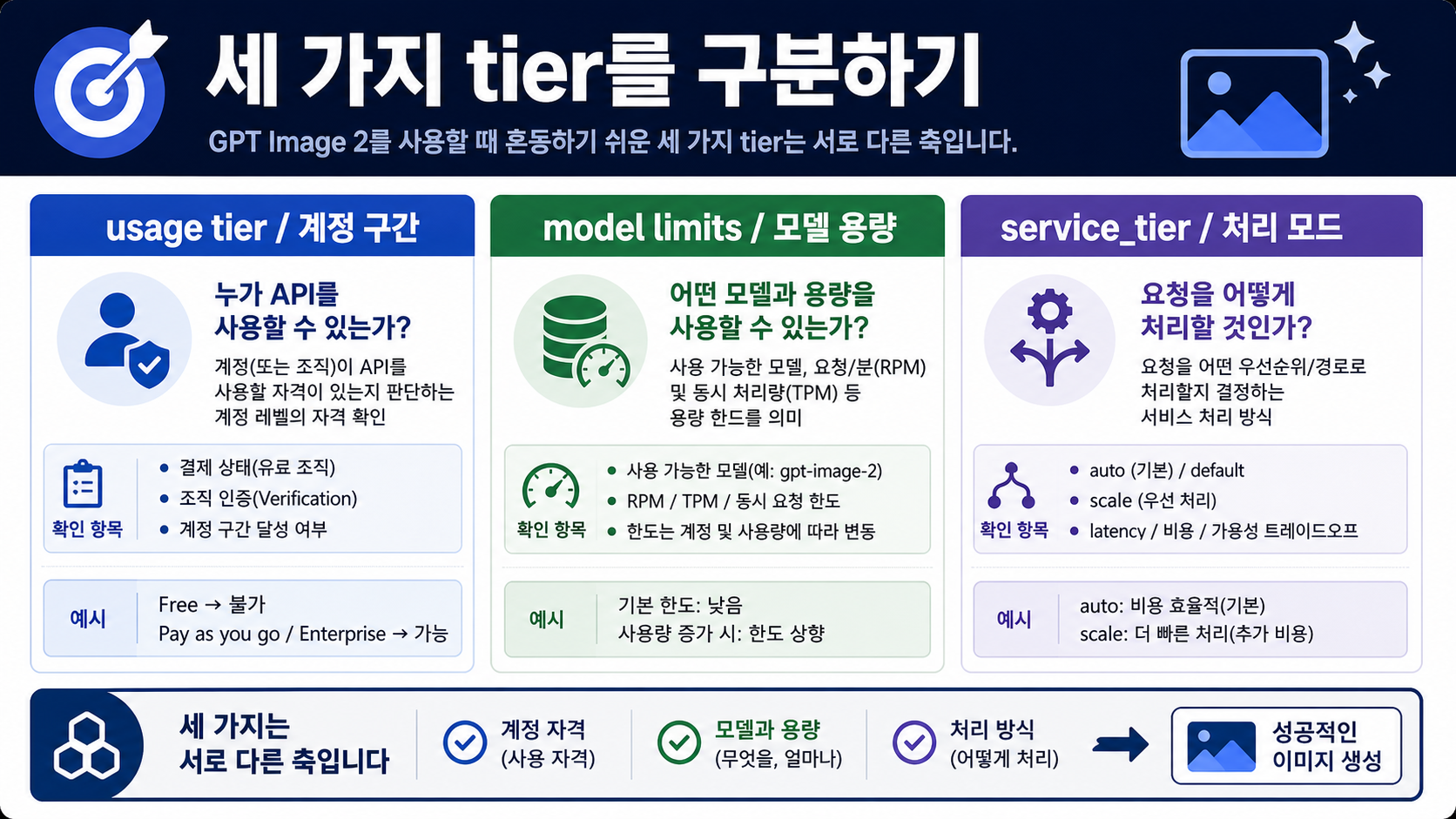
Usage tier는 계정 구간이지 모델 사용권 자체가 아니다
OpenAI usage tier는 organization 수준의 계정 구간입니다. 결제 금액, 월간 사용 한도, 자동 증가 조건과 관련이 있습니다. 그러나 특정 모델의 이용 가능성을 완전히 대체하지는 않습니다. GPT Image 2에서는 image size, quality, input image tokens, output image tokens, rate limit, safety verification이 함께 걸리므로 이 구분이 더 중요합니다.
Tier 2 조직이라고 해도 특정 project에서 gpt-image-2가 보이지 않을 수 있습니다. API key가 다른 project에 속했을 수 있습니다. Organization Verification이 완료되지 않았을 수 있습니다. 코드가 맞아도 실제 concurrency와 response headers가 다른 제한에 닿을 수 있습니다.
Usage tier는 배경 정보로 두고, production 근거는 따로 모읍니다. 필요한 증거는 organization, project, model ID, endpoint, minimal request, response headers, dashboard limits, pricing calculator입니다. 이 묶음이 있어야 사용자 quota, 내부 budget, rollout plan을 책임 있게 만들 수 있습니다.
모델 행은 공개 capacity, dashboard는 내 조직의 현실이다
gpt-image-2 모델 행은 공식 모델 여부, Free 미지원 여부, paid tiers의 capacity 증가를 확인하는 공개 기준입니다. Free / Tier 1 / Tier 2에 대한 첫 답으로는 적절하지만, 내 계정이 production-ready인지 결정하는 자료로는 부족합니다.
Dashboard가 필요한 이유는 공개 모델 행이 내 organization을 모르기 때문입니다. project-level settings, model availability, temporary limits, verification requirement는 계정마다 달라질 수 있습니다. limits 화면에 기대한 모델이나 capacity가 없다면 먼저 account evidence로 정리하고, 곧바로 SDK나 business logic을 바꾸지 않는 편이 빠릅니다.
개발 전에 다음 순서로 확인합니다.
- GPT Image 2를 사용할 수 있는 paid tier organization인지 확인합니다.
- 실제 request를 보낼 organization과 project의 limits를 엽니다.
- GPT Image models에 API Organization Verification이 필요한지 확인합니다.
- reference image, streaming, edit chain을 붙이기 전에 minimal Images API request를 실행합니다.
- 실패 시 request ID, status, response body, rate-limit headers를 남깁니다.
- 고객용 quota나 가격을 말하기 전에 model page, calculator, dashboard를 다시 확인합니다.
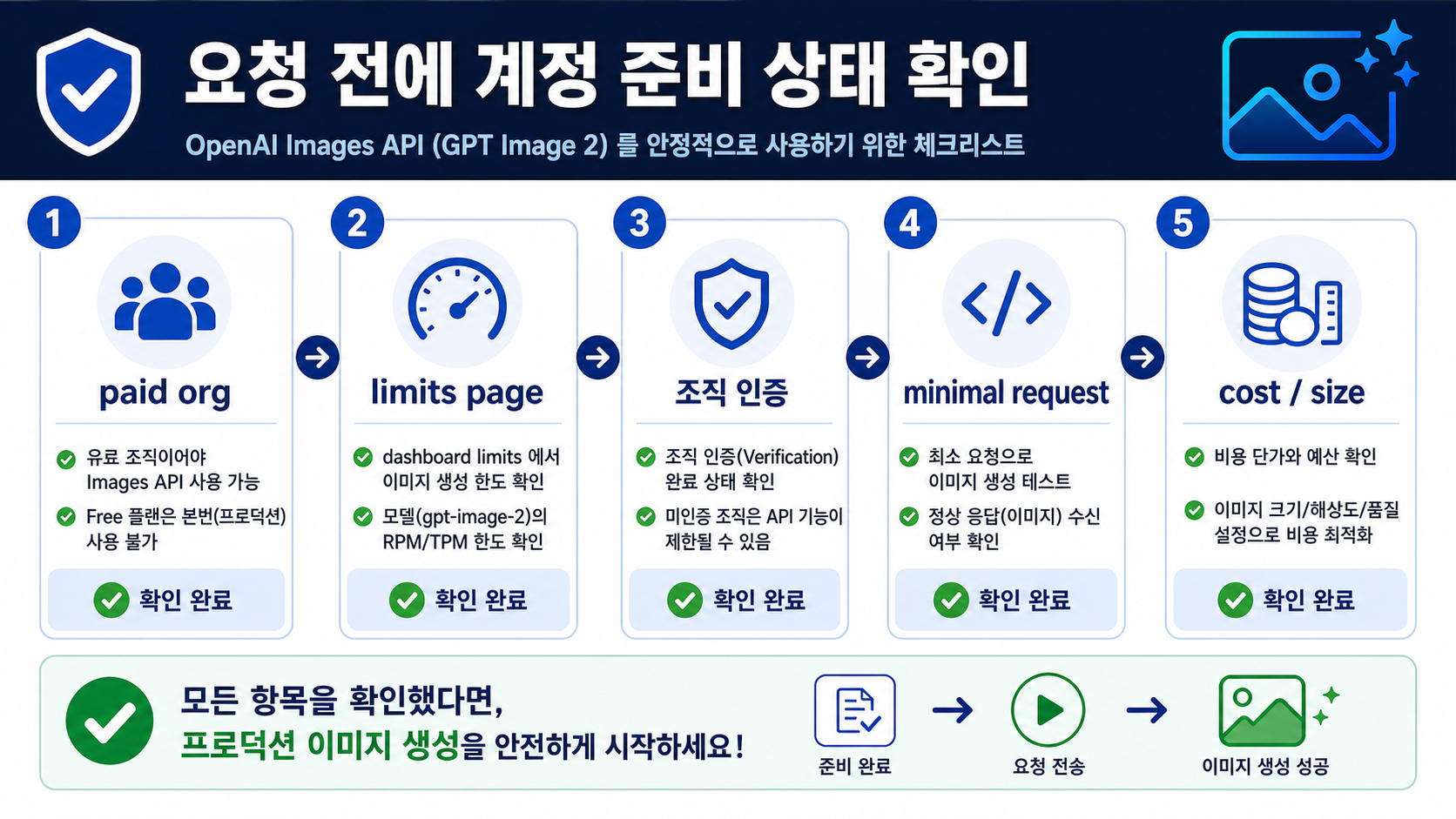
service_tier는 Tier 1이나 Tier 2가 아니다
service_tier는 API request에서 processing mode를 고르는 parameter입니다. 지원되는 경우 auto, default, flex, priority 같은 값을 사용할 수 있습니다. 이것은 결제 단계도, usage tier upgrade도, 지원되지 않는 모델을 여는 기능도 아닙니다.
혼동은 이름 때문에 생깁니다. 계정에도 tier가 있고 request에도 service_tier가 있습니다. 하지만 account usage tier는 조직의 사용 구간이고, model limits는 gpt-image-2의 capacity이며, service_tier는 이미 유효한 request를 어떤 processing lane으로 보낼지 정합니다.
모델이 unsupported이거나 dashboard에 보이지 않거나 verification이 끝나지 않았거나 endpoint가 틀렸다면 service_tier 변경은 root cause를 바꾸지 못합니다. 먼저 기본 access path가 성립하는지 확인하고, 그다음 처리 모드를 고릅니다.
gpt-image-2를 올바른 API route에 넣기
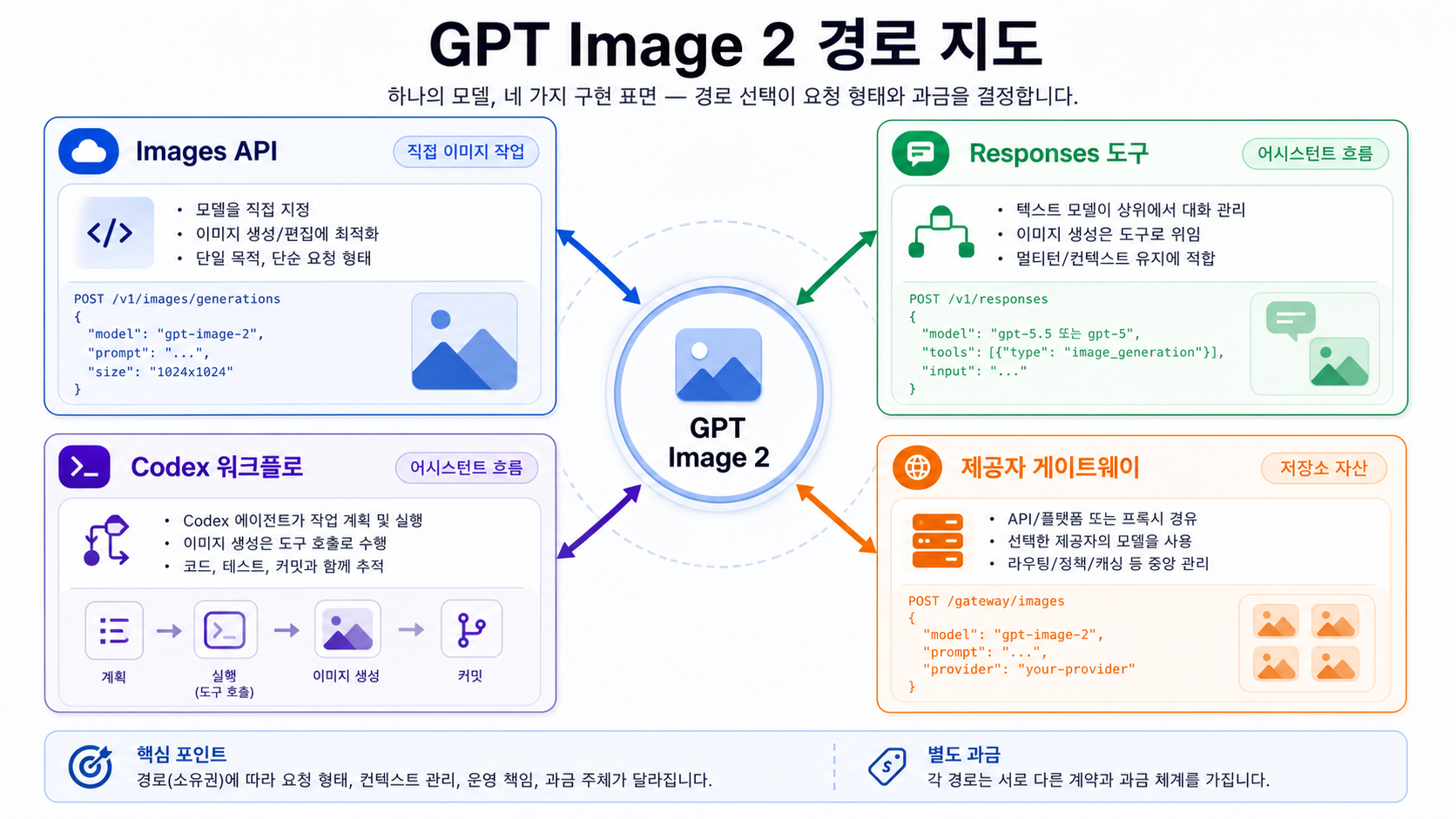
직접 이미지 생성 또는 편집은 Images API에서 model: "gpt-image-2"를 지정합니다. 초기 테스트에는 이 route가 좋습니다. model, endpoint, size, quality가 명확해서 account, model, verification, request body 중 어디가 실패했는지 나누기 쉽습니다.
import OpenAI from "openai";

const client = new OpenAI({ apiKey: process.env.OPENAI_API_KEY });

const result = await client.images.generate({
  model: "gpt-image-2",
  prompt: "A clean product diagram explaining API account tiers",
  size: "1024x1024",
  quality: "medium"
});
Responses는 다른 구조입니다. top-level model은 conversation이나 tool flow를 이끄는 text-capable model이어야 하며, tools: [{ type: "image_generation" }]로 hosted tool을 호출합니다. 이미지 작업은 tool 안에서 일어나므로 gpt-image-2를 top-level Responses model로 두지 않습니다.
import OpenAI from "openai";

const client = new OpenAI({ apiKey: process.env.OPENAI_API_KEY });

const response = await client.responses.create({
  model: "gpt-5.5",
  input: "Plan a simple visual and generate it as an image.",
  tools: [{ type: "image_generation" }]
});
Route choice는 product job에서 출발합니다. 단순한 image output이나 controlled edit은 Images API가 맞습니다. assistant flow, conversation, multi-step tool chain 안에서 이미지를 만들 때 Responses가 자연스럽습니다. 직접 Images API가 실패했는데 곧바로 Responses로 옮기면 account blocker를 숨길 수 있으므로 먼저 실패 owner를 확인합니다.
막힌 request는 책임 층으로 진단하기
GPT Image 2 request 실패는 하나의 문제가 아닙니다. account, model, route, request body, rate limit, verification, provider layer 중 어디에 속하는지에 따라 다음 조치가 달라집니다.
| 증상 | 가능한 owner | 첫 확인 | stop rule |
|---|---|---|---|
Free account가 gpt-image-2를 호출하지 못함 | model support와 account tier | model page와 dashboard limits | Free API 접근을 production 전제로 두지 않습니다. |
| paid account도 blocked | Organization Verification 또는 project access | developer console과 limits | verification 또는 support evidence를 먼저 정리합니다. |
| 429 또는 throttling | rate limits | response headers와 dashboard | headers 확인 전에는 tier increase만 보지 않습니다. |
| endpoint가 request shape를 거부 | route mismatch | Images API와 Responses docs | direct model call은 Images API에 둡니다. |
Responses top-level model이 gpt-image-2 | model placement | image_generation tool docs | text model plus tool을 사용합니다. |
| provider는 되지만 direct OpenAI는 실패 | separate contract | provider mapping, billing, limits | provider success는 OpenAI entitlement가 아닙니다. |
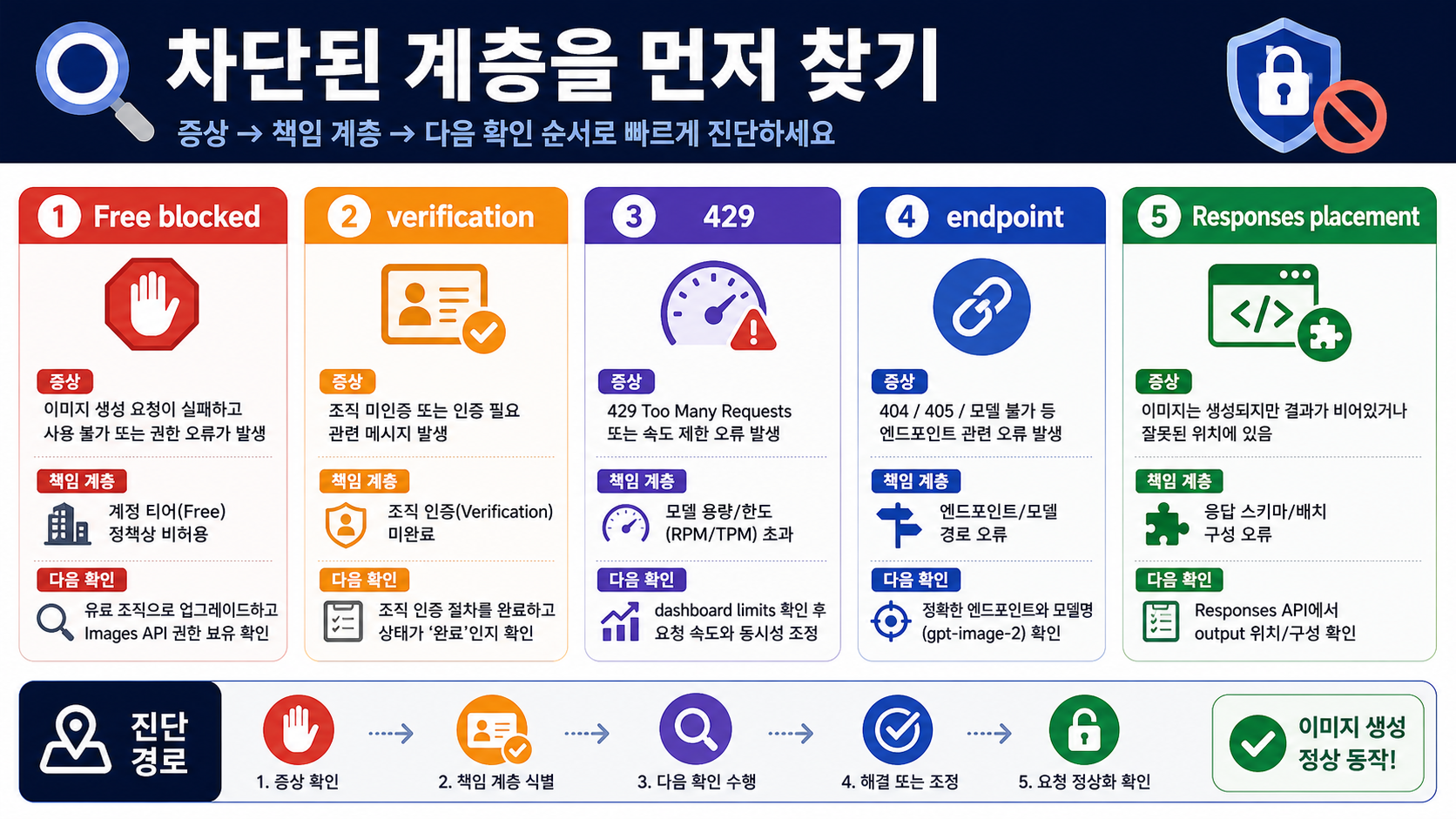
쓸모 있는 diagnostic bundle은 작아야 합니다. organization ID, project, model ID, endpoint, request ID, status, response body, rate-limit headers, verification state, minimal reproduction request만 모아도 capacity issue와 route issue를 분리할 수 있습니다.
Cost, size, verification은 tier access 뒤에도 남는다
Tier access가 있더라도 비용 설계는 별도입니다. GPT Image 2 cost는 input text tokens, input image tokens, image output tokens, size, quality에 영향을 받을 수 있습니다. 사용자 quota, 내부 budget, retry 정책은 tier 이름이 아니라 pricing calculator와 실제 request 기록으로 잡아야 합니다.
Size도 계약입니다. GPT Image 2는 여러 common sizes를 지원하지만 request는 documentation constraints를 따라야 합니다. transparent background가 필요한 workflow라면 gpt-image-2가 현재 transparent backgrounds를 지원하지 않는다는 점을 별도 design step이나 post-processing으로 처리해야 합니다.
Organization Verification도 독립 체크입니다. GPT Image models, including gpt-image-2, may require API Organization Verification. paid tier와 valid key만으로 image model이 사용자-facing launch에 준비됐다고 말할 수는 없습니다.
Provider route는 별도 계약으로만 평가하기
Cloud platform이나 provider gateway는 직접 OpenAI account route가 준비되지 않았거나, aggregated billing, local payment, fallback routing, operational controls가 필요할 때 실용적일 수 있습니다. 하지만 direct OpenAI API를 벗어나면 billing, refunds, limits, retries, logs, uploaded images, support의 owner가 바뀝니다.
사용 전에 네 가지를 확인합니다.
- provider가
gpt-image-2를 명확히 표시하고 model mapping을 검증할 수 있는가. - billing, refunds, rate limits, retries, support는 누가 책임지는가.
- reference images, generated files, logs는 어떻게 저장되거나 삭제되는가.
- 필요한 size, quality, edit flow, failure behavior를 재현할 수 있는가.
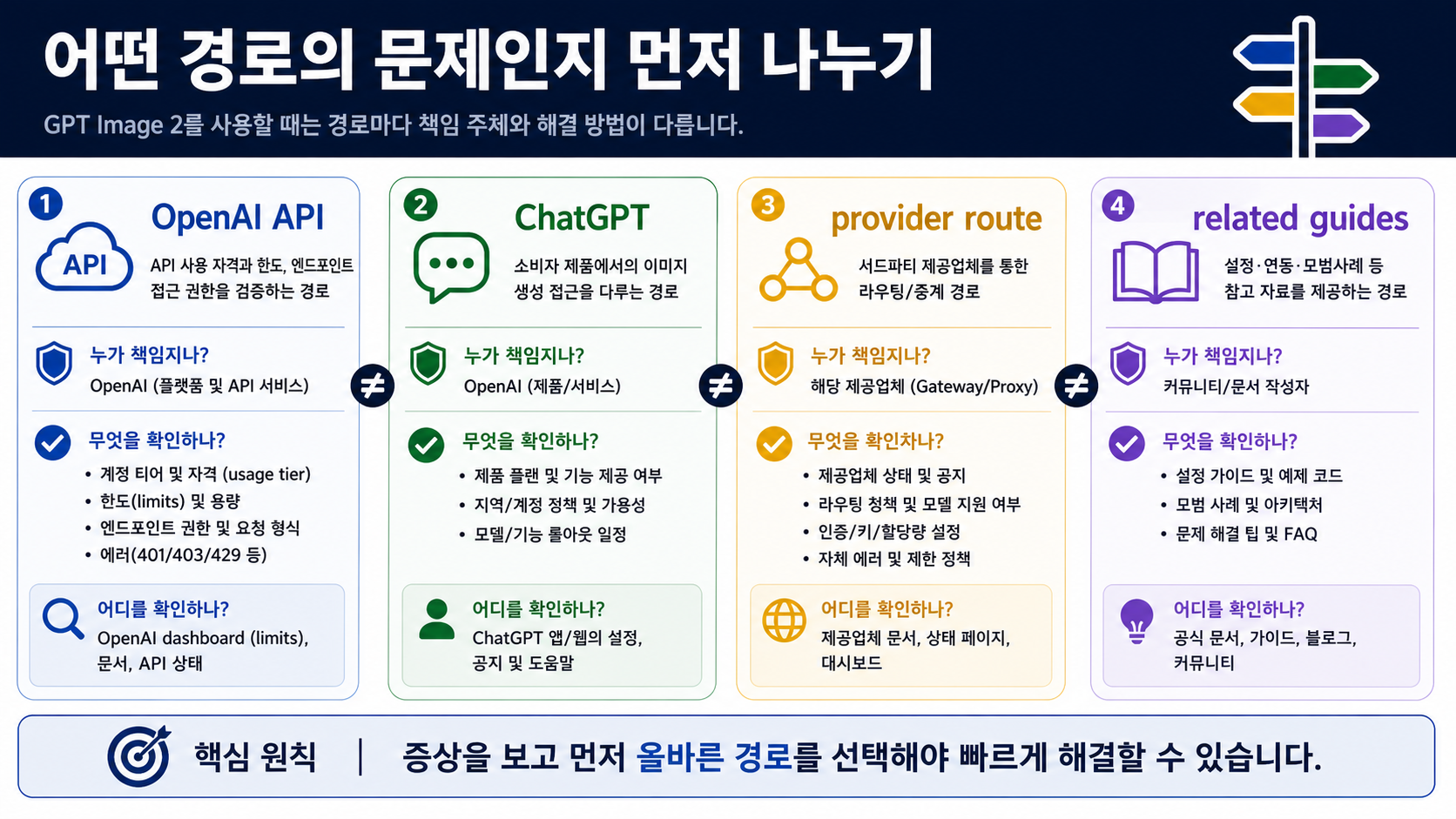
주변 주제는 역할별로 나눕니다. Images API, Responses, Codex, gateway의 전체 차이는 GPT Image 2 API 가이드에서 다룹니다. key 없이 브라우저에서 시험하고 upload safety를 보려면 GPT Image 2 free online 가이드를 사용합니다. free 4K API 주장과 경계는 free GPT Image 2 4K API 가이드에서 확인합니다. 모델 선택은 Nano Banana Pro vs GPT Image 2가 맡습니다.
실행 가능한 준비 경로
순서는 짧게 유지합니다. 먼저 official model ID와 snapshot을 확인합니다. 그다음 Free API를 GPT Image 2 production route로 두지 않습니다. 이어서 자신의 organization과 project dashboard limits를 확인합니다. 필요하면 Organization Verification을 끝냅니다. 그 후 minimal Images API request를 실행합니다. 성공한 뒤에야 size, quality, edit, queue, retry, Responses orchestration을 추가합니다.
Minimal request가 성공하면 scale planning으로 갑니다. size, quality, cost estimate, latency, response IDs, headers, concurrency를 기록합니다. 실패하면 architecture를 바꾸기 전에 owner를 분류합니다. Provider route는 임시 또는 상업 route가 될 수 있지만, 별도의 bill owner와 support owner를 가진 route로 평가해야 합니다.
핵심 모델은 간단합니다. usage tier는 account context, model row와 dashboard는 gpt-image-2 capacity, service_tier는 processing mode, provider route는 separate contract입니다. 네 층을 섞지 않으면 upgrade와 debugging이 빠르게 정리됩니다.
자주 묻는 질문
GPT Image 2는 Free OpenAI API tier에서 사용할 수 있나요?
Free API tier를 GPT Image 2 production route로 계획하지 마세요. 2026년 5월 16일 기준 공개 gpt-image-2 model surface는 Free를 not supported로 표시했습니다. ChatGPT나 browser의 무료 경험은 별도 product route입니다.
Tier 1이면 gpt-image-2를 반드시 호출할 수 있나요?
아닙니다. Tier 1은 organization이 usage-tier threshold를 만족했다는 뜻이지만, dashboard의 model support, project access, Organization Verification, 올바른 API route가 별도로 필요합니다.
usage tier와 model rate limit은 무엇이 다른가요?
Usage tier는 organization account bucket입니다. Model rate limit은 model page, account settings, dashboard, response headers에 나타나는 specific model capacity입니다. 더 높은 usage tier는 많은 limits를 늘리지만 exact capacity는 별도 확인이 필요합니다.
service_tier는 Tier 1 또는 Tier 2와 같은가요?
아닙니다. service_tier는 auto, default, flex, priority 같은 request processing option입니다. organization usage tier나 model entitlement를 바꾸지 않습니다.
GPT Image 2에는 Images API와 Responses 중 무엇을 쓰나요?
Direct image generation 또는 edit은 Images API에서 model: "gpt-image-2"를 지정합니다. conversation 또는 assistant flow에서 이미지를 만들 때는 Responses의 text model이 hosted image_generation tool을 호출합니다.
Provider gateway가 OpenAI tier limits를 우회할 수 있나요?
Provider gateway는 separate access route를 제공할 수 있지만 direct OpenAI API entitlement를 바꾸지는 않습니다. billing, limits, support, model mapping, failure behavior는 provider contract로 검증해야 합니다.
Upgrade 전에 무엇을 확인해야 하나요?
GPT Image 2 model page, organization limits, project access, Organization Verification, minimal Images API request, pricing calculator, response headers를 확인합니다. bottleneck이 account capacity라고 확인된 뒤에 upgrade를 선택합니다.