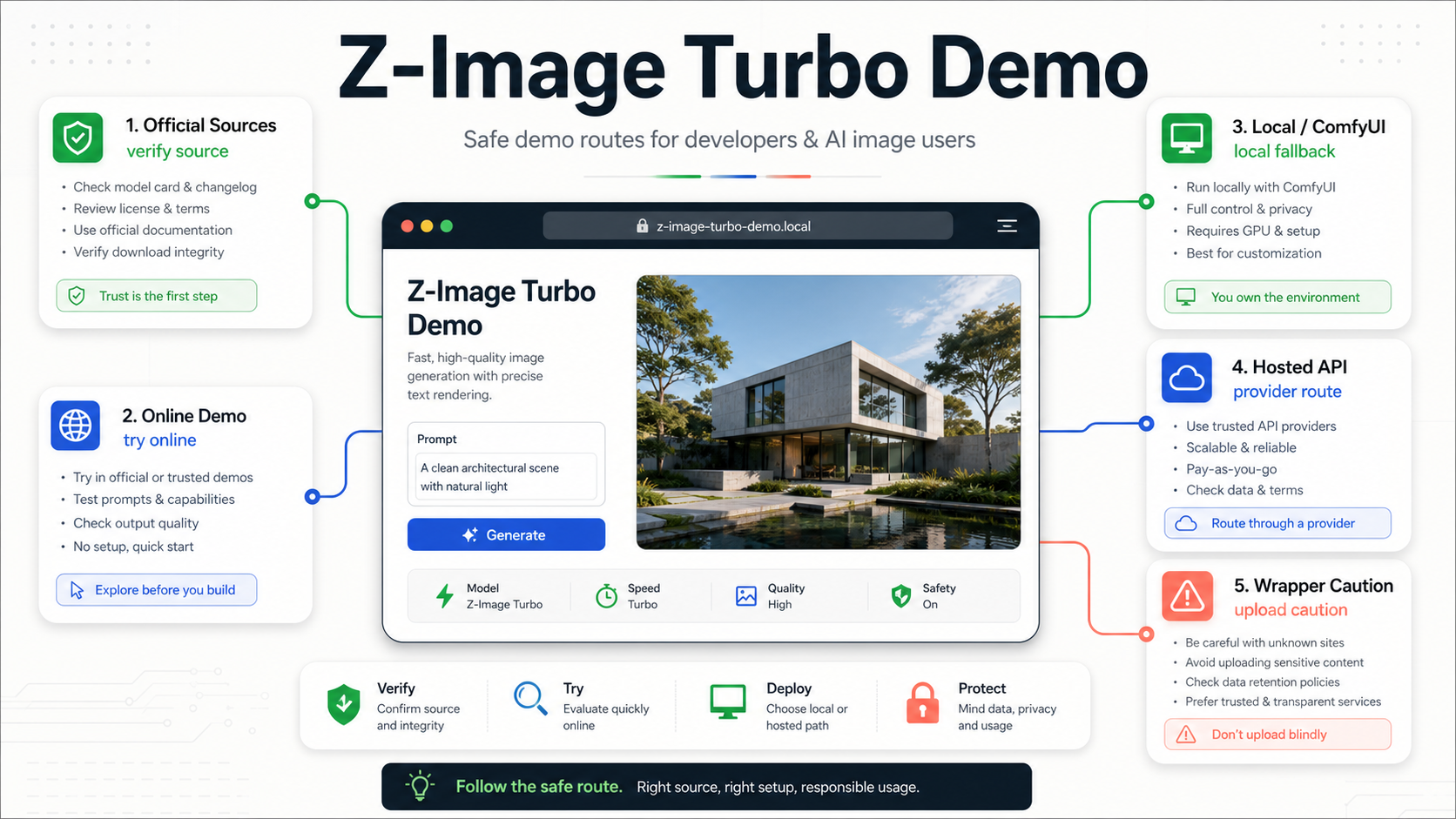
Use the public Z-Image Turbo demo for a harmless first prompt, then verify the model through Tongyi-MAI sources before you install files, upload sensitive images, or choose a hosted provider. The no-hyphen wording people use for the demo points back to the Z-Image model family; the route you pick still depends on who owns the page, where the image is processed, and whether you need repeatable output.
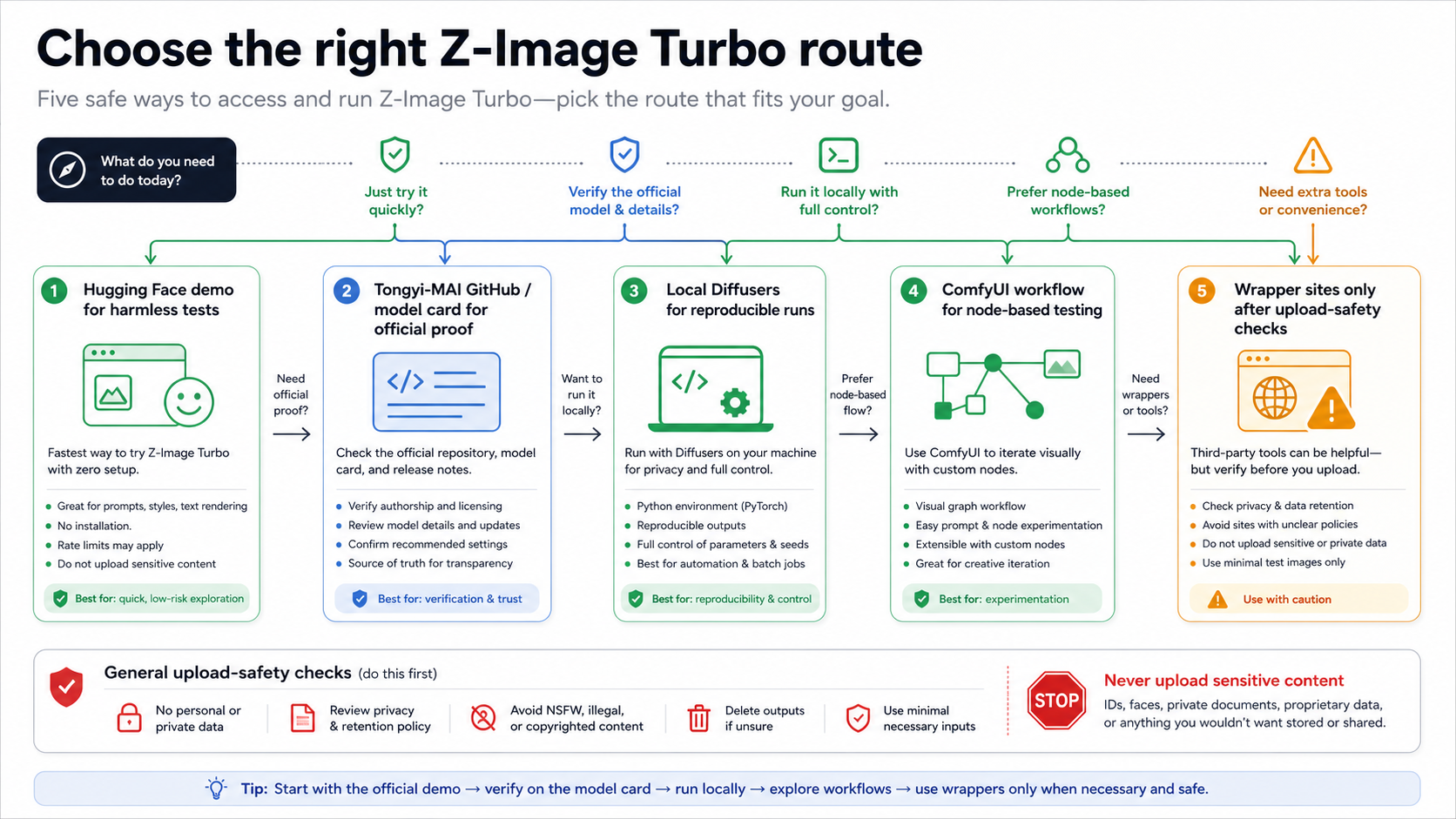
| Need | Start with this route | Trust boundary before the next step |
|---|---|---|
| First harmless test | Public Z-Image Turbo demo | Treat it as a convenience route, not production proof |
| Model identity | Tongyi-MAI GitHub and Hugging Face | Use these before downloading weights or citing release status |
| Repeatable local work | Local Diffusers or supported checkpoints | Check model variant, license notes, and hardware cost |
| Node-based workflow | ComfyUI route | Confirm the current node/workflow support before planning a client job |
| Hosted integration | Provider API route | Date the provider claim and separate billing owner from model owner |
| Quick wrapper test | Wrapper site | Use only harmless prompts until upload, retention, rights, and support terms are clear |
The official-source, hosted-demo, ComfyUI, and provider pages cited below were checked on May 17, 2026, because demo availability, release-state notes, workflow support, and hosted route claims can change.
Do not upload private, client, face, document, or unreleased product images to an unknown Z-Image wrapper just because it has a working generator. Use the demo to learn the model shape, then move to an official, local, ComfyUI, or provider route that matches the risk of the task.
What Z-Image Turbo is, and what it is not
Z-Image is the image generation model family published by Tongyi-MAI. The project identity belongs first to the Tongyi-MAI Z-Image GitHub repository, the Tongyi-MAI/Z-Image-Turbo model card on Hugging Face, and the Z-Image technical report on arXiv. A demo site, wrapper, or provider route can help you try the model, but it does not replace those sources when you need to verify what the model is.
The practical demo target is Z-Image-Turbo, not every Z-Image variant at once. At the May 17, 2026 check, the official repository separated Z-Image-Turbo, Z-Image, Z-Image-Omni-Base, and Z-Image-Edit. Turbo is the fast generation route most online-demo users mean. Base Z-Image is a fuller generation route with different sampling expectations. Omni and Edit release-state details should be checked at the source before you build a page, workflow, or customer promise around them.
That distinction matters because a prompt that is fine for a quick Turbo demo may not be the route you want for production evaluation. If you want a first look, use Turbo. If you need repeatable local output, inspect the model card, checkpoint files, dependencies, license surface, and example command path. If you need editing or multimodal behavior, do not infer it from a Turbo demo result.
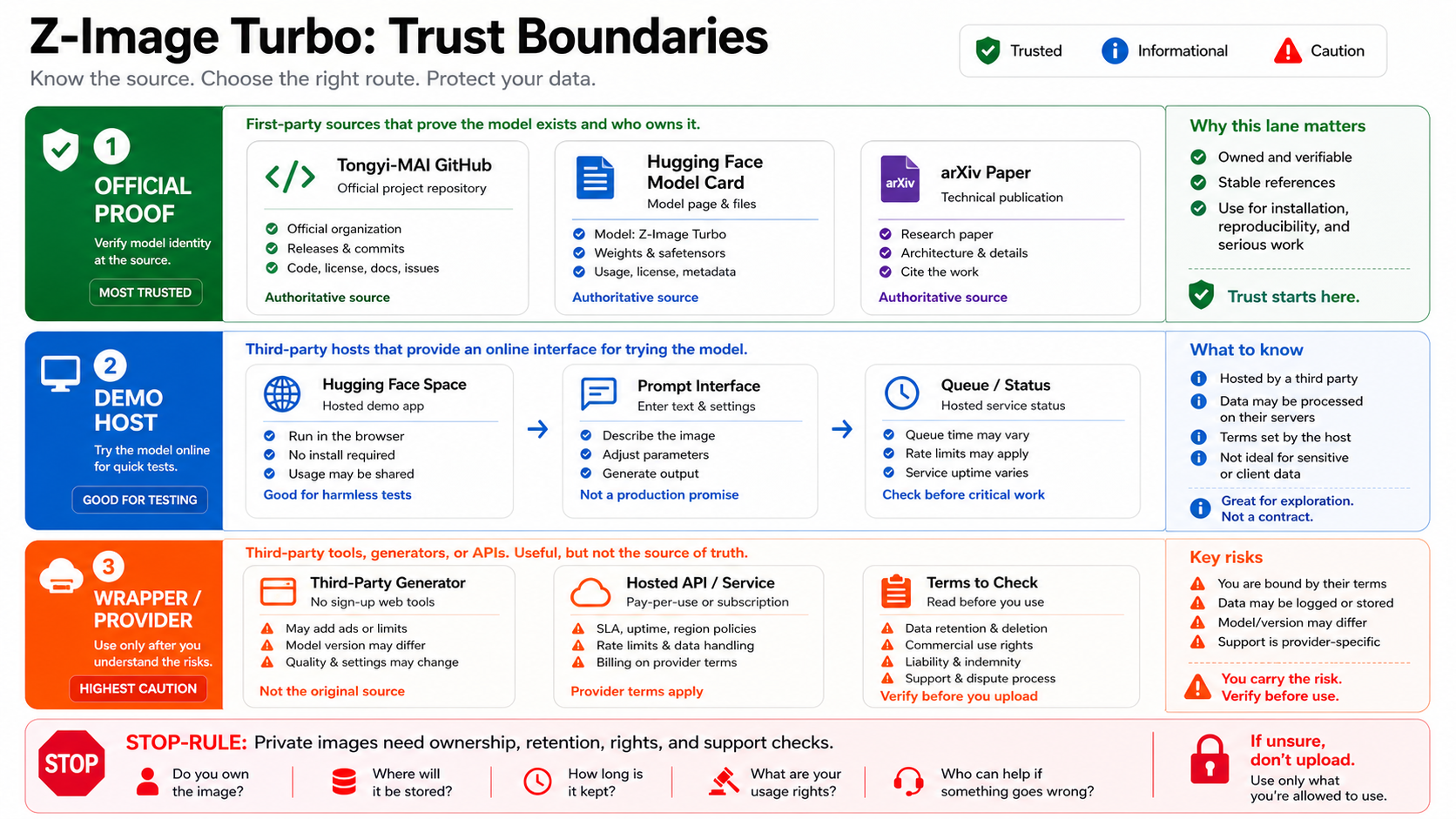
Think of the route stack in four layers:
| Layer | What it can prove | What it cannot prove by itself |
|---|---|---|
| Tongyi-MAI GitHub, Hugging Face, arXiv | model identity, release notes, license metadata, example usage direction | current hosted queue speed or a third-party wrapper's data handling |
| Public demo or Space | whether you can try a prompt in a browser now | production reliability, privacy policy quality, provider billing terms |
| ComfyUI or local workflow | whether you can reproduce the model in your own environment | that every stable install already has the required nodes |
| Provider or wrapper | a convenient hosted access path | official ownership, permanent pricing, retention policy, or support quality |
The safe habit is simple: use the demo for first contact, use official sources for identity, and use the route owner for operational claims.
Try the public demo as a harmless first test
The online demo is best for a prompt sanity check. Use it to learn whether the model follows a simple style instruction, whether text rendering is relevant to your use case, and whether the output direction is worth deeper testing. Do not start with proprietary product shots, face images, client concepts, screenshots of unreleased UI, legal documents, or anything that would be painful to expose to an unknown host.
A good first prompt is boring on purpose:
A clean product photo of a matte black desk lamp on a white table, soft studio lighting, no logo, no people, 16:9 composition.That prompt tells you enough about composition, instruction following, lighting, and object handling without uploading a sensitive source image. If the route exposes seed, resolution, guidance, steps, model variant, or queue metadata, save those details with the output. If it exposes nothing except an image, treat the result as an impression, not as reproducible evidence.
Use this first-test checklist:
| Check | Why it matters |
|---|---|
| Model label | Confirms whether the route says Turbo, base, or something vague |
| Page owner | Separates Tongyi-MAI, Hugging Face, provider, and wrapper surfaces |
| Input type | Text-only prompt is lower risk than uploaded source images |
| Output controls | Seed, aspect ratio, steps, guidance, and negative prompts affect reproducibility |
| Queue or login state | Demo behavior can change under load |
| Terms and privacy | Needed before any private or client upload |
When the demo works, resist the urge to call it the production answer. A browser demo is useful because it is fast. It is risky when it hides who stores inputs, how long outputs persist, what limits apply, and who supports failures.
Verify the official route before installing or citing claims
Before you install model files, cite release status, or tell a team that Z-Image is available for a workflow, open the official sources directly. The GitHub repository is the best starting point because it names the model family, records the model zoo, links to Hugging Face and ModelScope routes, and shows the quick-start direction. The Hugging Face model card is the better place to inspect the specific Turbo artifact and current model metadata.
Use these checks before you move beyond a demo:
| Verification job | Source to inspect | Reader action |
|---|---|---|
| Is this really Z-Image Turbo? | Tongyi-MAI GitHub and Hugging Face model card | Match the model ID and route label before using results as evidence |
| Is the variant released? | GitHub model zoo and update notes | Do not assume Edit or Omni availability from Turbo examples |
| What license surface is shown? | Hugging Face model metadata and repository license | Confirm the current license before commercial or customer-facing use |
| What local example is current? | Repository and model card snippets | Prefer source examples over old wrapper snippets |
| What hardware and dependency path is realistic? | Repository notes and your own environment | Run a local smoke test before promising repeatability |
The technical report is useful when you need the model framing: the arXiv page describes Z-Image as a 6B-parameter image generation family and places Turbo in a fast-generation context. That is not the same as a deployment contract. Use the paper for model understanding, not for hosted-demo guarantees.
Pick the fallback route by the job you need to prove
If the demo is slow, unavailable, rate-limited, or too opaque, the next step should be a route decision rather than a random mirror. Different fallback routes solve different problems.
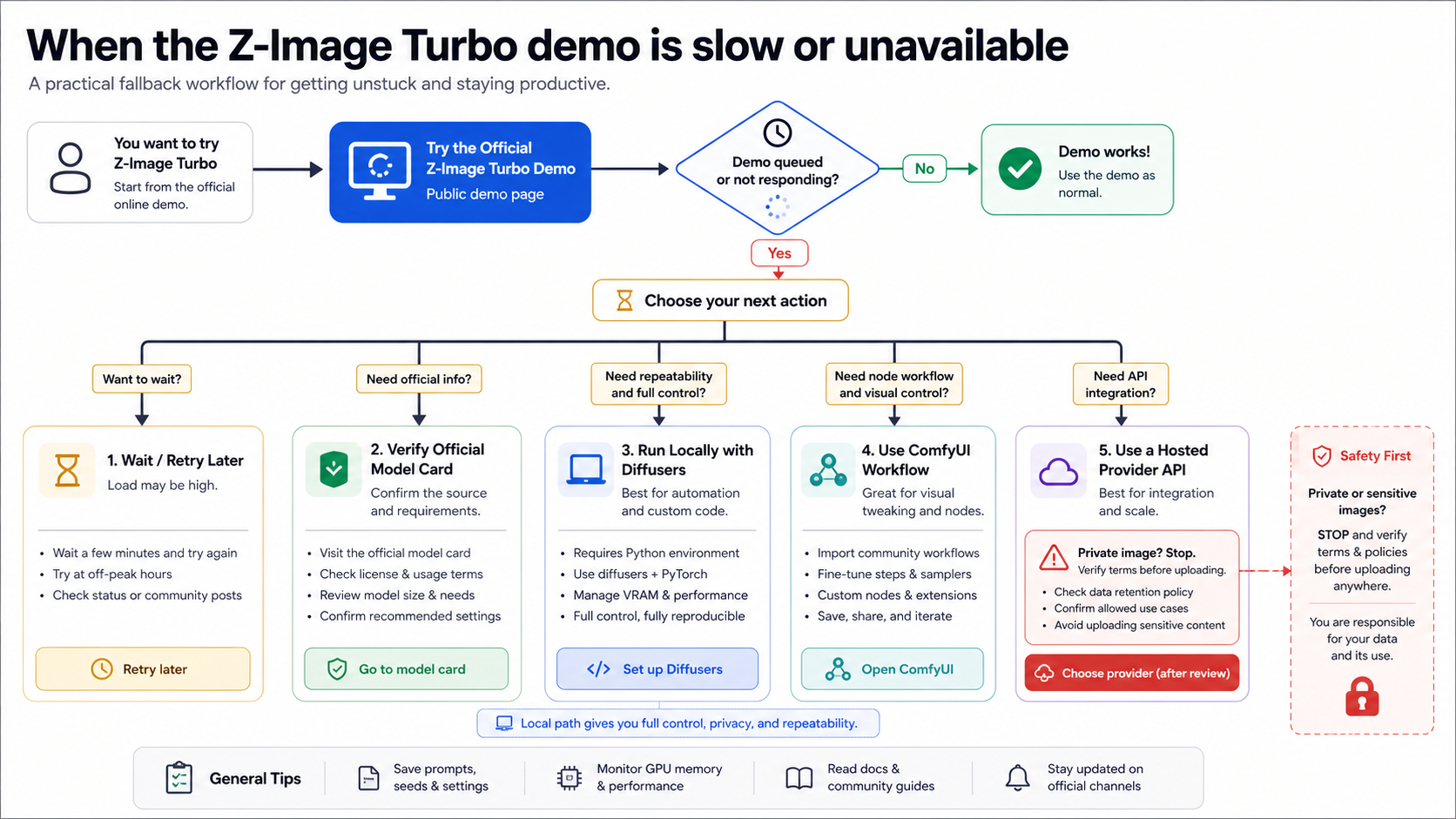
Use the official model card or repository when the job is proof. If the question is "what is this model, which variant exists, and what did Tongyi-MAI publish?", start with the official project surfaces. You do not need a working image output to answer identity and release-state questions.
Use local Diffusers or source examples when the job is repeatability. Local testing gives you control over prompt, seed, files, dependency versions, logs, and output storage. It also makes hardware cost visible. The tradeoff is setup time and environment friction. Because live Diffusers documentation could not be fetched through Context7 during research, use the current Tongyi-MAI repository and Hugging Face model card examples as the safer implementation source.
Use ComfyUI when the job is a node workflow. The ComfyUI Z-Image workflow documentation gives a route for model placement and node workflow use, while also warning that node support may require updated, nightly, or later stable versions. That caveat is the point: a ComfyUI screenshot from someone else is not enough. Check whether your current install can load the workflow before you plan a client process around it.
Use a provider route when the job is hosted integration. The fal Z-Image Turbo model page is a provider-owned route with its own playground, API surface, input/result schema, pricing, and commercial-use statements. That can be useful for developer evaluation, but it is not official Tongyi-MAI pricing or an Alibaba support contract. Date provider claims and keep billing owner separate from model owner.
Use wrappers only for low-risk exploration. A wrapper can be useful when you need a quick browser result and you are not uploading anything sensitive. It becomes a poor choice when you need clear data retention, deletion rights, support, billing transparency, model proof, or repeatable settings.
Wrapper safety: what to check before uploading anything important
Wrapper sites usually compete on convenience: no setup, no install, sometimes no login. That is exactly why they need a stricter upload rule. A working button proves that the page can return an image. It does not prove model identity, source ownership, data handling, output rights, or failure behavior.
Before any private upload, ask six questions:
| Question | Safe answer before upload |
|---|---|
| Who owns the route? | The page names its operator clearly and does not pretend to be Tongyi-MAI unless it is actually a first-party source |
| What model is used? | The model ID, variant, or checkpoint source is visible enough to audit |
| Where do prompts and images go? | Retention, deletion, training use, and storage location are stated in terms you can accept |
| Who pays and what are the limits? | Free, credit, paid, queue, or throttling behavior is explicit |
| What rights attach to outputs? | Commercial and redistribution terms match the task |
| What happens on failure? | Support, refund, retry, and error handling are not hidden behind marketing copy |
For harmless prompts, you can tolerate ambiguity. For client images, faces, documents, unreleased products, internal UI, or paid production work, ambiguity is a stop sign. Move to a local route, a provider route with terms you can audit, or wait until the official project route supports the workflow you need.
First prompt and logging checklist
The first useful Z-Image Turbo test should be small enough to repeat and specific enough to reveal whether the route deserves more time. Avoid prompts that require a private source image, a known face, a brand logo, or copyrighted style imitation. Start with a synthetic scene, then add complexity only after the route passes basic checks.
Use a simple progression:
- Plain object prompt with no upload.
- Same prompt with one controlled style modifier.
- Same prompt with a small text-rendering request if text matters to your use case.
- Same prompt on a fallback route if the first route does not expose enough controls.
- Only then decide whether the route is safe enough for uploaded source material.
Log the route owner, URL, model label, checked date, prompt, negative prompt if present, seed if present, aspect ratio, steps or guidance if exposed, queue status, and output file. If you compare the public demo with ComfyUI, local Diffusers, or a provider route, keep the prompt and aspect ratio the same. Otherwise you are comparing route randomness, not model behavior.
Do not write "Z-Image is better than X" from a single public demo result. A responsible first test can tell you whether a route is worth deeper evaluation. It cannot prove a benchmark, a commercial guarantee, or a general quality ranking.
FAQ
Is Z-Image Turbo the same as Z-Image?
No. Z-Image is the family name, while Z-Image Turbo is the fast generation variant most demo seekers mean. The official repository also lists other variants, and their release state or intended use can differ. Treat Turbo, base Z-Image, Edit, and Omni claims separately.
Is the public Z-Image Turbo demo official?
The model identity should be verified through Tongyi-MAI GitHub, Tongyi-MAI Hugging Face, and the arXiv paper. A public demo or Hugging Face Space can be a useful try-it-now route, especially when linked from an official source, but its availability, queue behavior, and host-level terms belong to the hosted surface.
Can I upload private images to a Z-Image wrapper?
Not until the wrapper proves route ownership, model identity, storage and deletion terms, rights, billing owner, and support path. Use harmless text-only prompts for wrapper exploration. Use local, auditable provider, or official routes for private, client, face, document, or unreleased product assets.
What should I do if the demo is down or too slow?
Do not jump straight to random mirrors. Verify the model through the official repository and model card, then choose the fallback by job: local examples for repeatability, ComfyUI for node workflows, or a hosted provider route for API integration.
Is fal.ai the official Z-Image API?
No. fal is a hosted provider route for Z-Image Turbo. It may be useful when you need an API/playground path, but its pricing, schema, commercial-use wording, and support behavior are provider-owned claims. Keep those separate from Tongyi-MAI's model identity.
Do I need ComfyUI for Z-Image Turbo?
No. ComfyUI is one workflow option, not the only route. It is useful if your image process already lives in ComfyUI or you need node-based control. If you only need a first look, use a public demo. If you need reproducibility and logs, local source examples may be the cleaner path.


