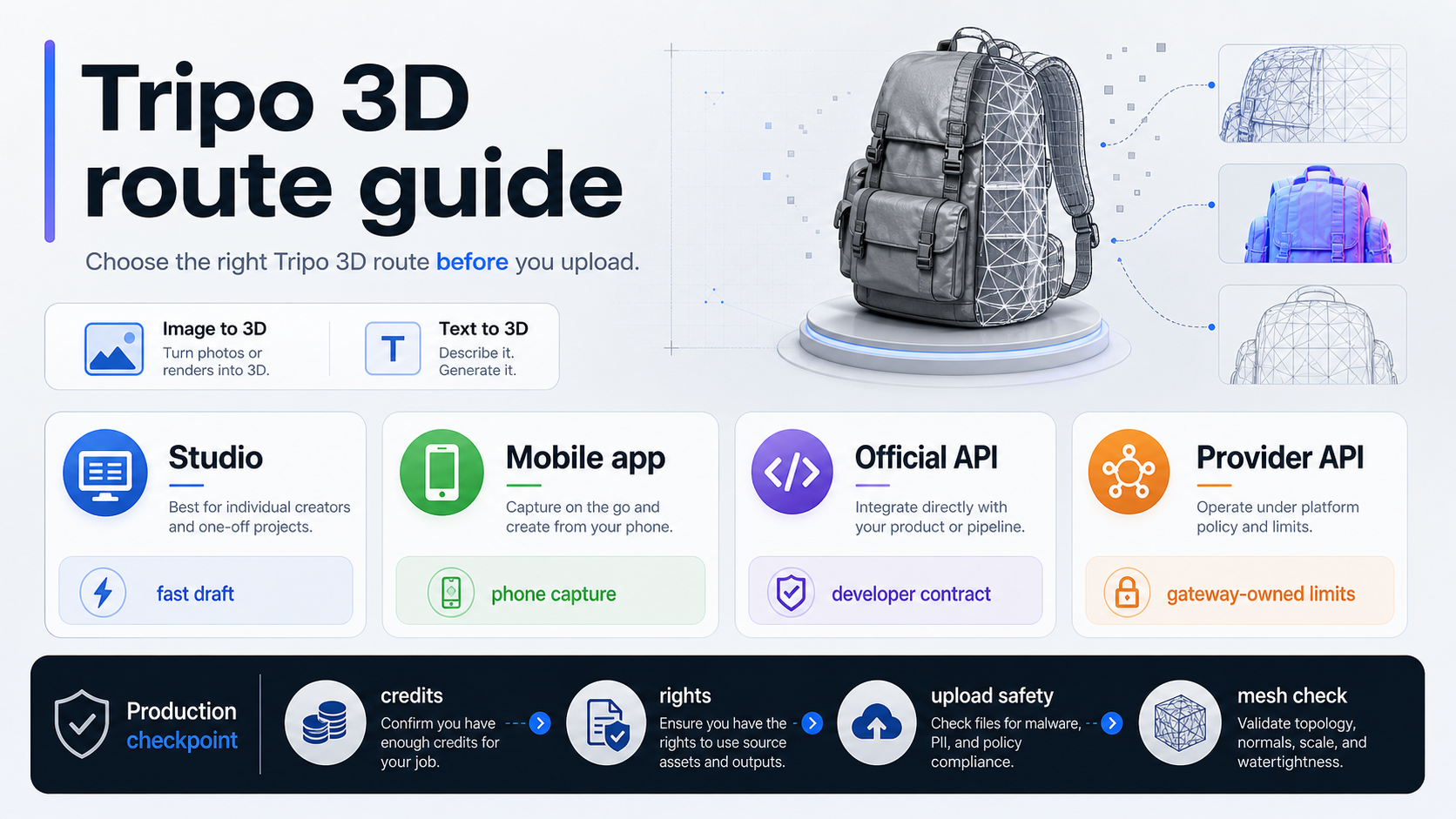
Tripo can turn an image or prompt into a 3D model draft quickly, but pick the route before you upload anything. Use Tripo Studio for browser generation, the mobile app for casual phone tests, the official API for first-party integration, and provider APIs only when provider-owned billing, storage, and output terms fit the job.
The term Tripo 3D usually points to Tripo / Tripo3D, not a generic category of 3D AI tools. Treat the free route as a low-risk test until the current plan, download, privacy, and commercial-use terms are checked.
A preview is not yet a production asset. Before using the model in Blender, a game engine, a product scene, or 3D printing, inspect topology, scale, normals, UVs, textures, and the cleanup burden.
Short Answer: What Tripo Does and Where to Start
Tripo is an AI 3D model generator for image-to-3D and text-to-3D work. The official Tripo site frames the product around creating 3D models from images or text, then expands into related tasks such as segmentation, texturing, rigging, animation, and export-oriented workflows. For public site image uploads, the checked boundary on May 17, 2026 was JPG, PNG, or WEBP up to 5MB.
That does not mean every Tripo route is the same product contract. Browser Studio, the iOS app, official developer API access, and a provider gateway all answer different questions. Studio is the lowest-friction way to learn the product. The mobile app is convenient for casual capture and quick testing. The official API route is the developer path, but direct platform documentation can change behind the logged-in surface. A provider route such as fal.ai can be useful for integration tests, but its schema, pricing, storage, and queue behavior belong to that provider.
Use the route board before the feature list:
| Reader job | Start with | Why | Stop before |
|---|---|---|---|
| Quick browser test from a public image | Tripo Studio | Lowest setup cost and official Studio plan context | Uploading private or client material |
| Casual phone capture | Tripo mobile app | Fast capture and app-store billing | Assuming app reviews prove production rights |
| Product or game pipeline integration | Official Tripo API | First-party developer route and official model family | Publishing endpoint code not checked in the current docs |
| Provider-side experiment | Provider API | Easier auth, queue, and result retrieval in some stacks | Treating provider terms as Tripo terms |
The first safe move is small: use a non-sensitive image, record the route, generate one draft, then inspect the mesh before spending credits on variations.
What Tripo Actually Does
Tripo is useful when the job needs a fast candidate model rather than a hand-built mesh. The official product surface supports the main reader expectation: image-to-3D and text-to-3D. The broader Tripo API landing page also markets multi-image to 3D, image to model, text to model, animation, style generation, post-processing, and model labels from earlier Tripo releases through v3.0.
The important word is "candidate." A generated model may look good in a preview and still need cleanup. A preview can hide dense topology, strange scale, broken UVs, texture seams, non-manifold geometry, or rigging problems. Those issues do not make Tripo useless. They define the handoff: Tripo can shorten the draft phase, while the target tool decides whether the asset is ready.
Tripo's Smart Mesh work is relevant here. The Smart Mesh P1.0 announcement frames it as a production-pipeline answer for clean low-poly topology in real-time, game, and XR workflows. On May 17, 2026, the article described Smart Mesh P1.0 as available in Studio and said API access would be available soon. That makes Smart Mesh a Studio-side production signal, not a reason to assume every API or provider route has the same low-poly behavior today.
Treat feature claims by route. A public-site capability, a Studio plan feature, an API landing page, a Smart Mesh blog post, and a provider endpoint can all be true without granting the same user rights, output format, or production guarantee.
Is Tripo Free Enough for Your Job?
The free plan is useful for learning the tool, but it is not a blanket answer for commercial production. On May 17, 2026, the Tripo pricing page listed a Basic plan at $0.0/month with 300 monthly credits, one concurrent task, one trial Tripo v3.0 Ultra generation, one-day history, limited downloads, and public models under CC BY 4.0. Paid tiers listed higher credits, more concurrency, longer history or storage, download expansion, private models, commercial-use availability, Smart Low Poly, and Tripo v3.0 Ultra access.
That split changes how the free route should be used. It is a good path for low-risk learning, source-image evaluation, prompt practice, and early mesh inspection. It is a weak path for client assets, private product work, marketplace models, game distribution, paid downloads, or a pipeline that needs private output by default.
The Tripo terms page, last updated July 11, 2025, also matters because it separates user responsibility, API-key handling, and input/output treatment. The terms say users are responsible for inputs, API keys must not be shared, free-user inputs and outputs are retained broadly by Tripo, and paid users generally receive broader rights to inputs and outputs subject to compliance and service authorization. That is not legal advice, but it is enough to stop one common mistake: do not say "free Tripo output is safe for every commercial use" without checking the route and plan.
Use this rule:
| Use case | Free route fit | Reason |
|---|---|---|
| Learning the product with a public sample | Good | Low upload risk and enough credits for orientation |
| Testing whether a source image converts well | Good if the source is safe to upload | The main result is learning, not publishing |
| Client product model | Weak | Privacy, output rights, and private model handling need plan review |
| Marketplace or game asset | Weak until checked | Commercial use and mesh quality both need acceptance |
| Developer API workflow | Not enough | Studio credits and API terms are separate route questions |
The practical budget question is not "is Tripo free?" It is "which route owns the credits, output rights, download limits, and privacy terms for the asset I am about to upload?"
Studio, Mobile App, Official API, or Provider API
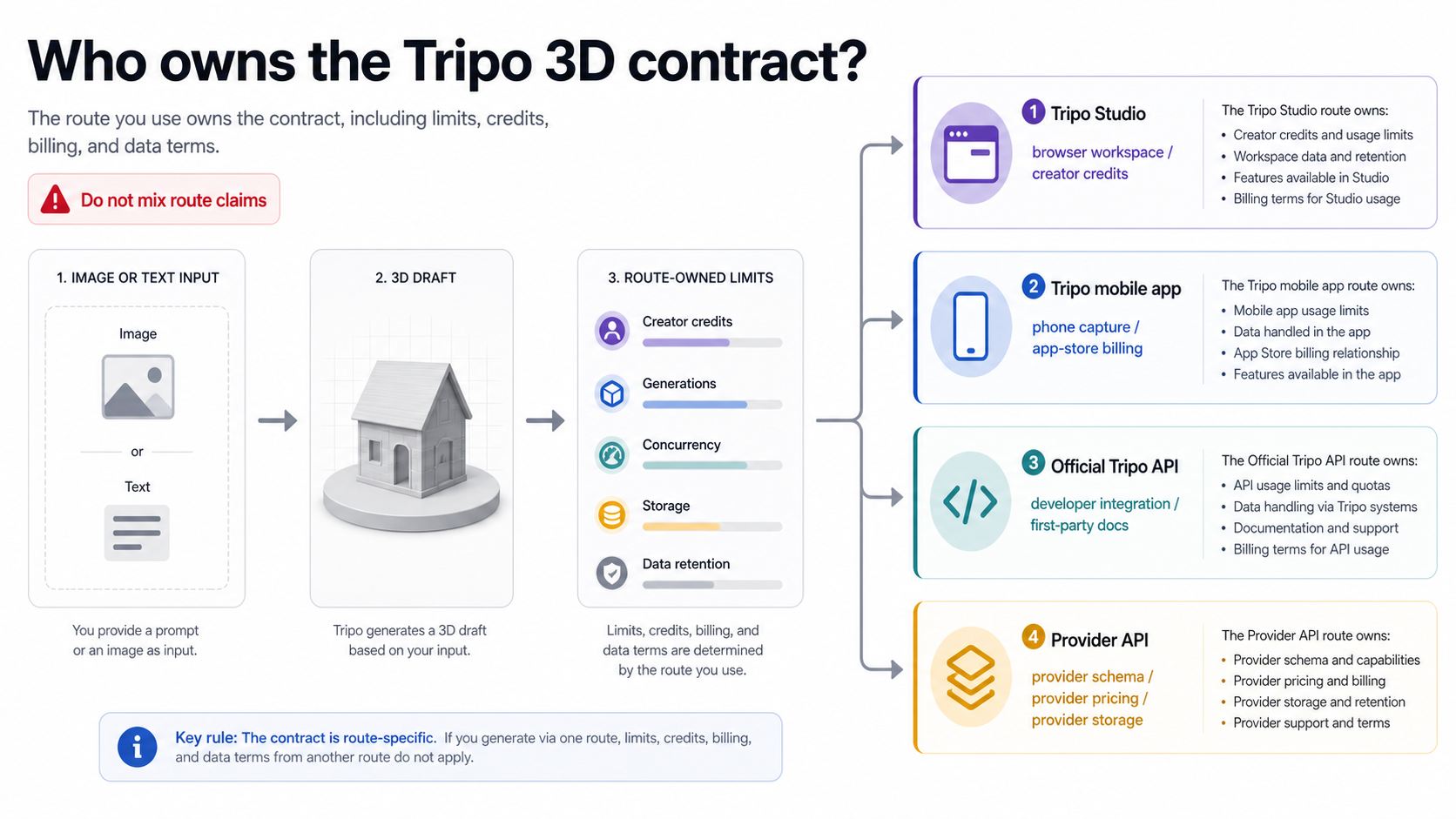
Route ownership is the difference between a safe test and a misleading integration plan. The same model family can appear in a browser product, an app listing, a developer page, and a provider endpoint. Those routes can differ in login, billing, queue behavior, uploaded-file handling, download format, support, and terms.
Tripo Studio is the right first stop when the reader needs an official, visual, low-setup test. It puts plan limits, credits, generation history, privacy options, and Studio-only features closest to the work. It is also where Smart Mesh P1.0 was described as available in the official material checked for this run.
The mobile app route fits casual capture. The Apple App Store page for Tripo AI - 3D Model Generator listed Holymolly Limited as developer, showed the app as free with in-app purchases, and surfaced ratings and reviews. That helps prove a real mobile route exists, but reviews are market feedback, not a production contract.
The official API route fits teams that need automation. Use the official Tripo API page for capability boundaries, then verify the current platform docs or console before writing production code. The direct docs surface was JavaScript-rendered during research, so no first-party endpoint example belongs in the body unless it is rechecked from the live developer documentation.
Provider APIs are a different branch. The fal.ai Tripo image-to-3D page exposes a provider-owned route with fal authentication, image_url, queue/result retrieval, PBR/texture/quad options, and output files such as a model mesh and rendered preview. That is useful if fal is the route you intend to bill and operate through. It is not proof of Tripo's official API pricing, retention, queue, or support behavior.
Before choosing any API route, write down four owners: account owner, bill owner, upload owner, and support owner. If those four owners are not the same company, keep their claims in separate columns.
First Safe Workflow
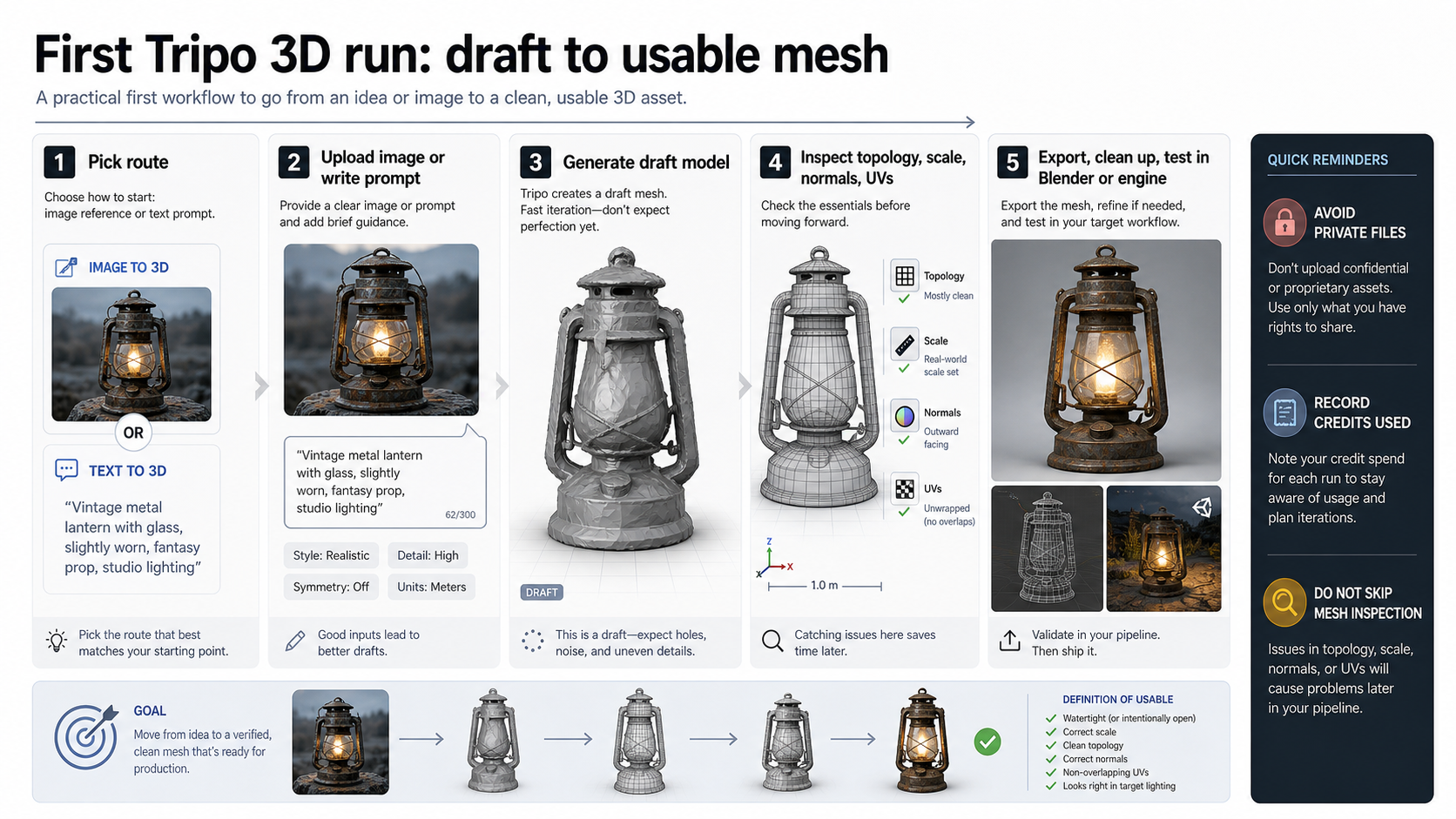
A controlled first run should prove the route before proving artistic quality. Start with a source image or prompt you are allowed to process. If the image contains private people, client products, unreleased designs, scans, or licensed material, do not upload it until the route's retention, deletion, training-use, support, and output-rights language is acceptable.
Then keep the first generation narrow. A good first image-to-3D test uses one object, a clean background, visible silhouette, and stable lighting. A good text-to-3D test describes one object, one style, and one intended use. Avoid asking for a complex scene, a rigged character, a print-ready object, and game-ready topology in one prompt. A first run should answer whether Tripo understands the asset class and whether the route behaves predictably.
Record the details beside the output:
| Field | Why it matters |
|---|---|
| Route | Studio, app, official API, or provider route decides the contract |
| Checked date | Plan and API details can change |
| Input type | Image, text, multi-image, or provider-specific schema affects repeatability |
| Credits or bill owner | Cost belongs to the route, not just the model name |
| Output files | Mesh, texture, preview, PBR, quad, or other options need route proof |
| Cleanup outcome | The final asset depends on what survives the target tool |
After generation, open the output in the real next tool. For many readers that means Blender, Unity, Unreal, a web viewer, a product configurator, or a 3D-print slicer. Do not judge the asset only from the Tripo preview. The target tool exposes scale, normals, UVs, texture behavior, polygon density, rigging issues, and import failures.
If the first output fails, change one variable at a time. Try a cleaner source image, a simpler prompt, a different route option, or Smart Mesh where available. Do not burn credits by changing source, prompt, settings, and route all at once.
Mesh Readiness Checklist
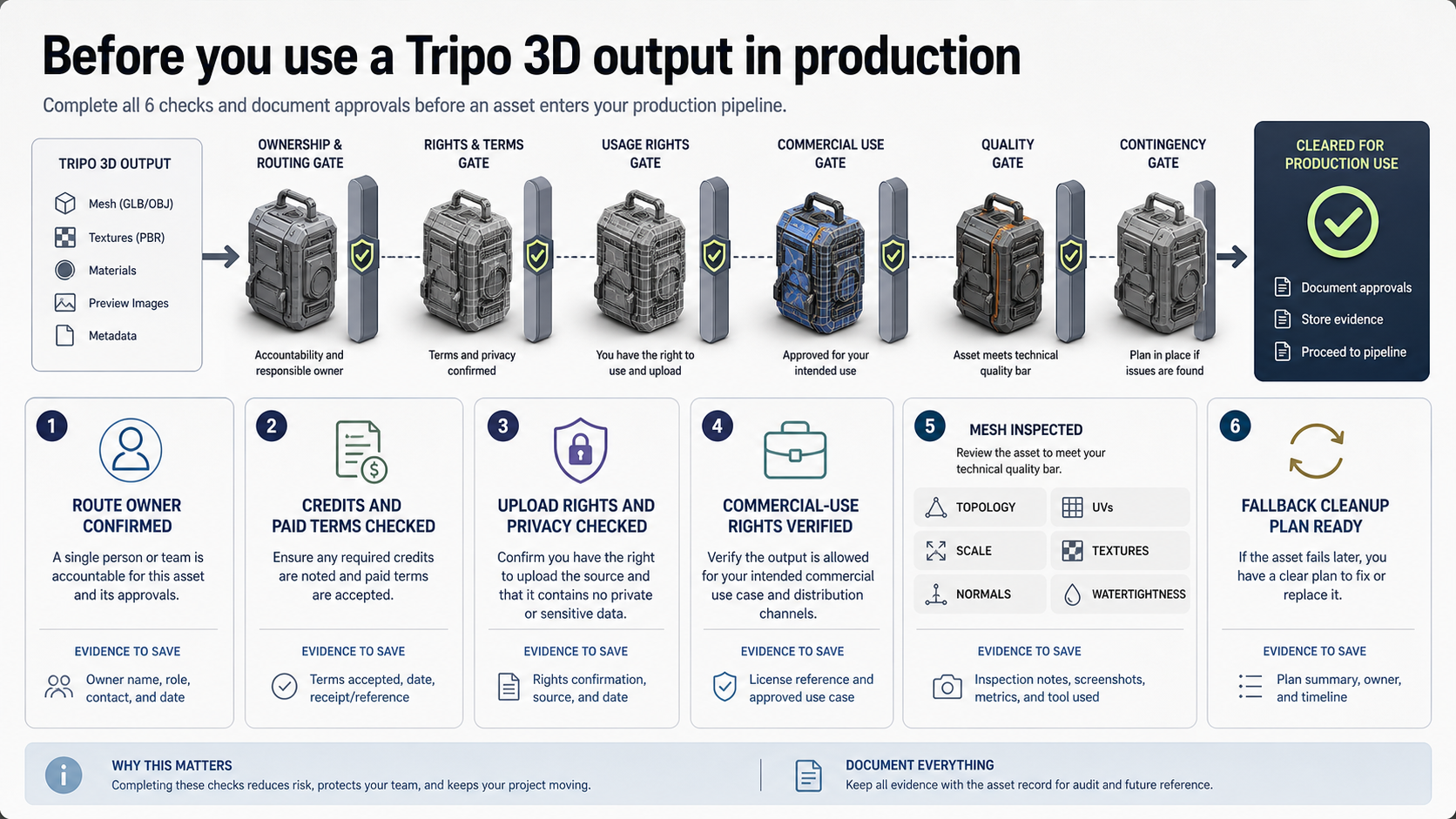
Production readiness starts after the model looks promising. A usable mesh must survive the workflow that will actually receive it. For a game asset, that may mean low-poly cleanup, UV consistency, texture control, scale, collision, rigging, and engine import. For product visualization, it may mean silhouette accuracy, material cleanup, normal direction, lighting behavior, and render fidelity. For 3D printing, it may mean watertight geometry, wall thickness, manifold checks, and scale.
Use the checklist as a stop rule:
| Check | Accept when | Stop when |
|---|---|---|
| Route and rights | The plan, terms, and bill owner fit the intended use | The output rights depend on a free/public route you have not reviewed |
| Upload safety | The input is public, owned, or allowed under the route | The source is private, client-owned, or contract-bound |
| Geometry | Topology, scale, normals, and polygon density fit the next tool | The preview hides broken geometry or extreme cleanup cost |
| UVs and textures | Materials import predictably and can be edited | Textures are baked in a way your workflow cannot change |
| Rigging or animation | The route supports what the downstream tool needs | A static mesh is being treated as a rigged character |
| Export and storage | Files can be downloaded and retained under the selected route | Download limits, history limits, or provider URLs are unclear |
The cleanest mental model is "draft, then accept." Tripo can reduce the time needed to reach a candidate 3D asset. Acceptance still happens in the downstream tool, under the selected route's rights and storage rules.
When Tripo Is the Wrong First Tool
Tripo is not always the best first move. If the asset must match engineering dimensions, start with CAD or a modeling workflow built for precision. If the source image is confidential, use a route with explicit upload governance or keep the work local. If the final mesh needs strict topology for deformation, game animation, or retopology standards, budget cleanup time or choose a workflow that gives topology control earlier.
Tripo is also the wrong shortcut when the decision depends on a specific unverified claim. Do not choose it because a provider page says a route is cheap, because a demo says output is production-ready, or because a preview looks clean. Choose it after the route, rights, upload policy, output files, and mesh checks fit the job.
Alternatives should be selected by constraint, not by hype. A different AI 3D tool may be better for topology. A manual Blender pass may be better for a hero asset. Photogrammetry may be better for real objects that need shape fidelity. CAD remains better for manufactured parts. Tripo stays useful when speed to draft is the bottleneck and inspection is part of the workflow.
FAQ
Is Tripo free?
Tripo has a free Basic Studio plan as checked on May 17, 2026, but free credits are mainly a testing route. The checked plan listed 300 monthly credits, limited downloads, and public-model constraints. Review the current pricing page and terms before using output for private, commercial, marketplace, or client work.
Does Tripo have an official API?
Yes, Tripo has an official API positioning page for generative 3D workflows. Use it as the first-party developer route, then check the current platform documentation or console before publishing endpoint code, pricing assumptions, Smart Mesh API availability, or production integration details.
Is fal.ai the same as the official Tripo API?
No. fal.ai is a provider-owned route that can expose Tripo model functionality through fal authentication, queue behavior, schema, pricing, storage, and result URLs. It can be useful for testing, but provider terms are not the same as Tripo's official account or API contract.
Can Tripo output be used in Blender, Unity, or Unreal?
It can be a starting point, but the output needs inspection in the target tool. Check topology, scale, normals, UVs, textures, material behavior, polygon density, and any rigging or collision requirements before treating the model as production-ready.
Can Tripo output be used for 3D printing?
Only after geometry checks. A visual preview does not prove watertightness, wall thickness, manifold structure, or printable scale. Run the output through the slicer or mesh repair workflow required by the printer.
Is Smart Mesh available through every route?
No blanket claim is safe. The official Smart Mesh P1.0 article checked on May 17, 2026 described Studio availability and said API access would be available soon. Check the current Studio, API, or provider route before relying on Smart Mesh in a workflow.
What image should be used for the first test?
Use a non-sensitive image with one clear object, visible silhouette, simple background, and stable lighting. Avoid private, client, unreleased, or licensed source material until the upload and output-rights contract fits the job.
When should another tool be used first?
Use another tool first when precision dimensions, private local processing, strict topology, rigging control, 3D-printing accuracy, or predictable production mesh structure matters more than speed to a draft.