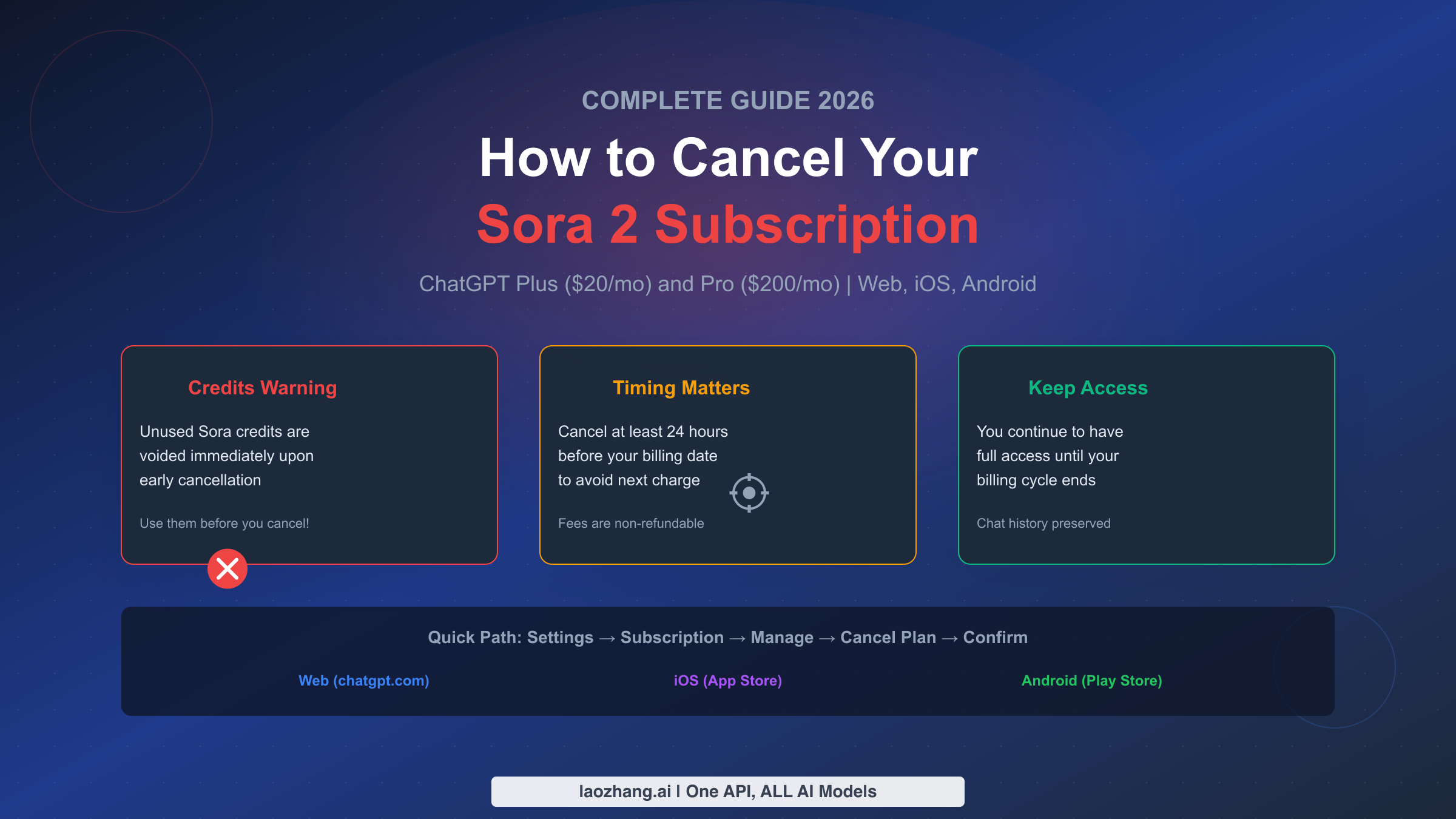
Canceling your Sora 2 subscription requires knowing exactly where you subscribed and understanding what happens to your unused video generation credits. Whether you signed up through the ChatGPT website, the iOS App Store, or Google Play, the cancellation process differs significantly for each platform. This guide walks you through the complete cancellation process while helping you preserve maximum value from your remaining credits.
The key facts you need to know upfront: cancel at least 24 hours before your billing date to avoid the next charge, unused Sora credits are voided immediately if you cancel early, and you maintain full access until your current billing period ends. Understanding these rules helps you make an informed decision about when and how to cancel.
TL;DR
To cancel your Sora 2 subscription:
- Web: ChatGPT → Settings → Subscription → Manage → Cancel Plan
- iOS: Settings app → Your Name → Subscriptions → ChatGPT → Cancel
- Android: Play Store → Profile → Payments → Subscriptions → ChatGPT → Cancel
Critical points:
- Cancel 24+ hours before billing to avoid next charge
- Unused Sora credits are lost upon early cancellation
- Access continues until billing cycle ends
- Subscription fees are non-refundable (except EU/UK/Turkey 14-day rule)
First: Identify How You Subscribed
Before attempting to cancel, you must determine where your subscription originated. Canceling in the wrong place will not stop your billing, which is why many users continue getting charged after thinking they've canceled successfully.
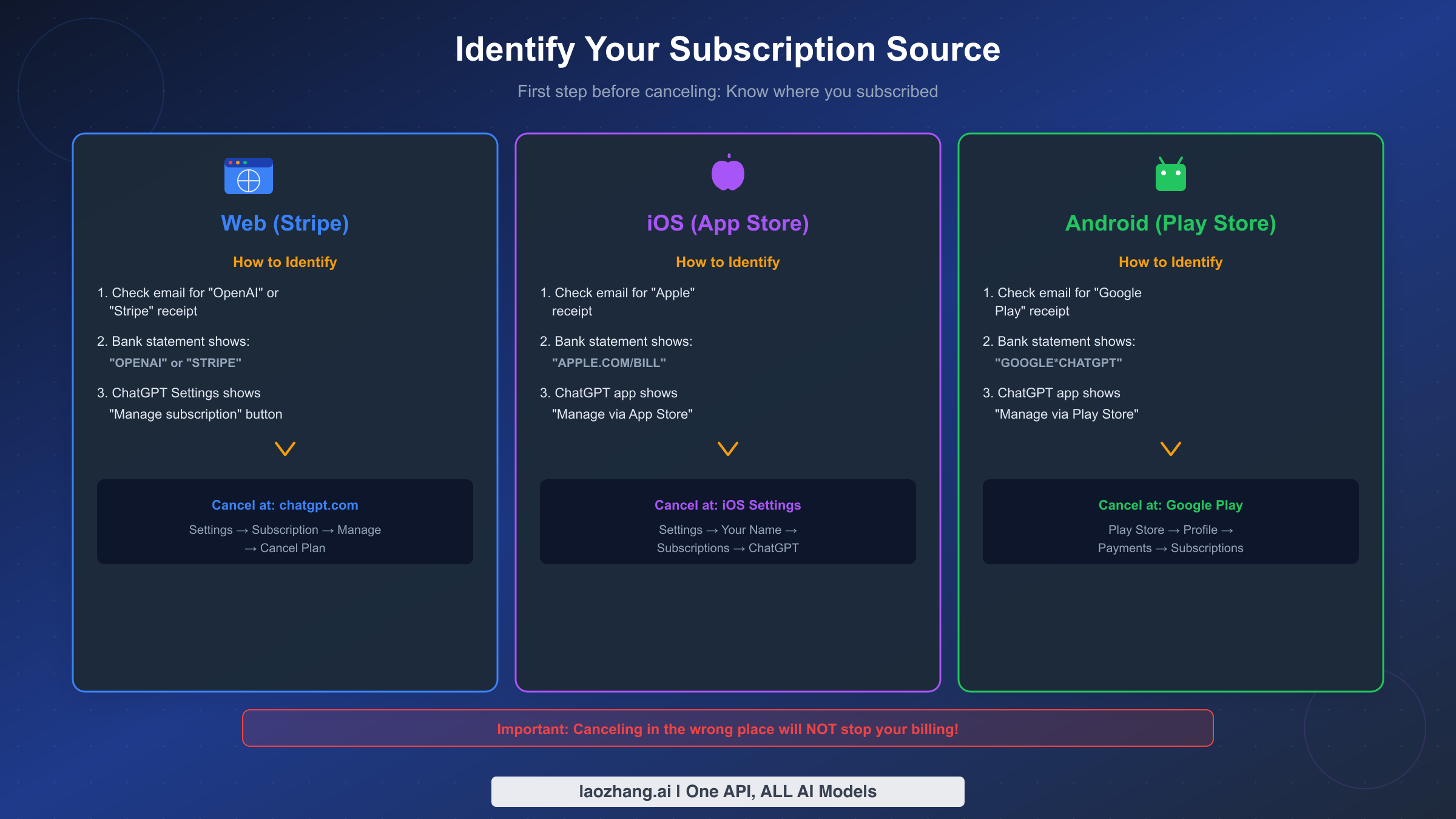
Check your email confirmations first. Search your inbox for subscription confirmations. An email from "OpenAI" or "Stripe" indicates you subscribed through the website. An email from "Apple" means you used the iOS App Store. An email from "Google Play" confirms an Android subscription.
Look at your bank or credit card statement. The charge descriptor reveals your subscription source. Charges showing "OPENAI" or "STRIPE" mean web subscription. "APPLE.COM/BILL" indicates iOS App Store billing. "GOOGLE*CHATGPT" or similar patterns point to Google Play.
Check within the ChatGPT app or website. Navigate to Settings and look at the subscription section. If you see a "Manage subscription" button that opens a Stripe portal, you subscribed via web. If the app directs you to the App Store or Play Store, you subscribed through that platform. This distinction is critical because attempting to cancel through the wrong channel leaves your billing active.
The reason this matters cannot be overstated. OpenAI cannot cancel subscriptions made through Apple or Google. Apple cannot cancel subscriptions made directly with OpenAI. Using the wrong cancellation path wastes your time and potentially costs you another billing cycle.
Before You Cancel: What Happens to Your Sora Credits
Understanding the credit system before canceling helps you avoid losing significant value. Sora video generation credits represent a substantial portion of what you're paying for, and the rules around cancellation directly impact whether you extract value from those credits.
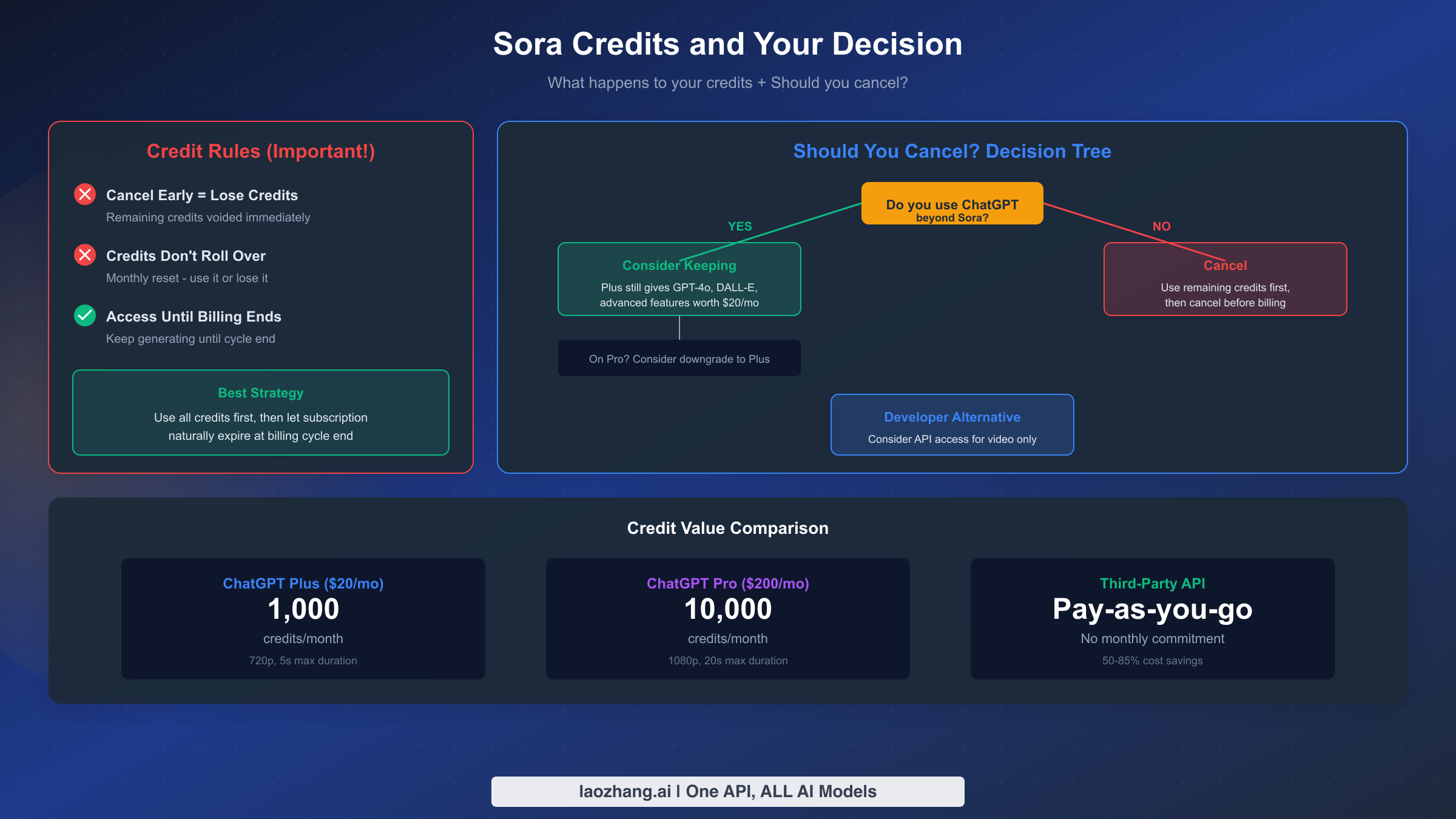
Credits are voided immediately upon early cancellation. When you cancel your subscription before the billing cycle ends, any remaining Sora credits disappear instantly. ChatGPT Plus includes 1,000 credits monthly for 720p, 5-second videos. ChatGPT Pro includes 10,000 credits monthly for 1080p videos up to 20 seconds. Canceling with 500 unused credits means those credits vanish without generating any value.
Credits do not roll over between months. Even if you stay subscribed, your credits reset at each billing cycle. The "use it or lose it" design means unused credits from last month don't accumulate. This matters for cancellation timing because waiting until near your billing date doesn't preserve credits from the current period for next month.
The optimal cancellation strategy combines timing with credit usage. First, use all your remaining credits before the cancellation takes effect. Generate whatever videos you've been planning. Second, initiate cancellation close to your billing date to maximize your access period. The ideal approach: use credits throughout the month, then cancel 24-48 hours before your next billing date.
For users with significant unused credits, consider a "credit burn" session before canceling. Generate multiple videos exploring different prompts, styles, and durations. Export everything you might want. Once you cancel early, those credits become permanently inaccessible.
The access continuation policy works in your favor. After canceling, you retain full access to ChatGPT Plus or Pro features, including remaining Sora functionality, until your current billing period ends. You just won't be charged again after that period. For more details on Sora video generation limits, understanding your credit allocation helps maximize value extraction before canceling.
Should You Cancel? A Decision Framework
Not everyone who considers canceling should actually proceed. The subscription provides value beyond Sora video generation, and some users benefit from keeping their plan even if they reduced their Sora usage.
Cancel if you subscribed primarily for Sora and don't use other ChatGPT features. If your main reason for upgrading to Plus or Pro was accessing Sora 2, and you rarely use GPT-4o, DALL-E image generation, advanced data analysis, or custom GPTs, cancellation makes financial sense. The free ChatGPT tier provides substantial functionality for casual users.
Consider keeping if you actively use ChatGPT beyond Sora. ChatGPT Plus at $20/month includes priority access during peak times, faster response speeds, access to the latest models, DALL-E image generation, and advanced features like Canvas. If you use these features regularly, the subscription retains value independent of Sora usage. The free tier was discontinued for Sora, but ChatGPT's core features remain compelling for many users.
Evaluate the downgrade option for Pro subscribers. If you're on ChatGPT Pro at $200/month and your Sora usage doesn't justify that tier, consider downgrading to Plus instead of full cancellation. You'll still get 1,000 Sora credits monthly, retain ChatGPT Plus benefits, and save $180 monthly. The downgrade option isn't prominently advertised but remains available through the subscription management interface.
Consider API access as a developer alternative. For users who only need video generation without the ChatGPT interface, third-party API access can be more cost-effective. Pay-as-you-go pricing means you only pay for what you generate, without monthly commitments. The cheapest Sora 2 API options offer 50-85% cost savings compared to subscription pricing for similar generation volumes.
Your usage patterns over the past month provide the best guidance. Review your ChatGPT history. Count how many Sora videos you generated. Consider how often you used other Plus/Pro features. If the numbers suggest low utilization relative to cost, cancellation becomes the rational choice.
Cancel on Web (chatgpt.com)
Web subscriptions managed through Stripe follow a straightforward cancellation path. This applies if you originally subscribed through the ChatGPT website rather than a mobile app store.
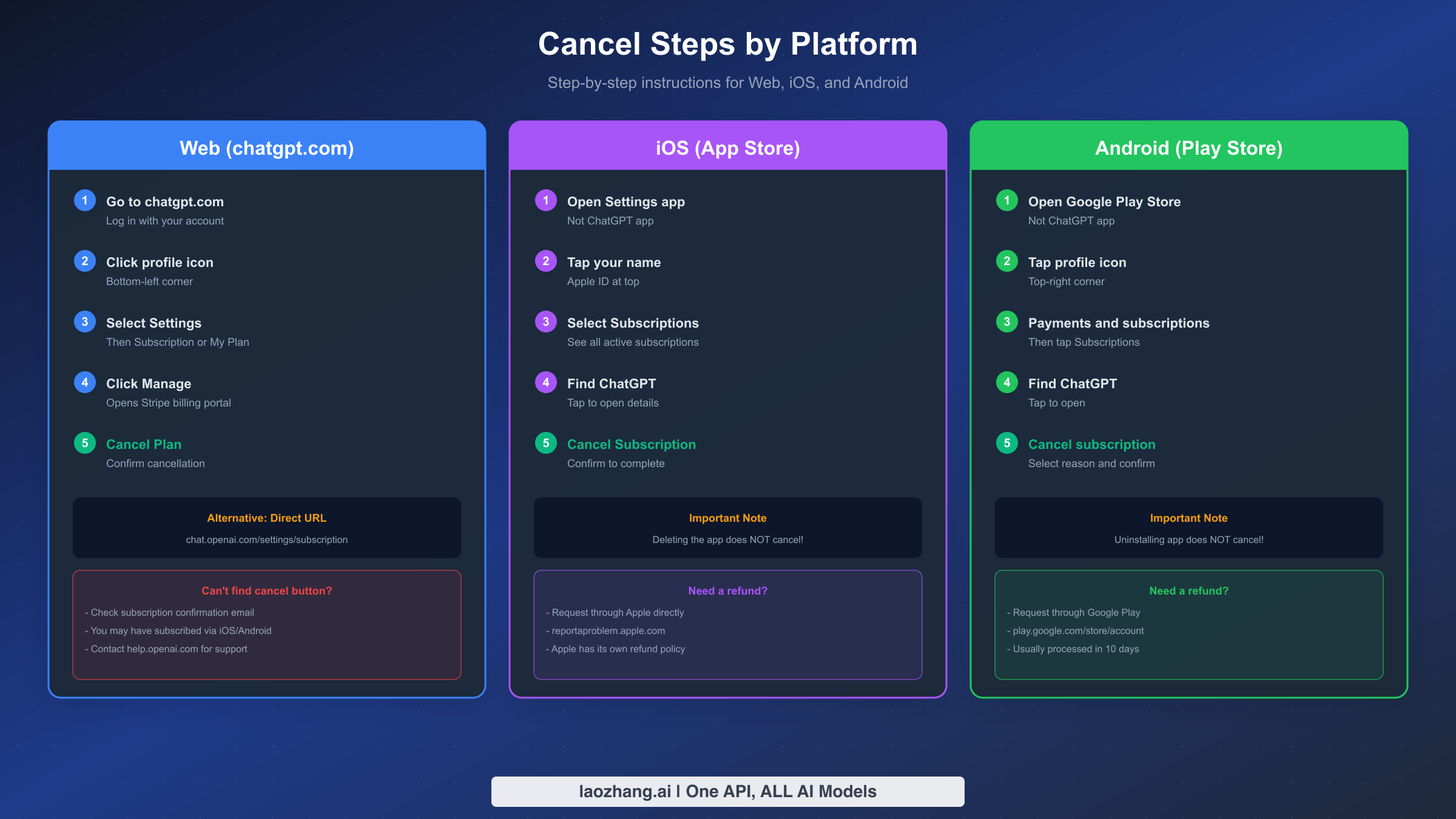
Navigate to your subscription settings. Go to chatgpt.com and log in with your account. Click your profile icon in the bottom-left corner of the interface. Select "Settings" from the menu that appears. Look for "Subscription" or "My Plan" in the settings options.
Access the Stripe billing portal. Click the "Manage" button next to your subscription details. This opens a new page powered by Stripe, OpenAI's payment processor. The Stripe portal displays your current plan, billing date, and payment method.
Complete the cancellation. In the Stripe portal, look for "Cancel plan" or similar wording. Click to initiate cancellation. You'll see a confirmation screen explaining that access continues until your billing period ends. Confirm the cancellation to complete the process.
Verify the cancellation succeeded. Return to ChatGPT settings and check your subscription status. It should now show a cancellation date or "Cancels on [date]" rather than an active renewal. Save or screenshot this confirmation for your records.
Alternative method if the standard path fails. Some users report difficulty finding the cancel button through normal navigation. Try accessing the subscription page directly at chat.openai.com/settings/subscription. You can also search your email for the original subscription confirmation from OpenAI and use links within that email to access your billing settings.
The troubleshooting approach for web cancellation issues starts with verifying your subscription source. If you can't find cancellation options in the Stripe portal, your subscription likely originated through iOS or Android, requiring platform-specific cancellation. Contact OpenAI support through help.openai.com if you believe you have a web subscription but cannot access cancellation options.
Cancel on iPhone or iPad (iOS)
iOS subscriptions must be canceled through Apple's subscription management, not through the ChatGPT app or OpenAI's website. Apple handles all billing for subscriptions initiated through the App Store.
Open the Settings app on your device. This is Apple's system Settings app with the gear icon, not the ChatGPT app. You cannot cancel through the ChatGPT app itself because Apple manages the billing relationship.
Navigate to your Apple ID subscriptions. Tap your name at the top of Settings to access Apple ID settings. Scroll down and tap "Subscriptions." You'll see a list of all active subscriptions associated with your Apple ID.
Find and cancel the ChatGPT subscription. Locate ChatGPT in your subscriptions list. Tap it to view subscription details including your renewal date and price. Tap "Cancel Subscription" at the bottom of the screen. Confirm the cancellation when prompted.
Understand what happens after iOS cancellation. Your ChatGPT Plus or Pro access continues through the current paid period. Apple shows when your access expires. After that date, you'll revert to the free ChatGPT tier. Your chat history remains accessible, but Plus/Pro features including Sora become unavailable.
Important: Deleting the ChatGPT app does not cancel your subscription. Many users make this mistake, assuming app removal stops billing. Apple continues charging your payment method regardless of whether the app is installed. Always formally cancel through Settings before assuming you've stopped payments.
For iOS refund requests, Apple handles these separately from OpenAI. Visit reportaproblem.apple.com while logged into your Apple ID. Find the ChatGPT subscription charge and request a refund. Apple has its own refund policies that may differ from OpenAI's direct subscription terms. Requests for accidental subscriptions or technical issues are more likely to succeed than general cancellation refund requests.
Cancel on Android
Android subscriptions managed through Google Play require cancellation through the Play Store, not the ChatGPT app or OpenAI website.
Open the Google Play Store app. Make sure you're signed into the same Google account that originally purchased the subscription. Using a different Google account will show no ChatGPT subscription to cancel.
Access your subscriptions. Tap your profile icon in the top-right corner. Select "Payments & subscriptions" from the menu. Tap "Subscriptions" to see all active Play Store subscriptions.
Cancel the ChatGPT subscription. Find ChatGPT in your subscriptions list and tap it. Review the subscription details including renewal date. Tap "Cancel subscription" and select a reason from the options provided. Confirm your cancellation.
Verify cancellation success. Your subscription should now show a cancellation date. You'll retain access until that date, after which the subscription won't renew.
Uninstalling the ChatGPT app does not cancel your subscription. This is identical to the iOS situation. Google continues billing regardless of app installation status. Always formally cancel through the Play Store.
For Android refund requests, use Google Play's support system. Go to play.google.com/store/account on a web browser. Find the ChatGPT subscription or transaction. Use the "Request a refund" option if available. Google typically processes refund requests within 1-4 business days, though eligibility depends on timing and usage.
Can You Get a Refund?
Understanding refund eligibility helps set realistic expectations. The standard policy is that ChatGPT subscription fees are non-refundable, but exceptions exist.
Standard policy: No refunds for normal cancellations. OpenAI's terms state that subscription fees are non-refundable. Canceling doesn't entitle you to a prorated refund for unused days. If you cancel on day 5 of a 30-day billing cycle, you keep access for the remaining 25 days but receive no money back.
Exception: EU, UK, and Turkey 14-day cooling-off period. Consumer protection regulations in the European Union, United Kingdom, and Turkey provide a 14-day right to cancel new subscriptions for a full refund. If you subscribed within the past 14 days and reside in these regions, you're entitled to a complete refund upon request.
Exception: Accidental purchases within 14 days. OpenAI generally honors refund requests for accidental subscriptions if you contact them within 14 days of the charge. This applies to users who didn't intend to subscribe or were charged unexpectedly.
Exception: Billing errors and unauthorized charges. If you were charged incorrectly, double-billed, or experienced unauthorized charges, OpenAI processes refunds for these situations. Document the error and contact support promptly.
How to request a refund from OpenAI. Navigate to help.openai.com while logged into your ChatGPT account. Look for the chat widget in the bottom-right corner. Explain your refund request and provide relevant details. Include your billing date, the charge amount, and why you believe you qualify for a refund. OpenAI typically responds within 1-3 business days.
For a more detailed walkthrough of the refund request process including templates and success strategies, see our comprehensive guide on canceling ChatGPT Plus subscriptions and requesting refunds.
Apple and Google refund processes are separate. If you subscribed through iOS or Android, OpenAI cannot process your refund. Apple subscriptions require refund requests through Apple. Google Play subscriptions require requests through Google. Each platform has its own policies that may differ from OpenAI's direct subscription terms.
User reports suggest that refund requests made within 48-72 hours of subscription with minimal usage have approximately 70% success rates. Requests after heavy usage or extended time periods face much lower approval odds.
What Happens After You Cancel
Understanding the post-cancellation timeline helps you plan your transition away from the paid subscription.
Access continues until your billing period ends. Cancellation stops future billing but doesn't immediately revoke access. If your billing date is January 31 and you cancel on January 15, you retain full Plus or Pro access through January 31. Use this time to finish any projects requiring paid features.
Your chat history remains accessible. Canceling doesn't delete your conversation history. All previous chats, including those using paid features, stay in your account. You can review, export, or reference them after reverting to the free tier.
Custom GPTs become inaccessible but aren't deleted. If you created custom GPTs, they become unusable on the free tier but aren't permanently removed. Resubscribing later restores access to your custom creations.
Sora videos you generated remain available. Videos created before cancellation aren't deleted. You can still view, download, and use them. You just can't generate new videos without an active subscription or API access.
Re-subscribing is straightforward. If you change your mind, you can resubscribe through the same process used originally. Your account history, including custom GPTs and preferences, carries over to the renewed subscription.
Consider alternative options for video generation. If you still need occasional AI video generation without a subscription commitment, third-party API access provides pay-as-you-go pricing. Services like laozhang.ai offer API access to Sora 2 and other video models without monthly commitments, with potential cost savings of 50-85% for equivalent generation volumes. Explore the full documentation at docs.laozhang.ai for API integration details.
The transition period between cancellation and access expiration is your opportunity to maximize remaining value. Generate any planned videos, export important data, and ensure you've captured everything you might need from the paid subscription.
Frequently Asked Questions
How do I find my billing date?
Go to ChatGPT Settings → Subscription (or My Plan). Your billing date appears in the subscription details. For iOS, check Settings → Your Name → Subscriptions → ChatGPT. For Android, check Play Store → Profile → Payments → Subscriptions → ChatGPT. Your billing date is typically the same day of the month you originally subscribed.
Can I pause my subscription instead of canceling?
OpenAI doesn't offer a pause option for ChatGPT subscriptions. You must either maintain active billing or cancel entirely. The workaround is canceling and resubscribing later when you need paid features again.
What happens to my custom GPTs after canceling?
Custom GPTs you created become inaccessible on the free tier but aren't deleted. They're preserved in your account. If you resubscribe later, your custom GPTs become usable again without needing recreation.
Can I downgrade from Pro to Plus instead of canceling?
Yes, but the process isn't straightforward. You typically need to cancel Pro first, wait for the billing period to end, then subscribe to Plus. Some users report success contacting OpenAI support to arrange a direct downgrade. Check your subscription settings for downgrade options before assuming cancellation is necessary.
How long does the cancellation process take?
The cancellation itself is immediate once confirmed. Access continues until your billing period ends. The entire process takes 2-5 minutes through any platform. There's no processing delay - your cancellation is effective as soon as you confirm it.
Will I lose my chat history after canceling?
No. Your complete chat history remains in your account regardless of subscription status. You can continue accessing, searching, and exporting previous conversations on the free tier. The history limitation only applies to new conversations and features.
Can I cancel and get a full refund if I haven't used the service?
Possibly, depending on timing and region. EU/UK/Turkey residents have a 14-day cooling-off period with guaranteed refund rights. Other regions depend on OpenAI's discretion for unused subscriptions. Requests within 48-72 hours with minimal usage have the best success rates. Contact support promptly if you believe you qualify.
Making an informed cancellation decision protects your finances while ensuring you've extracted maximum value from your subscription. Use your remaining credits, time your cancellation appropriately, and understand the refund policies that apply to your situation. Whether you're permanently leaving or taking a break, following the correct platform-specific cancellation process ensures clean billing termination.