If you've started using Nano Banana Pro (Google's Gemini 3 Pro Image model) for AI image generation, you've probably noticed a new line item on your bill: thinking tokens. Unlike traditional image generation APIs with straightforward per-image pricing, Nano Banana Pro charges separately for its internal reasoning process—and this can significantly impact your costs.
This guide breaks down exactly what thinking tokens cost, how they affect your per-image expenses, and proven strategies to reduce your thinking token spend by up to 42%.
Whether you're an individual developer testing Nano Banana Pro, a startup building an AI-powered product, or an enterprise team processing thousands of images monthly, understanding thinking token economics is essential for budget planning and cost optimization. We'll cover everything from basic pricing to advanced optimization strategies, including real cost scenarios and code examples you can implement immediately.
Quick Answer: Thinking Tokens Cost Breakdown
TL;DR: Thinking tokens cost $12 per million tokens on the standard API, or $6 per million with the Batch API (50% discount). For most users, this adds $0.01-$0.03 per image to your total cost.
| Pricing Tier | Cost per Million Tokens | Per-Image Impact |
|---|---|---|
| Standard API | $12.00 | +$0.01-$0.03 |
| Batch API | $6.00 | +$0.005-$0.015 |
| Third-Party (laozhang.ai) | Included | $0.00 extra |
Quick Cost Formula:
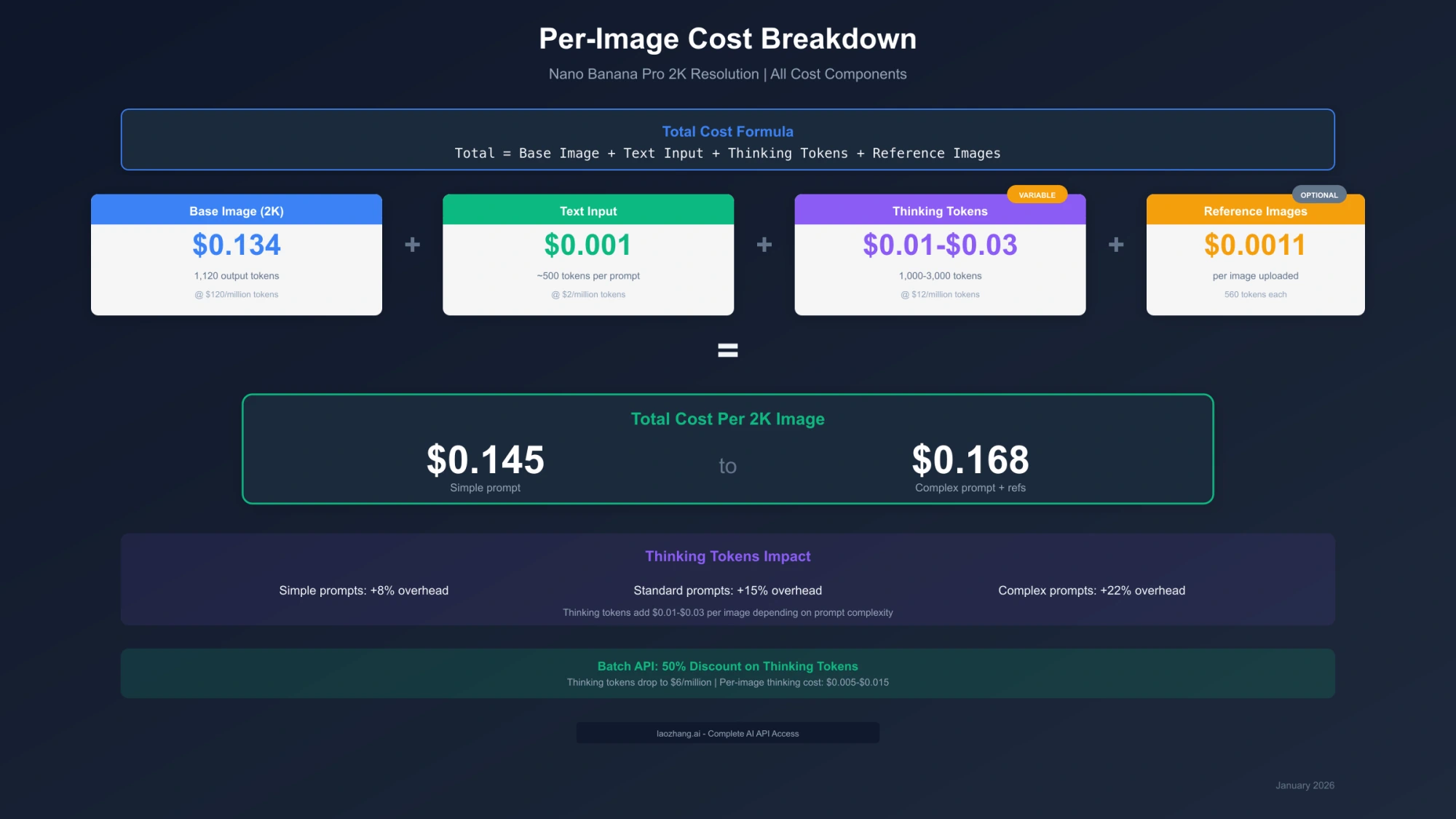
Total Cost = Base Image ($0.134) + Text Input (~$0.001) + Thinking Tokens ($0.01-$0.03) + Reference Images ($0.0011 each)For a typical 2K resolution image with a standard prompt, expect to pay approximately $0.145-$0.168 per image, with thinking tokens contributing 7-18% of your total cost.
At-a-Glance Cost Comparison:
| Scenario | Monthly Images | Google Standard | Google Batch | Third-Party |
|---|---|---|---|---|
| Hobby | 50 | $7.75 | $7.25 | $4.50 |
| Professional | 200 | $31.00 | $29.00 | $18.00 |
| Business | 500 | $77.50 | $72.50 | $45.00 |
| Enterprise | 2,000 | $310.00 | $290.00 | $180.00 |
Thinking tokens included in calculations. Third-party pricing from laozhang.ai.
What Are Thinking Tokens and Why They Matter
Thinking tokens represent a fundamental shift in how AI image generation works. Unlike traditional models that directly transform a prompt into an image, Nano Banana Pro employs Chain-of-Thought (CoT) reasoning—an internal reasoning process that plans, analyzes, and refines the generation strategy before producing pixels.
This approach was first popularized in large language models like GPT-4 and Claude, where allowing the model to "think through" a problem before answering dramatically improved accuracy. Google has now applied the same principle to image generation, and the results are remarkable—but they come at a cost.
How Thinking Mode Works
When you submit an image generation request to Nano Banana Pro, the model goes through several internal steps:
-
Prompt Analysis: The model interprets your text prompt, identifying key elements, style requirements, and composition goals. It breaks down complex descriptions into manageable components and determines the relationships between different visual elements.
-
Reference Processing: If you've included reference images, the model analyzes their visual features—color palettes, textures, lighting conditions, spatial arrangements—and plans how to incorporate these elements into the new generation.
-
Generation Planning: The model creates an internal plan for how to construct the image. This includes decisions about composition, perspective, focal points, and how different elements should interact spatially.
-
Coherence Verification: Before generating pixels, the model verifies that its plan will produce a coherent, physically plausible image. This step catches potential issues like impossible lighting, inconsistent perspectives, or conflicting style elements.
-
Quality Optimization: Final adjustments are made to ensure high-quality output, including decisions about detail levels, color harmony, and stylistic consistency.
All of this reasoning happens in what Google calls the "thinking" phase, and it generates thinking tokens—internal tokens that capture the model's reasoning process. These tokens are billed separately from your input and output tokens.
The Technical Foundation
Nano Banana Pro's thinking process is built on the same transformer architecture that powers Gemini 3's language capabilities. When processing an image generation request, the model:
- Tokenizes your text prompt into semantic units
- Processes any reference images into visual embeddings
- Generates a sequence of "thought" tokens that represent its reasoning
- Uses these thoughts to guide the image diffusion process
The number of thinking tokens generated depends on several factors:
| Factor | Impact on Thinking Tokens |
|---|---|
| Prompt length | Longer prompts = more analysis needed |
| Prompt complexity | Multiple subjects = more planning |
| Reference images | Each image adds analysis overhead |
| Style requirements | Specific styles need more consideration |
| Composition details | Precise layouts increase reasoning |
This variable thinking token generation is why your costs can differ significantly between simple and complex prompts—even when generating images at the same resolution.
Understanding this technical foundation helps explain why optimization strategies work. When you use thinking_level="low", you're telling the model to compress its reasoning process—skip elaborate planning for simple prompts, reduce verification steps, and generate images more quickly. The quality tradeoff is minimal for straightforward prompts but becomes noticeable for complex multi-element compositions where thorough planning matters.
Why Separate Billing?
Google bills thinking tokens separately for several reasons:
| Factor | Impact |
|---|---|
| Variable Processing | Complex prompts require more reasoning than simple ones |
| Quality Control | More thinking generally produces better results |
| Resource Allocation | Thinking uses significant GPU compute resources |
| User Control | Allows users to balance quality vs. cost |
The key insight is that thinking tokens are not optional junk—they directly contribute to image quality. A prompt that generates more thinking tokens typically produces more coherent, detailed, and accurate images.
Thinking Tokens vs. Other Cost Components
To put thinking costs in perspective, here's how they compare to other billing components:
| Component | % of Total Cost | Controllable? | Impact on Quality |
|---|---|---|---|
| Image Output | 85-90% | Resolution choice | Direct |
| Thinking Tokens | 7-18% | thinking_level parameter | Significant |
| Text Input | <1% | Prompt length | Minimal |
| Reference Images | 0-3% | Number of references | Indirect |
Thinking tokens sit in a middle ground—they're a meaningful cost factor but not the dominant expense. The image output tokens (the actual generated image data) account for 85-90% of your per-image cost at any resolution. However, thinking tokens are the most controllable cost factor, which is why optimization strategies focus heavily on them.
Quality-Cost Correlation
Google's research indicates that thinking tokens and output quality are correlated, though with diminishing returns:
| Thinking Token Range | Quality Improvement | Cost Increase |
|---|---|---|
| 0-500 | Baseline | Baseline |
| 500-1,500 | +15-25% | +100% |
| 1,500-3,000 | +10-15% | +200% |
| 3,000-6,000 | +5-10% | +400% |
| 6,000+ | +2-5% | +700%+ |
This diminishing returns curve is why the thinking_level="low" option exists—for simple prompts, the baseline 500-1,000 thinking tokens provide sufficient reasoning, and additional thinking produces marginal quality improvements that may not justify the cost.
Complete Thinking Tokens Pricing (January 2026)
Understanding the full pricing structure helps you accurately predict and optimize your costs.
Token-Based Pricing
Nano Banana Pro uses a token-based pricing model where different token types have different rates:
| Token Type | Standard API | Batch API | Context |
|---|---|---|---|
| Text Input | $2.00/million | $1.00/million | Your prompt text |
| Thinking Tokens | $12.00/million | $6.00/million | Internal reasoning |
| Image Output | $120.00/million | $60.00/million | Generated image data |
| Image Input | $2.00/million | $1.00/million | Reference images |
Key Observation: Thinking tokens cost 6x more than text input tokens but only 10% of image output tokens. This makes them a moderate cost factor—significant enough to optimize, but not the dominant expense.
Per-Image Cost Formula
For a complete picture of per-image costs, use this formula:
Total Cost = (Image Output Tokens × $120/M) + (Text Input Tokens × $2/M) +
             (Thinking Tokens × $12/M) + (Reference Image Tokens × $2/M)
Example Calculation (2K Resolution Image):
| Component | Tokens | Rate | Cost |
|---|---|---|---|
| Image Output (2K) | 1,120 | $120/million | $0.1344 |
| Text Input | ~500 | $2/million | $0.0010 |
| Thinking Tokens | 1,500 (avg) | $12/million | $0.0180 |
| Total | - | - | $0.1534 |
Batch API Discounts
The Batch API offers a flat 50% discount on all token types, including thinking tokens. The tradeoff: your requests are processed within a 24-hour window rather than immediately.
| Feature | Standard API | Batch API |
|---|---|---|
| Thinking Token Rate | $12.00/million | $6.00/million |
| Processing Time | Immediate | Up to 24 hours |
| Best For | Real-time apps | Bulk generation |
| Per-Image Thinking Cost | $0.01-$0.03 | $0.005-$0.015 |
| Minimum Batch Size | 1 request | 1 request |
| Maximum Batch Size | N/A | 100,000 requests |
| Results Availability | Streaming | Webhook or polling |
For batch processing workflows—such as generating product catalogs, social media content libraries, or dataset creation—the Batch API can cut your thinking token costs in half.
Understanding Token Counts by Resolution
The number of tokens generated varies by output resolution. Here's what to expect:
| Resolution | Output Tokens | Thinking Range | Total Per-Image |
|---|---|---|---|
| 1024×1024 (1K) | 560 | 500-4,000 | $0.073-$0.115 |
| 2048×2048 (2K) | 1,120 | 1,000-6,000 | $0.141-$0.206 |
| 1024×1792 (Portrait) | 896 | 800-5,000 | $0.114-$0.167 |
| 1792×1024 (Landscape) | 896 | 800-5,000 | $0.114-$0.167 |
Pro Tip: The 2K resolution generates roughly 2× the output tokens of 1K, but thinking tokens don't scale proportionally. Complex prompts at 1K may generate more thinking tokens than simple prompts at 2K.
This pricing structure means that resolution upgrades primarily affect your output token costs (the dominant expense), while prompt complexity primarily affects your thinking token costs. A strategic user might generate high-complexity images at 1K resolution for concept development, then regenerate selected finals at 2K with simpler, more refined prompts—optimizing both dimensions simultaneously.
How Thinking Affects Your Per-Image Cost
The impact of thinking tokens varies significantly based on prompt complexity. Here's what real-world usage looks like:
Cost by Prompt Complexity
| Prompt Type | Typical Thinking Tokens | Thinking Cost | % of Total |
|---|---|---|---|
| Simple (basic object) | 500-1,000 | $0.006-$0.012 | 4-8% |
| Standard (scene + style) | 1,500-2,500 | $0.018-$0.030 | 12-18% |
| Complex (multi-reference) | 3,000-5,000 | $0.036-$0.060 | 20-30% |
| Advanced (precise composition) | 5,000-8,000 | $0.060-$0.096 | 30-40% |
Monthly Cost Scenarios
Individual Developer (100 images/month):
| Configuration | Thinking Cost | Total Monthly |
|---|---|---|
| All simple prompts | $0.60-$1.20 | $14.50-$15.50 |
| Mixed complexity | $1.80-$3.00 | $15.80-$18.00 |
| All complex prompts | $3.60-$6.00 | $18.60-$22.00 |
Small Team (500 images/month):
| Configuration | Thinking Cost | Total Monthly |
|---|---|---|
| Standard API, mixed | $9.00-$15.00 | $79-$90 |
| Batch API, mixed | $4.50-$7.50 | $74-$82 |
| Third-party API | $0.00 | $45.00 |
Enterprise (2,000+ images/month):
| Configuration | Thinking Cost | Total Monthly |
|---|---|---|
| Standard API | $36-$60 | $316-$396 |
| Batch API (50% off) | $18-$30 | $298-$366 |
| Third-party (~42% savings) | $0.00 | $180.00 |
The data shows that for high-volume users, thinking tokens can add $36-$60 per month at the 2,000 image level—making optimization strategies increasingly valuable.
Hidden Costs You Might Miss
Beyond the obvious thinking token charges, several other factors can affect your total cost:
1. Search Grounding (Optional Feature) If you enable search grounding to incorporate web data, add $0.035 per request on top of all other costs.
2. Context Caching Limitations Unlike text-based Gemini models, Nano Banana Pro does not support context caching for thinking tokens. Every request starts fresh, so there's no way to amortize thinking costs across related requests.
3. Failed Generation Costs If generation fails after thinking is complete, you're still billed for the thinking tokens consumed. Failed requests typically generate 50-100% of normal thinking tokens.
4. Retry Overhead Rate limit retries reset the thinking process entirely. If you hit a rate limit and retry, you'll pay for thinking tokens twice.
| Hidden Cost Factor | Impact | Mitigation |
|---|---|---|
| Search grounding | +$0.035/request | Disable unless needed |
| No context caching | 100% thinking cost each time | Batch similar requests |
| Failed generations | 50-100% wasted thinking | Use proper error handling |
| Rate limit retries | 2× thinking cost | Implement backoff strategies |
Understanding these hidden costs helps you build more accurate cost models and avoid budget surprises.
Controlling Thinking Costs: thinking_level Guide
Google provides the thinking_level parameter to control how much reasoning the model performs. This is your primary tool for managing thinking token costs.
thinking_level Parameter Options
| Setting | Thinking Tokens | Cost Impact | Quality Impact |
|---|---|---|---|
"low" | ~500-1,000 | Save 50%+ | Suitable for simple tasks |
"high" | ~2,000-8,000 | Default cost | Maximum reasoning depth |
Python Implementation:
from anthropic import ThinkingConfig

# Cost-optimized configuration
thinking_config = ThinkingConfig(thinking_level="low")
# Saves 50%+ on thinking tokens

# Quality-focused configuration
thinking_config = ThinkingConfig(thinking_level="high")
# Default, maximum reasoning depth
When to Use Each Level
Use thinking_level="low" for:
- Simple image generation tasks
- High-volume batch processing
- Budget-conscious projects
- Draft/iteration phases
- Social media content
- Non-critical images
Use thinking_level="high" for:
- Complex multi-reference compositions
- High-value commercial imagery
- Product photography
- Print/large format output
- Marketing campaigns
- Premium client deliverables
Migration from thinking_budget
If you previously used the thinking_budget parameter, Google now recommends migrating to thinking_level for Gemini 3 models.
Key Migration Points:
| Aspect | thinking_budget | thinking_level |
|---|---|---|
| Control Type | Token count limit | Quality tier |
| Predictability | Variable | Consistent |
| Google Recommendation | Legacy | Preferred for Gemini 3 |
| Use Both? | ❌ Not recommended | ✅ Use alone |
Migration Example:
# Old approach (thinking_budget)
# thinking_budget = 2000  # Token limit

# New approach (thinking_level)
thinking_config = ThinkingConfig(thinking_level="low")  # or "high"
The thinking_level parameter provides more predictable performance because it lets the model dynamically allocate tokens based on task complexity rather than hitting a hard limit that might truncate reasoning.
Advanced: Combining with Other Parameters
The thinking_level parameter interacts with other Nano Banana Pro settings. Here's how to optimize the combination:
from google.generativeai import types

# Full configuration example
generation_config = types.GenerationConfig(
    thinking_config=types.ThinkingConfig(
        thinking_level="low"  # or "high"
    ),
    temperature=0.7,          # Lower = more consistent
    max_output_tokens=8192,   # For image generation
)

# Create request
response = model.generate_content(
    contents=[prompt],
    config=generation_config
)
Parameter Interactions:
| Parameter | With thinking_level="low" | With thinking_level="high" |
|---|---|---|
| temperature=0.5 | Fastest, most consistent | Balanced quality/speed |
| temperature=0.9 | Quick creative variations | Best for unique images |
| safety_settings=strict | May increase thinking | May increase thinking |
| image_count=4 | 4× thinking (per batch) | 4× thinking (per batch) |
Important Note: When generating multiple images in a single request (image_count > 1), thinking tokens are charged per image, not per request. Generating 4 images means 4× the thinking cost.
Monitoring Your Thinking Token Usage
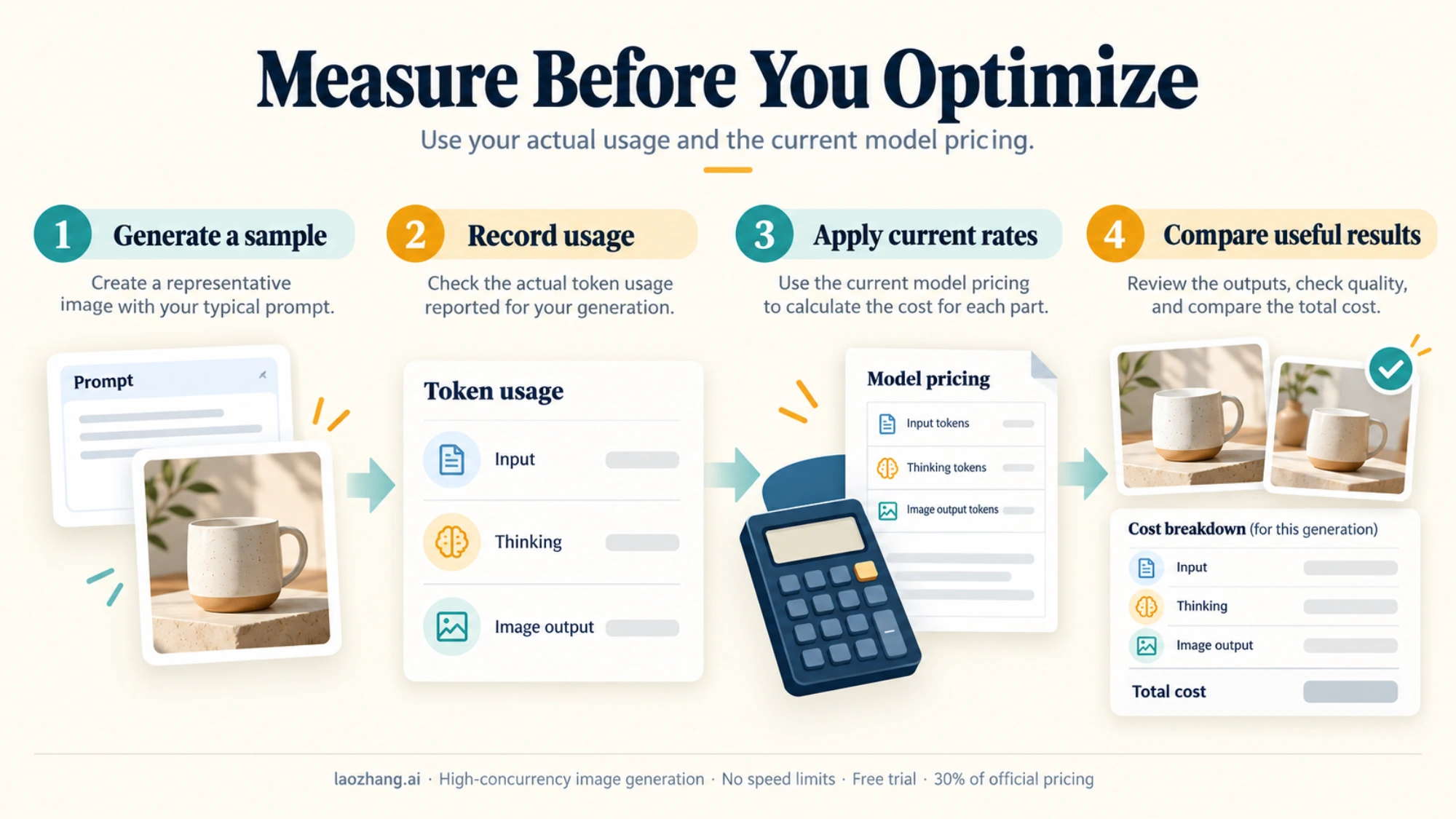
To optimize costs, you need visibility into your actual thinking token consumption. Here's how to track it:
# Extract thinking tokens from response
response = model.generate_content(contents=[prompt], config=config)

usage = response.usage_metadata
print(f"Input tokens: {usage.prompt_token_count}")
print(f"Thinking tokens: {usage.thinking_token_count}")
print(f"Output tokens: {usage.candidates_token_count}")

# Calculate cost
thinking_cost = (usage.thinking_token_count / 1_000_000) * 12.00
print(f"Thinking cost: ${thinking_cost:.4f}")
Building a logging system around this data helps you:
- Identify which prompt types generate the most thinking tokens
- Track cost trends over time
- Optimize prompts that consistently overspend
- Set usage alerts for budget protection
When is Thinking Mode Worth the Extra Cost?
Not every image justifies the full thinking token cost. Here's a decision framework to help you choose:
ROI Analysis Matrix
| Scenario | Thinking Value | Recommended Level | Reasoning |
|---|---|---|---|
| Client deliverable | High | high | Quality critical, cost justified |
| Internal draft | Low | low | Iteration phase, quality less critical |
| Product catalog | Medium | low or high | Volume vs. quality tradeoff |
| Social media | Low-Medium | low | Quick turnaround, good enough quality |
| Marketing hero image | High | high | High visibility, quality premium |
| Dataset generation | Low | low | Volume priority, manual curation |
Quality vs. Cost Decision Framework
Choose maximum thinking (high) when:
- The image will be used in high-visibility contexts
- Precise adherence to complex prompts is required
- Multiple reference images need accurate integration
- The cost of regeneration exceeds the thinking token cost
- Client expectations require premium quality
Choose minimal thinking (low) when:
- Generating variations to select from
- High-volume batch processing
- Quick conceptual exploration
- Budget constraints are primary concern
- Simple, straightforward prompts
Break-Even Analysis
When does the extra thinking cost pay for itself?
| Scenario | Low Thinking Cost | High Thinking Cost | Break-Even |
|---|---|---|---|
| Single generation | $0.006 | $0.030 | If high saves 1 regeneration |
| 5 generations (selecting best) | $0.030 | $0.150 | Need 5+ regen savings |
| Client revision | $0.006 + revision cost | $0.030 | If high avoids revision |
Rule of Thumb: If you expect to regenerate an image more than once with low thinking to get acceptable quality, using high thinking upfront often costs less.
Project Type Recommendations
Based on real-world usage patterns, here are thinking level recommendations by project type:
| Project Type | Recommended Level | Monthly Volume | Est. Thinking Cost |
|---|---|---|---|
| E-commerce product photos | high | 200-500 | $6-$15 |
| Social media content | low | 500-2000 | $3-$12 |
| Marketing campaigns | high | 50-200 | $3-$12 |
| Concept art iteration | low (drafts) → high (final) | 100-300 | $4-$10 |
| Stock image library | low | 1000-5000 | $6-$30 |
| Game asset generation | mixed | 200-1000 | $8-$25 |
| Training data creation | low | 5000+ | $30+ |
| Client presentations | high | 50-100 | $3-$6 |
E-commerce Example in Detail:
For a typical e-commerce workflow generating 300 product images monthly:
| Phase | Images | Level | Thinking/Image | Cost |
|---|---|---|---|---|
| Initial shots | 300 | high | $0.025 | $7.50 |
| Background variations | 600 | low | $0.008 | $4.80 |
| Lifestyle compositions | 100 | high | $0.040 | $4.00 |
| Total | 1,000 | - | - | $16.30 |
This mixed approach costs 40% less than using high thinking for everything ($27.50), while maintaining quality where it matters.
Cost Optimization Strategies
Here are six proven strategies to reduce your thinking token costs without sacrificing image quality:
Strategy 1: Dynamic thinking_level Selection (Save 30-50%)
Implement logic that automatically selects thinking_level based on request characteristics:
def get_thinking_level(prompt, reference_count, is_final=False):
    """Dynamically select thinking level based on context."""

    # Always use high for final deliverables
    if is_final:
        return "high"

    # Use high for complex prompts or multiple references
    if reference_count > 2 or len(prompt) > 500:
        return "high"

    # Default to low for iterations and simple prompts
    return "low"

# Usage example
class ImageGenerator:
    def __init__(self, model):
        self.model = model
        self.stats = {"low_count": 0, "high_count": 0}

    def generate(self, prompt, refs=None, is_final=False):
        refs = refs or []
        level = get_thinking_level(prompt, len(refs), is_final)

        config = ThinkingConfig(thinking_level=level)
        result = self.model.generate_content(
            contents=[prompt] + refs,
            config=config
        )

        # Track usage for optimization
        self.stats[f"{level}_count"] += 1
        return result

    def get_savings_estimate(self):
        """Estimate savings from dynamic selection."""
        if self.stats["low_count"] == 0:
            return 0

        total = self.stats["low_count"] + self.stats["high_count"]
        low_ratio = self.stats["low_count"] / total

        # Low thinking saves ~$0.02/image vs high
        estimated_savings = self.stats["low_count"] * 0.02
        return estimated_savings
This approach typically saves 30-50% on thinking costs while maintaining quality for important generations.
Strategy 2: Batch API for Non-Urgent Work (Save 50%)
Move any workflow that doesn't require immediate results to the Batch API:
| Workflow | Urgency | API Choice | Savings |
|---|---|---|---|
| Product catalog updates | Low | Batch | 50% |
| Social media scheduling | Low | Batch | 50% |
| Real-time generation | High | Standard | 0% |
| Client live session | High | Standard | 0% |
Strategy 3: Prompt Engineering (Save 20-40%)
Well-structured prompts reduce the thinking tokens needed:
Before (verbose):
Generate an image of a modern minimalist office space with a wooden desk,
an ergonomic chair, some plants, natural lighting coming from large windows,
a computer monitor, and some books on a shelf in the background
After (structured):
Minimalist office: wooden desk, ergonomic chair, monstera plant.
Natural window light. Background: monitor, bookshelf.
Style: architectural photography, 35mm
The structured prompt conveys the same information in fewer tokens and clearer instructions, reducing the model's reasoning overhead.
Strategy 4: Reference Image Optimization (Save 10-20%)
Each reference image adds tokens and increases thinking overhead. Optimize by:
- Using only essential reference images
- Compressing references to reasonable sizes (768px)
- Combining concepts into fewer images when possible
- Using text descriptions for simple style guidance
Reference Image Cost Analysis:
| Reference Count | Additional Input Cost | Additional Thinking Cost | Total Overhead |
|---|---|---|---|
| 0 | $0.000 | Baseline | Baseline |
| 1 | $0.0011 | +$0.003-$0.005 | ~$0.005 |
| 2 | $0.0022 | +$0.006-$0.010 | ~$0.010 |
| 3 | $0.0033 | +$0.010-$0.015 | ~$0.016 |
| 4+ | $0.0044+ | +$0.015-$0.020+ | ~$0.022+ |
Optimization Tips:
- Resize before uploading: Reference images are tokenized at ~560 tokens regardless of original size. Resize to 768px before upload to reduce bandwidth.
- Combine style references: Instead of 3 separate style references, create a single composite reference showing all style elements.
- Use text for simple styles: "watercolor style" or "in the style of Studio Ghibli" often works as well as a reference image for common styles.
- Quality over quantity: One excellent reference image typically produces better results than multiple mediocre ones.
Strategy 5: Caching and Regeneration Strategy (Save 25-40%)
For iterative workflows:
- Generate initial concepts with
lowthinking - Identify promising directions
- Regenerate finals with
highthinking only for selected concepts
This "funnel" approach dramatically reduces total thinking costs while maintaining quality for final outputs.
Funnel Strategy Example:
def generate_with_funnel(prompt, variations=5, finals=2):
    """Generate images using cost-optimized funnel strategy."""

    # Phase 1: Generate variations with low thinking
    drafts = []
    for i in range(variations):
        config = ThinkingConfig(thinking_level="low")
        result = model.generate_content(
            contents=[prompt],
            config=config
        )
        drafts.append(result)

    # Phase 2: User/automated selection of best candidates
    selected = select_best_drafts(drafts, count=finals)

    # Phase 3: Regenerate finals with high thinking
    finals = []
    for draft_prompt in selected:
        config = ThinkingConfig(thinking_level="high")
        result = model.generate_content(
            contents=[draft_prompt],
            config=config
        )
        finals.append(result)

    return finals
Cost Comparison:
- Without funnel: 5 × $0.030 = $0.150
- With funnel: (5 × $0.008) + (2 × $0.030) = $0.100
- Savings: 33%
Strategy 6: Third-Party API Providers (Save ~42%)
For users who want to eliminate thinking token complexity entirely, third-party providers offer flat per-image pricing.
| Provider | Price | Thinking Tokens | Savings vs Standard |
|---|---|---|---|
| Google Standard | $0.156/image | Billed separately | Baseline |
| Google Batch | $0.148/image | 50% off | 5% |
| laozhang.ai | $0.09/call | Included | ~42% |
For high-volume users generating 500+ images monthly, the ~42% savings translates to $79 vs $45—a significant operational cost reduction.
Third-Party Providers: Simpler Pricing
If managing thinking tokens feels complex, third-party API providers offer an alternative: flat per-image pricing that absorbs all token costs into a single rate.
Provider Comparison
| Feature | Google Direct | laozhang.ai |
|---|---|---|
| Per-Image Price (2K) | $0.145-$0.168 | $0.09 (laozhang.ai, Oct 2026) |
| Thinking Tokens | Billed separately | Included |
| Batch Discount | 50% off | Same rate |
| Rate Limits | Standard tiers | Flexible |
| Setup | Google Cloud project | API key only |
laozhang.ai Integration
laozhang.ai provides unified access to Nano Banana Pro with thinking costs absorbed into the base price:
Key Benefits:
- No thinking token anxiety: Flat $0.09/image regardless of complexity
- ~42% cost savings: vs Google's standard API
- Simplified billing: One rate, no token calculations
- Same capabilities: Full Nano Banana Pro feature access
Quick Start:
import requests

response = requests.post(
    "https://api.laozhang.ai/v1/images/generate",
    headers={"Authorization": "Bearer YOUR_API_KEY"},
    json={
        "model": "nano-banana-pro",
        "prompt": "Your prompt here",
        "size": "2048x2048"
    }
)
For detailed API documentation and setup guides, visit docs.laozhang.ai.
Real Cost Comparison: 1,000 Images
Let's calculate exact costs for generating 1,000 images at different complexity levels:
Scenario: Mixed complexity portfolio (40% simple, 40% standard, 20% complex)
| Provider | Simple (400) | Standard (400) | Complex (200) | Total |
|---|---|---|---|---|
| Google Standard | $57.60 | $64.80 | $39.20 | $161.60 |
| Google Batch | $51.20 | $58.40 | $35.20 | $144.80 |
| laozhang.ai | $36.00 | $36.00 | $18.00 | $90.00 |
Savings with laozhang.ai:
- vs Standard API: $111.60 (69% savings)
- vs Batch API: $94.80 (65% savings)
For teams generating 1,000+ images monthly, the annual savings exceed $1,000 compared to Google's direct API.
When Third-Party Makes Sense
| User Profile | Recommendation | Reasoning |
|---|---|---|
| High-volume (500+/month) | Third-party | Maximum savings |
| Budget-conscious | Third-party | Predictable costs |
| Variable complexity | Third-party | No premium for complex |
| Need Batch API | Google direct | Native integration |
| Google Cloud commitment | Google direct | Existing billing |
Migration Considerations
If you're considering switching from Google's direct API to a third-party provider, here are the key factors to evaluate:
Advantages of Third-Party Providers:
- Simplified billing without token complexity
- Often lower total costs for high-volume usage
- Single API key, no Google Cloud project required
- Predictable per-image pricing
Potential Tradeoffs:
- Additional latency (typically 50-200ms)
- May not support all Nano Banana Pro features immediately
- Less direct access to usage metrics
- Dependency on third-party infrastructure
Migration Checklist:
- Calculate current monthly spend on Google's API
- Estimate equivalent third-party cost
- Verify third-party supports all features you need
- Test quality consistency
- Plan gradual migration vs. full cutover
- Update monitoring and alerting
For most users generating 200+ images monthly, the cost savings significantly outweigh the tradeoffs.
Frequently Asked Questions
How much do thinking tokens cost per image?
Thinking tokens add approximately $0.01-$0.03 per image depending on prompt complexity. Simple prompts generate fewer thinking tokens (~500-1,000) while complex multi-reference prompts may generate 3,000-8,000 tokens.
Can I disable thinking tokens entirely?
No, thinking tokens are integral to Nano Banana Pro's image generation process. However, you can minimize them using thinking_level="low", which reduces thinking to the minimum necessary level.
What's the difference between thinking_level and thinking_budget?
thinking_level sets a quality tier (low/high), while thinking_budget set a hard token limit. Google recommends thinking_level for Gemini 3 models as it provides more consistent results. Don't use both parameters in the same request.
Do thinking tokens affect image quality?
Yes. More thinking tokens generally produce higher quality results, especially for complex prompts with multiple subjects, specific compositions, or style requirements. For simple prompts, the quality difference is minimal.
Is the Batch API worth the 24-hour wait?
If your workflow doesn't require immediate results, the Batch API's 50% discount on thinking tokens is significant. For 500 images/month, you'd save approximately $4.50-$7.50 on thinking tokens alone.
Why are thinking tokens priced at $12/million?
Thinking tokens require significant GPU compute resources for the model's Chain-of-Thought reasoning process. The $12/million rate reflects this computational cost while remaining lower than image output tokens ($120/million).
How do I track my thinking token usage?
Google provides token counts in the API response metadata. Monitor the thinking_tokens field in your responses to track usage. Many users implement logging to analyze thinking patterns across different prompt types.
Do reference images increase thinking tokens?
Yes. Each reference image requires the model to analyze visual features and plan how to incorporate them, increasing thinking token consumption. Using fewer, well-chosen references helps optimize costs.
What happens if I exceed my thinking budget?
If you're using the legacy thinking_budget parameter and the model needs more tokens than allocated, it will complete its reasoning but may produce lower quality results. The model won't exceed your budget—it simply works with what it has. This is one reason Google recommends thinking_level instead, which allows dynamic allocation.
Are thinking tokens charged for failed generations?
Yes, partially. If generation fails after the thinking phase completes, you're charged for the thinking tokens consumed. If it fails during thinking, you're only charged for tokens generated before the failure. Implement proper error handling to avoid wasting thinking tokens on preventable failures.
Can I estimate thinking tokens before making a request?
Not directly, but you can make educated estimates based on your prompt characteristics:
| Prompt Characteristic | Expected Thinking Multiplier |
|---|---|
| Basic single subject | 1.0× (baseline ~800 tokens) |
| Multiple subjects | 1.5-2.0× |
| Specific style requirements | 1.3× |
| Per reference image | +0.3× each |
| Precise composition | 1.5× |
| Complex lighting/perspective | 1.4× |
Example: A prompt with 2 subjects, specific style, and 1 reference image:
800 × 1.75 × 1.3 × 1.3 = ~2,370 thinking tokens
How do thinking tokens compare to other AI image generators?
Nano Banana Pro's thinking approach is unique among major image generators:
| Generator | Thinking Tokens | Cost Model |
|---|---|---|
| Nano Banana Pro | Yes, billed separately | Token-based |
| DALL-E 3 | No | Per-image flat rate |
| Midjourney | No | Subscription + per-image |
| Stable Diffusion | No | Compute time |
| GPT-Image 1.5 | No | Per-image flat rate |
The thinking token approach provides more control but adds billing complexity. For users who prioritize simplicity, flat-rate alternatives may be preferable.
How long does thinking take?
Thinking adds latency to image generation. Here's what to expect:
| Thinking Level | Additional Latency | Total Generation Time |
|---|---|---|
| Low | +2-5 seconds | 15-25 seconds total |
| High | +5-15 seconds | 25-40 seconds total |
For real-time applications, this latency is significant. Consider using thinking_level="low" for user-facing features where response time matters.
Is there a way to see what the model is thinking?
Currently, Google does not expose the thinking process directly. You only receive:
- Token counts (input, thinking, output)
- The final generated image
- Metadata (generation parameters, safety ratings)
Some developers have requested "thinking transparency" for debugging complex prompts, but this feature isn't available as of January 2026.
What's the minimum thinking token usage?
Even with thinking_level="low", the model generates a minimum of approximately 300-500 thinking tokens. There's no way to generate images without any thinking—it's fundamental to how Nano Banana Pro works.
Are thinking tokens different for different model versions?
Yes. As Google updates Nano Banana Pro, thinking efficiency may change:
| Model Version | Avg. Thinking (Standard Prompt) | Notes |
|---|---|---|
| gemini-3-pro-image-001 | ~1,500 tokens | Initial release |
| gemini-3-pro-image-002 | ~1,300 tokens | Improved efficiency |
| Future versions | Not announced | Expect continued optimization |
Google has indicated that future versions will aim to reduce thinking overhead while maintaining quality—which could lower your costs automatically as you upgrade.
Quick Reference: Thinking Token Cheat Sheet
Before we wrap up, here's a comprehensive cheat sheet you can reference when working with Nano Banana Pro:
Pricing Quick Reference
| Item | Standard | Batch |
|---|---|---|
| Thinking tokens | $12/million | $6/million |
| Per simple image | +$0.006-$0.012 | +$0.003-$0.006 |
| Per standard image | +$0.018-$0.030 | +$0.009-$0.015 |
| Per complex image | +$0.036-$0.060 | +$0.018-$0.030 |
thinking_level Quick Reference
| Level | Tokens | Use When |
|---|---|---|
"low" | 500-1,000 | Drafts, batches, simple prompts |
"high" | 2,000-8,000 | Finals, complex prompts, quality-critical |
Cost Optimization Checklist
- Use
thinking_level="low"for iterations - Batch non-urgent requests for 50% savings
- Structure prompts clearly to reduce thinking overhead
- Minimize reference images to essential ones
- Implement funnel strategy for variation workflows
- Consider third-party APIs for high-volume needs
- Monitor thinking token usage with logging
- Set budget alerts to avoid surprises
Code Templates
Basic Request (Low Cost):
config = ThinkingConfig(thinking_level="low")Quality Request (High Quality):
config = ThinkingConfig(thinking_level="high")Dynamic Selection:
level = "high" if is_final else "low"
config = ThinkingConfig(thinking_level=level)
Conclusion
Nano Banana Pro's thinking tokens represent a new cost dimension in AI image generation—one that rewards understanding and optimization. At $12/million tokens (standard) or $6/million (batch), thinking adds $0.01-$0.03 per image to your costs.
Key Takeaways:
- Thinking tokens are not optional—they're integral to image quality
- Use
thinking_levelto control costs:"low"for iterations,"high"for finals - Batch API saves 50% on thinking tokens for non-urgent work
- Third-party providers offer flat pricing that eliminates thinking token complexity
- For high-volume users, cost optimization can save 30-42% monthly
The most effective strategy combines multiple approaches: dynamic thinking_level selection, Batch API for eligible workflows, and potentially third-party providers for maximum savings.
For users generating 500+ images monthly who want simplified pricing without thinking token complexity, third-party providers like laozhang.ai offer an alternative at about 42% savings ($0.09 per call) versus Google's standard API.
Summary: Your Thinking Token Action Plan
Based on your usage profile, here's a quick action plan:
If you're generating <100 images/month:
- Start with default settings to understand your baseline
- Monitor thinking token usage in API responses
- Implement
thinking_level="low"for iterations - Total thinking cost: ~$1-$3/month
If you're generating 100-500 images/month:
- Implement dynamic thinking_level selection
- Use Batch API for non-urgent generations
- Optimize prompts for clarity
- Consider third-party providers
- Expected thinking cost: $3-$15/month (or $0 with third-party)
If you're generating 500+ images/month:
- Full cost optimization strategy implementation
- Strong case for third-party providers
- Funnel approach for quality-critical workflows
- Monthly cost review and optimization
- Expected thinking cost: $15-$60/month (or $0 with third-party)
The key insight from this guide: thinking tokens are a controllable cost. With the strategies outlined above, you can reduce your thinking token spend by 30-42% while maintaining image quality where it matters most.
Last updated: January 2026. Prices reflect current Google AI and third-party API rates. Always verify current pricing at ai.google.dev/gemini-api/docs/pricing. For questions about this guide or third-party API access, visit laozhang.ai.