
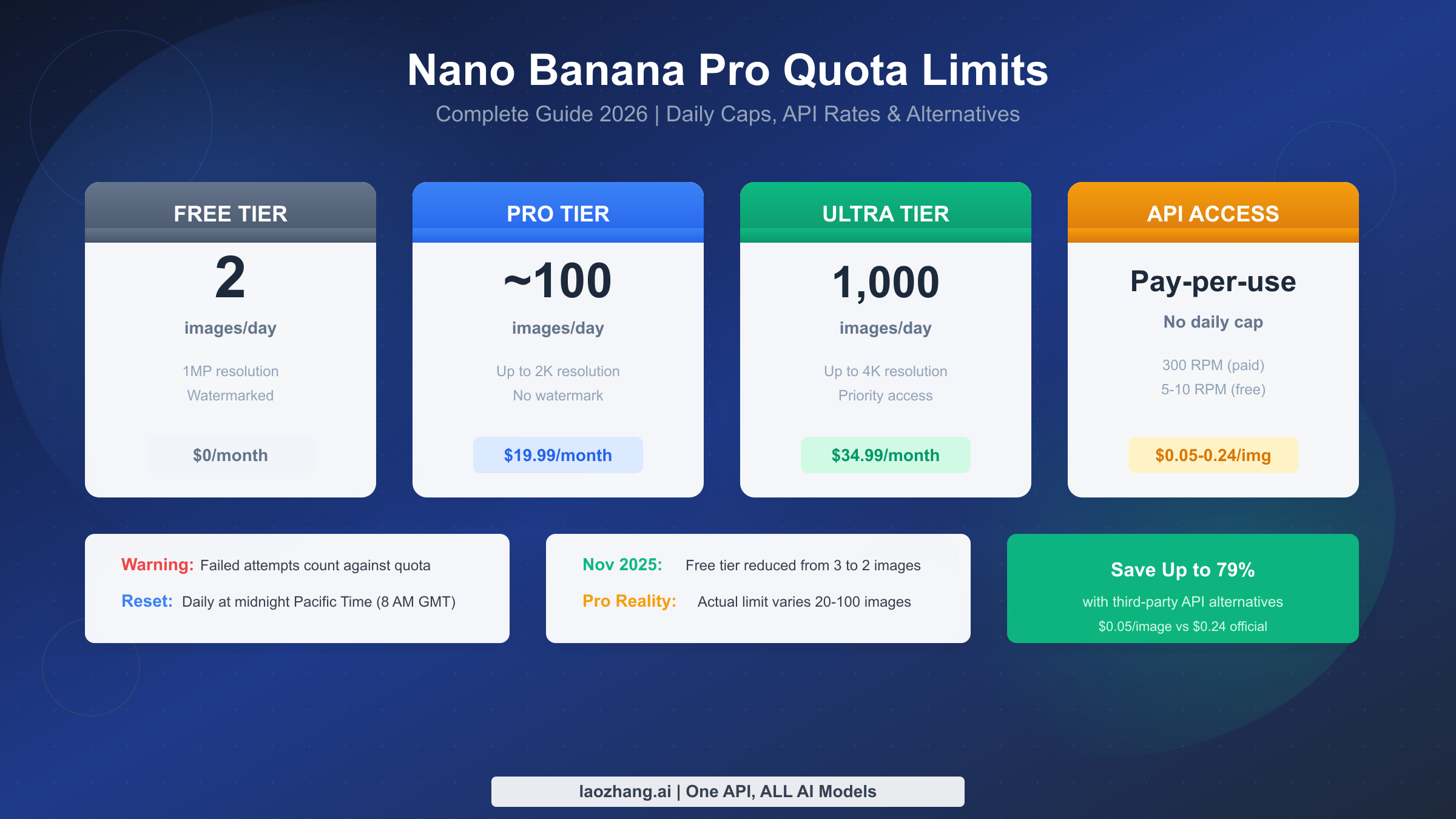
Google's Nano Banana Pro has quickly become one of the most sought-after AI image generation tools, delivering stunning photorealistic images with unprecedented text accuracy. However, understanding its complex quota system has become increasingly important as Google continues to tighten restrictions. In November 2025, the free tier was reduced from 3 images to just 2 per day, and many Pro subscribers report hitting limits far below the advertised 100 images.
This comprehensive guide breaks down every aspect of Nano Banana Pro's quota limits—from consumer subscriptions to API rate limits. Whether you're a casual user wondering why you've hit your daily cap, a content creator evaluating upgrade options, or a developer designing rate-limiting logic, you'll find the answers you need to make informed decisions and maximize your image generation potential.
TL;DR - Quick Facts
| Tier | Daily Limit | Price | Resolution | Best For |
|---|---|---|---|---|
| Free | 2 images | $0 | 1MP (watermarked) | Testing only |
| Pro | ~100 (actual: 20-100) | $19.99/mo | Up to 2K | Regular users |
| Ultra | 1,000 guaranteed | $34.99/mo | Up to 4K | Power users |
| API Free | 50-100 RPD | $0 | 1K-4K | Developers |
| API Paid | 1,000+ RPD | $0.134-0.24/img | 1K-4K | Production |
Key Points:
- Daily quota resets at midnight Pacific Time (8:00 AM GMT)
- Failed attempts count against your quota—including safety filter rejections
- 4K images consume 1.5-2x quota compared to 2K outputs
- Third-party APIs like laozhang.ai offer the same model at $0.05/image (79% savings)
Complete Tier Limits Breakdown
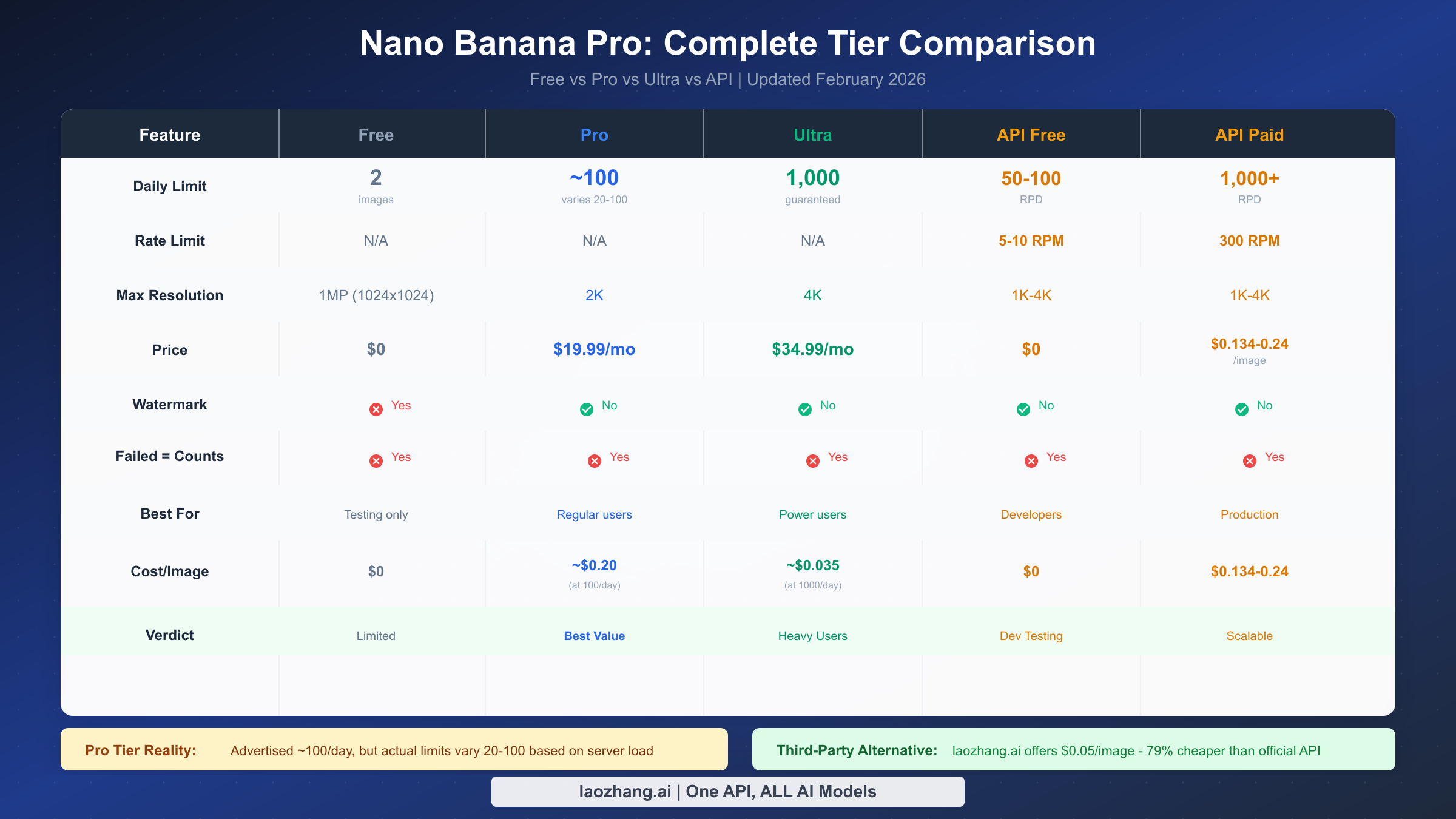
Understanding the differences between Nano Banana Pro's subscription tiers is crucial for choosing the right plan. While Google's marketing materials provide nominal limits, the reality for many users—particularly Pro subscribers—can be quite different.
The free tier, accessible through the Gemini app and Google AI Studio, allows just 2 image generations per day as of November 2025. Google reduced this limit from 3 images citing "high demand," and the change affected millions of users who relied on casual access for occasional image creation. Free tier images are limited to approximately 1 megapixel resolution (roughly 1024×1024 pixels) and include a visible watermark that cannot be removed. Perhaps most frustrating is that when you exceed your daily quota, the system silently falls back to standard Nano Banana (based on Gemini 2.5 Flash)—a noticeably lower-quality model—without any explicit notification.
Pro tier subscribers, paying $19.99 per month through Google One, receive access to what Google describes as "approximately 100 images per day." However, this is where things get complicated. Community reports on Google's support forums paint a very different picture. Posts from December 2025 describe Pro users hitting limits after generating as few as 20 images, while others report generating over 100 without restriction on the same day. This inconsistency stems from Google's dynamic load-balancing approach, where available capacity is distributed based on overall system demand. During peak hours or high-traffic periods like the December 2025 holiday season, Pro tier limits can be severely throttled.
The fundamental reason behind these limits traces back to computational economics. Each Nano Banana Pro image generation request consumes significant GPU resources on Google's infrastructure. Without limits, a small percentage of heavy users would monopolize capacity at the expense of the broader user base. Google's solution—dynamic allocation—ensures fair access but creates unpredictability that frustrates paying customers expecting consistent service.
Ultra tier, priced at $34.99 per month (with some regional variations up to $99.99), is the only subscription level that guarantees the full 1,000-image daily limit. If you consistently need high-volume generation without worrying about throttling, Ultra remains the only reliable consumer option. The tier also unlocks 4K resolution outputs and receives priority server allocation during peak demand periods.
For users experiencing inconsistent limits with Pro tier, the solution isn't necessarily upgrading to Ultra. If your actual usage falls below 50 images per day most of the time, consider the API approach or third-party alternatives discussed later in this guide. If you're encountering issues where Nano Banana Pro is not showing in your Gemini app, that's a separate account or regional issue rather than a quota problem.
Which Tier Is Right for You?
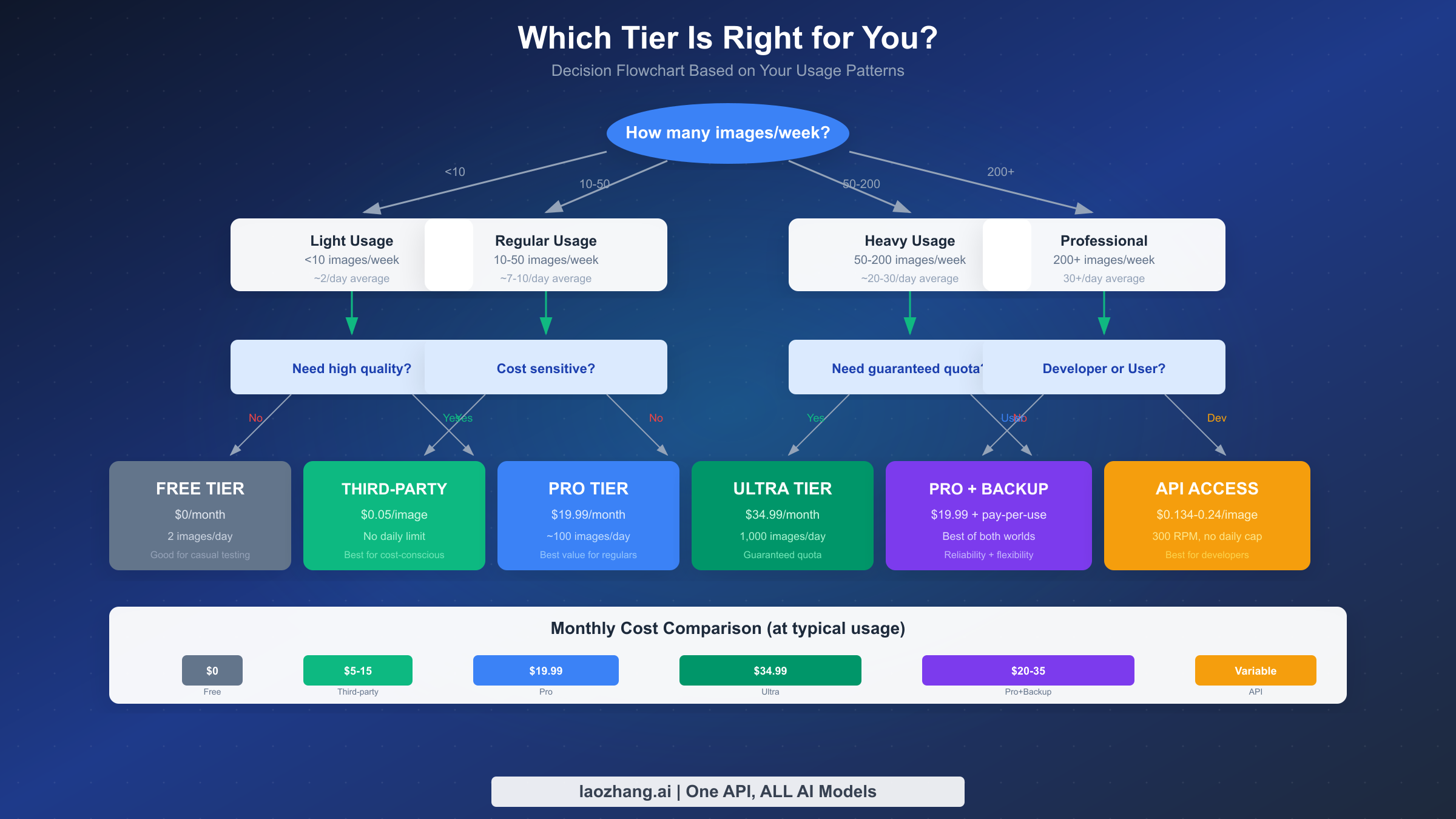
Choosing the optimal Nano Banana Pro access method depends on your usage patterns, budget constraints, and reliability requirements. Rather than simply comparing advertised limits, let's analyze real-world cost scenarios across different user profiles.
For light users generating fewer than 10 images per week, the free tier might seem adequate at first glance. However, the 2-image daily limit creates significant constraints. You cannot "save up" unused quota for busy days, and the watermarked, low-resolution output limits professional applications. If you occasionally need burst capacity or watermark-free images, the free tier falls short. Consider the third-party API approach with pay-per-use pricing—spending just $0.50 per week gets you 10 high-quality, watermark-free images through providers like laozhang.ai.
Regular users generating 10-50 images per week face the classic subscription dilemma. Pro tier at $19.99/month provides theoretical headroom, but the variable 20-100 daily limit creates uncertainty. Your actual cost per image depends heavily on utilization patterns. If you consistently use 100 images across 30 days (3,000 monthly), Pro costs roughly $0.0067 per image—exceptional value. But if you only use 300 images monthly (10/day average), that cost jumps to $0.067 per image, making the $0.05/image third-party API a better financial choice.
Heavy users generating 50-200 images per week need guaranteed capacity. The Pro tier's variable limits become problematic when you're running time-sensitive projects or client work. Ultra tier at $34.99/month provides that guarantee, and at 1,000 images daily (30,000 monthly potential), the per-image cost drops to just $0.0012 if fully utilized. However, most users don't need anywhere near 1,000 daily—they need reliable access to 50-100. For this profile, a hybrid approach works best: maintain Pro tier for primary access, with a third-party API account as backup when you hit throttling limits.
Professional users and developers generating 200+ images per week should evaluate the API option carefully. Google's official API pricing ranges from $0.134 per image at 1K-2K resolution to $0.24 for 4K outputs. At 1,000 images per month, that's $134-240 in API costs versus $34.99 for Ultra subscription. The API makes sense when you need programmatic access, higher rate limits (300 RPM versus consumer account limitations), or integration with automated workflows. For detailed pricing analysis, see our complete Nano Banana Pro API pricing breakdown.
The cost optimization sweet spot for most users lies in combining a Pro subscription with third-party API access. Use your Pro quota for daily work, switch to API when hitting limits, and leverage providers like laozhang.ai at $0.05/image for cost-effective overflow capacity. This hybrid approach typically costs $25-35 monthly while providing effective unlimited access.
How Quota Consumption Works
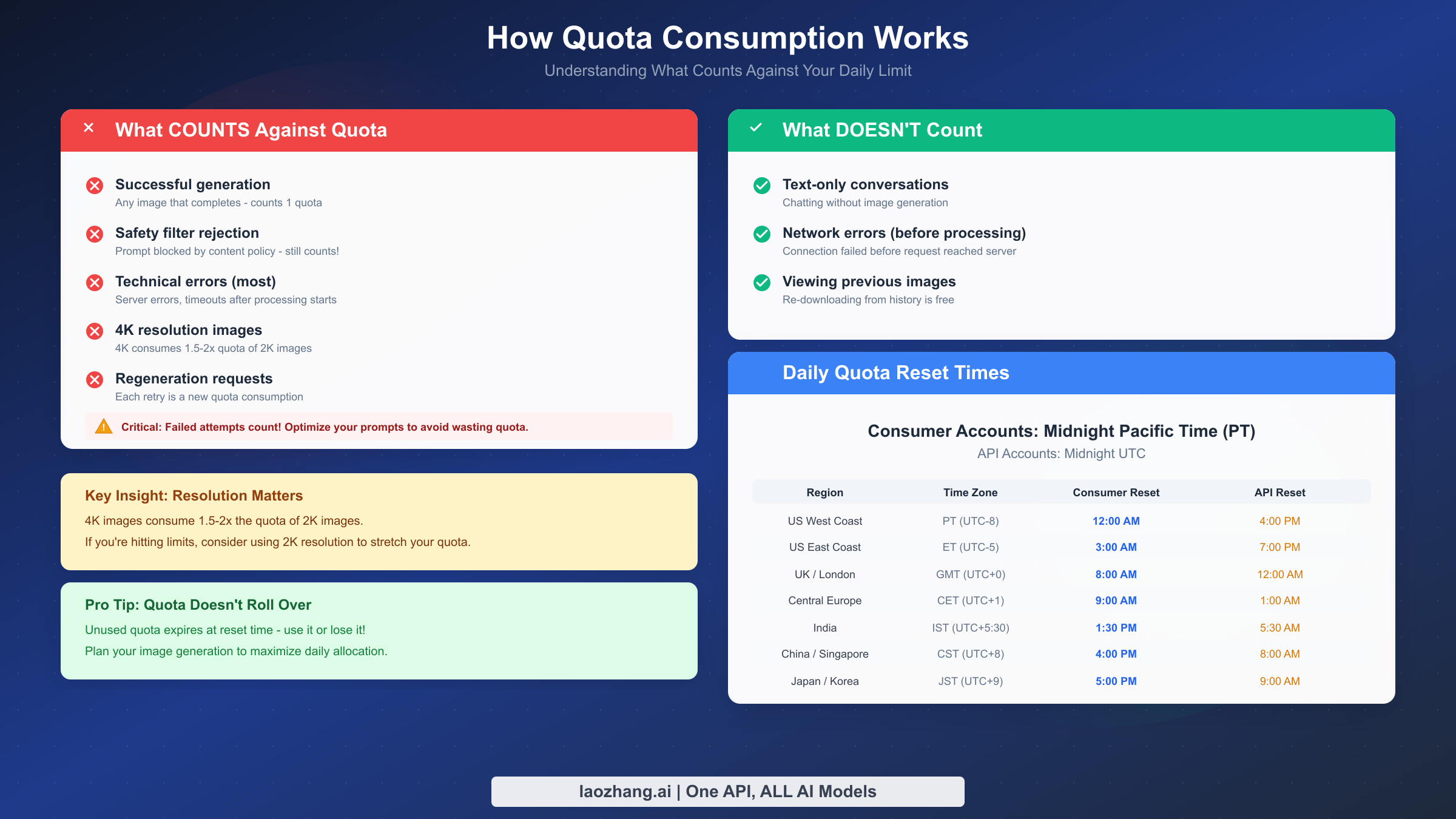
Understanding exactly what counts against your Nano Banana Pro quota helps you maximize each precious allocation—especially critical for free tier users with only 2 daily attempts.
Every successful image generation consumes one quota unit. This much is obvious. What catches many users off guard is that failed generations also count in most cases. If your prompt triggers a safety filter rejection due to content policy violations, that attempt still consumes quota. Technical errors that occur after processing begins—server timeouts, generation failures, GPU allocation errors—similarly count against your daily limit. The only exceptions are network failures that occur before your request reaches Google's servers, which don't register as attempts.
Resolution selection significantly impacts quota consumption for paid tiers. While Google doesn't officially document the multiplier, community testing suggests that 4K image generation consumes approximately 1.5 to 2 times the quota of 2K outputs. If you're consistently hitting limits, consider whether you actually need 4K resolution for every image. For many use cases—social media posts, blog illustrations, concept exploration—2K resolution provides more than adequate quality while effectively doubling your daily capacity.
Regeneration requests each count as new quota consumption. When you click "regenerate" or request variations of a previous image, each variation uses one quota unit. Batching multiple prompts doesn't save quota either—each prompt in a batch session counts individually. The practical implication: refine your prompts thoughtfully before hitting generate, rather than relying on iteration.
Quota limits are tied to your Google account, not devices. Accessing Gemini from your phone, tablet, and computer all share the same daily allocation. Switching devices doesn't reset or increase your quota, and there's no way to circumvent this through multiple browser sessions. However, if you have multiple Google accounts (personal and work, for example), each account has its own independent quota.
For Consumer accounts (Gemini app and web interface), daily quotas reset at midnight Pacific Time (PT). This is 8:00 AM GMT, 3:00 AM Eastern Time, or 4:00 PM China Standard Time. API accounts follow a different schedule, resetting at midnight UTC. During Daylight Saving Time transitions, your local reset time shifts by one hour—Pacific moves from UTC-8 to UTC-7, changing the GMT equivalent from 8:00 AM to 7:00 AM.
If you're hitting HTTP 429 errors indicating rate limits have been exceeded, consult our detailed guide on Nano Banana Pro 429 errors for troubleshooting steps and recovery strategies.
How to Check Your Remaining Quota
Monitoring your remaining Nano Banana Pro quota helps you plan generation sessions and avoid unexpected limitations. Unfortunately, Google doesn't provide a real-time quota dashboard, but several methods give you useful visibility.
Within the Gemini app, navigate to your profile settings and look for "Usage & limits" or similar wording (the exact path varies by app version and platform). This section shows your current tier and may display remaining daily generations, though updates aren't always real-time. Some users report the counter updating only after closing and reopening the app.
Google AI Studio provides better visibility for developers. When viewing your API project, the dashboard displays current usage against quota limits. For programmatic monitoring, the API response headers include useful information. The X-RateLimit-Remaining header indicates remaining requests in the current period, while X-RateLimit-Reset provides the Unix timestamp when your quota refreshes.
For automated workflows, implementing quota monitoring in your code prevents wasted requests. Here's a practical Python example that checks remaining quota before generating:
pythonimport requests
import time

def check_quota_and_generate(prompt, api_key):
    headers = {
        "Authorization": f"Bearer {api_key}",
        "Content-Type": "application/json"
    }

    # Attempt generation
    response = requests.post(
        "https://generativelanguage.googleapis.com/v1/models/nano-banana-pro:generate",
        headers=headers,
        json={"prompt": prompt}
    )

    # Check rate limit headers
    remaining = response.headers.get("X-RateLimit-Remaining", "unknown")
    reset_time = response.headers.get("X-RateLimit-Reset", None)

    if response.status_code == 429:
        retry_after = int(response.headers.get("Retry-After", 60))
        print(f"Rate limited. Retry after {retry_after} seconds")
        return None

    print(f"Remaining quota: {remaining}")
    if reset_time:
        reset_datetime = time.strftime('%Y-%m-%d %H:%M:%S', time.localtime(int(reset_time)))
        print(f"Quota resets at: {reset_datetime}")

    return response.json()
Third-party API providers often offer more transparent quota tracking. laozhang.ai's dashboard, for example, displays real-time credit balance, usage history, and projected depletion dates—visibility that Google's consumer interface lacks.
API Rate Limits Deep Dive
Nano Banana Pro's API rate limiting operates on multiple dimensions simultaneously, and understanding each metric helps developers design robust applications that handle limits gracefully.
The primary constraint for most developers is RPM (requests per minute). Free API tier accounts operate under 5-10 RPM limits, meaning you can send at most 10 generation requests per minute before encountering 429 errors. Enabling billing on your Google Cloud account automatically upgrades you to Tier 1 access with 300 RPM—a 30x increase that transforms API usability for production applications.
RPD (requests per day) defines your total daily generation capacity through the API. Free tier provides 50-100 RPD depending on account age and verification status. Paid tiers start at 1,000 RPD and scale higher for enterprise accounts through negotiated agreements. Unlike consumer subscriptions, API daily limits are hard caps—there's no dynamic throttling or "approximately" language.
TPM (tokens per minute) constrains the total input size of your requests. Image generation prompts typically consume 100-500 tokens depending on complexity, making the 15,000-100,000 TPM limits rarely constraining for image generation workloads. However, if you're combining Nano Banana Pro with text analysis or multi-modal workflows, TPM can become relevant.
When implementing API integration, exponential backoff remains the industry standard for handling rate limits. Rather than immediately retrying failed requests, introduce progressively longer delays:
pythonimport time
import random

def generate_with_backoff(prompt, api_key, max_retries=5):
    base_delay = 1
    max_delay = 60

    for attempt in range(max_retries):
        response = call_nano_banana_api(prompt, api_key)

        if response.status_code == 200:
            return response.json()

        if response.status_code == 429:
            # Calculate backoff delay with jitter
            delay = min(base_delay * (2 ** attempt), max_delay)
            jitter = random.uniform(0, delay * 0.1)
            total_delay = delay + jitter

            print(f"Rate limited. Waiting {total_delay:.1f}s before retry {attempt + 1}")
            time.sleep(total_delay)
        else:
            # Non-rate-limit error, don't retry
            raise Exception(f"API error: {response.status_code}")

    raise Exception("Max retries exceeded")
The key insight for API users: unlike consumer accounts where limits fluctuate, API quotas are predictable and documented. If you need guaranteed capacity, the API path provides more reliable performance than even Ultra subscription—at the cost of per-image pricing. For applications requiring both high volume and cost efficiency, third-party API aggregators offer compelling alternatives.
Unlimited Alternatives: Third-Party APIs
For users frustrated by Nano Banana Pro's quota limitations, third-party API providers offer a compelling escape from daily caps. These services act as intermediaries, providing access to the same underlying Gemini 3 Pro Image model through their own infrastructure and pricing structures.
The most significant advantage of third-party providers is pricing. Google's official API charges $0.134-0.24 per image depending on resolution. Third-party aggregators like laozhang.ai offer the identical model at $0.05 per image—a 79% savings for 4K generation. This dramatic price difference exists because aggregators purchase API access in bulk, negotiate enterprise rates, and pass savings to end users.
Beyond pricing, third-party providers typically offer more flexible rate limits. Rather than hard daily caps, many operate on fair-usage policies where burst traffic is accommodated as long as overall usage remains reasonable. For developers building applications with unpredictable demand patterns, this flexibility proves invaluable.
Integration complexity is minimal. Most third-party providers, including laozhang.ai, offer OpenAI-compatible API endpoints. If your application already integrates with OpenAI's image generation, switching to Nano Banana Pro through a third-party requires changing only the base URL and API key—your existing code structure remains unchanged. Documentation is available at docs.laozhang.ai with complete implementation examples.
Legitimate concerns about third-party services center on data privacy and output quality. Reputable providers process requests in real-time without storing your prompts or generated images. The output quality is identical to Google's direct API since requests ultimately reach the same model infrastructure. However, always verify a provider's privacy policy before transmitting sensitive prompts, and test output quality with sample generations before committing to production use.
The practical recommendation for most users: maintain your existing Google subscription for primary access, and use third-party APIs as cost-effective backup when you need burst capacity or want to avoid quota limitations. At $0.05/image, generating an additional 100 images costs just $5—far less than upgrading subscription tiers.
When encountering safety filter issues with any access method, our guide on Nano Banana Pro image safety errors provides workarounds and prompt refinement strategies.
Tips to Maximize Your Quota
Stretching your Nano Banana Pro quota requires strategic thinking about when, how, and what you generate. These practical techniques help you get more value from every allocated image.
First, optimize your prompts before generating. Vague or ambiguous prompts often require multiple iterations to achieve desired results. Spend extra time crafting detailed, specific prompts that clearly describe composition, style, lighting, and subject matter. A well-crafted prompt that succeeds on the first attempt is worth far more than five mediocre variations.
Second, use 2K resolution unless 4K is genuinely necessary. As discussed, higher resolutions consume more quota. For social media, blog posts, presentations, and most web applications, 2K resolution provides excellent quality while potentially doubling your effective daily capacity.
Third, time your generation sessions strategically. Quota resets at midnight Pacific Time for consumer accounts. If you're in a timezone where this falls during waking hours, plan your most important generations just after reset when your full quota is available.
Fourth, batch your creative exploration. Rather than generating sporadically throughout the day, consolidate your image creation into focused sessions. This approach helps you refine prompts iteratively while your creative context remains fresh, reducing the need for later regeneration.
Fifth, leverage the edit and extend features for variations. Rather than generating entirely new images, use Gemini's editing capabilities to modify existing generations. Inpainting, outpainting, and style adjustments often consume less quota than full regeneration while achieving similar creative goals.
Sixth, maintain a backup API account. Whether through Google's official API or a third-party provider, having alternative access prevents workflow disruption when you hit consumer quota limits. Even a small prepaid balance—$5-10—provides emergency capacity for deadline-critical work.
For users finding Nano Banana Pro not working entirely, that's typically a technical issue rather than quota exhaustion. Check our troubleshooting guide for resolution steps.
FAQ
Why did Google reduce the free tier from 3 to 2 images?
Google cited "high demand" as the primary reason for the November 2025 reduction. The explosive popularity of Nano Banana Pro strained infrastructure capacity, and reducing free tier allocation helped balance load while encouraging upgrades to paid tiers. This follows a common pattern in AI services where initial generous limits tighten as user bases grow.
Does regenerating an image count as a new quota use?
Yes, each regeneration request consumes one quota unit. When you click "regenerate" or request variations, you're essentially submitting a new generation request. There's no way to "refine" a previous image without using additional quota.
Can I get more free tier images by using multiple devices?
No. Quota is tied to your Google account, not your device. Using Gemini on your phone, tablet, and computer all draws from the same daily allocation. The only way to access additional free quota is through separate Google accounts, each with their own independent limit.
Why does my Pro subscription sometimes limit me to 20 images?
Pro tier operates on dynamic allocation where available capacity varies based on overall system demand. During peak usage periods—holidays, viral moments, product launches—Pro users may experience significantly reduced limits. This isn't a bug but rather Google's load-balancing approach. For guaranteed consistent limits, Ultra tier is the only consumer option.
What's the difference between consumer and API reset times?
Consumer accounts (Gemini app/web) reset at midnight Pacific Time. API accounts reset at midnight UTC. This 8-hour difference can be strategically useful—if you maintain both access types, you effectively get staggered refresh points throughout the day.
Are third-party API providers safe to use?
Reputable providers like laozhang.ai process requests in real-time without storing prompts or outputs. The generated images are identical to direct Google API results since requests reach the same model. Always review a provider's privacy policy and test with non-sensitive content before production use. The primary risk is service reliability, not output quality or data security.
Understanding Nano Banana Pro's quota system empowers you to make strategic decisions about access methods, subscription tiers, and usage patterns. Whether you optimize within free tier constraints, leverage Pro subscription value, guarantee capacity through Ultra, or unlock flexibility via API access, the key is aligning your choice with actual usage patterns and budget priorities. For most users, the hybrid approach—combining subscription access with third-party API backup—delivers the best balance of cost, reliability, and creative freedom.


