# Nano Banana API Free: 8 Methods to Access Google's Gemini Image Generation (December 2025)
> Complete guide to accessing Nano Banana (Gemini 2.5 Flash Image) API for free in December 2025. Compare 8 free methods including Google AI Studio, Puter.js, and more with working code examples.
- Source: https://www.aifreeapi.com/en/posts/nano-banana-api-free
- Language: en
- Published: 2025-12-11
- Updated: 2025-12-11
- Publisher: AI Free API (https://www.aifreeapi.com)
Looking to use Google's Nano Banana API for free? You're in the right place. In this comprehensive December 2025 guide, I'll show you 8 verified methods to access Google's Gemini image generation models without paying a cent.
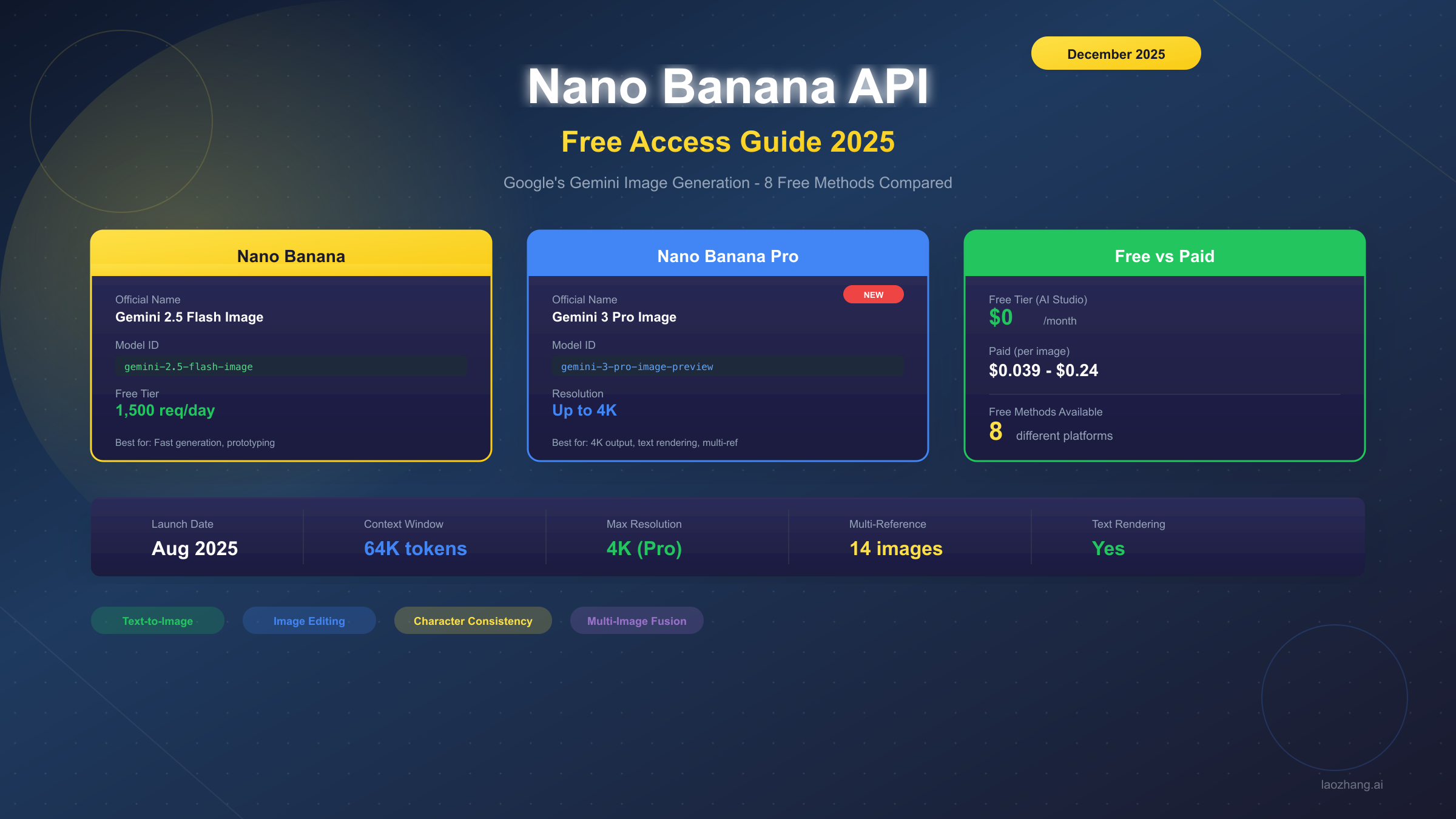
"Nano Banana" has become the community nickname for Google's **Gemini 2.5 Flash Image** model, while "Nano Banana Pro" refers to the newer **Gemini 3 Pro Image**. Both models offer impressive text-to-image generation, image editing, and even character consistency features.
## What is Nano Banana? (December 2025 Update)
The name "Nano Banana" originated from the AI community after Google released Gemini 2.5 Flash with image generation capabilities on August 26, 2025. The playful nickname stuck because of the model's speed ("nano" suggesting small and fast) combined with Google's colorful branding.
### Two Models Available
| Model | Nickname | Model ID | Launch Date |
|-------|----------|----------|-------------|
| Gemini 2.5 Flash Image | Nano Banana | `gemini-2.5-flash-image` | August 2025 |
| Gemini 3 Pro Image | Nano Banana Pro | `gemini-3-pro-image-preview` | November 2025 |
**Nano Banana (Gemini 2.5 Flash Image)** is optimized for speed and cost-efficiency. It generates images quickly at 1024x1024 resolution and is perfect for prototyping and high-volume applications.
**Nano Banana Pro (Gemini 3 Pro Image)** launched in November 2025 with significant upgrades:
- Up to 4K resolution output
- Superior text rendering in images
- Multi-reference image support (up to 14 images)
- Better style consistency
For a deeper dive into the technical specifications, check out our [Gemini 2.5 Flash Image API guide](/en/posts/free-gemini-flash-image-api) which covers the underlying architecture.
### Key Capabilities
Both Nano Banana models support:
1. **Text-to-Image Generation**: Create images from text prompts
2. **Image Editing**: Modify existing images with text instructions
3. **Character Consistency**: Maintain character appearance across multiple images
4. **Multi-Image Fusion**: Combine multiple reference images
5. **In-Context Learning**: Learn styles from provided examples
## Official Free Tier (Google AI Studio)
The most reliable way to access Nano Banana for free is through **Google AI Studio**. Google provides a generous free tier that resets daily.
### Free Tier Limits (December 2025)
| Resource | Free Limit | Resets |
|----------|-----------|--------|
| Requests | 1,500/day | Daily at midnight PT |
| Rate Limit | 10 RPM | Per minute |
| Images per Request | 1 | - |
### Getting Your API Key
Follow these steps to get free access:
**Step 1**: Visit [Google AI Studio](https://aistudio.google.com/)
**Step 2**: Sign in with your Google account
**Step 3**: Click "Get API Key" in the left sidebar
**Step 4**: Create a new API key or use an existing one
**Step 5**: Copy and securely store your key
```python
# Your API key looks like this:
API_KEY = "AIzaSy..." # Keep this secret!
```
### Important Notes
- The free tier is for **personal and prototyping use**
- Commercial production requires paid API access
- Some regions may have restrictions
- Keys can be revoked if terms are violated
For more details on Gemini API pricing and tiers, see our comprehensive [Gemini API pricing breakdown](/en/posts/gemini-api-token-pricing).
If you need more than 1,500 daily requests or want access to additional features, consider exploring [free Gemini 2.5 Pro API](/en/posts/google-gemini-api-free-tier) options.
## 8 Free Access Methods Comparison
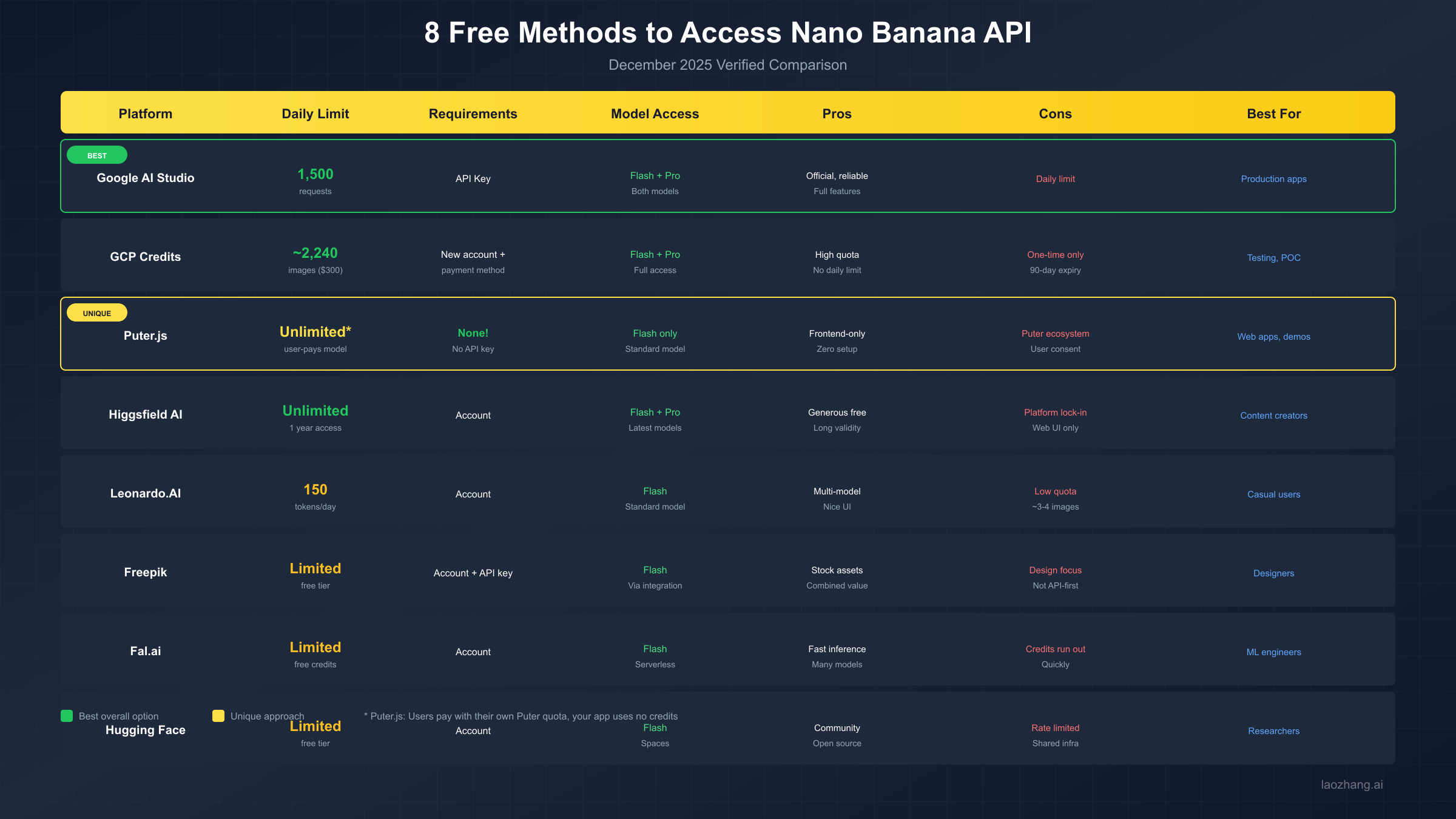
After testing all available options in December 2025, here are the 8 methods to access Nano Banana for free:
### Complete Comparison Table
| # | Platform | Daily Limit | Requirements | Model Access | Best For |
|---|----------|-------------|--------------|--------------|----------|
| 1 | **Google AI Studio** | 1,500 requests | API Key | Flash + Pro | Production apps |
| 2 | **GCP Credits** | ~2,240 images | New account | Flash + Pro | Testing, POC |
| 3 | **Puter.js** | Unlimited* | None | Flash only | Web apps, demos |
| 4 | **Higgsfield AI** | Unlimited (1yr) | Account | Flash + Pro | Content creators |
| 5 | **Leonardo.AI** | 150 tokens/day | Account | Flash | Casual users |
| 6 | **Freepik** | Limited | Account + Key | Flash | Designers |
| 7 | **Fal.ai** | Limited credits | Account | Flash | ML engineers |
| 8 | **Hugging Face** | Limited | Account | Flash | Researchers |
*Puter.js uses a "user-pays" model where users spend their own Puter credits
### Method 1: Google AI Studio (Recommended)
**Pros**:
- Official Google service
- Reliable and well-documented
- Access to both Nano Banana and Nano Banana Pro
- Full feature support
**Cons**:
- Daily limit of 1,500 requests
- Requires API key management
- Rate limited to 10 requests per minute
### Method 2: GCP Free Credits
New Google Cloud Platform accounts receive $300 in free credits valid for 90 days.
**Calculation**:
- Standard image: $0.039/image
- $300 ÷ $0.039 = ~7,692 images (Nano Banana)
- Pro images at $0.134 = ~2,240 images (Nano Banana Pro)
**Pros**:
- Large one-time quota
- No daily limits
- Full API access
**Cons**:
- One-time only
- Requires payment method on file
- 90-day expiration
### Method 3: Puter.js (Zero Cost for Developers)
Puter.js is unique because developers pay nothing—users pay with their own Puter quota.
**Pros**:
- No API key needed
- Frontend-only implementation
- Zero cost for your application
- Quick setup
**Cons**:
- Only supports Nano Banana (Flash model)
- Users must have Puter account
- Limited control over generation parameters
### Methods 4-8: Third-Party Platforms
These platforms integrate Gemini image generation with varying free tiers:
- **Higgsfield AI**: Generous free tier, 1-year access
- **Leonardo.AI**: ~3-4 images per day with free tokens
- **Freepik**: Combined with stock asset access
- **Fal.ai**: Fast inference, credits deplete quickly
- **Hugging Face**: Community-driven, shared infrastructure
For higher limits and unified API access across multiple AI models, services like [laozhang.ai](https://laozhang.ai) offer cost-effective alternatives with simplified billing and higher quotas.
## Python SDK Tutorial
The official Google Generative AI Python SDK provides the most complete access to Nano Banana features.
### Installation
```bash
pip install google-genai
```
### Basic Text-to-Image Generation
```python
from google import genai
# Initialize the client
client = genai.Client(api_key="YOUR_API_KEY")
# Generate an image
response = client.models.generate_content(
model="gemini-2.5-flash-image", # Nano Banana
contents="A cute robot holding a yellow banana, digital art style",
config={
"response_modalities": ["IMAGE"]
}
)
# Save the generated image
if response.candidates:
image = response.candidates[0].content.parts[0]
image.inline_data.save("robot_banana.png")
print("Image saved successfully!")
```
### Image Editing Example
```python
from google import genai
from PIL import Image
import base64
import io
client = genai.Client(api_key="YOUR_API_KEY")
# Load your source image
def load_image_as_base64(path):
with open(path, "rb") as f:
return base64.b64encode(f.read()).decode()
# Edit an existing image
response = client.models.generate_content(
model="gemini-2.5-flash-image",
contents=[
{
"role": "user",
"parts": [
{
"inline_data": {
"mime_type": "image/png",
"data": load_image_as_base64("input.png")
}
},
{"text": "Add a party hat to the character in this image"}
]
}
],
config={
"response_modalities": ["IMAGE"]
}
)
# Save edited image
if response.candidates:
result = response.candidates[0].content.parts[0]
result.inline_data.save("edited_output.png")
```
### Character Consistency
Nano Banana Pro supports multi-reference images for character consistency:
```python
# Character consistency with multiple references
response = client.models.generate_content(
model="gemini-3-pro-image-preview", # Nano Banana Pro
contents=[
{
"role": "user",
"parts": [
# Reference images
{"inline_data": {"mime_type": "image/png", "data": ref_image_1}},
{"inline_data": {"mime_type": "image/png", "data": ref_image_2}},
# Instruction
{"text": "Generate the same character from these references, now wearing a space suit"}
]
}
],
config={
"response_modalities": ["IMAGE"]
}
)
```
For alternative API access with higher rate limits, you can configure a different base URL:
```python
# Using alternative API endpoint (laozhang.ai example)
client = genai.Client(
api_key="YOUR_LAOZHANG_KEY",
http_options={"api_base": "https://api.laozhang.ai/v1"}
)
```
## JavaScript/Puter.js Tutorial
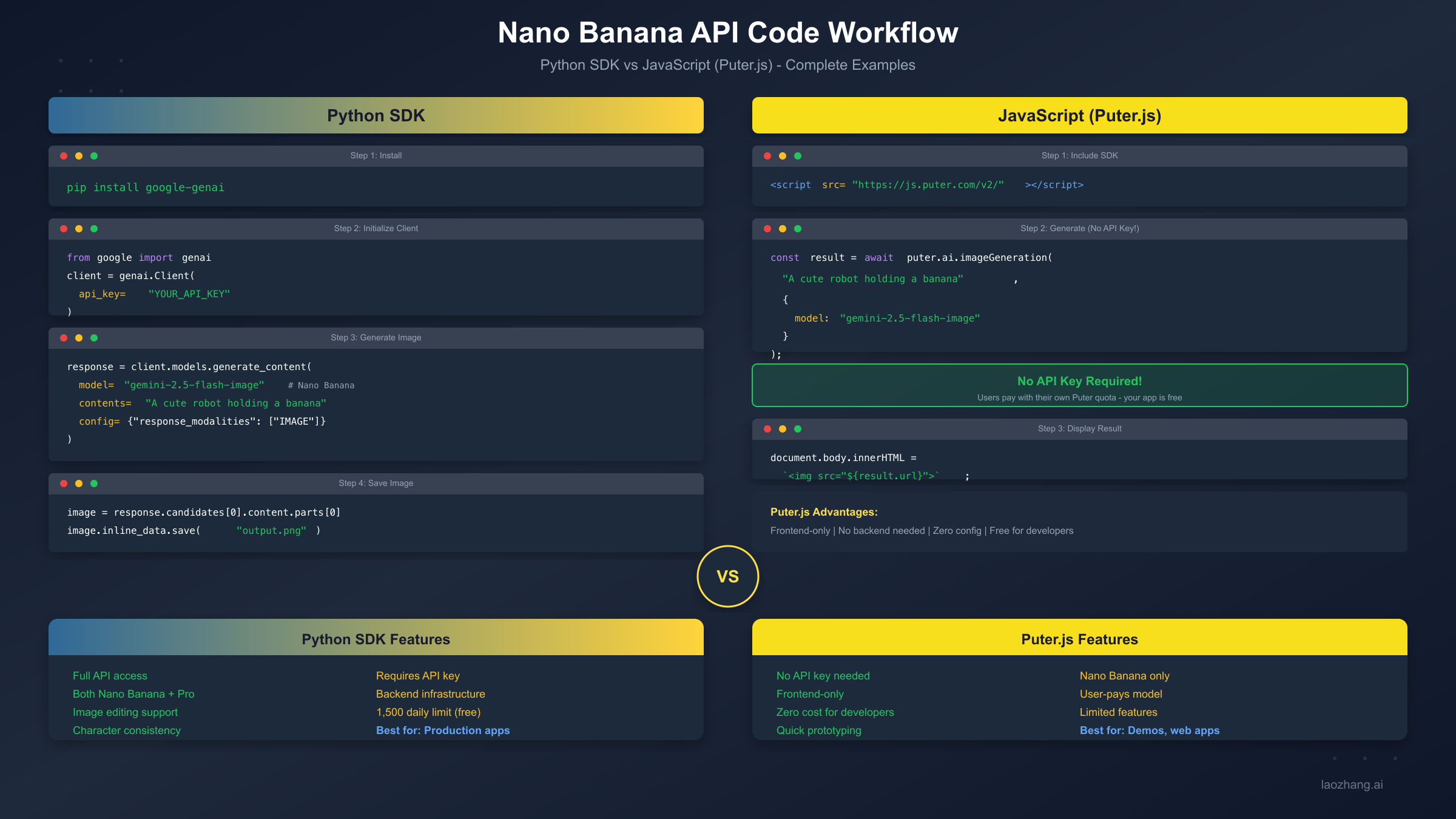
Puter.js offers a unique approach: **no API key required**. Your users pay for their own usage through their Puter accounts.
### Basic Setup
```html
Nano Banana Demo
```
### React Component Example
```jsx
import { useEffect, useState } from 'react';
function NanoBananaGenerator() {
const [imageUrl, setImageUrl] = useState(null);
const [loading, setLoading] = useState(false);
const [prompt, setPrompt] = useState('');
const generateImage = async () => {
if (!prompt.trim()) return;
setLoading(true);
try {
const result = await window.puter.ai.imageGeneration(
prompt,
{ model: "gemini-2.5-flash-image" }
);
setImageUrl(result.url);
} catch (error) {
console.error('Generation failed:', error);
} finally {
setLoading(false);
}
};
return (
setPrompt(e.target.value)}
placeholder="Describe your image..."
/>
{imageUrl && }
);
}
```
### Puter.js Limitations
While Puter.js is convenient, be aware of its constraints:
| Feature | Puter.js | Python SDK |
|---------|----------|------------|
| API Key Required | No | Yes |
| Model Selection | Flash only | Flash + Pro |
| Image Editing | Limited | Full |
| Multi-Reference | No | Yes (Pro) |
| Custom Parameters | Limited | Full |
| Backend Required | No | Yes |
## Rate Limits & Error Handling
Understanding and handling rate limits is crucial for production applications.
### Common Error Codes
| HTTP Code | Error | Cause | Solution |
|-----------|-------|-------|----------|
| 429 | Rate Limited | Too many requests | Implement backoff |
| 403 | Forbidden | Invalid key or quota exceeded | Check API key |
| 400 | Bad Request | Invalid parameters | Validate input |
| 500 | Server Error | Google's infrastructure | Retry later |
### Robust Error Handling Code
```python
import time
from google import genai
from google.api_core import exceptions
def generate_with_retry(prompt, max_retries=3, base_delay=1):
"""Generate image with exponential backoff retry logic."""
client = genai.Client(api_key="YOUR_API_KEY")
for attempt in range(max_retries):
try:
response = client.models.generate_content(
model="gemini-2.5-flash-image",
contents=prompt,
config={"response_modalities": ["IMAGE"]}
)
if response.candidates:
return response.candidates[0].content.parts[0]
except exceptions.ResourceExhausted as e:
# 429 - Rate limited
delay = base_delay * (2 ** attempt)
print(f"Rate limited. Waiting {delay}s...")
time.sleep(delay)
except exceptions.InvalidArgument as e:
# 400 - Bad request, don't retry
raise ValueError(f"Invalid request: {e}")
except exceptions.PermissionDenied as e:
# 403 - Check your API key
raise PermissionError(f"Access denied: {e}")
except Exception as e:
# Other errors - retry with backoff
if attempt < max_retries - 1:
delay = base_delay * (2 ** attempt)
print(f"Error: {e}. Retrying in {delay}s...")
time.sleep(delay)
else:
raise
raise Exception("Max retries exceeded")
# Usage
try:
image = generate_with_retry("A sunset over mountains")
image.inline_data.save("output.png")
except Exception as e:
print(f"Failed to generate: {e}")
```
### Quota Management
Track your daily usage to avoid hitting limits:
```python
class QuotaTracker:
def __init__(self, daily_limit=1500):
self.daily_limit = daily_limit
self.used_today = 0
self.last_reset = time.time()
def can_generate(self):
# Reset at midnight
if time.time() - self.last_reset > 86400:
self.used_today = 0
self.last_reset = time.time()
return self.used_today < self.daily_limit
def record_usage(self, count=1):
self.used_today += count
def remaining(self):
return self.daily_limit - self.used_today
# Usage
tracker = QuotaTracker()
if tracker.can_generate():
image = generate_with_retry("Your prompt")
tracker.record_usage()
print(f"Remaining today: {tracker.remaining()}")
else:
print("Daily quota exhausted. Try again tomorrow.")
```
For applications requiring higher limits, [laozhang.ai](https://laozhang.ai) provides increased quotas without daily caps, making it suitable for production workloads.
## Advanced Prompt Strategies
Getting great results from Nano Banana requires effective prompting. Here are proven strategies.
### Prompt Structure
A good prompt follows this structure:
```
[Subject] + [Style] + [Details] + [Quality modifiers]
```
**Example**:
```
A young astronaut (subject) in anime style (style),
floating in space station with Earth visible through window (details),
highly detailed, vibrant colors, cinematic lighting (quality)
```
### Effective Prompt Patterns
| Pattern | Example | Best For |
|---------|---------|----------|
| Detailed Description | "A golden retriever puppy wearing a red bandana, sitting in a sunlit meadow full of wildflowers, photorealistic style" | Realistic images |
| Style Reference | "A city skyline in the style of Van Gogh's Starry Night, swirling clouds, bold brushstrokes" | Artistic styles |
| Negative Context | "A clean modern living room, minimalist design, no clutter, bright natural lighting" | Avoiding unwanted elements |
| Technical Specs | "Product photo of a smartphone, white background, studio lighting, 4K detail" | Commercial images |
### Character Consistency Tips
For maintaining character consistency across multiple generations:
1. **Create a Character Sheet First**
```python
# Generate a character reference sheet
response = client.models.generate_content(
model="gemini-3-pro-image-preview",
contents="""Create a character reference sheet showing:
- Front view, side view, back view
- Character: Young female elf with silver hair and purple eyes
- Wearing: Blue mage robes with gold trim
- Style: Anime, detailed"""
)
```
2. **Use Reference Images in Subsequent Generations**
```python
# Use the character sheet as reference
response = client.models.generate_content(
model="gemini-3-pro-image-preview",
contents=[
{"inline_data": {"mime_type": "image/png", "data": character_sheet}},
{"text": "Generate this character casting a fire spell, same style and outfit"}
]
)
```
### Multi-Image Workflows
Nano Banana Pro supports up to 14 reference images for complex workflows:
```python
# Combine multiple style references
references = [style_ref_1, style_ref_2, character_ref]
parts = [{"inline_data": {"mime_type": "image/png", "data": ref}} for ref in references]
parts.append({"text": "Combine these styles to create a new character in a fantasy forest"})
response = client.models.generate_content(
model="gemini-3-pro-image-preview",
contents=[{"role": "user", "parts": parts}]
)
```
For more image generation techniques including alternative AI image models, check out our [Flux image generation API](/en/posts/flux-1-api-comprehensive-guide) guide.
## FAQ
### Is Nano Banana really free?
Yes, Google AI Studio offers 1,500 free requests per day. Puter.js is free for developers (users pay their own quota). Third-party platforms have varying free tiers.
### What's the difference between Nano Banana and Nano Banana Pro?
Nano Banana (gemini-2.5-flash-image) is faster and cheaper. Nano Banana Pro (gemini-3-pro-image-preview) offers higher resolution (up to 4K), better text rendering, and multi-reference support.
### Can I use Nano Banana for commercial projects?
The free tier is for personal/prototyping use. For commercial production, you need paid API access or should review Google's terms of service.
### Why am I getting 429 errors?
You've hit the rate limit (10 requests per minute or 1,500 per day). Implement exponential backoff retry logic as shown in the Error Handling section.
### Does Puter.js work with Nano Banana Pro?
Currently, Puter.js only supports Nano Banana (Flash model). For Pro features, use the Python SDK with an API key.
### How do I get more than 1,500 daily requests?
Options include: GCP free credits ($300 for new accounts), paid Google API, or alternative providers like [laozhang.ai](https://laozhang.ai) that offer higher quotas.
### Can Nano Banana edit existing images?
Yes! Both Nano Banana and Nano Banana Pro support image editing. Pass your image as base64 data along with editing instructions.
### What image formats are supported?
Input: PNG, JPEG, WebP, GIF (first frame)
Output: PNG (default), JPEG
## Conclusion
Nano Banana (Google's Gemini image generation) offers impressive AI image capabilities with multiple free access paths:
**For Developers building production apps**: Start with Google AI Studio's 1,500 daily free requests. The Python SDK provides full feature access.
**For Frontend/Web projects**: Puter.js offers a unique zero-cost approach for developers—no API key, no backend needed.
**For Testing and POC**: GCP's $300 free credits give you ~7,000+ images to experiment with.
**For Casual Users**: Platforms like Higgsfield AI and Leonardo.AI provide user-friendly interfaces with free tiers.
### Quick Recommendation Matrix
| Use Case | Best Method | Why |
|----------|-------------|-----|
| Production API | Google AI Studio | Official, reliable |
| Web Demo | Puter.js | No backend needed |
| High Volume Testing | GCP Credits | Large one-time quota |
| Character Consistency | Nano Banana Pro | Multi-reference support |
| Quick Prototyping | Any free tier | Fast iteration |
For applications requiring higher throughput, commercial use, or simplified billing across multiple AI models, consider [laozhang.ai](https://laozhang.ai) which offers unified API access to Nano Banana and other AI image models with competitive pricing.
Start generating images today with the free tier—1,500 requests is plenty for prototyping and learning the API!
---
*Last verified: December 2025. Free tier availability and limits are subject to change by Google and third-party providers.*