![Gemini 3 Multimodal Vision Limitations: Complete Guide to Accuracy, Constraints & Solutions [2025]](/posts/en/gemini3-multimodal-vision-limitations/img/cover.png)
Google's Gemini 3 represents a significant advancement in multimodal AI, offering impressive capabilities for understanding images, videos, and audio. However, like all AI systems, it comes with important limitations that developers, businesses, and researchers need to understand before deploying it in production environments. This comprehensive guide examines every documented limitation of Gemini 3's vision capabilities, backed by benchmark data and real-world testing results.
Understanding these limitations isn't about dismissing Gemini's capabilities. Rather, it's about setting realistic expectations and making informed decisions about when and how to use this powerful tool. Whether you're evaluating Gemini for an enterprise application, comparing it against alternatives like GPT-4 Vision, or troubleshooting issues you've encountered, this guide provides the depth of information you need.
Understanding Gemini Vision Limitation Categories
Gemini 3's vision limitations fall into five distinct categories, each affecting different use cases and requiring different mitigation strategies. Before diving into specific issues, understanding this categorization helps you assess which limitations are most relevant to your particular application needs.
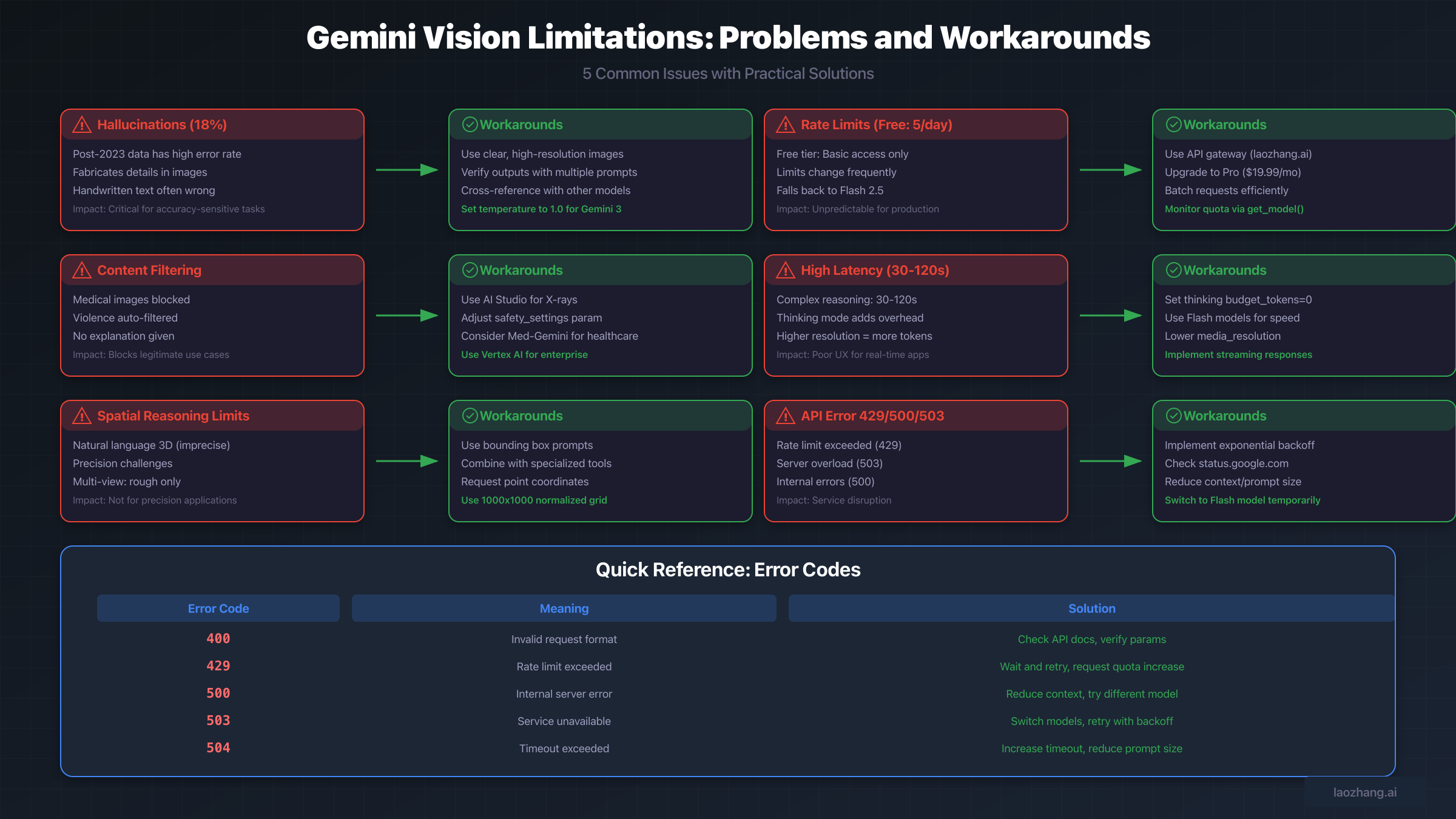
The first category encompasses accuracy limitations, primarily centered around hallucination issues. According to benchmark testing by AllAboutAI, Gemini 3 Pro exhibits an 18% hallucination rate when processing information from after its knowledge cutoff date, compared to just 7% for pre-2023 data. This represents a significant concern for applications requiring high accuracy on current events or recent developments. The hallucination problem manifests differently across various input types. Text extraction from images, particularly handwritten content, shows higher error rates than printed text recognition. Complex scenes with multiple objects tend to trigger more fabricated details than simple, well-lit photographs.
The second category involves technical constraints that impose hard limits on what Gemini can process. These include maximum image quantities per request, file size restrictions, token consumption calculations, and response latency ranges. Understanding these constraints is essential for capacity planning and cost estimation. For example, while Gemini 3 Pro supports up to 900 images per request, the inline data limit of 20MB means that high-resolution images quickly consume this allowance.
Content filtering represents the third category, where Gemini's safety systems may block legitimate use cases, particularly in healthcare, research, and other specialized domains. The fourth category addresses spatial reasoning limitations, where natural language descriptions of 3D positions prove insufficiently precise for many applications. Finally, model-specific behavioral issues, such as the temperature sensitivity in Gemini 3 and the default-enabled thinking mode, comprise the fifth category of limitations users must navigate.
| Category | Impact Level | Primary Affected Use Cases |
|---|---|---|
| Accuracy/Hallucination | Critical | Medical, Legal, Financial analysis |
| Technical Constraints | High | High-volume processing, Large files |
| Content Filtering | Medium-High | Healthcare, Research, Media analysis |
| Spatial Reasoning | Medium | Robotics, 3D modeling, Navigation |
| Model Behavior | Medium | Production deployments, Real-time apps |
Accuracy and Hallucination Issues Explained
Hallucination in vision AI refers to the model generating confident descriptions of elements that don't exist in the input image, or providing incorrect information about elements that do exist. For Gemini 3, this issue has been documented extensively by researchers and practitioners, with patterns emerging that help predict when hallucinations are most likely to occur.
Hallucination Rates by Data Recency
The most significant factor affecting Gemini's hallucination rate is the recency of the information being analyzed. Benchmark testing reveals a stark divide: content from before 2023 shows approximately 7% hallucination rates, while post-2023 content jumps to 18%. This 157% increase in errors for recent content has profound implications for applications dealing with current events, recent product releases, or newly published materials.
The knowledge cutoff effect creates particular challenges for visual verification tasks. When Gemini encounters an image of a product released in 2024, for instance, it may attempt to fill gaps in its knowledge by fabricating plausible-sounding but incorrect specifications. This behavior differs from simple uncertainty, as the model presents these fabrications with the same confidence level as accurate information. The GDELT Project documented specific cases where Gemini fabricated "full-length letters and speeches from President Biden" when performing OCR on news broadcast screenshots, demonstrating how severely hallucinations can manifest.
Root Causes of Vision Errors
Understanding why Gemini hallucinates helps in developing effective mitigation strategies. Research has identified several technical factors contributing to these errors. Embedding misalignment represents a fundamental challenge where concepts expressed in one modality don't correspond to the same concepts in another modality within the model's latent space. This means that what Gemini "understands" from an image may not align with what it knows from text training.
Low-quality input consistently triggers higher hallucination rates. Images that are blurry, poorly lit, rotated incorrectly, or at very low resolution cause Gemini to fill in perceived gaps with generated content. Google's own documentation acknowledges this, recommending that users "verify that images are correctly rotated" and "use clear, non-blurry images." Handwritten text presents additional challenges, with Google specifically noting that "the models might hallucinate when interpreting handwritten text in image documents."
The training data bias also contributes to errors. Gemini performs 23% better on North American English queries compared to Indian English or African English dialects, according to user testing reports. This geographic and linguistic bias extends to visual content, where images from certain regions or cultural contexts may be misinterpreted more frequently than those from well-represented areas in the training data.
Real-World Examples and Case Studies
Concrete examples illuminate how these hallucination issues manifest in practice. The GDELT Project conducted systematic testing that revealed striking inconsistencies. In one case, when shown a Putin broadcast screenshot on December 31, Gemini fabricated descriptions of "two men speaking to one another and a yellow star" that didn't exist in the image. By January 2, just 48 hours later, the same prompt on the same image correctly identified the actual content.
This rapid change demonstrates both the problem and the difficulty in relying on Gemini for consistent outputs. The same prompt returning different results days apart makes it challenging to build reliable systems. Interestingly, the GDELT research found that running identical prompts multiple times could yield the same hallucinations repeatedly, suggesting these aren't random errors but systematic patterns in how the model processes certain inputs.
Medical image analysis presents particularly concerning hallucination cases. A study published in JMIR Formative Research found that Gemini achieved only 44.6% accuracy on medical visual question answering tasks, compared to 56.9% for GPT-4 Vision. More troublingly, Gemini showed a "transparency problem" where questions weren't answered without explanation, making it impossible for users to understand why certain content was filtered or why certain responses were withheld.
Technical Constraints and Rate Limits
Beyond accuracy concerns, Gemini imposes technical limitations that directly affect what developers can build and how systems must be architected. These constraints vary by model version, pricing tier, and deployment context, requiring careful planning for production applications.
File Size and Image Quantity Limits
Gemini's image processing capabilities come with specific numerical limits that developers must work within. For Gemini 3 Pro, the maximum images per request stands at 900, though the Gemini 3 Pro Image variant restricts this to just 14 images. Other models in the family have different limits, with Gemini 2.5 variants supporting up to 3,000 images per request, except for Flash Image models capped at 3 images maximum.
File size constraints add another dimension to capacity planning. Inline data uploads and direct console uploads are limited to 7MB per file, while Google Cloud Storage sources extend this to 30MB per file. For Gemini 2.0 Flash and Flash-Lite models, the limit reaches 2GB, but these models have different capability profiles. The total request size, including prompts and system instructions, must not exceed 20MB for inline data.
These limits interact in complex ways. A request with 100 high-quality photographs might individually meet size requirements but exceed the total inline limit. Understanding these interactions is essential for designing robust pipelines that gracefully handle edge cases rather than failing unpredictably.
Token Calculation and Costs
Vision processing in Gemini consumes tokens differently than text processing, affecting both costs and context window utilization. Small images (both dimensions 384 pixels or smaller) consume 258 tokens. Larger images are processed by tiling into 768x768 pixel segments, each consuming 258 tokens. This means a 2048x2048 image would be divided into 9 tiles (3x3), consuming approximately 2,322 tokens just for the image input.
Gemini 3 introduces the media_resolution parameter, allowing developers to trade off between detail recognition and token consumption. Higher resolutions improve the model's ability to read fine text and identify small details but increase token usage proportionally. For cost-sensitive applications, finding the optimal resolution setting that balances accuracy needs against budget constraints requires experimentation and monitoring.
The context window of 1 million tokens sounds expansive, but vision-heavy applications can consume this rapidly. A document processing pipeline handling 100 pages of high-resolution scans might consume 200,000+ tokens before any text prompts are added. Planning for this consumption pattern prevents unexpected truncation or context overflow errors in production.
Free vs Pro vs Ultra Tier Comparison
Google has significantly restructured Gemini's pricing tiers, with implications for vision feature access and reliability. The changes affect both individual users and API developers differently.
| Feature | Free Tier | Pro ($19.99/mo) | Ultra ($249.99/mo) |
|---|---|---|---|
| Gemini 3 Pro Access | Basic only | 100 prompts/day | 500 prompts/day |
| Image Generation | 2/day | 100/day | 1,000/day |
| Deep Think | Not available | Not available | 10/day |
| Context Window | Limited | Full | Full + Priority |
| Rate Limit Stability | Variable | Stable | Stable + Priority |
The free tier has undergone the most dramatic changes. Originally offering "up to five prompts per day" at Gemini 3 Pro's launch, Google changed this to "basic access" where "daily limits may change frequently." When free users reach their daily limit, responses fall back to "Fast with Gemini 2.5 Flash" instead of the Pro model. This unpredictability makes free tier unsuitable for any production use case requiring consistent performance.
For developers needing reliable API access, services like laozhang.ai provide API gateway solutions that help manage rate limits across multiple AI providers, offering more predictable access patterns for production applications. Such gateways become particularly valuable when building systems that need fallback capabilities across different AI providers.
Content Filtering and Safety Restrictions
Gemini's safety systems, while important for preventing misuse, can inadvertently block legitimate applications. Understanding what triggers these filters and how to work within their constraints is crucial for certain industries and use cases.
Medical and Healthcare Image Handling
Healthcare represents perhaps the most challenging domain for Gemini's content filtering. The API safety settings are described as "prohibitively restrictive" for medical applications, particularly for video analytics where the system "pretty much automatically blocks any video with blood in it." This creates significant barriers for telehealth applications, medical education platforms, and clinical decision support tools.
X-ray interpretation illustrates the inconsistency in medical content handling. Gemini Chat, the consumer interface, refuses to interpret X-ray images due to privacy and compliance policies. However, AI Studio, Google's developer environment, is capable of providing X-ray interpretations. This discrepancy suggests the limitations are policy-based rather than technical, but the lack of clear documentation about what's permitted where creates confusion and development friction.
HIPAA compliance adds another layer of complexity. While Google Cloud will sign Business Associate Agreements for certain services, this coverage doesn't automatically extend to all Google products including Gemini. Organizations using Gemini for any protected health information analysis need extensive compliance measures beyond what the platform provides by default.
Sensitive Content Automatic Blocking
Beyond medical content, Gemini's filtering extends to violence, certain political content, and other sensitive categories. The filtering operates without explanation in many cases, returning blocked responses without indicating why the content was rejected. This "transparency problem" was specifically called out in academic research, noting that questions that don't appear problematic are still blocked with no explanation provided.
Language appears to affect filtering behavior unpredictably. Research found that more German than English questions are filtered, possibly because "the systems overregulate in languages they are not trained in." This creates additional uncertainty for multilingual applications where content might pass in one language but fail in another.
The safety settings API parameter offers some control over filtering behavior, but the available options and their effects aren't fully documented. Some applications report success adjusting safety_settings to reduce false positives, while others find the settings have no effect on their particular content type. The inconsistency requires application-specific testing to determine what's actually achievable.
Gemini Vision vs Alternatives Comparison
Making an informed choice between vision AI platforms requires understanding not just Gemini's limitations but how they compare to alternatives. Each platform brings different strengths and weaknesses that align better with different use cases.
GPT-4 Vision Comparison
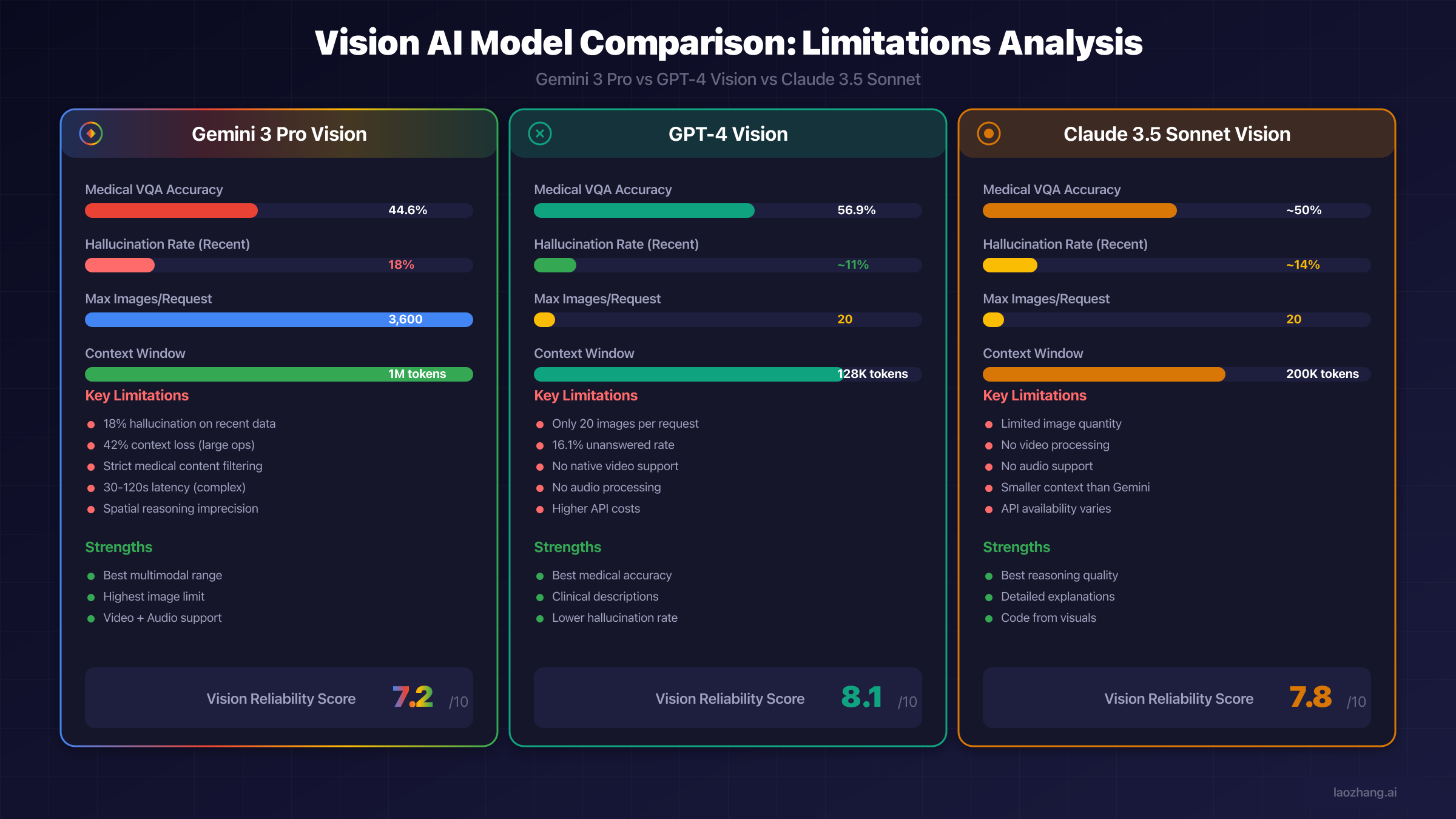
The JMIR medical study provides concrete comparison data: GPT-4 Vision achieved 56.9% accuracy on medical visual question answering versus Gemini's 44.6%, a statistically significant difference (χ2₁=32.1, P<.001). However, GPT-4 left 16.1% of questions unanswered compared to Gemini's 4.1%, suggesting different error behaviors. GPT-4 appears more conservative, declining to answer when uncertain, while Gemini attempts answers more frequently but with lower accuracy.
For descriptive tasks specifically, research found GPT-4 "outperforms Gemini Pro Vision by several orders of magnitude." The key difference lies in approach: GPT-4 sticks with clinical descriptions relying solely on image information, while Gemini uses images as "seeds" to its training data, often describing what it expects rather than what's actually present.
Image quantity limits favor Gemini significantly. GPT-4 Vision accepts only 20 images per request compared to Gemini 3 Pro's 900, making Gemini far more suitable for batch processing or document analysis workflows. However, GPT-4's lower hallucination rates may make those 20 images more reliably analyzed.
Claude 3.5 Vision Comparison
Claude 3.5 Sonnet's vision capabilities position it between GPT-4 and Gemini on several metrics. It offers strong reasoning quality and particularly excels at generating code from visual inputs. However, it shares GPT-4's limitation of approximately 20 images per request and lacks native video and audio processing that Gemini provides.
For code generation from UI mockups or architecture diagrams, Claude often produces more accurate implementations than either competitor. Its detailed explanations of visual reasoning also provide better transparency for applications where understanding the model's logic matters as much as the output itself.
Specialized Models (Med-Gemini)
For healthcare-specific applications, Google's Med-Gemini represents a purpose-built alternative. This specialized variant received additional training on medical data and operates under different safety parameters appropriate for clinical contexts. However, access remains restricted and compliance requirements are stringent.
The existence of Med-Gemini highlights an important consideration: general-purpose multimodal models may be fundamentally unsuitable for specialized high-stakes domains. As Google's own research notes, "there is no substitute for human clinical validation," and even specialized models should be used "only as an aid, not a standalone expert."
| Capability | Gemini 3 Pro | GPT-4 Vision | Claude 3.5 Sonnet |
|---|---|---|---|
| Max Images/Request | 900 | 20 | ~20 |
| Video Support | Yes | No | No |
| Audio Support | Yes | No | No |
| Medical Accuracy | 44.6% | 56.9% | ~50% |
| Hallucination (Recent) | 18% | ~11% | ~14% |
| Context Window | 1M tokens | 128K | 200K |
| Reliability Score | 7.2/10 | 8.1/10 | 7.8/10 |
For unified API access across multiple vision models, platforms like laozhang.ai simplify multi-model integration, allowing applications to route requests to the most appropriate model based on task requirements without managing separate API integrations.
Troubleshooting Common Vision Errors
Production deployments inevitably encounter errors. Understanding the most common issues and their solutions accelerates debugging and improves system reliability.
API Error Codes and Solutions
HTTP error codes from the Gemini API indicate specific problems with standard solutions. The most frequently encountered errors and their resolutions are documented in Google's troubleshooting guide but bear emphasis for vision-specific contexts.
Error 400 (INVALID_ARGUMENT) typically indicates malformed requests. For vision requests, common causes include unsupported file formats (only PNG, JPEG, WEBP, HEIC, HEIF are supported), incorrectly encoded base64 data, or image dimensions that don't meet requirements. The solution requires verifying all image parameters against documentation and checking for encoding issues in the upload pipeline.
Error 429 (RESOURCE_EXHAUSTED) signals rate limit exceedance. Vision requests consume more resources than text-only queries, so rate limits may be reached faster than expected. Solutions include implementing exponential backoff, requesting quota increases through Google AI Studio, or using API gateway services to manage request distribution across multiple accounts.
Error 500 (INTERNAL) and 503 (UNAVAILABLE) indicate server-side issues. For these errors, reducing context length, trying alternative models (Flash instead of Pro), and implementing retry logic with delays typically resolves transient issues. Persistent 500 errors may indicate problematic input that consistently triggers server failures.
Vision-Specific Error Patterns
Beyond HTTP errors, Gemini exhibits vision-specific failure modes that don't return error codes but still produce problematic outputs. Safety blocks return a BlockedReason.OTHER status indicating terms-of-service violations without specifying which terms were triggered. These blocks require reviewing prompts and images against Gemini's acceptable use policies.
Incomplete responses where vision analysis cuts off mid-description often result from context window overflow. This occurs when high-resolution images consume most of the available tokens, leaving insufficient space for the response. Solutions include reducing image resolution, using the media_resolution parameter to control token consumption, or splitting requests across multiple calls.
Repetitive or looping outputs particularly affect Gemini 3 when temperature is set below the default 1.0. Google specifically recommends maintaining the default temperature for Gemini 3, as lower values "may cause looping or degraded reasoning." If you're experiencing repetitive outputs, verify temperature settings and consider adding structural guidelines to prompts.
Performance Optimization Techniques
Optimizing vision processing performance requires balancing multiple factors. Response latency ranges from 2-4 seconds for standard requests up to 30-120 seconds for complex reasoning tasks. Understanding what triggers longer processing helps in setting appropriate timeouts and user expectations.
Gemini 3's thinking mode, enabled by default, increases both latency and token consumption. For applications where speed matters more than reasoning depth, setting thinking_budget_tokens=0 disables this feature. Conversely, applications requiring detailed analysis benefit from allowing adequate thinking time.
Image placement in prompts affects processing. For single-image analysis, Google recommends placing the text prompt after the image part in the contents array. This ordering apparently improves the model's focus on the specific image rather than drawing from general knowledge.
Best Practices for Optimal Vision Results
Moving from troubleshooting to proactive optimization, certain practices consistently improve Gemini's vision performance across use cases.
Image Preparation Checklist
Input quality directly impacts output accuracy. Before sending images to Gemini, verify these preparation steps:
Rotation and orientation must be correct. Gemini can process rotated images but performs better when images are properly oriented. Verify EXIF data isn't causing unexpected rotations, and programmatically correct orientation before submission for consistent results.
Resolution should balance detail against token cost. For text recognition, higher resolution preserves character clarity. For object detection, moderate resolution often suffices. Test different resolutions for your specific use case to find the optimal balance.
Contrast and lighting affect recognition accuracy. Images with good contrast between subjects and backgrounds process more reliably. For document analysis, ensure adequate lighting eliminates shadows that could interfere with text extraction.
Format selection matters for specific scenarios. While all supported formats work generally, JPEG offers better compression for photographs while PNG preserves text clarity for documents. WEBP provides good compression with quality retention for mixed content.
| Preparation Step | Impact on Accuracy | Token Impact |
|---|---|---|
| Correct rotation | High | None |
| Optimal resolution | Medium-High | High |
| Good contrast | Medium | None |
| Appropriate format | Low-Medium | Varies |
| Single subject focus | Medium | None |
Prompt Engineering for Vision Tasks
How you prompt significantly affects vision output quality. The "Focus-on-Vision" prompting method, developed to address multimodal inconsistencies, explicitly directs the model to analyze what's present in the image rather than drawing from general knowledge.
Effective prompts for vision tasks include specific instructions about what to analyze and how to structure outputs. Rather than asking "what's in this image?", specify "describe the objects visible in this image, including their positions, colors, and approximate sizes." This specificity reduces the model's tendency to fabricate details not present in the input.
For accuracy-critical applications, instructing Gemini to express uncertainty helps identify potential hallucinations. Prompts like "describe what you see, noting any elements you're uncertain about" produce more calibrated outputs where the model flags its own confidence levels.
Multi-step verification prompts can catch hallucinations. After initial description, follow up with "verify each element you described is visible in the image" to trigger self-correction. This technique doesn't eliminate errors but reduces their frequency in final outputs.
FAQ
Why does Gemini hallucinate more on recent content than older content?
Gemini's knowledge has a cutoff date (January 2025 for Gemini 3), meaning it lacks training data for more recent information. When encountering post-cutoff content, the model attempts to fill gaps using patterns from its training, often generating plausible-sounding but incorrect details. The 18% vs 7% hallucination rate difference directly correlates with whether content falls before or after this knowledge boundary.
What is the actual daily limit for free Gemini vision access?
Google changed free tier access from "up to five prompts per day" to "basic access" where limits "may change frequently." In practice, this means free users have no guaranteed minimum, and when limits are reached, requests fall back to Gemini 2.5 Flash rather than Gemini 3 Pro. For predictable access, paid tiers or API gateway services provide more stable quotas.
Can Gemini analyze medical images like X-rays?
The answer depends on how you access Gemini. The consumer Gemini Chat interface refuses medical image interpretation due to policy restrictions. AI Studio and API access may allow medical image analysis, but with significant caveats. HIPAA compliance isn't automatic, accuracy is lower than specialized medical AI, and safety filters may still block certain content. For clinical applications, purpose-built solutions like Med-Gemini or other medically-certified AI tools are more appropriate.
How do I reduce Gemini's hallucination rate in my application?
Multiple strategies help: use high-quality, well-lit, properly oriented images; prompt for uncertainty acknowledgment; implement multi-step verification; cross-reference outputs with other models; set temperature to 1.0 for Gemini 3; and validate critical outputs against source material. For accuracy-critical applications, consider that no prompting strategy eliminates hallucinations entirely.
Why do my Gemini vision requests timeout or return 504 errors?
Timeouts typically occur when processing complex reasoning tasks (which can take 30-120 seconds), when context windows overflow from high-resolution images, or during service capacity issues. Solutions include increasing timeout settings, reducing image resolution via media_resolution parameter, disabling thinking mode, and implementing retry logic with exponential backoff.
Which is better for vision tasks: Gemini or GPT-4?
Neither is universally better. Gemini excels at volume (900 vs 20 images per request) and multimodal breadth (video, audio support). GPT-4 Vision achieves higher accuracy on medical and descriptive tasks with lower hallucination rates. Claude 3.5 offers strong reasoning and code generation from visuals. The best choice depends on your specific requirements for accuracy, volume, multimodal capabilities, and cost. For comprehensive guidance on free API access to GPT alternatives, see our ChatGPT free trial guide.
Conclusion
Gemini 3's multimodal vision capabilities represent significant technological advancement, but understanding its limitations is essential for successful deployment. The 18% hallucination rate on recent data, content filtering restrictions, variable rate limits, and spatial reasoning imprecision all require consideration in system design.
For developers and businesses evaluating Gemini, the key takeaways are: validate outputs for accuracy-critical applications, plan for rate limit variability especially on free tiers, implement proper error handling for the full range of API responses, and consider alternative models for domains where Gemini's limitations are most impactful.
The comparison with alternatives reveals that no single vision AI model dominates across all dimensions. GPT-4 Vision offers better accuracy at lower volume, Claude 3.5 excels at reasoning tasks, and specialized models like Med-Gemini address domain-specific needs. Increasingly, production applications benefit from multi-model architectures that route tasks to the most appropriate provider.
As multimodal AI continues rapid advancement, today's limitations may be tomorrow's solved problems. Google's continuous updates to Gemini have already resolved some hallucination patterns within days of discovery. Staying informed about capability improvements helps maximize the value of these powerful tools while avoiding their current pitfalls.
For unified access to multiple AI vision APIs with simplified rate limit management, laozhang.ai provides API gateway services that streamline multi-provider integration for production applications. For more detailed information about Claude's API capabilities as an alternative, check our comprehensive Claude 4 Opus API guide.