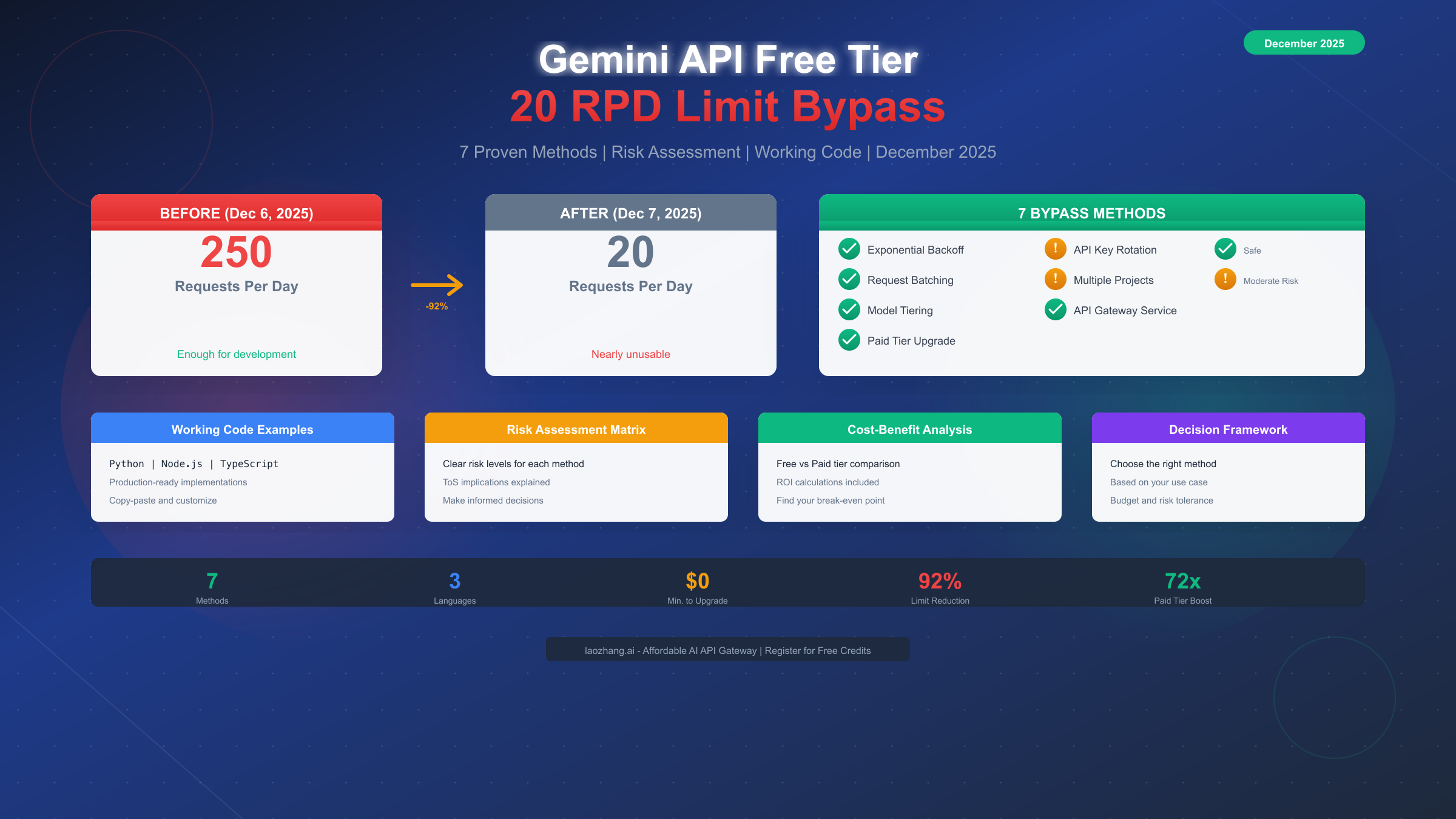
Google quietly slashed the Gemini API free tier quota from 250 requests per day (RPD) to just 20 RPD on December 7, 2025—a devastating 92% reduction that broke thousands of developer projects overnight. According to the official Google AI Developers Forum, this change was implemented to "free up compute for the growing demand for Gemini 3 Pro and Nano." If you woke up to 429 errors and wondered what happened, you're not alone. This comprehensive guide covers 7 proven methods to work around the new limit, complete with working code examples in Python and Node.js, a clear risk assessment matrix, and honest cost-benefit analysis to help you make the right choice for your situation.
The 20 RPD Crisis: What Happened on December 7, 2025
The Gemini API rate limit reduction caught the developer community completely off guard. There was no blog post, no email warning, and no advance notice—just sudden 429 "RESOURCE_EXHAUSTED" errors where working code had run fine the day before. Understanding exactly what changed and why is crucial for choosing the right bypass strategy.
The Numbers Tell the Story
Before December 7, 2025, the Gemini API free tier offered generous limits that made it viable for small projects and development work. The free tier provided 250 requests per day for Gemini Flash models, along with 5 requests per minute (RPM) and 250,000 tokens per minute (TPM). Many developers built automation scripts, testing pipelines, and small applications relying on these limits.
After the change, the daily limit dropped to just 20 RPD for Gemini Flash in the free tier—a reduction of over 92%. The RPM and TPM limits remained similar, but hitting the daily ceiling became almost inevitable for any non-trivial usage. For Gemini Pro models on the free tier, the limits became even more restrictive at around 5 RPD according to user reports on the Google AI Developers Forum (https://discuss.ai.google.dev/t/gemini-rate-limit-20-rpd/111274 ).
Why Google Made This Change
Logan Kilpatrick from Google provided the official explanation in forum responses: the limits were lowered due to "huge amount of growing demand" for newer models like Gemini 3 Pro and Nano. Google's position is that the free tier was always meant "to try and give people a sense of what the model can [do] for early testing" rather than serve as a production solution.
This reasoning frustrated many developers who had come to rely on the previous limits. One common complaint was that the change felt like a "bait and switch"—attractive free limits drew users to build on the platform, then severe restrictions pushed them toward paid tiers. Whether you agree with this characterization or not, the practical reality is that 20 RPD is insufficient for most development workflows, let alone production applications.
The Real Impact on Developers
The forum discussions reveal the true scope of the impact. Developers reported their n8n automation scripts becoming "nearly useless," testing pipelines breaking mid-development, and projects requiring complete architecture changes. The timing was particularly painful for those who had been evaluating Gemini for potential paid adoption—the sudden change made them question the platform's reliability for production use.
Understanding this context matters because it informs your bypass strategy. If Google views the free tier purely as a trial mechanism, methods that appear to circumvent this intent (like aggressive key rotation across many accounts) carry more risk than approaches that align with Google's preferred path (like upgrading to paid tiers).
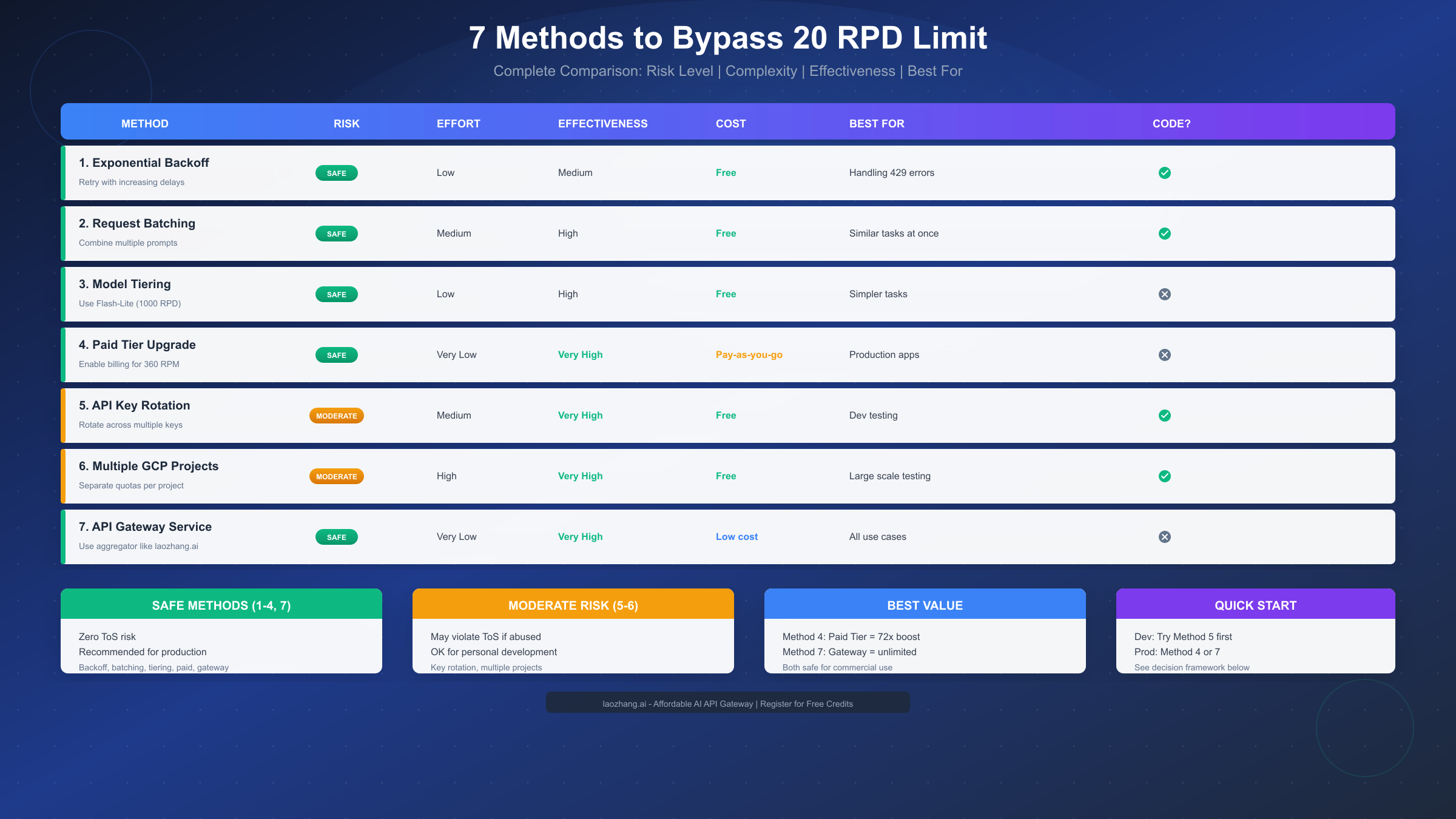
Complete Overview: 7 Methods to Work Around the Limit
Before diving into implementation details, let's survey all available options. Each method has different tradeoffs in terms of risk, effort, effectiveness, and cost. The table below provides a quick comparison, followed by deeper analysis of each approach.
| Method | Risk Level | Effort | Effectiveness | Cost | Best For |
|---|---|---|---|---|---|
| 1. Exponential Backoff | Safe | Low | Medium | Free | Handling 429 errors |
| 2. Request Batching | Safe | Medium | High | Free | Similar tasks |
| 3. Model Tiering | Safe | Low | High | Free | Simpler tasks |
| 4. Paid Tier Upgrade | Safe | Very Low | Very High | Pay-as-you-go | Production apps |
| 5. API Key Rotation | Moderate | Medium | Very High | Free | Dev testing |
| 6. Multiple GCP Projects | Moderate | High | Very High | Free | Large scale testing |
| 7. API Gateway Service | Safe | Very Low | Very High | Low cost | All use cases |
The Safe Methods (1-4, 7) carry zero risk of Terms of Service violations and are suitable for any use case including commercial production. These should be your first consideration.
The Moderate Risk Methods (5-6) can technically work but involve creating multiple accounts or projects to aggregate quotas. While developers commonly use these approaches for personal development, using them at scale or for commercial purposes could violate Google's ToS and risk account suspension.
The Best Value Options depend on your situation. For production applications that need reliability, Method 4 (paid tier) provides 72x the free tier limits with official support. For cost-conscious developers who want simplicity, Method 7 (API gateway services like laozhang.ai) offers professional-grade access at lower per-token costs than direct paid tiers.
Let me explain each method in detail, starting with the completely safe approaches.
Safe Methods: Zero ToS Risk
These methods are officially supported or work within the intended design of the API. You can use them freely for any purpose including commercial applications.
Method 1: Exponential Backoff and Retry
The most fundamental approach to handling rate limits is implementing proper retry logic with exponential backoff. When you hit a 429 error, instead of failing immediately, your code waits and tries again with progressively longer delays. Google's own documentation recommends this approach, and the official SDKs include built-in retry mechanisms.
The key insight is that rate limits are temporary constraints, not permanent blocks. If you're hitting the RPM (requests per minute) limit rather than the RPD (requests per day) limit, backoff and retry can recover automatically. Even for RPD limits, proper error handling prevents data loss and allows graceful degradation.
Here's a production-ready Python implementation using the tenacity library:
pythonfrom tenacity import retry, wait_random_exponential, stop_after_attempt
import google.generativeai as genai
import time

genai.configure(api_key="YOUR_API_KEY")

@retry(
    wait=wait_random_exponential(multiplier=1, max=60),
    stop=stop_after_attempt(5)
)
def call_gemini_with_retry(prompt: str, model_name: str = "gemini-1.5-flash"):
    """
    Call Gemini API with automatic retry on rate limit errors.

    - Exponential backoff: waits 1s, 2s, 4s, 8s... up to 60s max
    - Randomization prevents thundering herd
    - 5 retry attempts before giving up
    """
    model = genai.GenerativeModel(model_name)
    response = model.generate_content(prompt)
    return response.text

# Usage example
try:
    result = call_gemini_with_retry("Explain quantum computing in simple terms")
    print(result)
except Exception as e:
    print(f"Failed after retries: {e}")
For Node.js/TypeScript, here's an equivalent implementation:
typescriptimport { GoogleGenerativeAI } from "@google/generative-ai";

const genAI = new GoogleGenerativeAI(process.env.GEMINI_API_KEY!);

async function callGeminiWithRetry(
  prompt: string,
  maxRetries: number = 5
): Promise<string> {
  const model = genAI.getGenerativeModel({ model: "gemini-1.5-flash" });

  for (let attempt = 0; attempt < maxRetries; attempt++) {
    try {
      const result = await model.generateContent(prompt);
      return result.response.text();
    } catch (error: any) {
      if (error.status === 429 && attempt < maxRetries - 1) {
        // Exponential backoff with jitter
        const delay = Math.min(1000 * Math.pow(2, attempt) + Math.random() * 1000, 60000);
        console.log(`Rate limited. Waiting ${delay}ms before retry ${attempt + 1}...`);
        await new Promise(resolve => setTimeout(resolve, delay));
      } else {
        throw error;
      }
    }
  }
  throw new Error("Max retries exceeded");
}
This method won't increase your daily quota, but it makes your application more resilient and ensures you extract maximum value from your available requests.
Method 2: Request Batching
Request batching is a powerful technique that can reduce your API call count by 40-60% depending on your use case. Instead of making separate API calls for each task, you combine multiple prompts or items into a single request. Since Gemini models support up to 1 million tokens of context, you can process substantial amounts of data in one call.
The concept is straightforward: if you need to analyze 10 product descriptions, instead of making 10 API calls, you format all descriptions into a single prompt asking the model to analyze each one. You consume only 1 request from your quota while accomplishing the work of 10.
Here's how to implement effective batching:
pythonimport json

def batch_analyze_items(items: list, analysis_type: str = "sentiment") -> list:
    """
    Analyze multiple items in a single API call.

    Args:
        items: List of text items to analyze
        analysis_type: Type of analysis (sentiment, summary, classification, etc.)

    Returns:
        List of analysis results for each item
    """
    # Format items with clear numbering for reliable parsing
    formatted_items = "\n".join([f"[ITEM {i+1}]: {item}" for i, item in enumerate(items)])

    prompt = f"""Analyze each of the following items for {analysis_type}.
Return your analysis as a JSON array with one object per item.
Each object should have: "item_number", "analysis", "confidence".

Items to analyze:
{formatted_items}

Return ONLY valid JSON, no other text."""

    response = call_gemini_with_retry(prompt)

    # Parse the JSON response
    try:
        # Handle potential markdown code blocks in response
        json_str = response.strip()
        if json_str.startswith("```"):
            json_str = json_str.split("```")[1]
            if json_str.startswith("json"):
                json_str = json_str[4:]
        return json.loads(json_str)
    except json.JSONDecodeError:
        # Fallback: return raw response if JSON parsing fails
        return [{"raw_response": response}]

# Example: Analyze 10 reviews with 1 API call instead of 10
reviews = [
    "Great product, exceeded expectations!",
    "Terrible quality, broke after one day.",
    "It's okay, nothing special.",
    # ... add more items
]

results = batch_analyze_items(reviews, "sentiment")
Batching works best for homogeneous tasks—analyzing multiple similar items, generating variations of content, or processing lists of data. For diverse tasks requiring different system prompts or model configurations, batching provides less benefit.
The efficiency gains from batching can be substantial. Consider a content moderation system that needs to check 100 user comments per hour. Without batching, this consumes 100 of your 20 RPD limit in just one hour—impossible on the free tier. With batching 10 comments per call, you need only 10 requests per hour, or 240 per day at that rate—still too many for free tier, but now achievable with just 12 API keys through rotation, or easily handled by Tier 1 pricing.
Real-world batching performance depends on your use case. For sentiment analysis, batching 20-30 items per call typically works well. For summarization, 5-10 documents per call is more practical due to output length. For classification tasks, you can often batch 50+ items efficiently. The key is testing your specific prompts to find the sweet spot between efficiency and accuracy.
Method 3: Model Tiering Strategy
Not all tasks require Gemini Pro or even standard Flash. Google offers lighter models with significantly higher free tier limits. By routing simpler tasks to appropriate models, you can stretch your quota much further.
The key models and their free tier limits as of December 2025:
| Model | RPD (Free Tier) | Best For |
|---|---|---|
| Gemini 2.5 Pro | ~100 | Complex reasoning, code generation |
| Gemini 2.5 Flash | ~20-250 | General purpose, fast responses |
| Gemini 2.5 Flash-Lite | ~1,000 | Simple tasks, classification |
Flash-Lite offers up to 1,000 RPD on the free tier—50x more than standard Flash. For tasks like text classification, simple Q&A, content moderation, or basic summarization, Flash-Lite performs adequately while preserving your Pro/Flash quota for complex work.
pythondef get_appropriate_model(task_complexity: str) -> str:
    """
    Select the most efficient model based on task complexity.
    Preserves premium quota for tasks that need it.
    """
    model_mapping = {
        "simple": "gemini-1.5-flash-8b",  # Flash-Lite equivalent
        "medium": "gemini-1.5-flash",
        "complex": "gemini-1.5-pro"
    }
    return model_mapping.get(task_complexity, "gemini-1.5-flash")

def smart_generate(prompt: str, task_complexity: str = "medium") -> str:
    """Generate content using the most efficient model for the task."""
    model_name = get_appropriate_model(task_complexity)
    model = genai.GenerativeModel(model_name)
    response = model.generate_content(prompt)
    return response.text

# Route tasks appropriately
simple_result = smart_generate("Is this text positive or negative: 'I love it!'", "simple")
complex_result = smart_generate("Write a detailed technical analysis...", "complex")
Method 4: Paid Tier Upgrade
For production applications, upgrading to a paid tier is often the most practical solution. The process is simpler than many developers expect, and the cost can be surprisingly reasonable for moderate usage.
To upgrade from Free to Tier 1, you need to enable Cloud Billing for your Google Cloud project. This doesn't require a minimum payment—it's pay-as-you-go billing. Once billing is enabled, navigate to the API keys page in Google AI Studio, locate your project, and click "Upgrade" if the option appears.
The limits comparison makes the value proposition clear:
| Metric | Free Tier | Tier 1 (Paid) | Improvement |
|---|---|---|---|
| RPM | 5 | 360 | 72x |
| RPD | 20 | 10,000+ | 500x+ |
| TPM | 250,000 | 1,000,000+ | 4x+ |
Tier 1 pricing follows a pay-as-you-go model. For Gemini 1.5 Flash, input costs approximately $0.075 per million tokens and output costs $0.30 per million tokens as of December 2025. A typical application making 1,000 requests daily with 1,000 tokens per request would cost roughly $1-3 per month—often less than the time developers spend implementing complex workarounds.
The upgrade process itself takes just a few minutes. First, go to the Google Cloud Console and ensure billing is enabled for your project. You don't need to add credits or make a payment—simply having a valid payment method on file is sufficient. Next, navigate to Google AI Studio and find your API keys. If your project qualifies for upgrade (billing enabled), you'll see an "Upgrade" button next to the project. Click it, confirm the upgrade, and your new limits take effect immediately.
For higher volume needs, Tier 2 (requires $250 cumulative spend + 30 days) and Tier 3 ($1,000 + 30 days) provide even higher limits. The qualification criteria are based on total spending across all Google Cloud services linked to your billing account, not just Gemini API usage. If you're already using other Google Cloud services like BigQuery, Cloud Run, or Vertex AI, you may already qualify for higher tiers.
One important consideration: Tier 1 limits are generous enough for most applications. The 360 RPM limit means you can sustain 6 requests per second continuously—far more than most applications need. The daily limits are effectively unlimited for typical use cases. Unless you're building a high-scale public service, Tier 1 is likely sufficient.
Advanced Methods: Moderate Risk Approaches
The following methods work technically but involve practices that exist in a gray area regarding Google's Terms of Service. Use these for personal development and testing, but consider the safe methods for production applications.
Method 5: API Key Rotation
API key rotation distributes requests across multiple API keys to aggregate their individual quotas. If you have 3 keys each with 20 RPD, rotation theoretically gives you 60 RPD capacity. Several open-source implementations exist, including Node.js proxy servers and Deno edge functions.
The approach works by maintaining a pool of API keys and cycling through them for each request. When one key hits its limit (returns 429), the rotator marks it as exhausted and switches to the next available key.
Here's a simplified Python implementation:
pythonimport time
from typing import Optional
from dataclasses import dataclass

@dataclass
class KeyState:
    key: str
    exhausted_until: float = 0
    request_count: int = 0

class KeyRotator:
    def __init__(self, api_keys: list[str], cooldown_seconds: int = 3600):
        self.keys = [KeyState(key=k) for k in api_keys]
        self.current_index = 0
        self.cooldown = cooldown_seconds

    def get_available_key(self) -> Optional[str]:
        """Get the next available API key, skipping exhausted ones."""
        now = time.time()
        attempts = 0

        while attempts < len(self.keys):
            key_state = self.keys[self.current_index]
            self.current_index = (self.current_index + 1) % len(self.keys)

            if key_state.exhausted_until < now:
                key_state.request_count += 1
                return key_state.key

            attempts += 1

        return None  # All keys exhausted

    def mark_exhausted(self, key: str):
        """Mark a key as exhausted for the cooldown period."""
        for key_state in self.keys:
            if key_state.key == key:
                key_state.exhausted_until = time.time() + self.cooldown
                break

    def call_with_rotation(self, prompt: str) -> str:
        """Make an API call, rotating keys on rate limit errors."""
        for _ in range(len(self.keys)):
            key = self.get_available_key()
            if not key:
                raise Exception("All API keys exhausted")

            try:
                genai.configure(api_key=key)
                model = genai.GenerativeModel("gemini-1.5-flash")
                response = model.generate_content(prompt)
                return response.text
            except Exception as e:
                if "429" in str(e) or "RESOURCE_EXHAUSTED" in str(e):
                    self.mark_exhausted(key)
                    continue
                raise

        raise Exception("All keys exhausted or failed")

# Usage
rotator = KeyRotator([
    "AIzaSy...key1",
    "AIzaSy...key2",
    "AIzaSy...key3",
])

result = rotator.call_with_rotation("Your prompt here")
For production-grade key rotation, consider existing open-source solutions like the openai-gemini-api-key-rotator (https://github.com/p32929/openai-gemini-api-key-rotator ) which includes features like live key validation, request logging, and a web admin interface.
Method 6: Multiple GCP Projects
Since rate limits are applied per project rather than per account, creating multiple Google Cloud Platform projects can multiply your effective quota. Each project gets its own independent free tier allocation.
The setup process involves:
- Creating additional GCP projects in the Google Cloud Console
- Enabling the Gemini API for each project
- Generating API keys from each project
- Using these keys in a rotation system similar to Method 5
This approach provides the highest free capacity but requires the most setup effort. It also creates more complexity for key management and billing (if you later upgrade some projects to paid tiers).
Important Considerations for Methods 5-6
Both key rotation and multiple projects can be seen as circumventing Google's intended rate limiting. While individual developers routinely use these techniques for testing, the scale and intent matter. Using 2-3 keys to extend development testing is generally tolerated. Creating dozens of accounts or projects for commercial-scale free usage likely violates ToS and risks account suspension.
Google's Terms of Service prohibit "automated or systematic data collection" and using the services to "interfere with" or "circumvent" limitations. Aggressive quota aggregation could fall under these restrictions. The safer path for any production use case is upgrading to paid tiers or using legitimate API gateway services like laozhang.ai that have proper commercial relationships with AI providers.
The key distinction is intent and scale. A developer with 2-3 personal Google accounts using key rotation during a weekend hackathon is unlikely to face any consequences. A startup systematically creating hundreds of accounts to power a commercial product crosses a clear line. If you're unsure where your use case falls, that uncertainty itself suggests you should consider paid options.
Another factor to consider is reliability. Even if key rotation technically works, free tier API keys can be revoked at any time, rate limits can change without notice (as we saw on December 7), and there's no support channel if something goes wrong. For anything beyond personal experimentation, the stability and predictability of paid tiers or managed API services outweighs the cost savings of free tier workarounds.
Risk Assessment: What Could Happen?
Understanding the real risks helps you make informed decisions. Here's an honest assessment of what each approach means for your account and project.
Safe Methods Risk Profile
Methods 1-4 and 7 carry effectively zero account risk. Exponential backoff is literally recommended by Google. Request batching is standard API optimization. Model tiering uses the API as designed. Paid tier upgrade is Google's preferred path. API gateway services use legitimately obtained API access.
The only "risk" with safe methods is cost (for paid tiers) or the effort of implementation (for batching and tiering). No ToS concerns exist.
Moderate Risk Methods Profile
Methods 5-6 exist in a gray area. Here's what could theoretically happen:
| Scenario | Likelihood | Consequence |
|---|---|---|
| Using 2-3 keys for dev work | Very Low Risk | Generally tolerated |
| Automated rotation at scale | Moderate Risk | Possible warning or ban |
| Commercial use with many accounts | Higher Risk | Account suspension |
| Reselling aggregated access | Very High Risk | Permanent ban |
Google's enforcement appears to focus on abuse patterns rather than occasional personal use. However, "appears" is the key word—Google doesn't publish enforcement specifics, and policies can change.
What Enforcement Actually Looks Like
When Google detects abuse, the response typically escalates in stages. First, you might notice your API keys suddenly returning 429 errors even when you haven't hit documented limits—this is often a sign of behind-the-scenes rate limiting. If behavior continues, you may receive an email warning about ToS violations. Persistent abuse can result in API key revocation, and in serious cases, account suspension affecting all Google services.
The warning signs to watch for include: sudden unexplained 429 errors, keys that stop working without hitting known limits, and emails from Google about "unusual activity." If you see these signs while using workaround methods, it's time to migrate to a legitimate approach.
Practical Recommendations
For development and testing: Methods 5-6 are pragmatically acceptable for personal use. Many developers use multiple keys during development without issues. Just don't scale it up or commercialize it. Keep your total aggregated usage within reasonable bounds—if 3 keys give you 60 RPD, using 50 RPD is probably fine; using 60,000 RPD across 3,000 keys is clearly abuse.
For production applications: Stick with Methods 1-4 and 7. The cost of paid tiers or API gateways is trivial compared to the risk of building a production system on potentially ToS-violating foundations. A production application that suddenly loses API access due to ToS enforcement causes far more damage than the money saved on API costs.
For budget-conscious production: Consider API gateway services like laozhang.ai which provide professional-grade access at competitive per-token rates. These services handle the scaling and compliance while you focus on your application. The unified API approach also means you can easily switch between model providers if pricing or availability changes.
Paid Tier Deep Dive: Is It Worth It?
Let's do the math on whether upgrading to a paid tier makes sense for your situation.
Tier 1 Cost Analysis
Tier 1 requires only enabling billing—no minimum spend. Pricing as of December 2025:
| Model | Input (per 1M tokens) | Output (per 1M tokens) |
|---|---|---|
| Gemini 1.5 Flash | $0.075 | $0.30 |
| Gemini 1.5 Pro | $1.25 | $5.00 |
| Gemini 2.5 Flash | ~$0.15 | ~$0.60 |
For a typical use case of 500 requests/day with average 1,000 input + 500 output tokens per request:
- Daily token usage: 500K input + 250K output
- Daily cost (Flash): ~$0.04 + $0.08 = $0.12
- Monthly cost: ~$3.60
That's less than a cup of coffee for 500x the free tier capacity. For most developers, the question isn't whether they can afford paid tiers—it's whether they realized how affordable they are.
Break-Even Analysis
Consider the value of your time. If implementing and maintaining a key rotation system takes 4 hours, and your time is worth $50/hour, that's $200 of effort. At $3.60/month, the paid tier pays for itself within the first month just in saved development time.
The break-even calculation becomes even more favorable when you factor in:
- No risk of account suspension
- No maintenance of rotation infrastructure
- Access to official support
- Higher reliability and lower latency
When Free Methods Still Make Sense
That said, paid tiers aren't always the answer. There are legitimate scenarios where optimizing free tier usage is the right approach:
Learning and experimentation is the most obvious case. If you're just exploring Gemini's capabilities, running through tutorials, or building proof-of-concept projects, the 20 RPD free tier combined with safe workarounds like batching and tiering can be sufficient. You don't need production-grade capacity to learn how the API works. In fact, working within constraints can teach you optimization techniques you'll appreciate later.
Infrequent usage patterns also favor free methods. If your application only needs AI features occasionally—perhaps a weekend project, a personal tool you use a few times per day, or a prototype you're showing to potential investors—paying for API access may be premature. At 20 RPD, you can make 600 requests per month for free. Combined with batching (potentially doubling effective capacity) and model tiering (getting 1000 RPD for simple tasks), many hobbyist projects fit comfortably within free limits.
Budget constraints present a real consideration for some developers. Students building class projects, hobbyists in countries where international payments are complicated, and developers just starting out may genuinely need to minimize costs. The free tier exists precisely for these users. The key is being realistic about what you can achieve and accepting the limitations rather than trying to circumvent them in risky ways.
For these scenarios, combining Methods 1-3 can stretch free tier usage significantly. Implement exponential backoff first—it's essential regardless of tier. Add request batching to reduce call volume by 50% or more. Use model tiering to route simple tasks to Flash-Lite's generous 1000 RPD limit. This combination gives you effective capacity of several hundred meaningful operations per day without spending anything.
If you need more headroom during intensive development sprints, Method 5 (key rotation with 2-3 personal keys) provides a reasonable buffer without crossing into clearly problematic territory. Just remember this is for development, not production, and migrate to proper paid infrastructure before launching anything to users.
How to Choose: Decision Framework
With seven methods available, selecting the right approach depends on your specific situation. Use this decision framework to identify your best path.
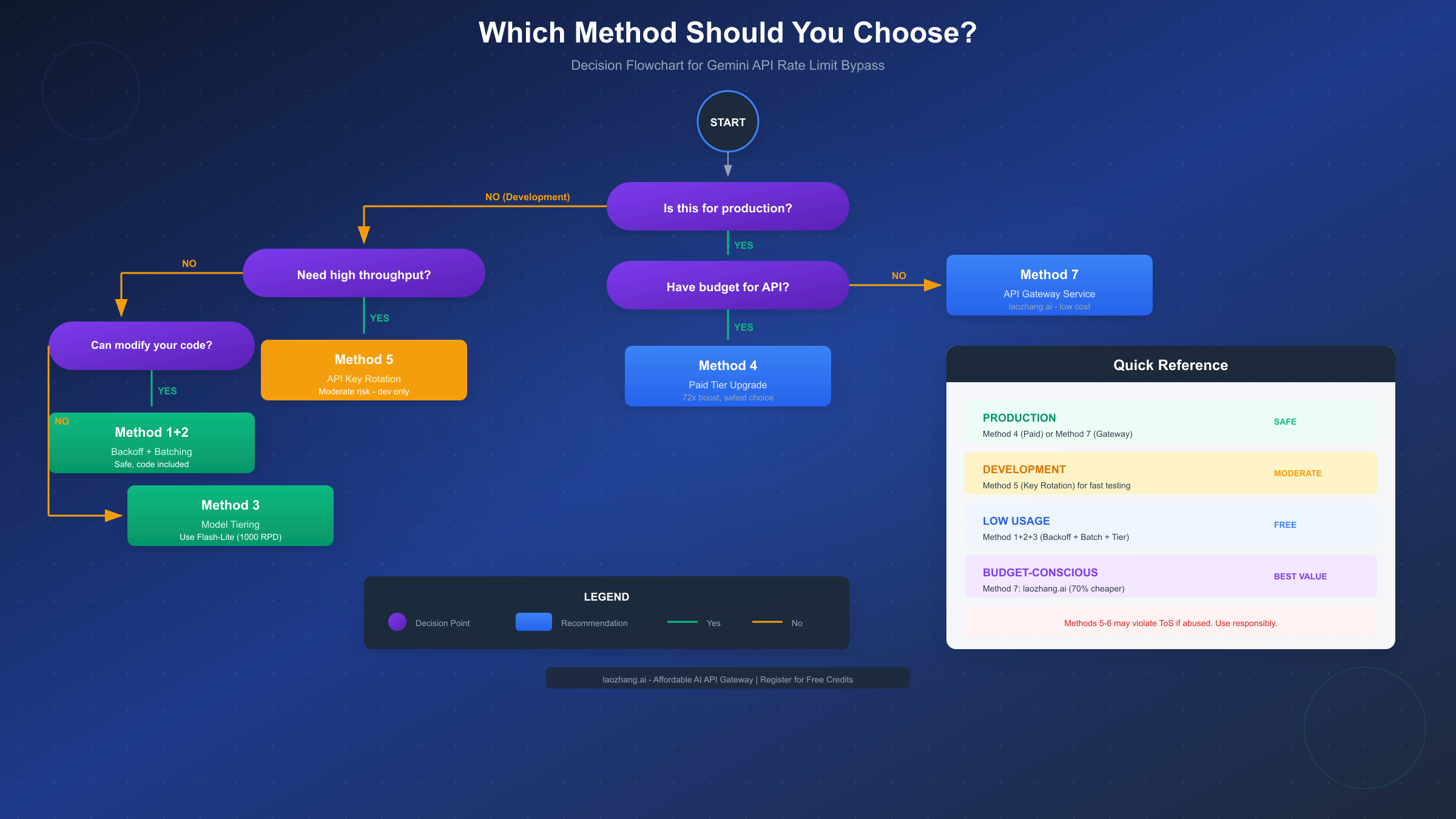
For Production Applications
If you're building something that will serve users, make money, or needs to be reliable, the choice is straightforward:
-
Primary option: Upgrade to Paid Tier (Method 4)
- Best reliability and support
- Clearest path for scaling
- No compliance concerns
-
Budget alternative: API Gateway Service (Method 7)
- Services like laozhang.ai aggregate access across providers
- Often 70% cheaper than direct API pricing
- Single integration point for multiple AI models
- Handles rate limiting and failover automatically
Both options are safe, reliable, and appropriate for commercial use.
For Development and Testing
When you're building and iterating, cost matters more than long-term reliability:
- Start with: Safe methods (1-3) to minimize API calls
- Add if needed: Key rotation (Method 5) with 2-3 personal keys
- Upgrade when: You're spending more time managing limits than coding
The progression makes sense because development usage is typically bursty—periods of intensive testing followed by coding. Safe methods handle the baseline, rotation handles the bursts.
For Learning and Experimentation
If you're exploring what Gemini can do without a specific project:
- Free tier is fine: 20 RPD is enough for casual experimentation
- Optimize with: Request batching to try more in fewer calls
- Consider: Model tiering to stretch quota further
You probably don't need workarounds at all—just thoughtful usage of the free tier.
The API Gateway Alternative
Method 7 deserves special mention because it solves multiple problems simultaneously. Services like laozhang.ai function as unified API gateways that:
- Aggregate quota across many backend sources
- Provide a single API key that works across models
- Handle rate limiting and failover automatically
- Offer competitive per-token pricing (often lower than direct API)
- Maintain OpenAI-compatible endpoints for easy integration
For developers who want to focus on building rather than managing API infrastructure, gateway services represent the best balance of cost, convenience, and capability. Registration typically includes free credits to evaluate the service before committing.
The technical implementation is straightforward—most API gateway services use OpenAI-compatible endpoints, so if you've written code for OpenAI's API, you can often switch by just changing the base URL and API key. This compatibility also means existing libraries, frameworks, and tools work out of the box. For Gemini-specific features, gateways typically offer both native Gemini endpoints and translation layers that convert OpenAI-format requests to Gemini's API.
The cost advantages can be significant. Direct Gemini API pricing starts at $0.075 per million input tokens for Flash models. Gateway services often offer bulk rates that reduce this by 30-70%, depending on volume. They achieve this through negotiated enterprise pricing, efficient batching across their user base, and competitive market positioning. For a developer making 10,000 requests per day, the savings can amount to hundreds of dollars monthly.
Common Mistakes to Avoid
Before implementing any bypass method, be aware of common pitfalls:
First, don't over-engineer for problems you don't have yet. Many developers spend hours building complex rotation systems when simple batching would solve their problem. Start with the simplest solution that addresses your actual usage patterns, then iterate if needed.
Second, don't mix free and paid infrastructure carelessly. If you're using key rotation with personal accounts alongside a paid business account, keep the usage completely separate. Mixing them creates confusion about which traffic is which, and could implicate your paid account if personal account usage triggers ToS concerns.
Third, don't forget about latency. Some bypass methods like aggressive batching or complex rotation add latency to your requests. For user-facing applications, this latency matters. A paid tier with direct API access often provides better user experience than heavily optimized free tier workarounds.
Fourth, don't assume current limits will stay the same. Google changed limits once; they can change again. Build your application to handle rate limit changes gracefully. This means comprehensive error handling, configurable limits, and ideally an abstraction layer that lets you switch API backends without rewriting application logic.
Finally, don't ignore monitoring. Whatever approach you choose, implement monitoring from day one. Track request counts, error rates, latency, and costs. This data helps you optimize usage, catch problems early, and make informed decisions about when to upgrade or change approaches.
FAQ and Future Outlook
Frequently Asked Questions
Q: Will Google increase the free tier limits again?
Based on Google's statements, this seems unlikely in the near term. The reduction was explicitly to reallocate compute resources for newer models. The free tier is positioned as a trial mechanism, not a production resource.
Q: Can I request a quota increase for the free tier?
No. Quota increase requests are only available for paid tier users. To request higher limits, you must first upgrade to a paid tier by enabling billing.
Q: Is using multiple Google accounts for more keys against ToS?
Technically, Google's ToS prohibit creating multiple accounts to circumvent limitations. In practice, enforcement appears focused on abuse rather than occasional personal use. However, building production systems on this approach is not recommended.
Q: How do I know which limit I'm hitting (RPM, TPM, or RPD)?
Check your error response—it typically includes which quota was exceeded. You can also view your current limits and usage in Google AI Studio under the API keys section. RPD limits reset at midnight Pacific Time.
Q: What happens if I exceed limits on a paid tier?
You'll receive 429 errors similar to free tier, but your higher limits make this less likely. Google may also dynamically throttle rather than hard-block, and you can request further increases for paid tiers.
Q: Are there alternatives to Gemini with better free tiers?
Several providers offer free tiers, though limits vary:
- Anthropic Claude: Limited free tier through Claude.ai, API access requires payment
- OpenAI: Pay-as-you-go only, no meaningful free tier for API
- Mistral: Some free tier access, primarily through their hosted chat
- Open-source models (Llama, Mistral): Unlimited but require self-hosting infrastructure
For developers who want hassle-free access to multiple models including Gemini, API aggregators like laozhang.ai provide unified access with competitive pricing. These services often offer free credits for new users and support multiple model providers through a single API endpoint, making it easy to switch between Gemini, GPT-4, Claude, and others without managing separate accounts and API keys.
Q: How do I monitor my current quota usage?
Google provides quota monitoring through multiple channels. In Google AI Studio, navigate to the API keys section where you can view current usage and limits for each project. For more detailed tracking, use the Google Cloud Console's "APIs & Services" dashboard, which shows request counts, error rates, and quota consumption over time. You can also set up Cloud Monitoring alerts to notify you when you approach quota limits, preventing surprise 429 errors.
Q: Can I combine multiple methods for maximum effect?
Absolutely, and this is often the best approach. A well-optimized setup might combine:
- Exponential backoff (Method 1) as a baseline for error handling
- Request batching (Method 2) to reduce total API calls by 50%+
- Model tiering (Method 3) to route simple tasks to Flash-Lite
- Key rotation (Method 5) with 2-3 keys for development bursts
This combination can effectively multiply your usable capacity by 10x or more while staying within reasonable bounds. For production, replace the key rotation with a paid tier or API gateway service for proper reliability.
What to Expect Going Forward
The trend in AI API pricing is clear: providers are tightening free tiers while reducing paid pricing. Gemini's paid rates are already competitive, and further reductions are possible as Google competes with OpenAI and Anthropic.
For developers, this means:
- Free tiers will become increasingly limited to trials only
- Paid access will become more accessible and affordable
- Gateway services will play a larger role in API access
The developers who adapt early—by building with scalable paid infrastructure from the start—will have smoother paths as their projects grow.
Final Recommendations
If you're affected by the 20 RPD limit, here's your action plan:
- Immediate fix: Implement exponential backoff (Method 1) to handle errors gracefully
- Quick wins: Add batching and model tiering (Methods 2-3) to reduce calls
- For development: Consider key rotation (Method 5) if you need more headroom
- For production: Upgrade to paid tier (Method 4) or use an API gateway (Method 7)
The 20 RPD limit is frustrating, but it's also navigable. With the right approach, you can continue building with Gemini API effectively—whether through optimized free usage, affordable paid tiers, or convenient gateway services.
Remember that Google's change reflects the broader reality of AI API economics—providing genuinely useful AI capabilities costs real money, and free tiers are transitioning from "generous trial" to "limited demo." Accepting this reality and budgeting for API costs as a normal part of development is healthier than fighting endless workaround battles. The good news is that paid access has never been more affordable. Whether through Google's paid tiers directly or through third-party services, the cost of meaningful AI API access is now measured in single-digit dollars per month for most use cases.
The developers who thrive in this environment are those who treat AI APIs as valuable infrastructure worth paying for, optimize their usage through smart batching and tiering, and build applications robust enough to handle the inevitable changes that will continue coming as the AI landscape evolves.
This guide is current as of December 2025. API pricing and limits may change. Always verify current rates at the official Google AI documentation (https://ai.google.dev/gemini-api/docs/rate-limits ).