Gemini 3 is Google's latest flagship AI model series released in late 2025, featuring the reasoning-powerful Pro variant and the lightning-fast Flash variant. For developers and enterprise users, understanding Gemini 3 API's pricing structure and quota limits is crucial for making informed technology decisions. This guide, based on verified Google AI Studio data (2026-02-04), provides a comprehensive analysis of Gemini 3 API pricing and quotas to help you maximize AI capabilities within your budget.
Gemini 3 API Overview
Google's approach to AI models has consistently emphasized multimodal capabilities and long context processing, and Gemini 3 takes both aspects to new heights. As the latest achievement from Google DeepMind, Gemini 3 not only continues the multimodal understanding advantages of its predecessors but also delivers significant improvements in reasoning depth and response efficiency.
The Gemini 3 API is currently available through two channels: Google AI Studio and Vertex AI. Google AI Studio targets individual developers and small teams, offering free tier and pay-as-you-go options, while Vertex AI caters to enterprise users with enhanced security compliance and service guarantees. Pricing strategies are largely consistent across both channels, though quota limits and enterprise features differ.
From a technical architecture perspective, Gemini 3 introduces the thinking_level parameter to control model reasoning depth, allowing developers to dynamically adjust the model's "thinking intensity" based on task complexity, finding the balance between reasoning quality and response speed. Additionally, Gemini 3 supports up to 1M tokens context window, providing ample space for processing long documents, codebase analysis, and multi-turn conversations. Gemini 3 is currently in Preview stage, and some features and pricing may change upon official release.
Complete Gemini 3 Pricing Details
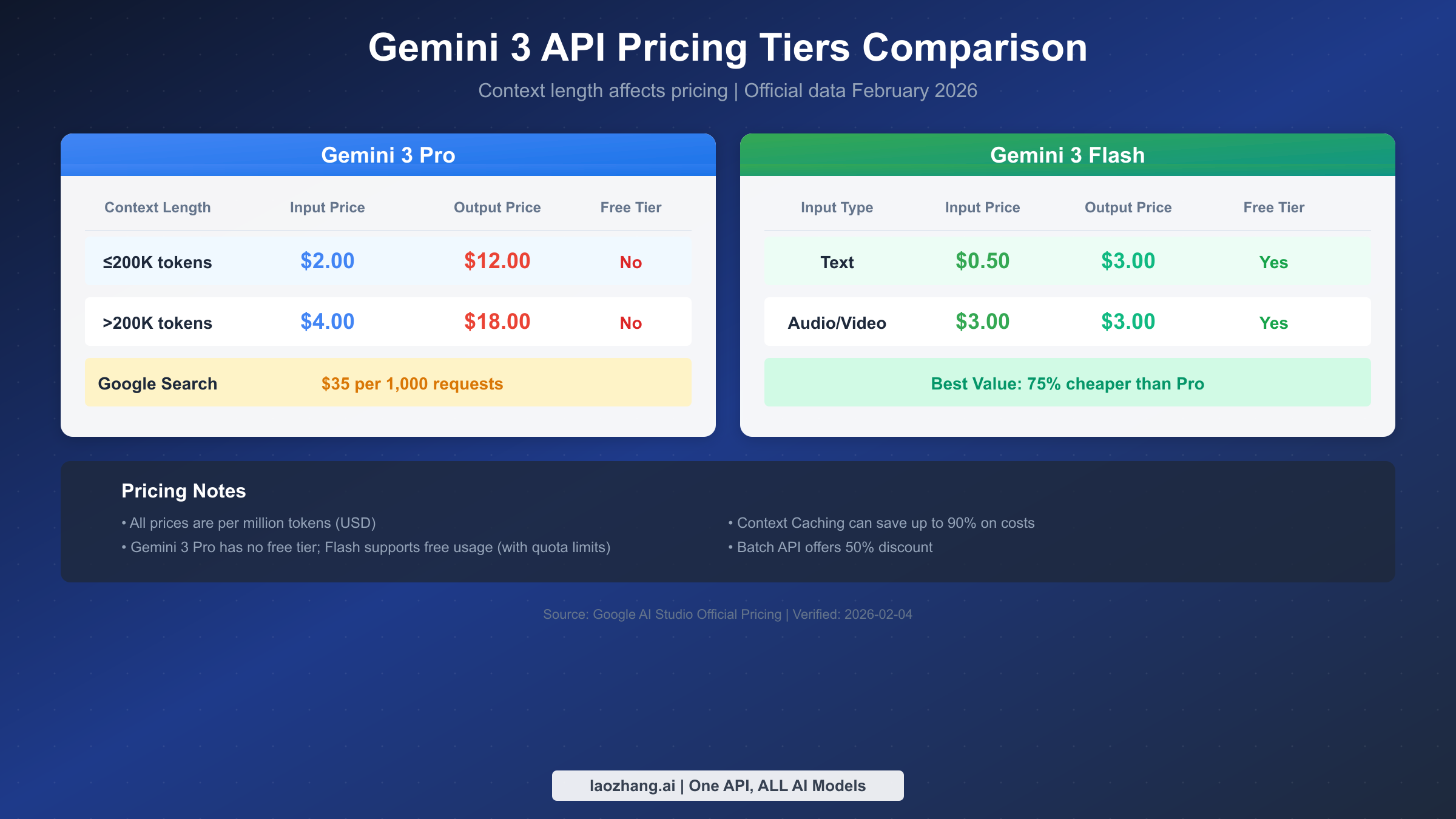
Understanding Gemini 3's pricing structure requires attention to several key dimensions: model version (Pro vs Flash), context length (≤200K vs >200K), and input/output types (text, images, audio/video). Google employs tiered pricing, with costs increasing when context length exceeds 200K tokens, reflecting the additional computational resources required for long context processing.
Gemini 3 Pro Pricing
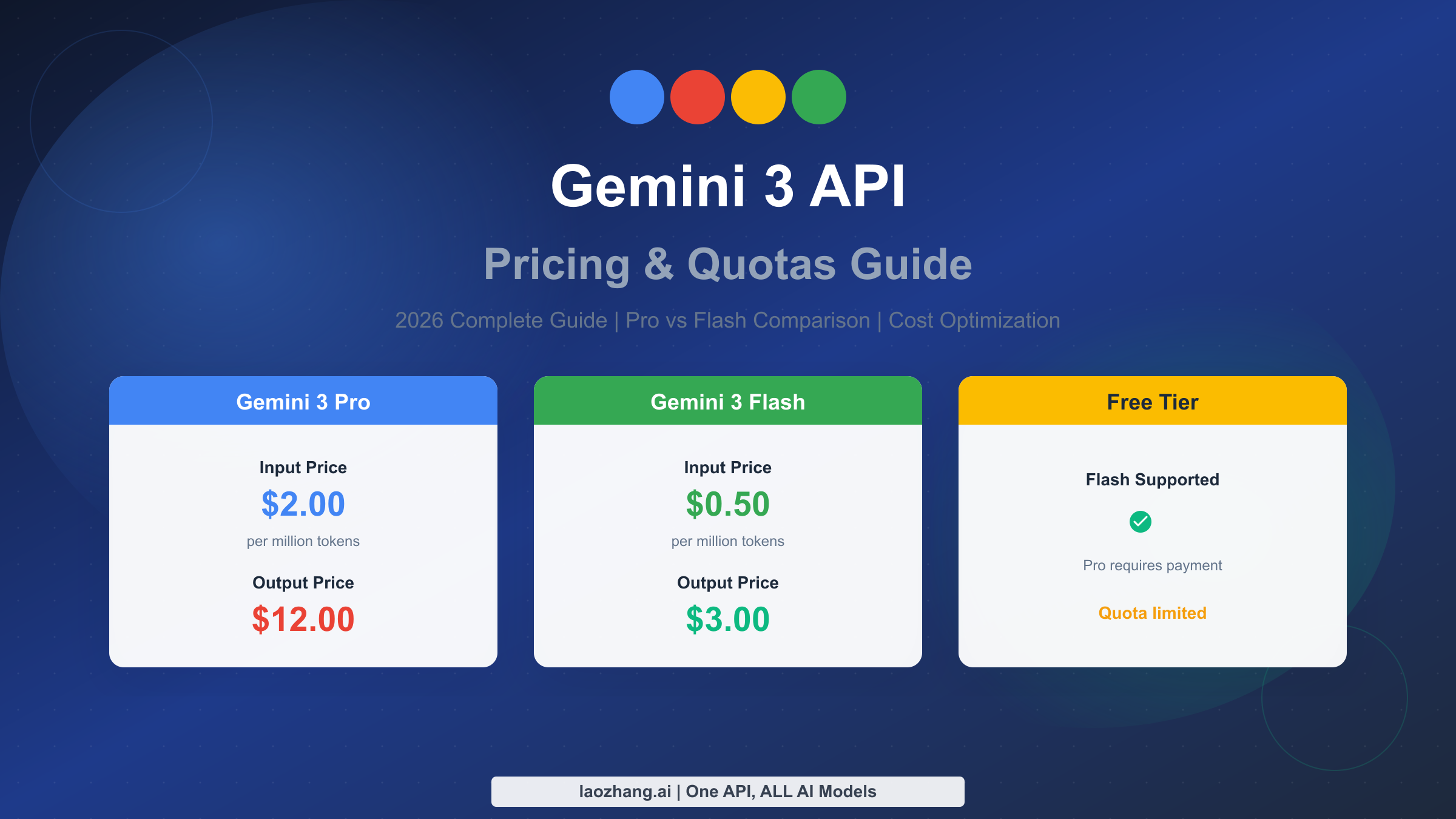
Gemini 3 Pro is the flagship model designed for complex reasoning tasks, and its pricing reflects its powerful capabilities. According to the Google AI Studio official pricing page (verified 2026-02-04), Gemini 3 Pro pricing is as follows:
| Billing Item | ≤200K tokens context | >200K tokens context |
|---|---|---|
| Input Price (per million tokens) | $2.00 | $4.00 |
| Output Price (per million tokens) | $12.00 | $18.00 |
| Google Search Tool | $35.00 / 1K requests | $35.00 / 1K requests |
Gemini 3 Pro currently has no free tier; all API calls require a linked billing account. This strategy aligns with Pro's positioning for production-grade applications and enterprise scenarios, ensuring service quality and stable resource supply.
Gemini 3 Flash Pricing
Gemini 3 Flash is optimized for high-frequency, low-latency scenarios, significantly reducing costs while maintaining good performance. Flash's pricing strategy is more accessible and includes a generous free tier:
| Billing Item | Free Tier | Paid Tier (per million tokens) |
|---|---|---|
| Text Input | ✅ Available | $0.50 |
| Text Output | ✅ Available | $3.00 |
| Audio/Video Input | ✅ Available | $3.00 |
| Image Input | ✅ Available | Billed by tokens |
From a price comparison perspective, Gemini 3 Flash input costs only 25% of Pro, and output costs are also just 25% of Pro. For most use cases that don't require extreme reasoning capabilities, Flash offers exceptionally competitive value.
Gemini 3 Pro Image Pricing
Beyond text processing, Gemini 3 also offers image generation capabilities, internally codenamed Nano Banana Pro. Image generation uses a separate pricing structure based on image size and complexity:
| Image Operation | Price (USD) | Equivalent Tokens |
|---|---|---|
| Image Input | $0.0011/image | ~560 tokens |
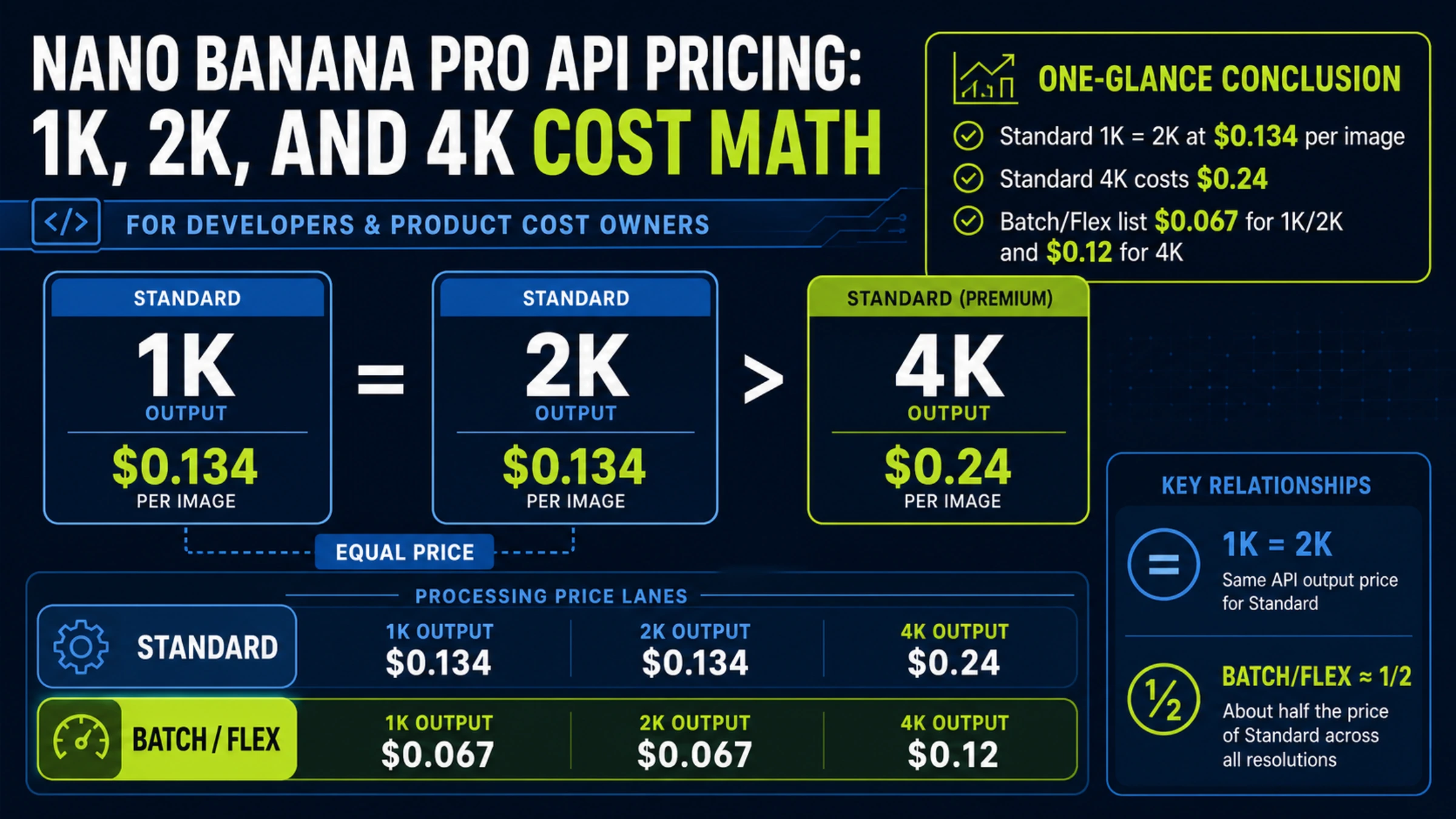
| Image Output (1K-2K size) | $0.134/image | ~1,120 tokens |
| Image Output (up to 4K size) | $0.24/image | ~2,000 tokens |
Cost Calculation Examples
To help you better estimate actual usage costs, here are cost calculations for typical scenarios:
Scenario 1: Smart Customer Service Assuming average 500 input tokens and 200 output tokens per conversation turn, using Gemini 3 Flash, processing 10,000 turns daily. Monthly cost: Input = 500 × 10,000 × 30 / 1,000,000 × $0.50 = $75; Output = 200 × 10,000 × 30 / 1,000,000 × $3.00 = $180; Total approximately $255/month.
Scenario 2: Long Document Analysis Using Gemini 3 Pro to analyze a 150K token technical document and generate a 2,000 token summary report. Single cost = 150,000 / 1,000,000 × $2.00 + 2,000 / 1,000,000 × $12.00 = $0.30 + $0.024 = $0.324.
Scenario 3: Code Generation and Review Development team using Gemini 3 Pro for code generation, averaging 50K tokens input context and requirements daily, outputting 20K tokens of code. Monthly cost = (50,000 × $2 + 20,000 × $12) / 1,000,000 × 30 = $10.20/month.
Quota Limits and Usage Tiers
Quota limits are among the most overlooked yet crucial factors in Gemini 3 API usage. Google employs a tiered quota system, providing different levels of resource access based on users' payment history and usage scale. Understanding these limits helps you better plan application architecture and resource allocation.
Usage Tier Explanation
Google divides API users into four usage tiers, each corresponding to different quota limits:
| Tier | Qualification | Applicable Scenarios |
|---|---|---|
| Free | Users from eligible countries/regions | Learning, testing, prototyping |
| Tier 1 | Linked billing account | Small-scale production apps |
| Tier 2 | Cumulative spend >$250 and ≥30 days | Medium-scale applications |
| Tier 3 | Cumulative spend >$1,000 and ≥30 days | Large-scale production deployment |
Tier upgrades don't require manual application; the system automatically adjusts based on your spending records. However, note that tier upgrades have a 30-day waiting period, so plan ahead for large-scale deployments.
Quota Dimensions Explained
Gemini 3 API quota limits involve three core dimensions, each potentially becoming a usage bottleneck:
RPM (Requests Per Minute) represents the number of requests allowed per minute, primarily affecting high-concurrency scenarios. If your application needs to handle many simultaneous user requests, RPM may be the primary bottleneck.
TPM (Tokens Per Minute) represents the total token volume allowed per minute, including both input and output. For applications processing long documents or generating extensive content, TPM limits may be more critical than RPM.
RPD (Requests Per Day) represents total daily requests allowed, a cumulative limit. Even if RPM and TPM requirements are met, exceeding RPD means no further API calls for that day.
Model Quota Comparison
According to Google AI Studio official documentation, here are quota limits for different models across tiers (Source: Google AI Studio Rate Limits page, verified 2026-02-04):
Gemini 3 Pro Quotas:
| Tier | RPM | TPM | RPD |
|---|---|---|---|
| Tier 1 | 1,000 | 4,000,000 | 10,000 |
| Tier 2 | 2,000 | 8,000,000 | 50,000 |
| Tier 3 | 4,000 | 16,000,000 | 100,000 |
Gemini 3 Flash Quotas:
| Tier | RPM | TPM | RPD |
|---|---|---|---|
| Free | 15 | 1,000,000 | 1,500 |
| Tier 1 | 2,000 | 4,000,000 | 10,000 |
| Tier 2 | 4,000 | 8,000,000 | 50,000 |
| Tier 3 | 10,000 | 16,000,000 | Unlimited |
The quota data shows that Flash's free tier RPM limit is quite strict (only 15 RPM), but TPM is relatively generous (1 million tokens/minute), suitable for handling fewer but longer requests. Upgrading to paid tier significantly increases quotas.
How to Check Current Quotas
In Google AI Studio, you can check current quota usage by: entering the AI Studio console, clicking "Quotas" in the left menu, where the system displays current tier, used quotas, and remaining allowance for each model. For Vertex AI users, quota information is available in the IAM and Admin section of Google Cloud Console.
Pro vs Flash: Which to Choose
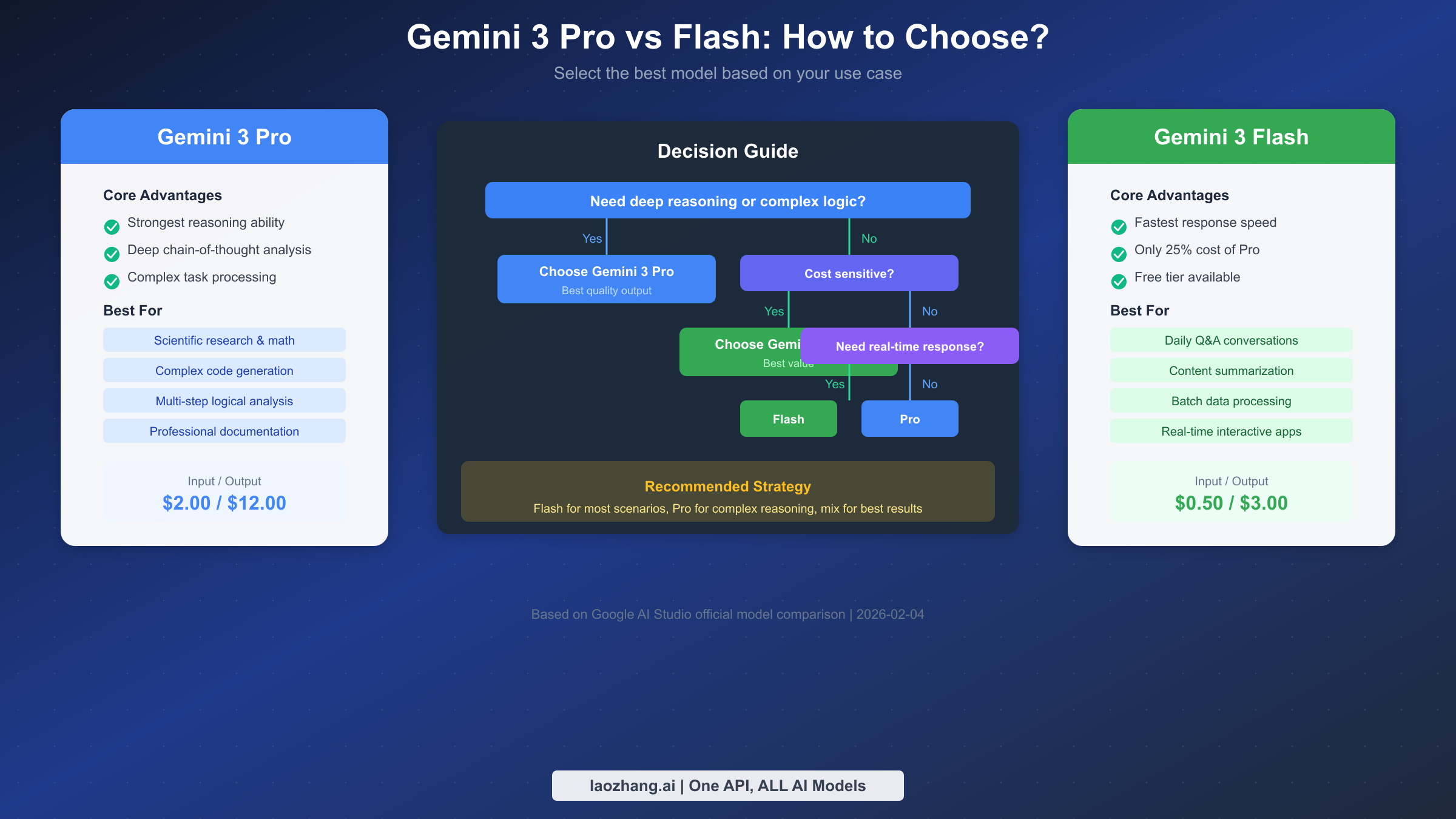
Choosing between Gemini 3 Pro and Flash is the most common decision developers face. The two models differ significantly in capabilities, pricing, and quotas, and the right choice helps you significantly reduce costs while maintaining quality.
Capability Comparison
Gemini 3 Pro's core advantage lies in deep reasoning capability. It excels at handling mathematical problems, logical analysis, code generation, and complex instruction understanding. Pro supports finer thinking_level control, allowing increased "thinking depth" to improve complex task completion quality. In benchmarks, Pro scores notably higher than Flash on MATH, HumanEval, and MMLU evaluation sets.
Gemini 3 Flash is optimized for response speed and cost efficiency. Its Time To First Token (TTFT) is 40-60% lower than Pro, and overall inference speed is faster. While not matching Pro on extremely complex reasoning tasks, Flash's output quality fully meets requirements for daily conversations, content summarization, simple code completion, and similar scenarios.
Price-Performance Ratio
From a cost-effectiveness perspective, Flash's advantage is very clear. For completing the same task, Flash costs only about 25% of Pro. If your use case doesn't involve complex reasoning, using Flash can save 75% on API costs.
But price isn't the only consideration. If task completion quality is critical to business, Pro's quality improvement may justify the extra investment. For example, in high-stakes scenarios like legal document analysis or medical diagnosis assistance, Pro's higher accuracy can reduce subsequent manual review costs.
Scenario Recommendation Matrix
Based on capability characteristics and cost considerations, here are model recommendations for different scenarios:
| Use Case | Recommended Model | Reason |
|---|---|---|
| Daily Q&A and conversation | Flash | Fast response, low cost |
| Content summarization & translation | Flash | Simple task, Flash sufficient |
| Math and scientific reasoning | Pro | Requires deep logical analysis |
| Complex code generation | Pro | High code quality requirements |
| Multimodal content understanding | Flash | Similar capabilities, Flash more economical |
| Long document analysis | Pro | Needs understanding complex context relationships |
| Batch data processing | Flash | Cost-sensitive with many requests |
| Real-time interactive apps | Flash | Strict latency requirements |
In practice, the best strategy is often using both models together. Use Flash for initial filtering and simple tasks, then hand off content requiring deep analysis to Pro, ensuring both quality and cost control.
Cost Optimization Practical Guide
Mastering Gemini 3 cost optimization techniques can significantly reduce API expenses. Google provides multiple official cost optimization mechanisms that, when properly utilized, can dramatically cut costs while maintaining service quality.
Context Caching Explained
Context Caching is Gemini 3's most powerful cost optimization tool, capable of saving up to 90% on input token fees. It works by caching frequently used context content on the server side; subsequent requests referencing cached content only pay minimal cache read fees instead of recomputing all input tokens.
Context Caching is particularly suitable for: applications that repeatedly analyze the same long document, like legal document review systems; chatbots using fixed system prompts; Q&A systems that continuously reference knowledge base content. To enable Context Caching, specify cache content and expiration time when creating the cache, then reference it in subsequent requests via the cached_content parameter.
Cache storage fees are calculated hourly, so cache duration should be decided based on usage frequency. If content is called dozens of times per hour, long-term caching is worthwhile; with lower call frequency, short-term caching or no caching may be more economical.
Batch API Usage Guide
Batch API provides a 50% price discount at the cost of real-time response capability. Batch requests are processed during system idle time, typically completing within 24 hours of submission. This mode is ideal for tasks not requiring immediate results, such as log analysis, content moderation, and batch translation.
When using Batch API, note several points: batch jobs have no strict SLA guarantees, and processing time may vary; individual batch jobs have request quantity limits; batch request error handling requires additional logic since you cannot retry immediately on failure.
Relay Platform Selection
For developers in China, direct access to Google API may face network stability issues. API relay platforms provide a reliable alternative, deploying proxy nodes overseas to forward API requests to Google servers while providing stable domestic access interfaces.
When choosing relay platforms, focus on several factors: whether pricing matches or beats official rates, acceptable response latency, support for all Gemini 3 features, and platform stability and technical support quality. Platforms like laozhang.ai not only provide stable Gemini API access but also aggregate APIs from Claude, GPT-4o, and other mainstream models, making it convenient for developers to manage multiple AI services on one platform. API documentation: https://docs.laozhang.ai/
Cost Monitoring Best Practices
Effective cost monitoring is key to avoiding billing surprises. Establish a comprehensive monitoring system early in your project: set daily and monthly budget alert thresholds; record API call volumes and costs for each functional module; regularly analyze call patterns to identify optimization opportunities; use token counters to estimate costs before requests.
Google Cloud provides built-in budget alert functionality that sends notifications when costs reach preset thresholds. For more granular cost analysis, record token counts and costs for each API call at the application level to generate detailed cost reports.
Price Comparison with Claude/GPT-4o
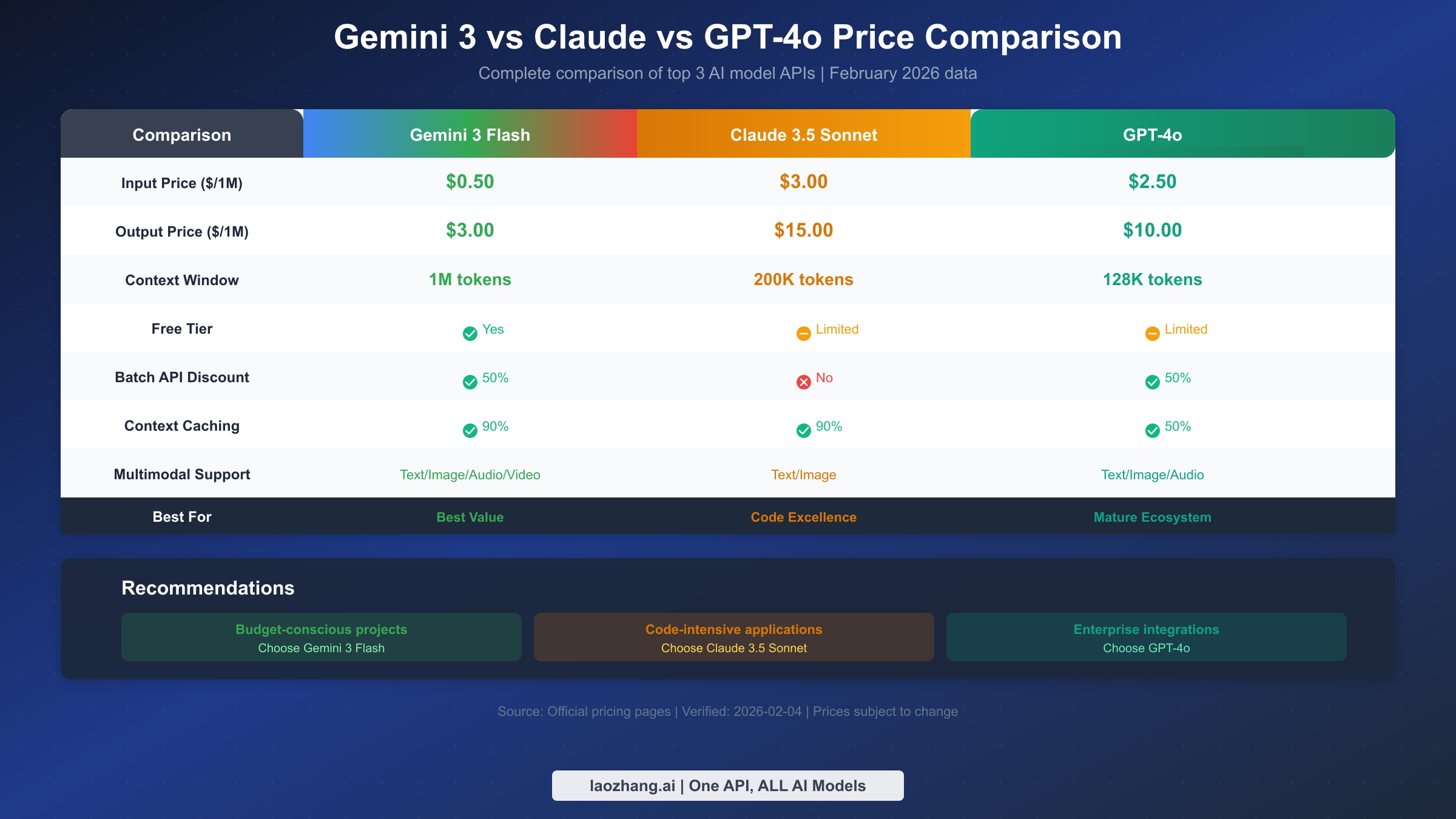
When selecting AI API services, understanding price differences among major models helps you make smarter decisions. Here we compare Gemini 3 Flash with Anthropic Claude 3.5 Sonnet and OpenAI GPT-4o—three models in the same capability tier that are currently the most popular AI API choices.
Direct Price Comparison
| Comparison Item | Gemini 3 Flash | Claude 3.5 Sonnet | GPT-4o |
|---|---|---|---|
| Input Price ($/1M) | $0.50 | $3.00 | $2.50 |
| Output Price ($/1M) | $3.00 | $15.00 | $10.00 |
| Context Window | 1M tokens | 200K tokens | 128K tokens |
| Free Tier | ✅ Yes | ⚠️ Limited | ⚠️ Limited |
| Batch Discount | 50% | None | 50% |
| Cache Discount | 90% | 90% | 50% |
From a pure price perspective, Gemini 3 Flash offers the most competitive pricing—input costs are one-sixth of Claude and one-fifth of GPT-4o. For output pricing, Gemini 3 Flash is also the lowest at one-fifth of Claude and 30% of GPT-4o.
Free Tier Comparison
The three platforms have distinct free tier strategies. Gemini 3 Flash's free tier is most generous, offering 15 requests per minute and 1,500 requests per day—quite sufficient for individual developers and testing. Claude and GPT-4o have stricter free tier limits, mainly provided through web chat interfaces, with API access typically requiring payment.
Respective Strength Scenarios
While Gemini 3 Flash leads in pricing, different models excel at specific tasks. Gemini 3 Flash leads in multimodal processing (supporting audio, video input) and ultra-long context (1M tokens); Claude 3.5 Sonnet excels at code generation and long-form writing, with its "Artifacts" feature particularly developer-friendly; GPT-4o has the most mature ecosystem, with the richest third-party tools and integrations, plus more complete enterprise features.
For budget-sensitive projects, Gemini 3 Flash is the best value choice; for code-intensive applications, Claude 3.5 Sonnet may be worth the extra investment; for enterprise applications requiring deep integration with existing toolchains, GPT-4o's ecosystem advantages may be more important. Using aggregation platforms like laozhang.ai makes it convenient to switch between different models for testing to find the best fit for your needs.
Common Issues and Error Handling
During Gemini 3 API usage, quota-related issues are the most common developer challenges. Understanding error causes and handling methods helps you build more robust applications.
429 Error Causes and Handling
HTTP 429 status code means "Too Many Requests" and is the standard response for quota exceeded. Common causes for triggering 429 errors include: RPM exceeded (requests too dense in short time), TPM exceeded (total token volume exceeds limit), RPD exceeded (daily total requests reached limit).
The standard approach for handling 429 errors is implementing exponential backoff retry strategy. Specifically: first retry wait 1 second, second retry wait 2 seconds, third retry wait 4 seconds, and so on, with maximum wait time not exceeding 60 seconds. Also check the Retry-After header in the response; if present, use that value as wait time.
For production environments, implement request throttling at the application level to proactively control request frequency within quota limits, rather than relying on reactive retries after 429 errors. Token bucket or sliding window algorithms can implement smooth request throttling.
Quota Exceeded Response Strategies
When quota limits become business bottlenecks, several response strategies are available. First, confirm current usage tier and evaluate whether tier can be upgraded by increasing spending—quota significantly increases after tier upgrade. Second, optimize application architecture: use Context Caching to reduce duplicate token consumption, merge similar requests to reduce total request count.
For RPD exceeded situations, consider creating multiple Google Cloud projects, each with independent quotas. Note that this approach should be used within Google's Terms of Service; abuse may result in account restrictions.
Common Billing Questions
Developers often have questions about billing details. First, regarding free tier data usage, Google clearly states that free tier API call data may be used for model improvement, while paid tier data receives stricter privacy protection. Second, regarding token calculation, Gemini uses a different tokenizer than the GPT series—the same text may have different token counts across models, so use Google's official token counting tool for cost estimation.
Another common question concerns thinking token billing. When using the thinking_level parameter to enhance reasoning depth, the model's generated "thinking process" also counts toward output tokens; this content is returned through the thought_signatures field. In cost-sensitive scenarios, balance thinking depth against cost expenditure.
Summary and Next Steps
Through this detailed analysis, you should now have comprehensive understanding of Gemini 3 API's pricing system and quota limits. Key takeaways: Gemini 3 Pro pricing is $2/$12 (input/output per million tokens), no free tier, suitable for complex reasoning tasks; Gemini 3 Flash pricing is $0.50/$3, with generous free tier, the best value choice for most scenarios; Context Caching can save 90% input costs, Batch API offers 50% discount; quotas are managed through usage tiers that automatically upgrade when spending thresholds are met.
For different user types, here are targeted recommendations. Individual developers and learners can fully utilize Gemini 3 Flash's free tier for exploration and prototyping, temporarily switching to Pro when deep reasoning is needed. Startups and small projects should use Flash as the primary model, establish cost monitoring, then gradually introduce Pro for high-value tasks after confirming ROI. Enterprise users should consider Vertex AI for more complete enterprise features and support, while evaluating Context Caching and Batch API optimization potential.
If you're ready to start using Gemini 3 API, next steps include visiting Google AI Studio to create an account and obtain an API Key, referring to our Gemini 3 API Key Guide for detailed steps. Developers in regions with access restrictions can also consider using relay platforms like laozhang.ai for stable access. Whichever approach you choose, we hope the pricing and quota information in this guide helps you make informed technology decisions.