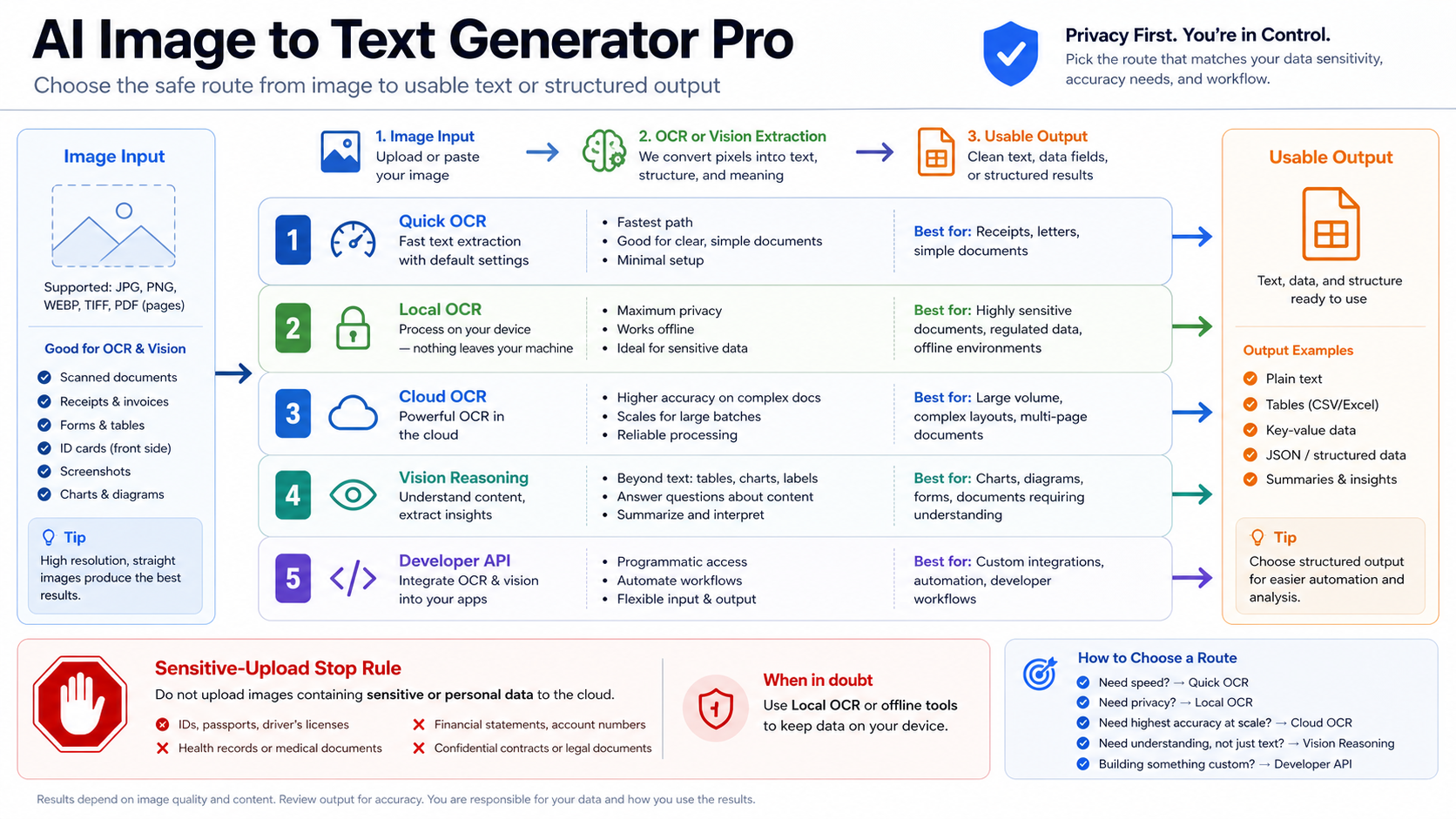
Image-to-text means image in, text or structured output out. Choose the route before you upload: quick OCR for disposable clean text, local or verified OCR for private files, cloud document OCR for batches, and a vision model when the image needs reasoning over handwriting, tables, charts, equations, receipts, or UI screenshots.
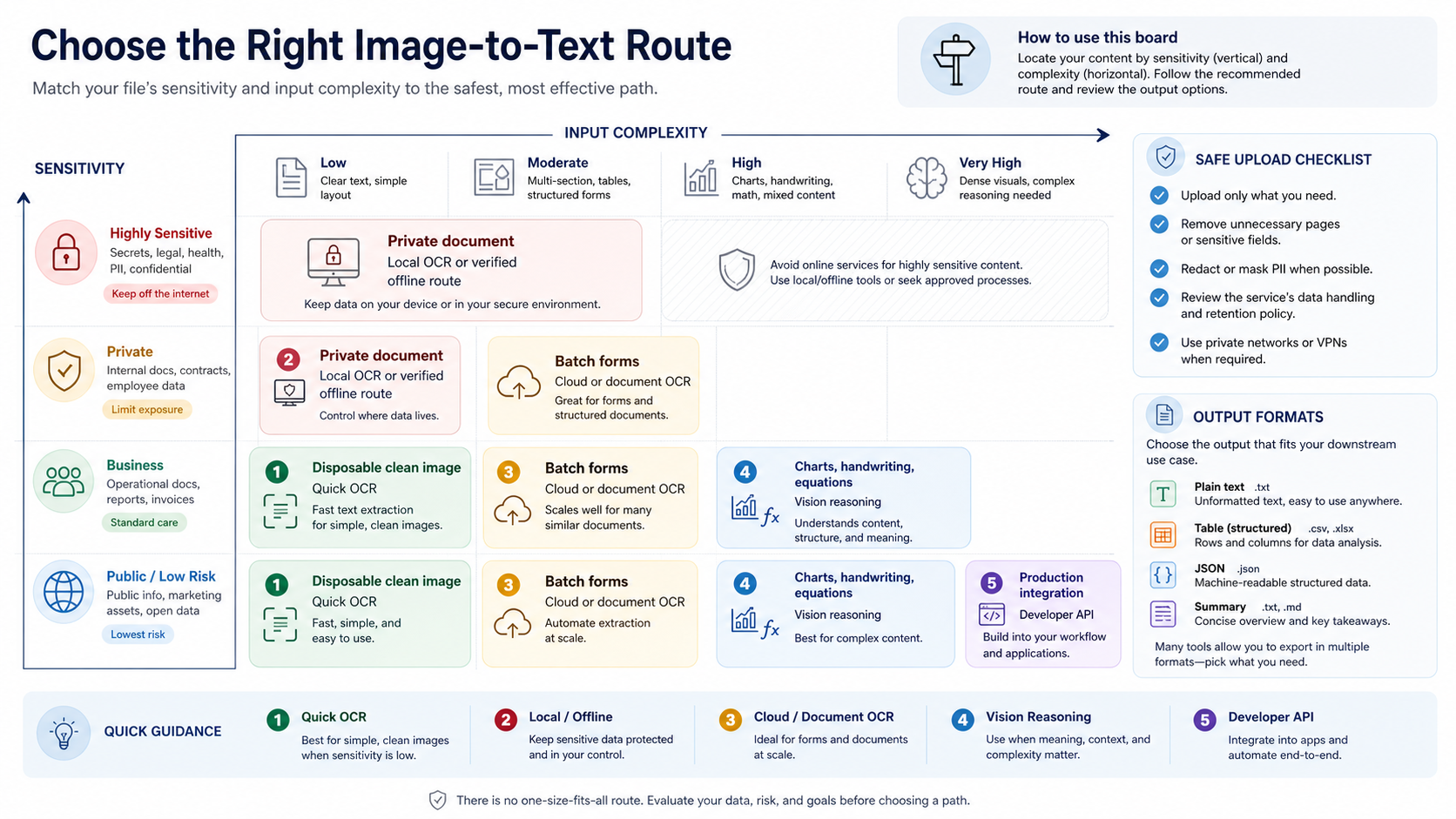
| If your file or task looks like this | Start with this route | Why |
|---|---|---|
| Clean public screenshot, menu, label, or short scan | Quick OCR | The file is low-risk and the output is usually plain text. |
| Private, client, legal, medical, financial, or unreleased material | Local OCR or a verified private route | The upload owner matters before convenience. |
| Batches of forms, invoices, receipts, or page scans | Cloud or document OCR | Structure, layout, and repeatability matter more than a one-off paste box. |
| Handwriting, tables, charts, equations, dense UI, or visual questions | Vision reasoning | The model must interpret layout or context, not only recognize characters. |
| A production workflow, app, or automation | Developer API | Billing owner, data handling, retry behavior, and output schema need to be explicit. |
Do not upload sensitive images to an unknown browser tool until retention, deletion, training use, rights, and support ownership are clear. Pick the output format before upload too: plain text, Markdown table, CSV, JSON fields, LaTeX, alt text, or a short visual answer.
Treat the first extraction as a draft. For anything high-stakes, sample-check rows, totals, names, dates, and uncertain characters against the source image before you export or paste the result downstream.
Image-to-text is extraction, not image generation
The first mistake is using a text-to-image tool for an image-to-text job. A text-to-image generator makes pictures from words. Image-to-text extraction starts with a visual file and returns text, tables, fields, descriptions, or answers about that file. Those jobs need different trust rules.
For a clean printed label, the best result may come from ordinary OCR. For a photographed invoice, the better route may be document OCR that keeps line order and fields. For a chart, a screenshot of a dashboard, a handwritten note, or a math problem, raw OCR may capture characters but miss the meaning. A vision model can answer questions about layout and context, but it also needs stronger verification because it can infer, summarize, or normalize rather than merely transcribe.
That is why the word "pro" should not mean a shiny upload box. A professional image-to-text workflow decides four things before choosing a tool: whether the file can be uploaded, how hard the visual content is, what output format is needed, and how the result will be checked.
Choose by input type before choosing a tool
Start with the file itself. A crisp screenshot of a product label and a phone photo of a crumpled receipt are both images, but they do not need the same extraction path.
| Input type | Better first route | What to ask for |
|---|---|---|
| Clean printed text, labels, simple screenshots | Quick OCR or local OCR | Plain text with line breaks preserved |
| Scanned documents, invoices, receipts, forms | Document OCR or cloud OCR | Fields, table rows, page order, totals, and confidence notes |
| Handwriting or mixed notes | Vision reasoning, sometimes followed by manual review | Transcription plus uncertain-word markers |
| Tables in screenshots or PDFs | OCR plus structured output | Markdown table, CSV, or JSON rows with original headers |
| Charts, dashboards, diagrams, UI screenshots | Vision reasoning | What the chart shows, visible labels, data caveats, and an answer to the question |
| Equations or technical notation | Vision reasoning with format instructions | LaTeX or step-by-step transcription, then manual verification |
| Images for accessibility | Alt text or long description workflow | Purpose-based description, not raw OCR only |
Traditional OCR is strongest when the characters are visible and the main job is transcription. The Google Cloud Vision OCR documentation separates general text detection from document-oriented text detection, which is a useful mental model even if you use a different provider. Use simple OCR when the page is simple; use document OCR when layout, dense text, or repeatable processing matters.
Vision models are stronger when the reader needs interpretation. The OpenAI image and vision guide describes image inputs as part of multimodal requests, which is the right lane when you need the model to answer questions about visual content, read a screenshot in context, or return structured text from an image. That does not make vision models a universal OCR replacement. It means they are the route for visual reasoning and output shaping.
If your job is specifically Gemini-based image analysis, the adjacent Google AI Studio Vision guide is a useful route-specific read. Keep that separate from this decision: first identify the extraction job, then pick the model or platform.
Choose by file sensitivity before upload
A free upload box is not a privacy policy. It can be acceptable for a public menu, a product label, a conference slide, or a low-risk screenshot. It is not the right default for client invoices, contracts, medical forms, financial statements, unreleased product screens, legal evidence, employee records, or identity documents.
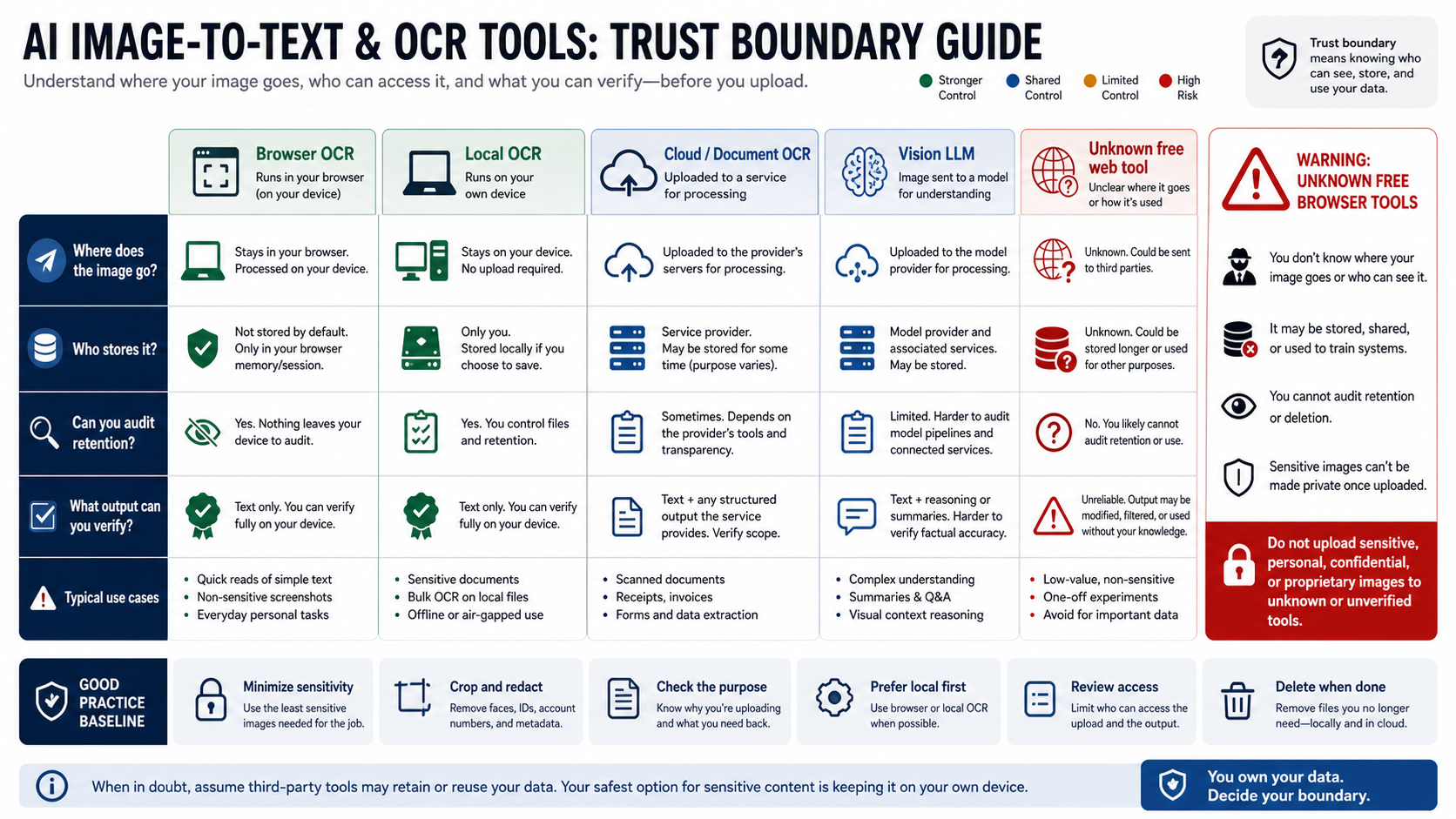
Use a simple stop rule: if the file would be a problem in the wrong inbox, do not upload it to an unknown browser converter. First check who runs the service, whether images are stored, how deletion works, whether inputs can be used for training or improvement, what rights you grant, and who supports failed or disputed output. If those answers are unclear, local OCR or a verified enterprise route should come first.
Local OCR is not magic, but it changes the trust boundary. Tesseract OCR is an open-source OCR engine, and local wrappers around OCR engines can be useful when private images should stay on your own machine. The tradeoff is setup and quality control. Local OCR can struggle with handwriting, skewed photos, tables, or unusual scripts unless you preprocess images and test the language data.
Cloud OCR and document intelligence services move the file to a provider, but they also give stronger production controls than a random web converter. Azure's current OCR guidance separates image OCR from document-heavy processing: Azure Vision OCR for images is the lane for printed or handwritten text in images, while Document Intelligence is the lane for PDFs, Office files, and document images at scale. The practical takeaway is not "Azure only." It is that production OCR should name the route owner, service class, data handling, and output contract.
For sensitive work, write the decision down. A small internal rule such as "client files use local OCR or approved cloud document OCR only" prevents the exact failure that quick browser tools invite: someone uploads a valuable file because the converter looked convenient.
Ask for the output you actually need
The right request is rarely just "extract text." That produces a blob, and a blob often creates extra work. Name the output before upload so the tool or model can format the answer around your next step.
For plain reading, ask for line-preserved text. For a spreadsheet, ask for CSV or a Markdown table with the visible headers. For an invoice, ask for fields such as vendor, invoice number, date, subtotal, tax, total, currency, and line items. For a screenshot, ask for UI labels, error text, visible state, and the user's likely next action. For a chart, ask for title, axes, visible series, legend, data labels, and the conclusion that is actually supported by the image.
Here are compact prompt patterns that work across many vision-capable tools:
Extract the visible text exactly. Preserve line breaks. Mark unreadable words as [unclear].Turn the table in this image into Markdown. Keep the original headers. Do not invent missing cells.Extract invoice fields as JSON: vendor, invoice_number, date, subtotal, tax, total, currency, line_items. Use null when a field is not visible.Describe this chart for a reader who cannot see it. Include title, axes, legend, visible values, trend, and any uncertainty.Write alt text for this image for a web page. Describe the purpose and information the image conveys, not every pixel.The alt text case deserves its own boundary. Accessibility text is not just OCR. W3C's Images Tutorial frames image alternatives around purpose and context. A chart may need a short alt text plus a longer data description; a decorative image may need null alt text; a screenshot used as evidence may need the visible text and the reason it matters. Treat that as a writing task supported by vision, not as raw character extraction.
Verify the extraction before using it
OCR and vision outputs fail in predictable ways: dropped minus signs, swapped digits, merged table cells, missed decimal points, normalized names, guessed handwriting, and confident summaries of labels that were only partly visible. A good image-to-text workflow assumes the first pass is useful but not final.
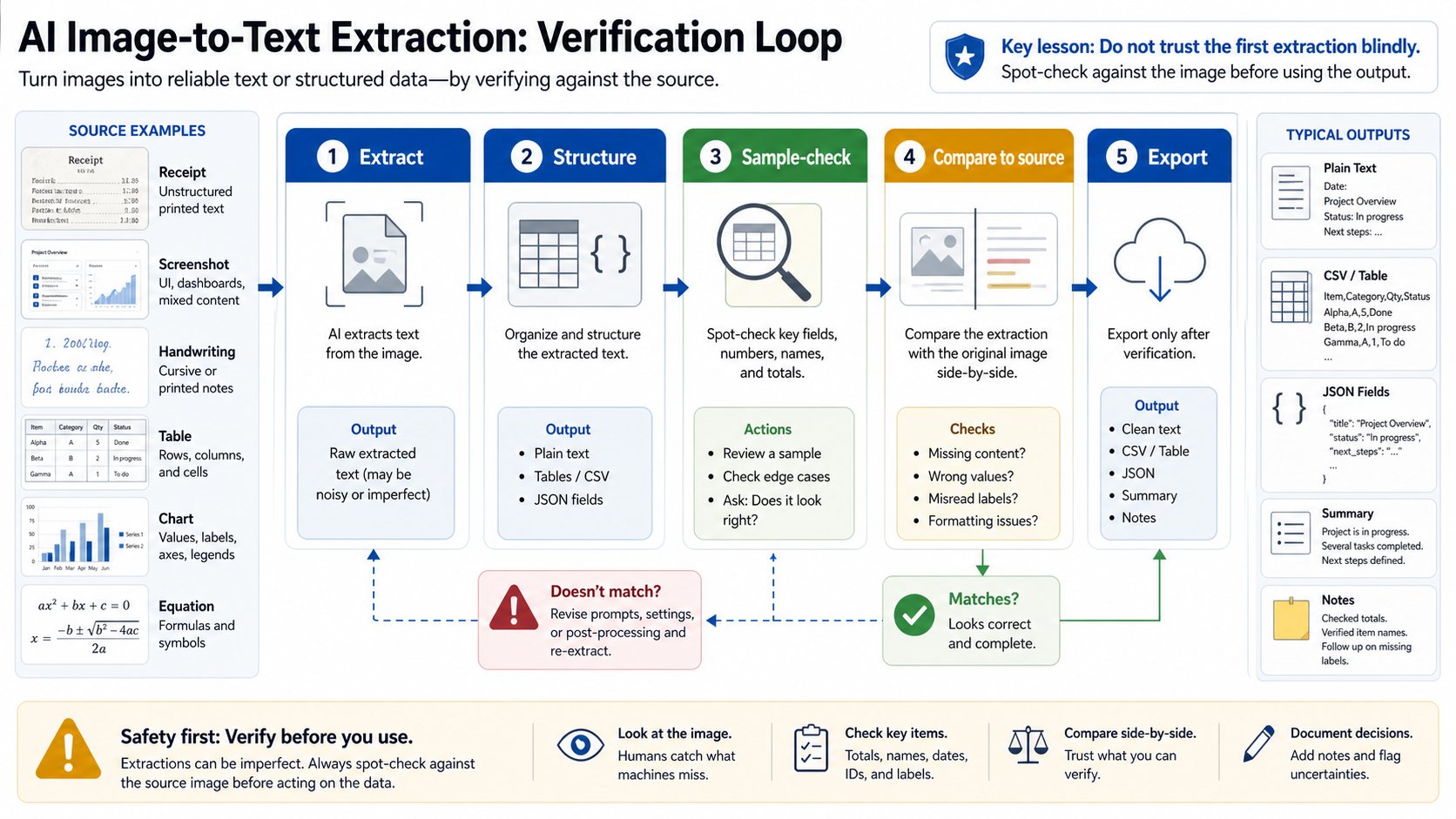
For plain text, compare the first and last line, any numbers, and any words that look like names, identifiers, SKUs, dates, or amounts. For tables, sample the header row, one middle row, the final row, and any totals. For invoices or receipts, recompute total, tax, and currency instead of trusting the extracted fields. For handwriting, ask the tool to mark uncertainty rather than silently picking the most likely word.
When the file matters, run a second route. A local OCR pass and a vision-model pass often fail differently. If both agree on a total, a date, and a table row, your confidence improves. If they disagree, the disagreement tells you exactly where a human check is needed.
Use a verification note when the output will feed another system. A simple note can record the source image, extraction route, checked fields, reviewer, and date. That may feel excessive for a public screenshot, but it is practical for legal, finance, operations, support, or client-facing workflows where one wrong digit changes the outcome.
Use APIs when repeatability matters
A browser converter is fine for a one-off public image. It is not a production system. If you need repeatable extraction inside a product, an operations workflow, or an automation, move to an API route where authentication, logging, retries, limits, cost, data handling, and output schema are part of the contract.
The API choice depends on the job:
| Production need | Better route | What to define |
|---|---|---|
| High-volume printed text or labels | OCR API | Image preprocessing, language hints, confidence handling, retries |
| Scanned documents and forms | Document OCR / Document Intelligence | Page order, fields, tables, model version, review queue |
| Visual questions and screenshots | Vision model API | Prompt template, image detail level, structured output, human review |
| Private batch processing | Local OCR pipeline or approved private cloud route | Storage boundary, access control, deletion, audit logs |
| Accessibility descriptions | Vision plus editorial review | Purpose, context, alt text length, long description policy |
For Google, the Cloud Vision text detection lane is a current OCR option. For Microsoft, Azure Vision and Document Intelligence split image OCR from document-heavy processing. For OpenAI, Responses-style image input is the right mental model when the output is reasoning, JSON, or a guided answer rather than only raw OCR. For local work, Tesseract remains a practical open-source engine when the file should not leave the machine and the input is compatible with OCR.
Do not build a production extractor around unsupported claims such as "99 percent accurate," "unlimited free OCR," or "private by default" unless you have a current service contract and your own test set. The better production test is small and repeatable: 20 representative images, expected output fields, a pass/fail rubric, and examples of the errors that matter to your workflow.
A safe route checklist
Before using any image-to-text tool, answer these questions:
- Is the image disposable, public, private, client-owned, regulated, or unreleased?
- Does the job need raw text, a table, JSON fields, alt text, a summary, or a visual answer?
- Is the image clean printed text, dense document text, handwriting, a chart, a screenshot, or mixed content?
- Who owns the upload route, storage, deletion, support, and billing?
- What will you sample-check before using the output?
- What happens if OCR and a vision model disagree?
- Can the output be regenerated later with the same route and prompt?
If you cannot answer the upload and verification questions, slow down. The "best" image-to-text tool is not the fastest one. It is the one whose trust boundary and output shape fit the file in front of you.
FAQ
Is image-to-text the same as text-to-image?
No. Image-to-text starts with an image and returns text, fields, descriptions, or answers. Text-to-image starts with a prompt and creates an image. Mixing those directions is the easiest way to end up on the wrong tool page.
What is the safest route for private documents?
Use local OCR or an approved private cloud/document OCR route before any unknown browser upload. For private, legal, medical, financial, client, or unreleased files, the upload owner matters more than speed.
When is plain OCR better than a vision model?
Plain OCR is usually better for clean printed text when the output should be an exact transcription. It is simpler, easier to verify, and often cheaper to run at scale. Use a vision model when the image requires interpretation, context, visual questions, tables, charts, handwriting, equations, or structured output.
Can AI extract handwriting from images?
Often, but treat handwriting as a verification-heavy route. Ask the tool to mark uncertain words, compare important names and numbers against the image, and use human review when the result affects money, identity, legal meaning, medical context, or customer records.
How should I extract tables from screenshots?
Ask for a Markdown table, CSV, or JSON rows with the original headers. Then check the header row, one middle row, the final row, and totals. Table extraction errors are often structural rather than obvious spelling mistakes.
Is alt text just OCR?
No. OCR extracts visible characters. Alt text describes the purpose and information an image conveys in context. A chart, button, product image, decorative image, and screenshot may all need different text alternatives.
Which API should developers start with?
Start from the route that matches the job. Use OCR or document OCR for repeatable extraction from text-heavy images and documents. Use a vision model API when you need visual reasoning or structured answers about the image. Define output schema, retention boundary, retry behavior, and review rules before scaling.
Can I use a free image-to-text tool for business work?
Only for low-risk files unless you have checked the service owner, privacy policy, retention and deletion behavior, rights, and support path. Free can be useful for public or disposable images. It is not proof that private business files are safe to upload.